Best 13 Inch Laptop for Everyday Use: MacBook Air

Five 13-inch-class laptops compared on weight, memory, battery claims and warranty. The verdict splits three ways by budget, and the tightest cutoff is 8GB of RAM.

By Samuel HarrisUpdated 15 min read
On this page
- Best 13 inch laptop for everyday use at a glance
- How I screened the shortlist down to five
- 1. Apple 2026 MacBook Air 13-inch (M5) — Best overall
- 2. Apple 2026 MacBook Neo 13-inch (A18 Pro) — Best lightweight
- 3. Lenovo IdeaPad 3 (14-inch, 2023) — Most versatile
- 4. HP New Everyday Slim Laptop (N150) — Best value
- 5. HP Everyday Laptop (N150) — Best for families
- Screen size, honestly: is 13 inches actually enough?
- How much RAM do you really need for everyday use?
- Mac or Windows for daily driving?
- What the listings do not tell you
- The verdict
- FAQ
The best 13 inch laptop for everyday use is Apple's 2026 MacBook Air with the M5 chip, because 16GB of unified memory and a claimed 18 hours of battery in a 2.71 lb chassis is the combination that actually survives four years of email, tabs and video calls. If the outlay is too much, the 2026 MacBook Neo drops to a lower price with the same weight and a claimed 16 hours of battery, at the cost of half the memory and half the storage.
Most guides at this size class chase the thinnest lid or the shiniest badge. That is not what decides it. The real cutoff is how much RAM you buy at the door, because you cannot add more later on any of these five, and 4GB in 2026 ages faster than the battery does.
Best 13 inch laptop for everyday use at a glance
| Pick | Memory / Storage | Weight | Price |
|---|---|---|---|
Best overall Apple 2026 MacBook Air 13-inch (M5) |
16GB / 512GB | 2.71 lb | Check Price |
Best lightweight Apple 2026 MacBook Neo 13-inch (A18 Pro) |
8GB / 256GB | 2.71 lb | Check Price |
Most versatile Lenovo IdeaPad 3 (14-inch, 2023) |
8GB DDR4 / 128GB | 3.31 lb | Check Price |
Best value HP New Everyday Slim Laptop (N150) |
4GB DDR5 / 128GB | 3.24 lb | Check Price |
Best for families HP Everyday Laptop (N150) |
4GB DDR5 / 128GB | 5 lb | Check Price |


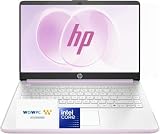

A quick note on the keyword. Two of the five listings are strictly 14-inch machines, not 13 inches on the dot. Amazon returns them for a 13-inch search anyway, and their footprints (12.7 x 8.8 in for both HPs, 12.9 x 9.49 in for the Lenovo) sit close enough to a 13-inch bag that most buyers treat them as the same class. Measure your sleeve if you care about the last inch.
How I screened the shortlist down to five
I lined up every listing Amazon returned for the phrase, then cut on hard rules before opinion got a look-in.
- Anything without a published weight, storage figure and warranty was out. If a listing hides those, the seller is hiding something.
- Machines heavier than 5 lb were out, because a portable laptop is one you actually carry.
- Fanless tablets with detachable keyboards were out, because this guide is about a clamshell laptop for everyday use.
- Duplicate SKUs of the same model with only a colour or storage swap were collapsed to one entry.
That left five: two Apple, two HP, one Lenovo. Prices span an entry tier (both HPs), a middle tier (the Lenovo IdeaPad 3) and a premium tier (both MacBooks). The MacBook Neo sells faster than the rest of this set, according to the category ranking, and the IdeaPad is the slowest seller of the five. The Air runs a close second on that ranking. Whether that matters to you depends on whether "what other people buy" is your tiebreaker or your warning sign.
1. Apple 2026 MacBook Air 13-inch (M5) — Best overall
A 2.71 lb laptop with 16GB of memory, 512GB of storage and a claimed 18 hours of battery is the one that ages best.
Best for: someone who wants a laptop that lasts four or five years. Skip it if: you refuse to use macOS.
This is the pick because it is the only laptop in the set that ships with 16GB of RAM and 512GB of SSD. Every other machine here has 4GB or 8GB, and none of them let you upgrade memory later. Apple claims the M5 chip is faster than the previous generation, which is what Apple always claims. The stronger evidence is the shape of the spec sheet: 13.6-inch Liquid Retina display, Wi-Fi 7, Touch ID and a 12MP webcam with Center Stage. The chassis is 0.44 inches thick and weighs 2.71 lb, the lightest of the five along with the Neo. Apple says up to 18 hours of video playback. It is the most expensive pick here, and it carries the same one-year limited warranty as every other laptop in the set: the extra money buys headroom, not coverage. Against the Neo below, the Air's advantage is doubled memory, doubled storage and a bigger battery figure. Against the two HPs, it is a different class of machine at a different price.
Pros:
- 16GB unified memory, most in the set
- 512GB SSD, most in the set
- 2.71 lb, joint-lightest here
- Claimed 18 hours of battery
- Wi-Fi 7 and Touch ID on the listing
Cons:
- The most expensive pick here
- One-year warranty, same as machines a third the price
- macOS only, so Windows apps need workarounds
2. Apple 2026 MacBook Neo 13-inch (A18 Pro) — Best lightweight
Same 2.71 lb weight as the Air, with a slimmer 0.5-inch profile and a claimed 16 hours of battery, for less money.

Best for: students and commuters who carry a bag every day. Skip it if: you need 16GB of RAM out of the box.
The Neo is the pick when the bag matters more than the workload. It matches the Air's 2.71 lb weight and comes in at 0.5 x 8.12 x 11.7 in, so it is the smallest footprint here. The A18 Pro is Apple's phone-class silicon rather than a full desktop chip; Apple positions it for schoolwork, Apple Intelligence and Apple Arcade, and the listing frames the whole machine around a student on the move. You get 8GB of unified memory and 256GB of storage, half of what the Air offers on both counts, and a claimed 16 hours of battery instead of 18. It is the one buyers choose most often in this set, going by the category ranking. The trade-off against the Air is real: 8GB of memory in 2026 is fine for one browser and one video call, tight for a dozen tabs and a Zoom window at once. Against the HPs, it is twice the RAM and a lighter chassis at a much higher price.
Pros:
- 2.71 lb, joint-lightest of the five
- Smallest footprint here at 8.12 x 11.7 in
- Claimed 16 hours of battery life
- 13-inch Liquid Retina display with 1 billion colours
- Four listed colours, keyboard matched
Cons:
- 8GB of memory, half what the Air offers
- 256GB of storage fills up quickly
- macOS on phone-class silicon is a newer combination
3. Lenovo IdeaPad 3 (14-inch, 2023) — Most versatile
8GB of RAM, a 14-inch full HD screen and a physical webcam shutter, in the middle of this set's price range.

Best for: a household that wants Windows and 8GB of RAM without a premium price. Skip it if: you want the newest silicon.
The IdeaPad is the Windows machine that gets the memory decision right at a sensible price. 8GB of DDR4 is twice what either HP ships with, and it is the only mid-priced pick in this set. The Intel Core i3-1115G is a 2020-era chip, and the listing dates the model to 2023, so this is the oldest machine of the five. It weighs 3.31 lb, which is heavier than both MacBooks but lighter than the HP Everyday, and it is 0.78 inches thick. The 14-inch full HD panel gives you more working area than the 13-inch Macs, and Lenovo lists a physical shutter for the webcam, which the HPs and Macs do not. Battery is quoted at up to 7.5 hours, the shortest claim in the set by a wide margin. The trade-off is age: you are buying yesterday's silicon at today's mid-tier price, and the payoff is 8GB of RAM and Windows 11 rather than a fresh chip on 4GB.
Pros:
- 8GB DDR4 RAM, twice the HPs
- 14-inch full HD panel, largest here
- Physical webcam shutter on the listing
- Two sellers stock it, so pricing is competitive
- 0.78 in thick and 3.31 lb, still portable
Cons:
- Battery claim of 7.5 hours, shortest in the set
- 2023 model with a 2020-era Intel chip
- 128GB SSD is tight for photos and video
4. HP New Everyday Slim Laptop (N150) — Best value
A 3.24 lb Windows 11 laptop with DDR5 memory and a claimed 11 hours of video playback, at the lowest price in this set.
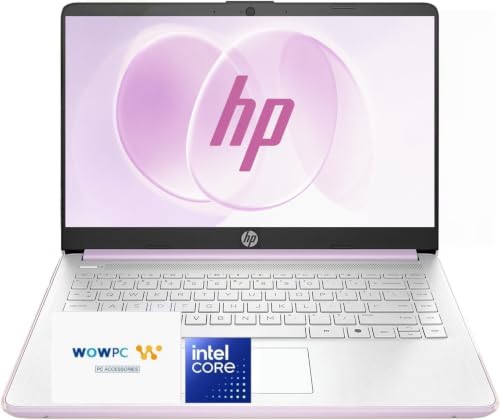
Best for: the second laptop for a kitchen counter or a spare bag. Skip it if: you edit photos or keep 20 browser tabs open.
This is the cheapest of the five and the right pick when the alternative is no laptop. The Intel N150 is a low-power processor, and 4GB of DDR5 memory is the floor of what Windows 11 will tolerate. HP quotes up to 11 hours of video playback, which is longer than the Lenovo's 7.5 hours but shorter than either Mac's. Weight is 3.24 lb in a 0.7-inch chassis, so it is the lighter of the two HPs by a wide margin. The listing calls out Wi-Fi 6, Bluetooth 5.4, USB-C, two USB-A, HDMI and a 720p HP True Vision camera, which is a fuller port list than either Mac. Warranty is one year. The reason it is not ranked higher is simple: 4GB of RAM in 2026 is a hard ceiling on how many apps you can run at once, and you cannot upgrade it. Buy it for browsing, email, video, homework and light Office work, and buy something else if that list grows.
Pros:
- Cheapest of the five
- 3.24 lb, lighter than the Lenovo and the other HP
- DDR5 memory rather than DDR4
- Wi-Fi 6, HDMI and USB-C on the listing
- Claimed 11 hours of video playback
Cons:
- 4GB of RAM is the floor for Windows 11
- 128GB SSD fills fast with updates and apps
- N150 processor is entry-level
5. HP Everyday Laptop (N150) — Best for families
Same processor, memory and storage as the Slim, in a heavier 5 lb chassis with a claimed 11.5 hours of video playback.

Best for: a shared family laptop parked on a desk. Skip it if: you carry your laptop between rooms all day.
The Everyday is the pick for the shared laptop in the kitchen or the family room. It runs the same N150 chip, the same 4GB of DDR5 memory and the same 128GB SSD as the Slim, in the same 12.7 x 8.8 in footprint. What changes is the weight: 5 lb rather than 3.24 lb. HP quotes up to 11.5 hours of video playback here, half an hour more than the Slim. The listing calls out Windows 11 with Copilot AI, which is the same software you get on the Slim, so the Copilot mention is not a differentiator. It is the second-cheapest of the five, and the sales ranking is the second-slowest, well behind both Macs and the Slim. The honest read: at this price band, the Slim does the same job in a lighter chassis for less money. The reason to pick this one is if you want a matte, softer-coloured laptop that stays on a desk, and the extra weight does not matter because it does not move.
Pros:
- Second-cheapest of the five
- DDR5 memory and Windows 11 with Copilot
- Claimed 11.5 hours of video playback
- 12.7 x 8.8 in footprint, same as the Slim
Cons:
- 5 lb, the heaviest laptop in the set
- 4GB RAM and 128GB SSD, same limits as the Slim
- The lighter Slim covers the same job for less
Screen size, honestly: is 13 inches actually enough?
For everyday use, 13 inches is the sweet spot for weight, and it is the reason both MacBooks land at 2.71 lb. Anything bigger costs weight, and anything smaller starts to feel cramped for two side-by-side windows.
Where the 13-inch class shows its limits:
- Spreadsheets with more than eight columns force horizontal scrolling.
- Video calls with a shared screen leave your own tiles very small.
- Editing photos at full resolution means constant zoom-and-pan.
Where 13 inches is genuinely enough:
- Email, browsing, streaming, writing, one document at a time.
- Study, one browser plus one PDF or one video call.
- Travel, because 2.71 lb in a bag is a real quality-of-life difference.
The Lenovo's 14-inch panel splits the difference: the footprint is 12.9 x 9.49 in, only slightly bigger than the MacBook Air's 12 x 8.46 in, but the screen area is meaningfully larger. If you spend most of the day in spreadsheets, the extra inch is worth the extra half-pound.
How much RAM do you really need for everyday use?
This is the single most important spec in the set, because none of these five laptops let you upgrade memory later. What you buy is what you have for the life of the machine.
The rough ladder:
- 4GB is the Windows 11 minimum. It runs, but heavy browsing (say, 15 tabs plus a Zoom call) will feel sluggish inside a year. Both HPs sit here.
- 8GB is comfortable for most everyday workloads: a dozen tabs, an email client, a chat app, a video call. The MacBook Neo and the Lenovo sit here.
- 16GB is future-proofing. It handles heavier multitasking, and it is what keeps a laptop useful for four or five years instead of two. The MacBook Air is the only pick with 16GB.
macOS and Windows manage memory differently, so 8GB on a Mac generally feels more responsive than 8GB on a Windows machine at the same task. That is why the MacBook Neo at 8GB reads as a comfortable everyday laptop, while the HPs at 4GB read as tight. If your budget stretches to 16GB, buy 16GB. If it does not, 8GB on either the Neo or the IdeaPad is the sensible floor.
Mac or Windows for daily driving?
The honest answer is that either works for everyday use, and the choice is mostly about what you already own.
Reasons to pick macOS in this set:
- You have an iPhone and want AirDrop, iMessage and continuity to work.
- You want the longest battery claims on the shelf (16 to 18 hours).
- You want the lightest chassis (2.71 lb on both MacBooks).
Reasons to pick Windows in this set:
- You need a specific Windows-only app for work or school.
- You want a wider port selection out of the box (HDMI, USB-A).
- You want a physical webcam shutter, which the Lenovo lists and neither Mac does.
The MacBook Air is the pick if you want a laptop that just keeps working for years. The IdeaPad is the pick if Windows is a hard requirement and 8GB is your memory floor. The HPs are the pick when the budget is the deciding constraint.
What the listings do not tell you
Every laptop listing hides the same three things, and the picks here are no exception.
Battery figures are marketing. Every hours-of-battery number in this guide is a manufacturer claim, measured during video playback on a dim screen with Wi-Fi off. Real everyday use, with the screen bright and a video call open, will run through a battery in half the claimed time. Use the figures for ranking against each other, not for planning your afternoon.
Storage fills up faster than you think. A 128GB SSD gives you around 90GB usable after the operating system, updates and preinstalled apps. Photos from a modern phone take 3 to 5MB each. A single hour of 1080p video is around 4GB. If you take pictures, buy 256GB or plan on cloud storage.
Warranty is one year on all five. Both HPs, the Lenovo and both MacBooks all carry a one-year limited warranty. AppleCare, HP Care Pack and Lenovo's extended plans exist as separate purchases; the sticker price does not include them.
The verdict
Three-track answer, because the price gap in this set is too wide to pretend one laptop suits every wallet.
At the premium tier, the Apple 2026 MacBook Air with M5 is the pick. 16GB of memory and 512GB of storage in a 2.71 lb chassis with a claimed 18 hours of battery is the specification sheet that ages best over four or five years. Nothing else in the set ships with that much memory, and none of these laptops let you upgrade later.
At the middle tier, the Lenovo IdeaPad 3 wins on the memory decision alone. 8GB of DDR4 is twice what either HP offers, and the 14-inch full HD panel is the biggest working area here. The chip is older and the battery claim is shorter, but the memory and screen are the specs you touch every day.
At the entry tier, the HP New Everyday Slim is the sensible pick over the HP Everyday, because it does the same job in a 3.24 lb chassis rather than a 5 lb one for less money. The cutoff between the tiers is 8GB of RAM: below it, you are buying a laptop for browsing and email only; at or above it, you are buying one that can handle the rest of daily life.
FAQ
Is a 13 inch laptop big enough for working from home?
Big enough for working from home, yes, for most jobs that live in a browser and an email client. Where 13 inches gets tight is spreadsheets with many columns and video calls where a shared screen shrinks your own tiles. If you spend most of the day in Excel, the Lenovo IdeaPad's 14-inch panel gives you meaningful extra room without adding much to the footprint.
Is the MacBook Air worth it over the MacBook Neo?
The MacBook Air is worth it over the Neo if you keep a laptop for more than two years. The Air ships with 16GB of memory to the Neo's 8GB, and 512GB of storage to the Neo's 256GB. Neither is upgradeable later, so what you buy is what you keep. The Neo is 2.71 lb like the Air and claims 16 hours of battery. Weight and shape are near-identical.
How much RAM does a 13 inch laptop for everyday use really need?
RAM for everyday use in a 13 inch laptop should be 8GB at minimum in 2026, and 16GB if the budget stretches. Both HPs here ship with 4GB, which is the Windows 11 floor and will feel tight within a year. The MacBook Neo and Lenovo IdeaPad ship with 8GB. The MacBook Air is the only pick in the set with 16GB.
MacBook Air vs Lenovo IdeaPad 3, which wins for daily use?
MacBook Air vs Lenovo IdeaPad 3 comes down to operating system and budget. The Air is lighter (2.71 lb versus 3.31 lb), has twice the memory (16GB versus 8GB) and quotes far longer battery life (18 hours versus 7.5 hours). The IdeaPad wins on price, on Windows compatibility, on a bigger 14-inch screen and on the physical webcam shutter. If Windows is required, the IdeaPad. Otherwise, the Air.
What is the biggest mistake buying a 13 inch laptop for everyday use?
The biggest mistake buying a 13 inch laptop for everyday use is choosing on price and ending up with 4GB of RAM. You cannot upgrade memory later on any of these five, so the cheap laptop that felt fine on day one starts to stutter within a year of updates. Spend one tier up if you can, and buy 8GB of memory as the floor rather than the ceiling.
The right way to pick out of this set is to start with the memory figure, then the weight, then the price. The MacBook Air is the default recommendation because it is the only pick with 16GB of RAM and 512GB of storage, and because 2.71 lb with an 18-hour battery claim is the shape of a laptop you keep for years rather than replace. If macOS is not for you, the Lenovo IdeaPad 3 is the honest middle choice. If the budget is fixed at the bottom of this set, the HP New Everyday Slim does the everyday job in a chassis that actually travels. Buy the memory you need for the life of the machine, because you cannot buy it later.