Best Compact KVM Switch by Ports, Video and Size

Five compact KVM switches lined up on published specs: USB port generation, video ceiling, chassis footprint and remote switching. Where each one fits, and which pick to skip if you run more than one display.

By Samuel HarrisUpdated 14 min read
On this page
- Best compact KVM switch for graphic designers at a glance
- What each price tier actually buys here
- How I screened these five listings
- 1. Hearvo USB 3.0 HDMI KVM Switch for 2 Computers 1 Monitor — Best overall
- 2. UGREEN 8K@60Hz HDMI Displayport KVM Switch 3 Monitors 2 — Best premium
- 3. GREATHTEK Greathek 4K@60HZ HDMI KVM Switch 2 Monitors 2 — Best for families
- 4. Jancane 4K KVM Switch HDMI 2 Port Box — Best for heavy use
- 5. CMSTEDCD HDMI KVM Switch 1 Monitors 2 Computers 4K@60Hz — Best budget pick
- Does a KVM switch protect colour accuracy?
- USB 2.0 or USB 3.0: which matters for a design desk?
- How much desk space does each one take?
- What the listings do not tell you
- The verdict
- FAQ
The best compact KVM switch for graphic designers is the Hearvo S7232H, because it pairs 4K at 60Hz HDMI with four USB 3.0 ports in a chassis just 0.8 in tall. If you drive two or three displays from one workstation, the UGREEN AK704 is the better buy, since it carries two DisplayPort 1.4 outputs plus HDMI 2.0. Money buys different things at each tier here. Entry-level boxes get you one 4K display and slower USB. Mid-range adds USB 3.0 speed. The premium end buys display count and video headroom you may never use.
Best compact KVM switch for graphic designers at a glance
| Pick | Video out | USB sharing | Price |
|---|---|---|---|
| 1× HDMI 4K@60Hz claim |
4× USB 3.0 (3 A + 1 C) |
Check Price | |
| 2× DP 1.4 + 1× HDMI 8K@60Hz claim |
4× USB 3.0 claim | Check Price | |
Best for families GREATHTEK Greathek 4K@60HZ HDMI KVM Switch 2 Monitors 2 |
2× HDMI 2.0 3840×2160 @60Hz |
3× USB 3.0 | Check Price |
Best for heavy use Jancane 4K KVM Switch HDMI 2 Port Box |
1× HDMI 4K@60Hz claim |
USB peripheral sharing (generation not listed) |
Check Price |
Best budget pick CMSTEDCD HDMI KVM Switch 1 Monitors 2 Computers 4K@60Hz |
1× HDMI 4K@60Hz claim |
2× USB 2.0 480Mbps claim |
Check Price |




What each price tier actually buys here
Three tiers sit in this set, and the jump between them is not about picture quality. All five listings claim 4K at 60Hz or better. What separates them is port generation and display count.
At the entry end, the CMSTEDCD and the Jancane both handle one HDMI monitor. The CMSTEDCD publishes USB 2.0 at a claimed 480Mbps. That is a keyboard-and-mouse spec, not a storage spec.
The middle rung is where the Hearvo sits. Same single display, but four USB 3.0 ports at a claimed 5Gbps, one of them USB-C. For a designer who moves project folders on and off a bus-powered drive, that gap is the whole purchase.
The premium tier splits into two different arguments. The GREATHTEK buys you a second HDMI output and three USB 3.0 ports. The UGREEN buys you three outputs across two DisplayPort 1.4 connectors and one HDMI 2.0, with an 8K at 60Hz claim on top. Neither buys faster USB than the mid-range Hearvo. You are paying for screens, not speed.
How I screened these five listings
I started from published specifications rather than marketing headlines, because a KVM switch is one of the few peripherals where the spec sheet genuinely predicts the experience.
Four things had to be present or the pick was cut:
- A stated video ceiling. Every survivor publishes at least 4K at 60Hz.
- Named USB provision. I needed to know how peripherals get shared, and ideally which generation.
- A published chassis size. All five list dimensions, which is what makes "compact" checkable rather than a slogan.
- A second switching method. Reaching behind a monitor twenty times a day is the reason people abandon these boxes.
What I could not screen for is the part designers care about most: colour handling under load. No listing here publishes chroma subsampling, bit depth or HDR pass-through behaviour. So I ranked on what is documented and flagged the gap rather than filling it with a guess.
One more filter shaped the order. The best compact KVM switch for graphic designers has to match your display count first, because a two-port HDMI box cannot be talked into driving a second panel.
1. Hearvo USB 3.0 HDMI KVM Switch for 2 Computers 1 Monitor — Best overall
The Hearvo S7232H hits the sweet spot: USB 3.0 throughout, a single 4K HDMI output, and a 0.8 in profile that hides behind a monitor stand.
Best for: one calibrated display, two machines, fast external drives Skip it if: you run two or three monitors from one workstation
Four USB 3.0 ports is the number that puts this ahead of the rest of the field, and the port mix is the reason. Three USB-A plus one USB-C means a keyboard, a mouse, a tablet and a modern SSD all live on the switch without a hub stacked behind it. Hearvo claims 5Gbps across those ports. Compare that to the 480Mbps USB 2.0 claim on the cheapest pick here and the practical difference is whether you can work off a shared drive or only type on a shared keyboard.
At 0.8 x 5 x 2.4 in, this is the thinnest chassis in the set by a clear margin. It slides under a monitor foot or tucks against a riser leg.
Hearvo lists HDCP 2.2 support and adaptive EDID, plus both a body button and a wired remote for switching. Model number is S7232H.
The trade-off is display count. One HDMI output means one screen, full stop. The GREATHTEK and UGREEN both go further, and the Hearvo publishes no warranty term while the cheapest pick here does.
Pros:
- Four USB 3.0 ports, three USB-A plus one USB-C
- Thinnest chassis in this set at 0.8 in
- Claimed 5Gbps USB throughput, fastest here
- Body button and wired remote both included
- Adaptive EDID and HDCP 2.2 listed
Cons:
- Single HDMI output caps you at one display
- No warranty term published in the listing
- Only one seller lists it
- Costs more than two picks that also claim 4K@60Hz
2. UGREEN 8K@60Hz HDMI Displayport KVM Switch 3 Monitors 2 — Best premium
The only pick here with DisplayPort, and the only one that addresses three monitors from two computers.

Best for: a triple-display setup mixing DisplayPort and HDMI Skip it if: you only own one monitor
Two DisplayPort 1.4 outputs and one HDMI 2.0 output make this the outlier. Every other pick in this roundup is HDMI-only, which matters because plenty of colour-critical panels put their highest refresh and bit-depth modes on DisplayPort. UGREEN claims 8K at 60Hz or 4K at 240Hz across that video path, the highest ceiling in the set.
The chassis is aluminium and measures 1.57 x 6.18 x 2.83 in. That is the widest footprint here and roughly twice the height of the Hearvo, so "compact" applies relative to rack gear, not relative to this shortlist. UGREEN lists four USB 3.0 ports, button and desktop-controller switching, two display modes, and driver-free operation across Windows, macOS and Linux.
Model AK704. It is the most expensive pick here, and two sellers list it, the only entry in the set with more than one.
What you give up is simplicity and thinness. Buy it for the third display or the DisplayPort connectors, not for the USB, which the mid-range Hearvo matches on generation.
Pros:
- Only pick with DisplayPort 1.4 outputs
- Addresses three monitors from two computers
- Highest published video ceiling at 8K@60Hz claim
- Aluminium shell, Windows, macOS and Linux support listed
Cons:
- Most expensive pick here
- Widest and tallest chassis at 1.57 x 6.18 x 2.83 in
- No weight or warranty figure published
- USB generation matches the cheaper Hearvo, so no speed gain
3. GREATHTEK Greathek 4K@60HZ HDMI KVM Switch 2 Monitors 2 — Best for families
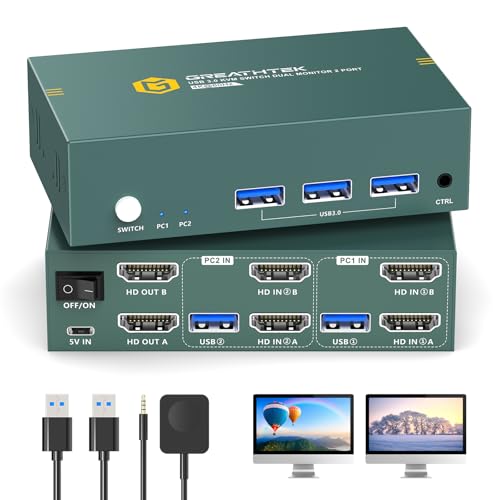
Two HDMI outputs plus published EDID emulation, which is the feature that keeps a shared desk from rearranging windows on every switch.
Best for: a two-monitor HDMI setup that needs stable display identity Skip it if: desk depth is your tightest constraint
This is the dual-HDMI middle ground between the single-display picks and the UGREEN's triple-output setup. GREATHTEK states 3840 × 2160 at 60Hz with HDMI 2.0 and HDCP 2.2, and lists backward compatibility down to 1080p.
The specification worth reading twice is EDID emulation. GREATHTEK says each computer retains its monitor identification, resolution and display configuration through a switch. On a shared machine, that is the difference between resuming work and re-dragging every palette. Three USB 3.0 ports handle keyboard, mouse, printer, webcam, scanner and external storage per the listing. Switching happens via a white button on the body or the bundled wired desktop controller.
Dimensions are 1.8 x 5.8 x 5.7 in. That 5.7 in depth is the largest of any pick here, and the 1.8 in height is the tallest, so this one sits on the desk rather than hiding under a stand.
It also carries a premium price position with one fewer USB port than the mid-range Hearvo, and it publishes neither a weight nor a warranty term. Model S7232H.
Pros:
- Two HDMI 2.0 outputs at 3840×2160 @60Hz
- EDID emulation explicitly described in the listing
- Three USB 3.0 ports for storage and peripherals
- Wired desktop controller included
Cons:
- Largest footprint here at 5.8 x 5.7 in
- Tallest chassis in the set at 1.8 in
- Premium price position with one fewer USB port than the Hearvo
- No published warranty or weight
4. Jancane 4K KVM Switch HDMI 2 Port Box — Best for heavy use
The most versatile source list here, with cables in the box and console support stated outright.

Best for: mixed-source desks that also feed consoles into the same panel Skip it if: you copy large files across the switch's USB ports
Jancane is the only listing here that names non-computer sources. The V806-A1 is described as working with PS4, PS4 Pro, PS3, Xbox One, TV Box, PC, laptop and Nintendo Switch, which turns a design monitor into a shared panel after hours. The claimed video ceiling is 4K at 60Hz on a single HDMI output.
It also ships with two USB cables and two HDMI cables, which no other listing in this set specifies. That saves a separate cable order.
The catch is what the listing leaves out. It describes USB peripheral sharing for keyboard, mouse and printer but never names a USB generation or a transfer figure. Where the Hearvo publishes 5Gbps and the CMSTEDCD publishes 480Mbps, this one publishes nothing. If you shuttle raw files across the switch, that silence is a real risk.
Dimensions are 1.18 x 7.87 x 4.72 in, making it the longest chassis here at 7.87 in. Driver-free operation is listed for Windows 10 and 8.x. It sits second-cheapest of the five.
Pros:
- Widest source list, including consoles and TV boxes
- Two USB cables and two HDMI cables included
- Second-cheapest pick in this set
- Single-button switching, driver-free on Windows
Cons:
- USB generation and speed never stated
- Longest chassis here at 7.87 in
- One HDMI output only, so a single display
- No warranty term or weight published
5. CMSTEDCD HDMI KVM Switch 1 Monitors 2 Computers 4K@60Hz — Best budget pick
Cheapest of the five, lightest at 2.12 oz, and the only pick that publishes a warranty term.

Best for: a keyboard-and-mouse-only switch on a single 4K panel Skip it if: you plug a card reader or SSD into the switch
Two figures make this pick interesting. It weighs 2.12 oz, the only weight published in the whole set, and CMSTEDCD lists a 2 year warranty, which nobody else here does. For the cheapest box in the group, that is an unusual combination.
Video is a claimed 4K at 60Hz over a single HDMI output. Dimensions are 0.63 x 3.86 x 2.36 in, and that 0.63 in height makes it the slimmest chassis of the five, narrowly under the Hearvo. Switching works from the body button or the wired desktop remote. Driver-free, plug and play per the listing.
Then the limit. CMSTEDCD states two USB 2.0 ports at a claimed 480Mbps. That is fine for a wired keyboard and mouse and nothing beyond it. Plug a card reader into this and you will feel the ceiling on the first transfer. The Hearvo's four USB 3.0 ports exist precisely to solve that, which is why it wins overall despite costing more.
Model GMXUS-SW219S. One seller lists it.
Pros:
- Cheapest of the five picks
- Only pick with a published warranty, at 2 year
- Slimmest chassis here at 0.63 in
- Lightest in the set at 2.12 oz
- Body button plus wired remote switching
Cons:
- USB 2.0 only, a claimed 480Mbps ceiling
- Two USB ports, fewest in this comparison
- Single HDMI output, one display maximum
- No USB-C port for modern drives
Does a KVM switch protect colour accuracy?
Honest answer: none of these listings tells you. Not one publishes chroma subsampling, colour depth or HDR pass-through behaviour, so any claim about colour fidelity through the switch would be invented.
What you can act on is the surrounding evidence:
- Video ceiling with headroom. A box claiming 4K at 60Hz driving a 4K panel is at its limit. The UGREEN's 8K@60Hz claim leaves margin.
- Connector type. Only the UGREEN offers DisplayPort 1.4, and on many wide-gamut panels the deepest colour modes live there.
- EDID handling. Hearvo lists adaptive EDID, GREATHTEK lists EDID emulation. Both are aimed at the machine correctly reading what the display can do.
The practical move is to profile your monitor with the switch in the chain, not bypassed. Whatever the box does to the signal, your calibration then accounts for it.
USB 2.0 or USB 3.0: which matters for a design desk?
USB generation is the single most decisive specification in this comparison, and it is the one most shoppers skip past on the way to the resolution number.
Here is the split across the five:
- USB 3.0, four ports: Hearvo (3× A + 1× C), UGREEN (claimed)
- USB 3.0, three ports: GREATHTEK
- USB 2.0, two ports: CMSTEDCD, a claimed 480Mbps
- Not stated: Jancane
If the switch only ever carries a keyboard and a mouse, USB 2.0 is genuinely enough and the CMSTEDCD saves you money. The moment a card reader, a drawing tablet or a portable SSD joins the chain, you want the claimed 5Gbps tier.
That is the threshold that decides the best compact KVM switch for graphic designers for most people: peripherals only, or peripherals plus storage.
How much desk space does each one take?
Every listing here publishes dimensions, so "compact" is measurable rather than a marketing word. Ranked by height, thinnest first:
- CMSTEDCD — 0.63 x 3.86 x 2.36 in
- Hearvo — 0.8 x 5 x 2.4 in
- Jancane — 1.18 x 7.87 x 4.72 in
- UGREEN — 1.57 x 6.18 x 2.83 in
- GREATHTEK — 1.8 x 5.8 x 5.7 in
The two thinnest are also the two smallest overall, and both hide under a monitor foot or behind a riser leg. The Jancane's 7.87 in length is awkward on a shallow desk. The GREATHTEK's 5.7 in depth combined with 1.8 in height makes it the one you will actually see.
Measure before you buy. A cable-managed spot behind the display beats a box on the desktop, and 0.8 in versus 1.8 in decides which is possible.
What the listings do not tell you
Four gaps run through this whole set, and knowing them changes what you expect on arrival.
Weight is almost never published. Only the CMSTEDCD gives a figure, at 2.12 oz. A light box with stiff HDMI cables can lift off the desk, which is why cable routing matters more than it sounds.
Warranty coverage is mostly silent. Again only the CMSTEDCD publishes a term, at 2 year. Four of five listings say nothing.
Cables are usually unspecified. Jancane names two USB and two HDMI cables. The others do not commit either way, so budget for cables unless the listing says otherwise.
Hotkey switching is nowhere in this set. Every pick offers a body button and, for four of them, a wired remote. If you want keyboard-shortcut switching, none of these listings promises it.
The verdict
Read this as three tiers, because that is how the set actually divides.
At the entry level, the CMSTEDCD is the correct answer when the switch carries only a keyboard and mouse. It is the cheapest here, the slimmest at 0.63 in, the lightest at 2.12 oz, and the only pick publishing a warranty term at 2 year. Its claimed 480Mbps USB 2.0 ceiling is the price of admission. The Jancane sits alongside it and earns the nod if you also want consoles and a TV box feeding the same panel, with cables in the box.
The middle tier is where the best compact KVM switch for graphic designers lives, and it is the Hearvo S7232H. Four USB 3.0 ports at a claimed 5Gbps, one of them USB-C, plus a 0.8 in chassis and adaptive EDID. That is the configuration a one-monitor design desk with a fast external drive actually needs.
The premium tier only pays off if you count displays. The GREATHTEK adds a second HDMI output and explicit EDID emulation for 3× USB 3.0. The UGREEN adds a third output, two DisplayPort 1.4 connectors and an 8K@60Hz claim, and it is the only route to DisplayPort here. Neither beats the Hearvo on USB.
FAQ
Is a compact KVM switch worth it over unplugging cables?
A compact KVM switch is worth it the moment you swap machines more than a couple of times a day. Every pick here offers a body button, and four add a wired desktop remote, so switching takes one press instead of reaching behind a monitor. The Hearvo also carries peripherals across at a claimed 5Gbps, so your drive follows the switch.
Which offers better value, the CMSTEDCD or the Hearvo?
Better value between the CMSTEDCD and the Hearvo depends entirely on your peripherals. The CMSTEDCD is the cheapest pick here, publishes a 2 year warranty and weighs 2.12 oz, but tops out at two USB 2.0 ports. The Hearvo costs more and gives you four USB 3.0 ports including USB-C. Storage on the switch means Hearvo; keyboard and mouse only means CMSTEDCD.
Will a compact KVM switch handle a 4K monitor at 60Hz?
Handling a 4K monitor at 60Hz is claimed by all five picks. The Hearvo, CMSTEDCD, Jancane and GREATHTEK all state 4K at 60Hz, with GREATHTEK naming 3840 × 2160 and HDMI 2.0 specifically. The UGREEN claims 8K at 60Hz or 4K at 240Hz across DisplayPort 1.4 and HDMI 2.0, giving it the most headroom above a 4K panel.
How does the UGREEN compare to the GREATHTEK for multiple displays?
Comparing the UGREEN to the GREATHTEK on displays comes down to count and connector. UGREEN drives three monitors via two DisplayPort 1.4 outputs plus one HDMI 2.0. GREATHTEK drives two via HDMI 2.0 only, but describes EDID emulation for retaining display configuration. UGREEN is the only DisplayPort route here; GREATHTEK is the simpler dual-HDMI answer.
What is the most common mistake when buying a KVM switch?
The most common mistake when buying is choosing on resolution and ignoring USB generation. All five picks here claim at least 4K at 60Hz, so resolution rarely separates them. USB does: the CMSTEDCD lists 480Mbps USB 2.0, while the Hearvo lists a claimed 5Gbps across four USB 3.0 ports. Check that spec before the video number.
Start by counting your displays and your connectors, because that single answer eliminates most of this shortlist before price enters the conversation. One HDMI panel points you at the Hearvo, and its four USB 3.0 ports mean your card reader and external drive move with the switch rather than living on one machine. Two HDMI panels point at the GREATHTEK; three, or anything on DisplayPort, points at the UGREEN. Then measure the gap behind your monitor stand and check the height figure against it. The Hearvo's 0.8 in body earns its place there in a way the taller picks cannot.