Best KVM Switch for Well-Being of Tight Desks

Two computers, one keyboard, and a desk that stays sane. I lined up five KVM switches on published specs to find the right pick for a coding setup, from a single-monitor budget box to a triple-display, four-machine command center.

By Samuel HarrisUpdated 13 min read
On this page
- Best KVM switch for programmers at a glance
- How I screened these five down to the picks
- 1. UGREEN 8K@60Hz HDMI Displayport KVM Switch 3 Monitors 2 Computers — Best overall
- 2. Heravo USB 3.0 HDMI KVM Switch 2 Monitors 2 Computers — Best for families
- 3. Hearvo USB 3.0 HDMI KVM Switch for 2 Computers 1 Monitor — Best budget pick
- 4. QORESWT KVM Switch 2 Monitors 2 Computers USB C — Best for heavy use
- 5. QORESWT KVM Switch 3 Monitors 4 PC with Audio — Best premium
- What actually decides a KVM switch for a coding desk?
- How many monitors and machines do you really need?
- What the listings don't tell you about switching
- The verdict
- FAQ
The best KVM switch for programmers is the UGREEN AK704, which drives three monitors from two computers at a stated 8K@60Hz over two DisplayPort 1.4 ports and one HDMI. If you only run two screens on a shared desk, the Heravo dual-monitor switch is the better buy. The deciding number here isn't resolution. It's how many display outputs you actually need, because every box in this set is locked to a fixed count of monitors and machines. Pick that count wrong and you buy the whole thing again.
Best KVM switch for programmers at a glance
| Pick | Monitors / PCs | Max resolution | Price |
|---|---|---|---|
Best overall UGREEN AK704 |
3 mon / 2 PC | 8K@60Hz claim | Check Price |
Best for families Heravo Dual Monitor |
2 mon / 2 PC | 4K@60Hz claim | Check Price |
Best budget pick Hearvo S7232H |
1 mon / 2 PC | 4K@60Hz claim | Check Price |
Best for heavy use QORESWT USB-C PD |
2 mon / 2 PC | 4K@60Hz claim | Check Price |
Best premium QORESWT SW403HD |
3 mon / 4 PC | 8K@30Hz claim | Check Price |

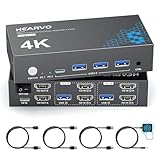



A quick note on the word "programmers." Amazon's search treats it loosely, and none of these switches carries a spec that makes it coder-specific. A KVM switch doesn't know what runs on the machines behind it. So treat "for programmers" as shorthand for a common coding setup: two machines, several monitors, a keyboard and mouse you trust, moved between them without unplugging anything. That's the lens I used, and I'll flag where a pick suits a different desk.
How I screened these five down to the picks
I worked from published listing specifications only: dimensions, model numbers, and the manufacturer's own feature claims. No testing, no handling. Here's how I weighted things for a coding desk.
- Display topology first. How many monitors and how many computers each switch supports. This is fixed hardware, not a setting, and it's the number most people get wrong.
- Connector type second. HDMI-only, DisplayPort, or USB-C changes which machines can even plug in.
- USB peripheral sharing third. Programmers run mechanical keyboards, hubs, and license dongles. USB 3.0 ports matter.
- Switching method last. Button, wired remote, or desktop controller.
What got cut in principle: anything a coder can't map to two computers and a mechanical keyboard. The best KVM switch for programmers has to move your real peripherals cleanly, not just push pixels. Every pick here shares a keyboard and mouse across at least two machines, and every one claims plug-and-play across Windows, macOS, and Linux, which matters when your work spans all three.
1. UGREEN 8K@60Hz HDMI Displayport KVM Switch 3 Monitors 2 Computers — Best overall
The UGREEN AK704 is the best KVM switch for programmers because it drives three monitors from two machines with two DisplayPort 1.4 ports plus HDMI, the most flexible display layout in this set.
Best for: coders running two machines across three displays Skip it if: you only ever use a single monitor
This is the one switch here that mixes connector types on the output side: UGREEN lists two DisplayPort 1.4 ports and one HDMI 2 port, so you can run a DisplayPort-heavy tower and still feed a spare HDMI panel. It claims 8K@60Hz or 4K@240Hz, the highest headline resolution in this group. For a programmer that mostly means room to spare, not a daily need. The aluminum body measures 1.57 x 6.18 x 2.83 in, so it sits low behind the monitors.
UGREEN says it shares four USB 3.0 ports across the two computers, enough for a keyboard, mouse, and a hub or dongle. Switching works two ways: a physical button and a desktop controller you can keep within reach, which beats blindly hunting for a button behind the desk.
Its trade-off against the cheaper picks is complexity. Three displays and mixed ports mean more cables to route and more to go wrong at setup. Two sellers list it, more than most here.
Pros:
- Only pick mixing DisplayPort and HDMI on output
- Highest stated resolution ceiling, 8K@60Hz
- Four USB 3.0 ports for peripherals
- Desktop controller plus button switching
- Low-profile aluminum body, 1.57 in tall
Cons:
- Three monitors mean more cabling to manage
- No stated warranty in the listing
- Overkill for a single-monitor desk
2. Heravo USB 3.0 HDMI KVM Switch 2 Monitors 2 Computers — Best for families
The Heravo dual-monitor switch is the right pick for a shared home desk, giving two computers a clean handoff of two screens, a keyboard, and a mouse.
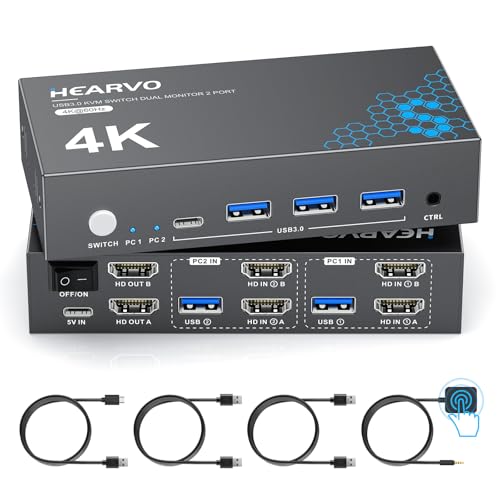
Best for: a shared home desk with two computers and two screens Skip it if: you need DisplayPort input
This is the sensible middle of the group: two monitors, two computers, all over HDMI. Heravo lists four USB 3.0 ports, three USB-A and one USB-C, rated up to 5Gbps, so a shared keyboard, mouse, and one fast drive all move together when you switch. The body measures 1.1 x 5.1 x 2.4 in in an ebony finish, small enough to hide.
Heravo says an included wired remote sits alongside the on-unit button, which is the feature that makes it a family pick. Anyone at the desk can tap a puck instead of reaching behind the tower. The company also claims adaptive EDID to cut screen flicker and resolution drops when you swap machines, a common annoyance on cheaper dual-monitor boxes.
It's the second-cheapest here, and its limit is connector type. Everything runs on HDMI, so a graphics card that only offers DisplayPort needs an adapter. Only one seller lists it. For two HDMI machines sharing two panels, though, nothing in this set is simpler.
Pros:
- Two monitors, two PCs, straightforward HDMI
- Included wired remote plus button
- Four USB 3.0 ports, one USB-C
- Adaptive EDID claim reduces flicker
- Small ebony body, 1.1 in tall
Cons:
- HDMI-only, no DisplayPort input
- Only one seller lists it
- No stated warranty in the listing
3. Hearvo USB 3.0 HDMI KVM Switch for 2 Computers 1 Monitor — Best budget pick
The Hearvo S7232H is the cheapest way onto this list, sharing one monitor between two computers without giving up USB 3.0 speed.

Best for: a two-computer, single-monitor coding station Skip it if: you run more than one display
If your desk has one good monitor and two machines, this is the honest answer. The S7232H is the cheapest of the five and the slimmest, at 0.8 x 5 x 2.4 in, so it tucks under a monitor arm without a fight. Hearvo lists two HDMI inputs sharing a single display, plus four USB 3.0 ports, three USB-A and one USB-C, rated to 5Gbps.
For a coder that USB spec is the part that earns it a place. A single-screen switch that throttled a keyboard hub would be useless. Instead you get full 5Gbps sharing for a mechanical board, a mouse, and a fast SSD. Hearvo claims 4K@60Hz with HDCP 2.2 and adaptive EDID, and offers both a button and a wired remote for switching.
The obvious ceiling is one monitor. If you already run dual screens, this box can't stretch to them, and you'd be re-buying within a month. It's also HDMI-only, and just one seller lists it. Within its narrow brief, it's the value pick.
Pros:
- Cheapest pick in this set
- Slimmest body, 0.8 in tall
- Four USB 3.0 ports at 5Gbps
- Button and wired remote switching
Cons:
- Single monitor only, no dual-screen path
- HDMI-only inputs
- Only one seller lists it
4. QORESWT KVM Switch 2 Monitors 2 Computers USB C — Best for heavy use
The QORESWT USB-C switch fits the laptop-plus-desktop coder, pairing a USB-C notebook with an HDMI tower and feeding the laptop 60W of power while it works.

Best for: a laptop-plus-desktop setup that needs PD charging Skip it if: both your machines use full-size HDMI or DisplayPort
This one solves a specific problem well. QORESWT builds it around one USB-C source and one HDMI source, so a modern laptop and a desktop tower share two monitors, a keyboard, and a mouse. The standout claim is a 60W PD charging port that powers the laptop over the same USB-C link it uses for video. For anyone who docks a work laptop next to a personal desktop, that's one fewer cable and no dead battery mid-build.
It supports 4K@60Hz and switches by physical button or wired control, per the listing. The body measures 1.18 x 4.72 x 2.56 in. It's the more expensive of the two-monitor options here, and the PD feature is the reason.
The catch is that its layout is prescriptive: it wants exactly one USB-C machine and one HDMI machine. Two desktops that both output HDMI won't fit the design, and the Heravo covers that case for less. One seller lists it. Buy this only if the USB-C laptop is central to your day.
Pros:
- 60W PD charging claim over USB-C
- Pairs a USB-C laptop with an HDMI desktop
- 4K@60Hz support stated
- Button and wired control switching
Cons:
- Needs one USB-C and one HDMI machine
- Pricier than the other two-monitor picks
- Only one seller lists it
- No stated warranty in the listing
5. QORESWT KVM Switch 3 Monitors 4 PC with Audio — Best premium
The QORESWT SW403HD is the command-center pick, wiring four computers to three monitors with dedicated audio routing.

Best for: a four-machine, three-monitor build with audio routing Skip it if: you only run two computers
This is the biggest box here by every measure. QORESWT lists three monitors shared across four computers over mixed HDMI and DisplayPort, plus a dedicated audio path the other picks don't advertise. It's the most expensive pick in the set and the largest, at 1.18 x 8.31 x 3.07 in, roughly 21.1 cm along its longest edge. If you juggle a work desktop, a test box, a personal machine, and a spare, this is the only switch here that holds them all.
QORESWT claims 8K@30Hz, along with 4K@60Hz and 4K@144Hz modes, and four USB 3.0 ports for keyboard, mouse, printers, and scanners. Switching is by button or wired control.
The trade-off is scale you may never touch. Its 8K claim tops out at 30Hz rather than the UGREEN's 60Hz, so at maximum resolution the AK704 is the smoother panel. Four inputs also mean four times the cabling and a bigger footprint. One seller lists it. For a genuine four-machine desk it's the only fit; for two machines it's more switch than you need.
Pros:
- Only pick handling four computers
- Three monitors with HDMI and DisplayPort
- Dedicated audio routing
- Four USB 3.0 ports for peripherals
Cons:
- 8K tops out at 30Hz, below the UGREEN
- Largest footprint, 8.31 in wide
- Most expensive pick here
- Overkill for a two-machine setup
What actually decides a KVM switch for a coding desk?
Most guides lead with resolution. That's the wrong number. Four of these five already clear 4K@60Hz, which is more than sharp text needs, and the two that claim 8K reach it under conditions you probably won't hit. Resolution rarely decides the purchase.
What decides it is fixed topology: the exact count of monitors and computers a switch supports. These are hardware boxes, not software. A two-monitor switch cannot become a three-monitor switch. Get the count wrong and the only fix is a new unit.
A short "is Y" list of the traps:
- A single-monitor box is a dead end the day you add a second screen.
- A USB-C switch is built for a laptop-plus-desktop pair, not two towers.
- A four-computer switch is wasted money on a two-machine desk.
Decide your topology first. Then the best KVM switch for programmers is whichever pick matches that count at 4K or better with real USB 3.0 sharing.
How many monitors and machines do you really need?
Count the boxes on your desk, then the screens, before you shop. The picks here split cleanly by that answer.
- One monitor, two computers: the Hearvo S7232H. Slimmest and cheapest, no wasted ports.
- Two monitors, two computers, all HDMI: the Heravo dual-monitor switch.
- Two monitors, a USB-C laptop and an HDMI desktop: the QORESWT USB-C, for the 60W PD charging.
- Three monitors, two computers: the UGREEN AK704, my overall pick.
- Three monitors, up to four computers: the QORESWT SW403HD.
Buy for the desk you'll have in a year, not just today. If a second work machine is coming, size up now. The gap between a two-monitor and a three-monitor switch is real money, but re-buying the whole box costs more. That's the single most common regret with this category, and it's entirely avoidable by counting first.
What the listings don't tell you about switching
A few things sit outside the published specs, and they matter to a coder who switches machines dozens of times a day.
USB device re-enumeration is one. Every switch here shares USB peripherals, but a listing won't say how fast a keyboard reconnects after a swap. On a coding desk that half-second gap is felt. The desktop controller on the UGREEN and the wired remotes on both Hearvo units at least put the switch within reach, so you're not diving behind the tower.
Cables are another. The two 8K claims, on the UGREEN and the SW403HD, depend on rated 8K HDMI and DisplayPort cables you supply yourself. A cheap cable caps you well below the headline number, and the listing won't warn you.
None of these five states a warranty in its listing, and most have a single seller. That's normal for the category, but worth knowing before you commit.
The verdict
Two tracks decide this one. If you run two computers across three monitors, the UGREEN AK704 is the best KVM switch for programmers, full stop. It's the only pick mixing two DisplayPort 1.4 ports with HDMI, it claims the highest usable resolution at 8K@60Hz, and its desktop controller keeps switching within reach. Four USB 3.0 ports handle a real coding peripheral load.
If you run two computers across two monitors, drop to the Heravo dual-monitor switch instead. It's the second-cheapest here, adds a wired remote, and its adaptive EDID claim targets the flicker that plagues dual-screen switching. You lose DisplayPort input and the third monitor, but you keep the full USB 3.0 sharing and pay noticeably less.
The cutoff is your monitor count. Three or more, take the UGREEN. Exactly two, take the Heravo. One screen only, the Hearvo S7232H is the smart budget stop. A USB-C laptop in the mix pushes you to the QORESWT PD switch, and a genuine four-machine desk is the only reason to buy the SW403HD. Match the topology and every pick here does its job.
FAQ
Is a KVM switch worth it for a programmer?
A KVM switch is worth it for a programmer who runs two or more computers from one seat. Instead of two keyboards and a tangle of cables, you share one trusted mechanical board and mouse and swap machines with a button. The UGREEN AK704 adds four USB 3.0 ports, so your hub and dongles move too. For a single-computer desk, skip it.
What decides the best KVM switch for programmers?
What decides the best KVM switch for programmers is topology: the exact number of monitors and computers the box supports, since that's fixed hardware you can't change later. Resolution matters less, as four of these five already reach 4K@60Hz. Count your screens and machines first, then match a switch to that count with USB 3.0 peripheral sharing intact.
Does the UGREEN AK704 support DisplayPort and HDMI together?
The UGREEN AK704 supports DisplayPort and HDMI together, and it's the only pick here that mixes them on the output side. UGREEN lists two DisplayPort 1.4 ports plus one HDMI 2 port, driving three monitors from two computers. That flexibility lets a DisplayPort-heavy tower feed a spare HDMI panel without adapters, which is why it's the overall pick for a coding desk.
UGREEN AK704 or Heravo dual monitor: which for two screens?
For two screens, choose between the UGREEN AK704 and the Heravo dual monitor by connector need. The Heravo runs two monitors over HDMI, adds a wired remote, and costs less, making it the value call for two HDMI machines. The UGREEN handles three monitors and adds DisplayPort input, so pick it only if you want that headroom now.
What is the most common KVM switch buying mistake?
The most common KVM switch buying mistake is choosing too few monitor or computer ports. These are fixed-hardware boxes, so a single-monitor switch can't grow to two screens, and the only fix is buying again. Size for the desk you'll have in a year. The 8K cable requirement is a second trap: rated cables aren't included, and cheap ones cap resolution.
Start by counting the screens and machines on your desk right now, then add any you expect within a year. That single number points you at one pick. For most coding desks it lands on the UGREEN AK704, because two computers and three monitors is the setup that outgrows everything cheaper without outrunning your budget. It mixes DisplayPort and HDMI, shares four USB 3.0 ports, and keeps the switch within arm's reach. Match your topology, buy rated cables, and you won't be shopping this category again.