Best Portable Dual Monitor KVM Switch for Two Laptops
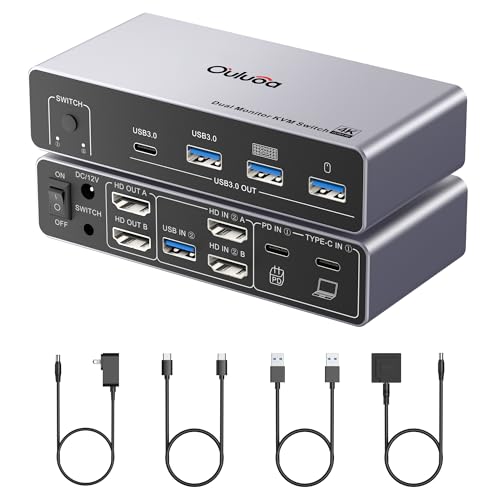
Five dual-monitor KVM switches compared on ports, resolution and switching method, with a clear winner for laptop-plus-desktop desks and honest trade-offs.

By Samuel HarrisUpdated 15 min read
On this page
- How I cut the shortlist
- Best portable dual monitor KVM switch at a glance
- What actually decides a dual-monitor KVM
- 1. Ouluoa USB-C KVM Switch — Best overall
- 2. Cable Matters Dual 4K 60Hz USB-C KVM Switch — Best budget pick
- 3. JCYMELE 4K@144Hz DisplayPort KVM Switch — Most versatile
- 4. UGREEN HDMI KVM Switch AK500 — Best upgrade
- 5. UGREEN 8K KVM Switch AK704 — Best premium
- Is a truly portable dual-monitor KVM realistic?
- USB-C, HDMI or DisplayPort: which port set fits you?
- What the listings do not tell you
- Ouluoa vs Cable Matters: which laptop setup wins?
- The verdict
- FAQ
The best portable dual monitor KVM switch for most desks is the Ouluoa USB-C KVM Switch, because it pairs one desktop and one laptop across two 4K@60Hz HDMI displays, adds 80W PD charging, and ships with a wired remote in a 1.3 x 5.24 x 2.52 in body. If you are switching two USB-C laptops instead, the Cable Matters Dual 4K 60Hz USB-C KVM Switch is the smarter buy, with one-cable docking and four USB 3.0 ports per side.
How I cut the shortlist
I lined up the listing data for five dual-monitor KVM switches and sorted them by three things that decide daily use: the video interface each one accepts, the maximum published resolution, and the switching method the manufacturer includes. Three reasons killed picks before they made the table.
First, single-monitor units. A best portable dual monitor kvm switch has to drive two displays natively, not one output with a splitter, so anything that only lists a single video output was cut. Second, no remote or button. A tiny KVM that lives behind your monitor is useless if the switch button is buried; every pick here has either a wired desktop controller or a wireless RF remote. Third, no USB 3.0 peripheral sharing. USB 2.0 is fine for a keyboard, but a webcam or external SSD needs the 5Gbps throughput that USB 3.0 delivers.
What survived is five switches with clear roles:
- One USB-C dock-style unit built for laptop-plus-desktop.
- One USB-C-to-HDMI switch built for two laptops.
- One DisplayPort switch built for high-refresh gaming or CAD.
- One HDMI switch built for two mainstream desktops.
- One triple-monitor DisplayPort-plus-HDMI switch built for power users.
Every pick ships with a wired remote or a desktop controller, every pick supports at least 4K@60Hz on both outputs, and every pick sits between roughly one and two inches thick so it slips into a backpack sleeve.
Best portable dual monitor KVM switch at a glance
| Pick | Video out | USB ports | Switching | Price |
|---|---|---|---|---|
Best overall Ouluoa USB-C KVM Switch |
2x HDMI 4K@60Hz | 3x USB 3.0 + 1x USB-C | Wired remote | Check Price |
Best budget pick Cable Matters Dual 4K USB-C KVM |
2x HDMI/DP 4K@60Hz claim | 4x USB 3.0 | Wireless RF remote | Check Price |
Most versatile JCYMELE DisplayPort KVM |
2x DisplayPort 4K@144Hz | 4x USB 3.0 | Button + desktop controller | Check Price |
Best upgrade UGREEN HDMI KVM AK500 |
2x HDMI 4K@60Hz | 3x USB-A + 1x USB-C | Button + desktop controller | Check Price |
Best premium UGREEN 8K KVM AK704 |
2x DP + 1x HDMI, 8K@60Hz claim | 4x USB 3.0 | Button + desktop controller | Check Price |


What actually decides a dual-monitor KVM
Most guides compare KVM switches on maximum resolution. That is not what decides it. Refresh rate is a ceiling you rarely hit, and 4K@60Hz on both outputs is table stakes across every pick here.
The real deciding criterion is what plugs into it. A KVM is a hub for the ports on your two computers, and those ports are fixed. If both machines have HDMI, a DisplayPort switch is scrap. If one machine is a laptop that already carries video over USB-C, an HDMI-only switch forces a dongle you did not want. The best portable dual monitor kvm switch for you is the one that matches the video connectors your computers already have, then adds enough USB 3.0 ports for the peripherals you actually use.
Second decision: how you switch. A button on the box is fine on a desk with the switch in reach. A wired desktop controller like the UGREEN AK500 or AK704 sits on the desk while the switch hides behind a monitor. A wireless RF remote like the Cable Matters unit works even inside a drawer.
1. Ouluoa USB-C KVM Switch — Best overall
The Ouluoa is the pick I would default to for a mixed desk running one laptop and one desktop, because it is the only switch here designed around that specific pairing.
Best for: one laptop plus one desktop sharing two monitors and a wired remote Skip it if: you need to switch between two USB-C laptops
Ouluoa describes this as a KVM docking station rather than a plain switch, and the port layout backs that up. One side takes a USB-C laptop with DP Alt Mode, the other takes a desktop over standard USB, and both feed two HDMI monitors at 4K@60Hz according to the listing. Ouluoa says the built-in 80W PD port charges the laptop while it is docked, so the laptop lives on a single cable. The chassis measures 1.3 x 5.24 x 2.52 in, which is genuinely portable in a backpack. Three USB 3.0 ports and one USB-C port share peripherals across both machines, with 5Gbps transfer claimed on the listing. The trade-off is scope. This unit is built for the laptop-plus-desktop case, not for two towers or two laptops, and only one seller stocks it, which narrows your options if you need a replacement. It is also the second most expensive here, so you are paying for the PD charging and the wired remote.
Pros:
- Purpose-built for one laptop plus one desktop
- 80W PD charging keeps the laptop on one cable
- Two HDMI outputs at 4K@60Hz claim
- Wired remote and USB cable included
- Compact 1.3 in thick silver chassis
Cons:
- Only one seller lists it
- Not designed for two USB-C laptops
- Second-highest price position in this set
- No stated warranty on the listing
2. Cable Matters Dual 4K 60Hz USB-C KVM Switch — Best budget pick
Cable Matters gives you the cleanest two-laptop setup here, with one USB-C cable per machine carrying video, data and switching.

Best for: two USB-C laptops with DisplayPort Alt Mode and a single-cable dock feel Skip it if: either machine is a Mac wanting two extended displays
This is the cheapest of the five and the only one designed exclusively for two USB-C laptops. Cable Matters says both laptops need USB-C ports with DisplayPort Alt Mode, which covers Thunderbolt 3, 4 and 5 machines. Each laptop connects with one USB-C cable that carries two 4K@60Hz video streams to the switch, which then feeds two external monitors over HDMI or DisplayPort. Four USB 3.0 ports share peripherals at up to 5Gbps according to the listing. A wireless RF remote handles switching, so the switch itself can hide. Read the Mac caveat carefully: the listing states that Mac laptops get only a single extended display, not two, because of how macOS handles DP Alt Mode. Windows and Linux users get the full dual-monitor experience the product name promises. Compared with the Ouluoa, you lose PD charging and the desktop compatibility, but you gain a true two-laptop workflow at the lowest price in this set. Only one seller lists it, and no dimensions are published.
Pros:
- Lowest price position in this set
- Single USB-C cable per laptop for docking feel
- Four USB 3.0 ports at 5Gbps claim
- Wireless RF remote for hidden mounting
- Compatible with Thunderbolt 3, 4 and 5
Cons:
- Only one extended display on Mac laptops
- Both computers must be USB-C laptops with DP Alt Mode
- No published dimensions on the listing
- Only one seller stocks it
3. JCYMELE 4K@144Hz DisplayPort KVM Switch — Most versatile
JCYMELE is the DisplayPort answer for anyone whose two computers run high-refresh monitors and drive them natively.

Best for: high-refresh DisplayPort desktops that share four USB 3.0 devices Skip it if: your computers only output HDMI or USB-C video
The JCYMELE is the only DisplayPort-only switch in the shortlist, and it carries the highest published refresh figures: 4K@144Hz and 8K@60Hz according to the listing, with backward compatibility down to 1080p. Two computers share four USB 3.0 devices and two DisplayPort monitors. Switching happens two ways: a Select button on the 5.91 x 2.68 x 1.5 in body, or a plug-in desktop controller you can leave under a monitor. A 12V DC power adapter keeps USB peripherals stable when a bus-powered switch would flag. JCYMELE is also the only pick here with a published warranty: two years. The catch is the interface lock-in. If either computer is a USB-C laptop or an HDMI-only mini PC, you need adapters, and DisplayPort adapters that carry 4K@144Hz are their own compatibility exercise. It also sits in a bright blue that will not disappear into a black desk setup. Against the more flexible port layouts on the two UGREENs, JCYMELE is the pick when you know your monitors are DisplayPort and you want the ceiling raised.
Pros:
- 4K@144Hz DisplayPort claim on both outputs
- Only pick here with a published two-year warranty
- Four USB 3.0 devices shared at 5Gbps claim
- Button plus wired desktop controller
- External 12V power for stable USB output
Cons:
- DisplayPort only, no HDMI or USB-C inputs
- Bright blue chassis stands out on a dark desk
- Only one seller lists it
- No PD charging for laptop docking
4. UGREEN HDMI KVM Switch AK500 — Best upgrade
The AK500 is the safe HDMI pick for two desktop PCs that want a wired desk controller and mixed USB-A plus USB-C peripheral sharing.

Best for: two HDMI desktops with a wired desktop controller under the monitor Skip it if: you want three monitors or DisplayPort inputs
The AK500 is UGREEN's dual-HDMI KVM for two computers and two monitors. The listing states 4K@60Hz per output, with fallback to 4K@30Hz and 1080p, and support for HDMI 2.0 and HDCP 2.x. The USB layout is the most flexible in the mid tier: three USB-A 3.0 ports and one USB-C port, so a USB-C webcam or dock sits on the switch alongside a keyboard, mouse and printer. Switching runs through a button on the 1.18 x 6.18 x 2.83 in aluminium body or a wired desktop controller, which is the layout most people prefer once the switch is hidden. UGREEN publishes wide OS compatibility across Windows, macOS and Linux. Two sellers list it, which is one more than most picks here and helps with availability. What you do not get: 8K support, DisplayPort inputs, or a triple-monitor option, all of which push you up to the AK704. No warranty is stated on the listing, and the desktop controller is wired rather than wireless, so cable routing matters. Against the Ouluoa, the AK500 wins if both machines are desktops, and loses if one is a laptop that wants PD charging.
Pros:
- Mixed USB-A plus USB-C peripheral ports
- 4K@60Hz on both HDMI outputs claim
- Wired desktop controller included
- Aluminium 1.18 in thin chassis
- Two sellers stock it
Cons:
- HDMI only, no DisplayPort inputs
- No PD charging port for laptops
- No stated warranty on the listing
- Wired remote means one more cable to route
5. UGREEN 8K KVM Switch AK704 — Best premium
The AK704 is the only switch here that drives three monitors from two computers, and it is the highest-priced pick.

Best for: a triple-monitor workstation running 8K@60Hz or 4K@240Hz between two PCs Skip it if: you only own two monitors and want to save cabinet space
The AK704 is the most capable box here and the reason to spend up. UGREEN pairs two DisplayPort 1.4 outputs with one HDMI 2.1 output, so two computers can share three monitors, four USB 3.0 devices, and a wired desktop controller. The listing states 8K@60Hz and 4K@240Hz ceilings on the DisplayPort side. Compatibility spans Windows, macOS and Linux, plug-and-play, driver-free per the listing. The chassis measures 1.57 x 6.18 x 2.83 in, so it is still portable rather than a rackmount unit. The catch is that a portable dual monitor kvm switch is not what most three-monitor buyers want; the AK704 is the pick when you have already committed to three displays and want one switch that will not bottleneck them. Against the AK500, you pay for the extra DisplayPort output and the 8K claim you probably will not use. Against the JCYMELE, you gain an HDMI output and lose the two-year warranty since none is stated here. Two sellers list it, which is a small comfort on the highest-priced item in the set.
Pros:
- Three monitors from two computers
- 8K@60Hz and 4K@240Hz DisplayPort claim
- Mixed DisplayPort plus HDMI outputs
- Wired desktop controller and four USB 3.0 ports
- Aluminium body still portable at 1.57 in thick
Cons:
- Highest price position in this set
- Overspec for two-monitor desks
- No stated warranty on the listing
- No PD charging port
Is a truly portable dual-monitor KVM realistic?
The word "portable" in the keyword covers two different jobs. The listings in this set support the small-and-carry-able job, not the plug-in-anywhere job.
Every pick here is under two inches thick and small enough to slip into a laptop bag. Ouluoa comes in at 1.3 x 5.24 x 2.52 in, the UGREEN AK500 at 1.18 x 6.18 x 2.83 in, JCYMELE at 5.91 x 2.68 x 1.5 in. That is portable in the physical sense.
Where the modifier gets shaky is power. Four of the five listings mention an external 12V DC adapter, and the Ouluoa uses a 12V adapter plus an 80W PD port for the laptop. None of these is bus-powered off a laptop's USB-C port alone. If you want a switch that lives on hotel desks with nothing but the laptop's own charger nearby, you have to plan for two power bricks in your bag: the laptop's and the KVM's. The best portable dual monitor kvm switch is still portable, but it is a portable dock rather than a passive cable.
USB-C, HDMI or DisplayPort: which port set fits you?
Match the switch to the ports your two computers already have, not to a spec you saw on YouTube.
- Both computers are USB-C laptops with DP Alt Mode: the Cable Matters unit is the natural fit. One cable per laptop carries video, USB and switching.
- One laptop plus one desktop: the Ouluoa is the only pick built around this mismatch, with a USB-C input on one side and standard USB on the other.
- Two HDMI desktops: the UGREEN AK500 is the mainstream choice, with 4K@60Hz on both outputs and a USB-A plus USB-C peripheral layout.
- Two DisplayPort desktops running high refresh: the JCYMELE raises the ceiling to 4K@144Hz per its listing, and adds a two-year warranty.
- Two computers, three monitors: the UGREEN AK704 is the only pick that solves it.
Adapters exist, but every adapter is a compatibility risk at 4K@60Hz or higher, especially on DisplayPort. Buy the switch that matches your outputs and skip the dongle chain.
What the listings do not tell you
Three things the product pages here quietly omit are worth flagging before you buy.
First, hotkey support. None of these listings explicitly promises keyboard hotkey switching, only button, remote or desktop controller. If you rely on Scroll Lock double-tap to flip machines, none of these is a safe assumption; use the remote or controller you are given.
Second, audio. HDMI and DisplayPort both carry audio, but a KVM does not always pass it cleanly, and none of these listings publishes a separate 3.5mm audio pass-through. If you use USB headphones on the shared peripheral hub, this is a non-issue. If your speakers are on a monitor's HDMI audio out, test early.
Third, EDID handling. When you flip away from a computer, some monitors drop off its desktop, so windows reshuffle. None of the listings here promises EDID emulation. Expect it on any switch at this price range and plan window layouts accordingly.
Ouluoa vs Cable Matters: which laptop setup wins?
If your desk has exactly one laptop on it, the Ouluoa wins because it charges the laptop over an 80W PD port while docking it, and it accepts a desktop on the other side. That is a specific mismatch this switch solves and nothing else here does.
If your desk has two laptops on it, Cable Matters wins. It is the lowest price of the five, its wireless RF remote works from inside a drawer, and its one-cable-per-laptop layout is exactly what a two-laptop worker asks for. The Mac caveat matters: Cable Matters states that macOS gets only one extended display, so a Mac user with two external monitors should look again at the Ouluoa and add a desktop on the second input.
The verdict
If you want a single answer, the Ouluoa USB-C KVM Switch is the best portable dual monitor kvm switch for the mixed desk most readers actually have: one laptop, one desktop, two HDMI monitors, and a wired remote you can reach without leaning. The 80W PD port turns the laptop side into a real dock, the 4K@60Hz output covers any current display you would pair with it, and the 1.3 x 5.24 x 2.52 in body slips into a bag.
The runner-up depends on the machines, not the price. Two USB-C laptops? Cable Matters and its one-cable-per-laptop setup. Two DisplayPort desktops chasing refresh rate? JCYMELE, with the only published two-year warranty and 4K@144Hz on the listing. Two HDMI desktops that want a wired controller? UGREEN AK500. Three monitors from two PCs? UGREEN AK704. The cutoff is your existing port layout: below "both machines are USB-C laptops", Cable Matters is right; above it, the switch that matches your outputs wins.
FAQ
What is the best portable dual monitor KVM switch for one laptop and one desktop?
The best portable dual monitor KVM switch for that pairing is the Ouluoa USB-C KVM Switch. It is the only pick here with a USB-C input on the laptop side, standard USB on the desktop side, an 80W PD charging port, and two HDMI outputs rated at 4K@60Hz on the listing, in a 1.3 x 5.24 x 2.52 in body with a wired remote.
Can a KVM switch handle 4K at 60Hz on two monitors?
A KVM switch can handle 4K at 60Hz on two monitors when both the switch and the video cables support the required bandwidth. Every pick in this guide claims 4K@60Hz per output on its listing, with the JCYMELE and UGREEN AK704 raising the ceiling to 4K@144Hz and 8K@60Hz on DisplayPort. HDMI 2.0 or DisplayPort 1.4 cables are the practical minimum.
Is a dual monitor KVM switch worth it over swapping cables?
A dual monitor KVM switch is worth it once you swap cables more than twice a day. One remote press or controller tap moves the keyboard, mouse, two monitors and up to four USB peripherals between machines. Cable swapping wears connectors, misaligns monitor arrangements and interrupts EDID handshakes. The switch pays back in saved seconds and preserved window layouts within a work week.
JCYMELE DisplayPort or UGREEN HDMI AK500: which should I pick?
JCYMELE DisplayPort or UGREEN HDMI AK500 comes down to your monitors and refresh rate. Pick the JCYMELE if both computers output DisplayPort and you run high-refresh panels; the listing claims 4K@144Hz and adds a two-year warranty. Pick the UGREEN AK500 if both machines output HDMI and you want a wired desktop controller plus a USB-C peripheral port alongside three USB-A ports.
Do dual monitor KVM switches work with a Mac?
Dual monitor KVM switches work with a Mac, but with caveats. The Cable Matters listing explicitly states Mac laptops get one extended display, not two, because of how macOS handles DisplayPort Alt Mode over USB-C. The UGREEN AK500 and AK704 list macOS compatibility for their HDMI and DisplayPort inputs. Match the switch's video interface to your Mac's port before you order.
The fastest way to shortcut this decision is to open your two computers' spec sheets and write down the video outputs. If both say USB-C with DP Alt Mode, order the Cable Matters. If one is a laptop and the other a desktop, order the Ouluoa. Everything else falls out of that first check. A best portable dual monitor kvm switch works when it disappears into a workflow, so buy the one that matches the ports you already own, not the one with the biggest number on the box. The Ouluoa is the default because more desks look like laptop-plus-desktop than any other shape.