Best Portable Keyboard for Programmers Who Travel

Seven folding and compact keyboards ranked for coders who work away from a desk, from a pocket-sized ProtoArc to a hot-swappable RK61. Layout, weight and multi-device switching decide it, not headline specs.

By Samuel HarrisUpdated 15 min read
On this page
- Why layout matters more than portability for coders
- Best portable keyboard for programmers at a glance
- How I screened these seven keyboards
- 1. ProtoArc XK04 Foldable Compact Keyboard for Phone and — Best overall
- 2. ProtoArc XK01 Full-Size Foldable Bluetooth Keyboard for — Best for heavy use
- 3. TECKNET Foldable Bluetooth Keyboard with Touchpad & Numpad — Best lightweight
- 4. Guiheng Wired Portable 60% Mechanical Feeling Gaming Keyboard — Best budget pick
- 5. MEETION Foldable Wireless Keyboard and Mouse Combo — Best for families
- 6. MEETION Foldable Keyboard with Touchpad — Most versatile
- 7. RK ROYAL KLUDGE RK61 Wireless 60% Mechanical Keyboard — Best premium
- Does a portable keyboard really suit programming?
- Folding or compact: which travels better?
- When a different pick wins
- The verdict
- FAQ
The best portable keyboard for programmers is the ProtoArc XK04, a two-fold Bluetooth board that weighs 2.2 lb yet closes to a 0.55 in slab under a PU leather cover. If you want a full 105-key layout with a number pad for long sessions, the ProtoArc XK01 is the better buy at 0.65 lb. The deciding factor here is not size. It is whether the layout keeps your fingers where muscle memory expects them.
Why layout matters more than portability for coders
Here is the misconception. Buyers shopping for the best portable keyboard for programmers compare folded thickness and shipping weight, then pick whatever slides flattest into a sleeve. That is the wrong contest.
Code is punctuation-dense. Brackets, semicolons, backslashes and the arrow cluster carry more of your day than any letter key. A keyboard that shaves 0.1 in off its fold but drops the arrow keys or splits the layout at a fold seam will slow you more than an extra ounce ever could.
So the real deciding criterion is this: does the board keep a standard QWERTY spacing and a usable navigation set? Two of the seven here run a genuine full-size 105-key layout. One drops to 60% and cuts the arrows. The rest sit in between.
- Full-size keeps every key, at the cost of a longer folded strip.
- Compact 60-64 key boards shrink hardest but demand a function-layer for arrows and symbols.
- Wireless multi-device switching lets you jump from laptop to a phone terminal without re-pairing.
Weight settles ties. It rarely settles the decision.
Best portable keyboard for programmers at a glance
| Pick | Layout | Weight | Price |
|---|---|---|---|
Best overall ProtoArc XK04 |
Compact two-fold | 2.2 lb | Check Price |
Best for heavy use ProtoArc XK01 |
105-key full-size | 0.65 lb | Check Price |
Best lightweight TECKNET Foldable |
64-key tri-fold | 0.52 lb | Check Price |
Best budget pick Guiheng 68-Key |
68-key wired | not listed | Check Price |
Best for families MEETION Combo |
Foldable + mouse | 1.04 lb | Check Price |
Most versatile MEETION K9552 |
96-key + touchpad | not listed | Check Price |
Best premium RK ROYAL KLUDGE RK61 |
61-key mechanical | not listed | Check Price |





How I screened these seven keyboards
I lined up the published specifications for every board side by side, then sorted them by the things a coder actually touches. The approach was disqualification-first: cut on the deal-breakers, then rank what survived.
Three reasons pushed picks down the order:
- A layout that breaks muscle memory. The 60% and 61-key boards drop the dedicated arrow cluster onto a function layer. That is fine for gaming, awkward for editing code, so both sit low here.
- No wireless. A wired board tethers you to one machine. The Guiheng is plug-and-play only, which is why it lands as the budget option rather than higher.
- Missing spec depth. Where a listing publishes no weight or dimensions, I can't promise it packs small, so it can't win on portability.
What survived splits cleanly. The two ProtoArc boards carry the most complete specifications and the longest stated warranties, both 2 years. That transparency is why the winner and runner-up both wear the ProtoArc badge. Everything else here fills a narrower need: a mouse in the box, a touchpad, a mechanical feel, or the lowest possible spend.
1. ProtoArc XK04 Foldable Compact Keyboard for Phone and — Best overall
The ProtoArc XK04 wins because it disappears into any bag while keeping a typing surface wide enough for real coding.
Best for: coders who want a keyboard that vanishes into a bag Skip it if: you need a number pad or arrow cluster
The XK04 folds to a 0.55 x 10.8 x 10.8 in slab, which is the flattest closed profile in this group. ProtoArc says the folded weight is 7.8 oz, though the listed shipping weight is 2.2 lb with the cover and packaging. Either way, it slides into a laptop sleeve without complaint.
Bluetooth 5.1 pairs up to three devices, and ProtoArc says you switch between them with dedicated keys, no re-pairing. For a programmer who runs a laptop, a phone terminal and a tablet, that matters more than any headline feature. The integrated PU leather cover doubles as scratch protection, which most rivals here lack.
The trade-off is the compact layout. This board is built for phones and tablets first, so you give up the dedicated number pad the XK01 keeps. Against the mechanical RK61, you also give up tactile feedback. But no other pick here matches the mix of a 2-year warranty, three-device switching and a fold this flat.
Pros:
- Flattest folded profile at 0.55 in
- Three-device Bluetooth 5.1 switching without re-pairing
- 2-year warranty, longest tie in the set
- PU leather cover protects the keys in transit
- USB-C charging with claimed 150-day standby
Cons:
- No dedicated number pad
- Compact layout puts symbols on a function layer
- Scissor keys lack mechanical feedback
- Only one seller lists it
2. ProtoArc XK01 Full-Size Foldable Bluetooth Keyboard for — Best for heavy use
The XK01 is the pick when you type all day and refuse to give up any keys.

Best for: long coding sessions that need a full 105-key layout Skip it if: your bag has no room for a 16.5 in strip
This is the only board here with a true full-size deck: 105 keys, a number pad, a function row and a dedicated navigation cluster. For anyone writing code, that navigation cluster is the reason to buy. Your arrow keys stay where your fingers already reach.
It weighs just 0.65 lb and folds to a claimed 8.46 x 4.68 x 0.78 in, using internal aluminum hinges ProtoArc says are tested for 10,000 folds. The scissor switches are low-profile and quiet, which the listing pitches at coffee shops and open offices. Three-device Bluetooth 5.1 switching carries over from the XK04.
The catch is footprint. Unfolded it runs 16.5 in wide, the longest strip in this set, so it needs real desk space and a bag that fits a longer object. It also drops the pocketable cover the XK04 offers. If you value a full layout over the smallest fold, this is your board, and its 2-year warranty backs the heavy use.
Pros:
- True full-size 105-key layout with number pad
- Dedicated arrow cluster kept intact
- Light at 0.65 lb
- Aluminum hinges claimed to survive 10,000 folds
- Quiet scissor switches for shared spaces
Cons:
- Longest unfolded width at 16.5 in
- No protective cover included
- Scissor feel, not mechanical
- Listed count shows 0 in the data
3. TECKNET Foldable Bluetooth Keyboard with Touchpad & Numpad — Best lightweight
The TECKNET is the one to grab when every ounce in the bag counts.

Best for: carrying the absolute minimum weight Skip it if: you want full-travel keys
At 0.52 lb, this is the lightest board here, and it folds to 0.63 x 7.1 x 4.2 in. The listing calls it a 64-key tri-fold with a built-in precision touchpad, so you can navigate without a mouse. For a programmer living out of one bag, the touchpad removes an accessory you'd otherwise carry.
TECKNET says it connects up to three devices over Bluetooth and covers iOS, Windows, Android and macOS, with an Fn+Q/W/E/R combo to switch operating systems. USB-C charging carries a claimed 300-day standby, the longest quoted in this set. The warranty runs 36 months, matching the ProtoArc pair for length.
The compromise is the 64-key count. That means symbols and some navigation live on a function layer, which slows the punctuation-heavy work coding demands. The touchpad also can't fully replace a mouse for precise cursor work. Against the XK01, you trade a full number pad for the lowest weight and the smallest folded footprint here.
Pros:
- Lightest board at 0.52 lb
- Built-in touchpad removes the need for a mouse
- Claimed 300-day standby, longest quoted here
- 36-month warranty
- Four-OS switching via function keys
Cons:
- 64-key layout buries symbols on a function layer
- Touchpad is no substitute for a real mouse
- Only one seller lists it
- Small keys tighten spacing
4. Guiheng Wired Portable 60% Mechanical Feeling Gaming Keyboard — Best budget pick
The Guiheng is the cheapest way to get a mechanical-style deck for a fixed desk.

Best for: a desk setup on the tightest spend Skip it if: you need wireless or quiet keys
This is the cheapest of the seven and the one buyers choose most often in its gaming-keyboard category. It runs a 68-key compact layout with red switches and RGB backlighting, and Guiheng lists it as plug-and-play over a USB cable. The listing names typists, writers and programmers among its intended users.
For a coder who works at one desk and doesn't move around, the wired connection is actually a plus: no charging, no pairing, no dropouts. The 68-key layout keeps a small arrow cluster, which the 61-key RK61 does not. Guiheng describes the switches as loud and clicky with a strong mechanical feel.
The limits are clear. There's no wireless, so this can't follow you to a phone or tablet the way the ProtoArc boards do. The published specifications are thin, with no weight or dimensions listed, so I can't promise it packs small. And loud clicky keys don't suit a shared office. This is a value desk board first, a travel board a distant second.
Pros:
- Cheapest pick in the set
- Mechanical-feel red switches
- Keeps an arrow cluster at 68 keys
- Plug-and-play with no charging
- RGB backlighting included
Cons:
- Wired only, no multi-device use
- No weight or dimensions published
- Loud clicky keys unsuited to shared rooms
- Not a true fold-away travel design
5. MEETION Foldable Wireless Keyboard and Mouse Combo — Best for families
The MEETION combo is the pick when one purchase needs to kit out more than one person.

Best for: a shared travel kit with a mouse included Skip it if: you already own a good mouse
This is the only pick that ships a mouse in the box. The keyboard folds from the sides into a compact unit held by a magnetic clasp, and MEETION says it pairs with iOS, Android, Windows and Mac across three devices. The whole set weighs 1.04 lb. For a household kitting out more than one traveller, a matched keyboard-and-mouse pair simplifies the packing list.
The scissor switches are pitched as quiet and responsive, and the bundled mouse offers four-level DPI adjustment. Both charge over USB, so there are no disposable batteries to track. MEETION lists a 1-year warranty.
The programmer angle is where it slips. The mouse is the selling point, and a coder who already owns a trackball or gaming mouse pays for a part they'll leave in a drawer. The published specs skip folded dimensions, and the 1-year warranty is the shortest here alongside the two premium picks. It's a solid shared kit, not a specialist coding board. Buy it for the bundle, not the deck.
Pros:
- Includes a matched wireless mouse
- Magnetic clasp holds the fold shut
- Four-OS, three-device pairing
- Both parts rechargeable over USB
- Reasonable 1.04 lb combined weight
Cons:
- Bundled mouse wasted if you own one
- Shortest 1-year warranty in the set
- No folded dimensions published
- Only one seller lists it
6. MEETION Foldable Keyboard with Touchpad — Most versatile
The K9552 packs the most input types into one folding board.

Best for: spreadsheet-and-code work needing a numpad and touchpad Skip it if: you want the smallest folded size
If your work mixes code with spreadsheets and data entry, this is the most complete deck here. MEETION lists a 96-key QWERTY layout with an integrated numeric keypad, a touchpad and a full shortcut row. That combination means you rarely reach for a mouse or a separate numpad.
It also solves a real folding-keyboard flaw. MEETION says metal support bars on both sides keep the deck flat instead of buckling at the seam, which matters when you're typing on a lap or an uneven café table. Bluetooth 5.3 pairs three devices, and the 280mAh battery carries a claimed 90-day standby.
Two things hold it back. The published specs skip both weight and folded dimensions, so I can't confirm how small it packs, and the 90-day standby is the shortest quoted figure in the group. The 1-year warranty also trails the ProtoArc and TECKNET boards. Against the winner, you gain a numpad and touchpad but lose the confirmed pocketable fold. Choose it for the feature count, not the carry.
Pros:
- 96-key layout with numpad and touchpad
- Metal support bars keep the deck flat
- Bluetooth 5.3, three-device pairing
- Full shortcut row for editing
- Two sellers list it
Cons:
- No weight or folded size published
- Shortest 90-day standby quoted here
- 1-year warranty trails the leaders
- Larger key spread than the compact picks
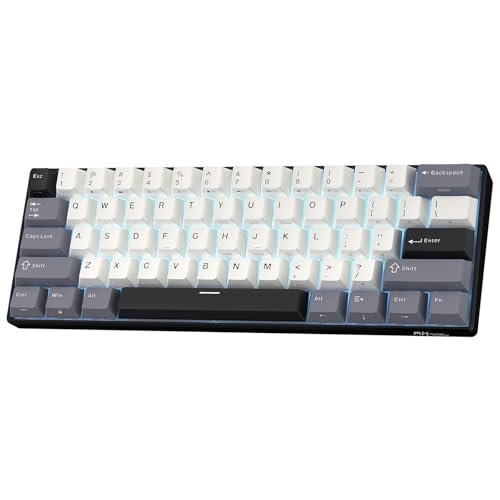
7. RK ROYAL KLUDGE RK61 Wireless 60% Mechanical Keyboard — Best premium
The RK61 is the pick for coders who won't type on anything but mechanical switches.
Best for: coders who want mechanical feel and custom switches Skip it if: you carry it in a slim sleeve
This is the most expensive pick and the only true mechanical board here. It runs a 61-key 60% layout measuring 1.89 x 12.6 x 5.91 in, with a hot-swap PCB that takes 3-pin and 5-pin switches. For a coder who cares about feel, that swappability means you tune the typing experience instead of settling for what shipped.
RK offers three-mode connectivity across Bluetooth 5.0, 2.4GHz wireless and USB-C wired, so it fits both a travel bag and a desk. The double-shot PBT keycaps resist oil and wear, and RK says dual-layer silencing foam cuts the hollow sound most mechanical boards make. It's the slowest seller of the two ranked here, but that reflects its niche, not its build.
The 60% layout is the real cost. There's no dedicated arrow cluster, so navigation drops to a function layer, and coding leans hard on those keys. At 1.89 in tall it's the thickest board here, so a slim sleeve won't take it. You buy this for switch feel and customisation, accepting the layout compromise that comes with 60%.
Pros:
- Only true mechanical board in the set
- Hot-swap PCB takes 3-pin and 5-pin switches
- Three modes: Bluetooth, 2.4GHz, wired
- Durable double-shot PBT keycaps
- Silencing foam reduces hollow noise
Cons:
- 60% layout drops the arrow cluster
- Thickest board at 1.89 in
- Most expensive pick here
- Shorter 1-year warranty
Does a portable keyboard really suit programming?
Short answer: a portable keyboard suits programming well, with one caveat. The caveat is the layout. Coding depends on symbols and arrow keys far more than prose does, so the boards that keep a standard QWERTY spacing and a real navigation cluster serve you best.
The folding scissor-switch boards here handle punctuation fine because their key spacing stays close to a laptop's. The 60% mechanical boards feel great under the fingers but push arrows and symbols onto a function layer, which interrupts flow.
Worth it if you:
- Work from cafés, trains or a second desk
- Pair a phone or tablet as a terminal
- Want a full layout your laptop lacks
Not worth it if you never leave a fixed desk with a full-size board already on it.
Folding or compact: which travels better?
Both fold flat and both fit a bag, but they solve different problems. A folding board like the ProtoArc XK01 collapses to a smaller footprint by hinging, then opens to a full-size deck. A compact wired board like the Guiheng stays one rigid piece but shrinks by cutting keys.
- Folding wins on layout. You get full-size keys that pack small.
- Compact wins on rigidity. No hinge seam to flex under your palms.
- Folding needs charging. Compact wired boards never run out of battery.
For a programmer, folding usually wins because the seam sits between key blocks, not under your typing fingers. The XK04 and XK01 both prove a fold need not compromise the deck. A rigid 60% board saves you nothing on layout, since it shrank by dropping the exact keys you use most.
When a different pick wins
The XK04 is the default, but the right board flips with your setup. Here are the conditions that change the answer.
- If you never travel and want mechanical feel, the RK61 wins. Its hot-swap switches and PBT keycaps beat any scissor board on typing feel, and a fixed desk absorbs its 1.89 in height.
- If your work is half spreadsheets, the MEETION K9552 wins. A 96-key deck with a numpad and touchpad saves you two accessories.
- If weight is everything, the TECKNET at 0.52 lb wins. It's the lightest here and the touchpad means you skip a mouse.
- If you're buying for two people, the MEETION combo wins on the bundled mouse alone.
Each of these beats the winner on one axis. None beats it on the balance of fold, layout and multi-device switching that defines a coding travel board.
The verdict
The best portable keyboard for programmers is the ProtoArc XK04. It folds flatter than anything else here at 0.55 in, switches between three devices over Bluetooth 5.1 without re-pairing, and carries a 2-year warranty. For a coder moving between a laptop, a phone terminal and a tablet, that combination is the whole job.
Two conditions flip it. If you want a full 105-key deck with a real number pad and arrow cluster, buy the ProtoArc XK01 instead; it weighs only 0.65 lb and keeps every key your muscle memory expects, at the cost of a longer 16.5 in unfolded strip. The cutoff is your layout tolerance: below a full deck, the XK04's smaller fold wins; if you need the number pad, the XK01 does.
If you never travel and care only about feel, the RK61's hot-swap mechanical switches are in a different league, but its 60% layout drops the arrows coding leans on. That trade-off keeps it a specialist pick rather than the default. For most programmers packing a bag, the XK04 is the board that gets out of the way and lets you type.
FAQ
Is a portable keyboard worth it for a programmer?
A portable keyboard is worth it if you code away from a fixed desk. It gives you a fuller layout than a laptop and lets you pair a phone or tablet as a second screen. The XK04 folds to 0.55 in and switches three devices, so it earns its bag space for anyone working from cafés, trains or a second office.
What is the best portable keyboard for programmers on a budget?
The best portable keyboard for programmers on a budget is the Guiheng 68-key. It's the cheapest of the seven, uses mechanical-feel red switches, and keeps a small arrow cluster the 61-key boards drop. The catch is it's wired only, so it won't follow you to a phone or tablet the way the ProtoArc boards do.
Which layout suits coding, full-size or 60%?
Layout suits coding best when it keeps a dedicated arrow cluster and standard symbol row. A full-size 105-key board like the XK01 does that; a 60% board like the RK61 pushes arrows and symbols onto a function layer. Coding leans hard on those keys, so a full or near-full layout beats a 60% deck for punctuation-dense work.
ProtoArc XK04 or XK01, which should a coder buy?
Choose between the XK04 and XK01 on layout need. The XK04 folds flatter at 0.55 in and slips into any sleeve, ideal if you type in short bursts. The XK01 keeps a full 105-key deck with a number pad and arrow cluster, better for all-day sessions, at the cost of a longer 16.5 in unfolded strip.
What mistake do buyers make choosing a travel keyboard?
The mistake buyers make is shopping on folded thickness alone. A board that packs flattest is useless if it drops the arrow keys or splits symbols across a fold seam. For coding, check the layout first: confirm a real navigation cluster and standard spacing, then compare weight and fold size to settle any ties.
Start by deciding one thing: can you code on a compact layout, or do you need every key present? If the answer is compact, the ProtoArc XK04 is the board that folds smallest, pairs three devices and stays out of your way. If you need the full deck, the XK01 keeps your arrows and number pad intact for a small footprint penalty. Both back their build with a 2-year warranty, which is why the ProtoArc pair leads this list. Match the layout to your work first, and the rest of the decision falls into place.