Best Premium Trackball Mouse by Tilt and DPI Control

A working shortlist of six thumb-controlled trackballs, ranked by what the listings actually publish: tilt angle, DPI steps, warranty length and body size. The Logitech Ergo M575S leads on fit.

By Samuel HarrisUpdated 16 min read
On this page
- Best premium trackball mouse at a glance
- How I screened the six down from a longer list
- 1. Logitech Ergo M575S — Best overall
- 2. Logitech MX Ergo S — Best premium
- 3. ProtoArc EM01 NL — Most versatile
- 4. Nulea M501 — Best upgrade
- 5. Nulea M511 — Best minimal setup
- 6. TECKNET TK-MS023 — Best budget pick
- What actually decides a thumb trackball?
- Tilt, DPI and click noise across the six
- Is a premium trackball worth it over a mid-range one?
- What the listings do not tell you about ball maintenance
- Who should skip a thumb trackball entirely?
- The verdict
- FAQ
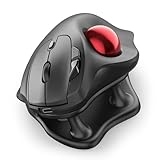
The best premium trackball mouse in this set is the Logitech Ergo M575S, a 5.28 x 4.13 x 3.94 in sculpted body with thumb control that Logitech says was tuned with its Ergo Lab team. For medium to large hands that want a 20-degree tilt and USB-C charging, the Logitech MX Ergo S is the better buy. The deciding specification here is not DPI; it is body size and tilt angle, and this shortlist splits cleanly on both.
Most trackball guides compare DPI numbers as if they settled the question. They do not. A thumb trackball lives or dies on whether the shell fits your palm and whether the ball sits at a wrist-neutral angle. Get either wrong and you buy a paperweight, no matter how many sensitivity steps the listing advertises. That is the trap this roundup is built to help you avoid.
A note on the word premium in the search: only two picks here sit in the premium price position, so the qualifier is only partly a fit. I have kept the mid and entry picks in because they are the honest alternatives when the premium shape does not suit your hand. Judge that for yourself against the figures below.
Best premium trackball mouse at a glance
| Pick | Tilt angle | DPI steps | Price |
|---|---|---|---|
Best overall Logitech Ergo M575S |
Fixed sculpted shape, no stated tilt | Not published | Check Price |
Best premium Logitech MX Ergo S |
20° claim | Speed / precision toggle | Check Price |
Most versatile ProtoArc EM01 NL |
0–20° adjustable hinge | 5 steps, 200–1600 | Check Price |
Best upgrade Nulea M501 |
No stated tilt | 4 steps | Check Price |
Best minimal setup Nulea M511 |
21.7° fixed stand | 4 steps, 400–1600 | Check Price |
Best budget pick TECKNET TK-MS023 |
16° claim | 5 steps, 100–1200 | Check Price |



How I screened the six down from a longer list
I pulled thumb-operated wireless trackballs from the Mice and Trackballs categories, then filtered to listings that publish enough dimensional or ergonomic data to compare like for like. Anything with no measurement of the body, no warranty and no DPI figure got cut, because there is nothing to judge on.
Three criteria did the cutting:
- A stated ergonomic angle or a sculpted profile. If the listing does not describe how it sits under the palm, it goes.
- A published warranty. Twelve months minimum. Two of the six here publish two years or longer, and that matters for a device with a moving mechanical ball.
- A specific DPI ladder or a precision toggle. Any trackball that only says "adjustable DPI" without steps is unshoppable.
That left six picks that span the entire price range, from the entry-level TECKNET at price rank 1 to the Logitech MX Ergo S at rank 6. The Logitech Ergo M575S is the best premium trackball mouse for most hands in the set because it holds the middle ground: a body big enough to rest a palm on, without the tilt-and-toggle complexity of the MX Ergo S.
1. Logitech Ergo M575S — Best overall
The best premium trackball mouse in this set for hands that want a proven sculpted shell rather than a tilt gimmick.
Best for: most hand sizes wanting a proven ergonomic shape Skip it if: you need USB-C charging or a tilt angle
The M575S runs 5.28 x 4.13 x 3.94 in, which is the largest published footprint in the set and the reason it works for medium to large palms without pinching. Logitech says this shape reduces forearm muscle strain by 25% and calls it certified by ergonomists, which is a manufacturer claim rather than a measured result you should quote back to yourself. What is measurable is the shell size and the three customisable buttons, which is fewer than the MX Ergo S offers but more than the two Nulea models publish.
Where it loses to the MX Ergo S is charging and tilt. There is no 20-degree angle here and no USB-C port on the listing, so it sits flat on the desk. It is also the second most expensive pick, which means you are paying for the shape and the software support rather than extra hardware features. For the best premium trackball mouse role, that trade is the right one because the shape is what decides comfort.
Pros:
- Largest published body in the set at 5.28 x 4.13 x 3.94 in
- Manufacturer claim of 25% less forearm strain
- Three customisable buttons with Logi Options+
- 2024 release, current-generation model
- Bluetooth and receiver both supported
Cons:
- No published tilt angle
- No USB-C charging on the listing
- Only a 1 year limited hardware warranty
- Second-most expensive pick with fewer buttons than the MX Ergo S
2. Logitech MX Ergo S — Best premium
The most expensive pick here, and the only one combining a 20-degree tilt with USB-C charging and six programmable buttons.

Best for: medium to large hands that want a 20-degree tilt Skip it if: you have small hands or a tight budget
The MX Ergo S is the top of the price ladder for this set. Logitech states a 20-degree tilt angle, a manufacturer figure of 27% less muscle strain and clicks that it describes as 80% quieter than the previous version. There is a speed-and-precision toggle button, which is a different approach than the numbered DPI ladders on the ProtoArc and TECKNET picks. Instead of five steps, you switch between two modes at the press of a button.
Six customisable buttons is the highest count published in this shortlist. USB-C charging is listed as one minute for 24 hours of use or 120 days on a full charge, which is a manufacturer claim rather than something I have verified. Logitech says the sculpted shape suits medium to large hands, so anyone with small hands should read that as a warning rather than a suggestion. The MX Ergo S trades a bigger body and a higher price for the tilt angle and the extra buttons; if either of those matters, this is the pick.
Pros:
- 20-degree tilt angle claim, unique in this set alongside the M511 stand
- Six customisable buttons, the most in the shortlist
- USB-C fast charging on the listing
- 80% quieter clicks claim versus the previous generation
- Speed and precision toggle instead of a stepped DPI ladder
Cons:
- The most expensive pick of the six
- Only a 1 year limited hardware warranty
- Body dimensions not published
- Sized for medium to large hands, not small
3. ProtoArc EM01 NL — Most versatile
The only pick with a 0–20° adjustable tilt hinge, and one of two here with a 2 year warranty.

Best for: shoppers who want an adjustable tilt hinge Skip it if: you want fully silent scroll and side buttons
ProtoArc lists a 0–20° hinge, which is the only fully adjustable tilt in the set. The Logitech MX Ergo S publishes a single 20° angle and the Nulea M511 publishes a 21.7° stand; both are fixed. That flexibility is the reason this trackball earns the versatile label rather than a straight ranking. The DPI ladder runs 200/400/800/1200/1600, five steps, which sits between the four-step Nulea models and the five-step TECKNET.
Weight is 0.77 lb and the listing publishes 0.04 x 3.54 x 2.76 in dimensions. Three-device Bluetooth and 2.4 GHz switching is included. ProtoArc is clear that the quiet clicks apply to the left and right buttons only; the scroll wheel and side buttons are not silent, which the listing states directly. That honesty is worth something. The 2 year warranty is double what either Logitech pick publishes, and the mid-range price position gives up little except brand support software. In practice, if you cannot decide between a flat shell and a tilted one, this is the only pick that lets you have both.
Pros:
- 0–20° adjustable tilt hinge, unique here
- Five DPI steps from 200 to 1600
- 2 year warranty, double the Logitech picks
- Three-device Bluetooth and 2.4 GHz switching
- Mid price position, cheaper than either Logitech
Cons:
- Scroll and side buttons are not silent
- No Logi Options-style software ecosystem
- Body is smaller than the Logitech Ergo M575S at 3.54 x 2.76 in
- Only one seller lists it, so stock is thinner
4. Nulea M501 — Best upgrade
An entry-price trackball with three-device switching, aimed at anyone stepping up from a basic office mouse.

Best for: someone moving up from a basic office mouse Skip it if: you want a published tilt angle
The M501 sits at price rank 2, so it is the second-cheapest of the six. At 4.51 oz and 5.51 x 4.37 in, it has a body wider and longer than the ProtoArc but flatter than the sculpted Logitech shells. Nulea publishes four DPI levels and six buttons, along with three-device switching over Bluetooth and a USB dongle. There is no published tilt angle, which is the main reason this pick is a step below the ProtoArc and the M511 rather than a step above them.
Where it earns the upgrade label is the jump from a plain office mouse. Thumb control removes the arm sweep, the rechargeable battery removes the disposable AA habit, and three-device pairing removes the second dongle from your bag. Logitech's own entry-level trackball is not in this set, but the M501 covers the same ground for less money. The trade you are making is the ergonomic angle: Nulea does not state one, and you should assume the shell sits flat. If you can rest your wrist on a pad and stay neutral, that is fine; if you cannot, spend up.
Pros:
- Second-cheapest pick in the set
- Four DPI levels, six buttons
- Three-device Bluetooth and dongle switching
- Rechargeable battery, no AA swaps
- Twelve months warranty
Cons:
- No published tilt angle
- Wider body may crowd small desks
- Only twelve months of warranty cover
- No published quiet-click spec beyond marketing
5. Nulea M511 — Best minimal setup
The only pick that publishes fully silent operation across the trackball, buttons and scroll wheel.

Best for: an open-plan desk that needs total silence Skip it if: you want more than four DPI steps
Nulea says the M511 is silent from the trackball to every button and scroll wheel, which is a broader claim than the "quiet clicks" language on the Logitech Ergo M575S, the MX Ergo S and the ProtoArc. The tilt stand is fixed at 21.7°, the sharpest angle in this shortlist. Four DPI levels run 400/800/1200/1600, which is a shorter ladder than the ProtoArc's five steps and the TECKNET's five steps. Body dimensions are 5.35 x 4.06 in, weight 4.51 oz.
The minimal setup label fits because this is the pick you buy when you want one item on the desk that fades out. No dongle clutter beyond the included receiver, no click noise for the person next to you, one fixed tilt that either suits your wrist or does not. It gives up software depth to both Logitech picks and gives up the adjustable hinge to the ProtoArc. In return, you get the quietest published operation in the set and a bigger tilt angle than the MX Ergo S. If you share the room you work in, that trade is easy to justify.
Pros:
- Silent trackball, buttons and scroll wheel per the listing
- 21.7° fixed tilt, the sharpest published here
- Bluetooth and USB receiver both supported
- 4.51 oz weight, easy to move around
- Mid price position
Cons:
- Only four DPI steps, fewer than three other picks
- Fixed tilt, no adjustment
- No published customisation software
- Twelve months warranty, half what ProtoArc offers
6. TECKNET TK-MS023 — Best budget pick
The cheapest pick here and the lightest at 2.12 oz, with the longest published warranty of the six.

Best for: a light, portable second mouse for travel Skip it if: you want a big, sculpted body to rest a full palm on
At 2.12 oz, the TK-MS023 is less than half the weight of the Nulea trackballs and roughly a third of the ProtoArc. The body measures 5 x 4 in. TECKNET states a 16° vertical angle and a manufacturer claim of up to 50% less muscle strain, along with five DPI steps from 100 to 1200. That is a lower top-end sensitivity than every other pick, which matters if you run a high-resolution display.
The stand-out figure is the 36 months warranty, which is three times what either Logitech publishes and one and a half times the ProtoArc. Bluetooth plus 2.4 GHz supports three devices. The 500 mAh battery is quoted at 15 minutes charging for a full day, which is a manufacturer claim. Where this pick loses to the Logitech Ergo M575S is body size: the sculpted Logitech shell is significantly larger, and if you rest a full palm on your mouse, that will feel more natural than the flatter TECKNET body. For travel or as a second setup, though, the light weight and long warranty make this an honest budget choice.
Pros:
- Cheapest pick in the set
- 36 months warranty, the longest here
- Lightest at 2.12 oz
- 16° vertical angle claim
- Three-device Bluetooth and 2.4 GHz switching
Cons:
- DPI tops out at 1200, lower than every other pick
- Small, flat body may not suit large palms
- No published silent-scroll spec
- Battery life claims not independently verifiable
What actually decides a thumb trackball?
Three specifications actually decide this purchase, and DPI is not one of them.
- Body size and shape. The Logitech Ergo M575S publishes 5.28 x 4.13 x 3.94 in, which is a sculpted shell. The Nulea and TECKNET picks are flatter and smaller. If your palm arches high, the Logitech works better; if you keep a low hand posture, the flatter shells are fine.
- Tilt angle. The MX Ergo S publishes 20°, the M511 publishes 21.7°, the ProtoArc is adjustable 0–20°, and the TECKNET is 16°. Both Logitech Ergo M575S and Nulea M501 publish no tilt. A tilt angle rotates the wrist toward a handshake position, which is what reduces the pronation strain a flat mouse causes.
- Warranty length. This is a mechanical device with a rolling ball. The 36-month TECKNET and 2-year ProtoArc warranties are more meaningful here than they are on a keyboard.
DPI matters last because a trackball uses the ball itself for coarse movement and the DPI setting for fine tuning. Five steps versus four steps is not what will make or break your day. A shell that pinches your palm is.
Tilt, DPI and click noise across the six
Read this like a shortlist filter, not a scorecard.
- Only two picks publish a full silent-operation claim across every input: the Nulea M511, and by implication no other. The Logitech Ergo M575S, MX Ergo S and ProtoArc EM01 NL state quiet clicks on the main buttons only.
- Only one pick has an adjustable tilt hinge: the ProtoArc EM01 NL, at 0–20°. Two picks have fixed tilts: MX Ergo S at 20° and Nulea M511 at 21.7°. TECKNET is fixed at 16°. Both the M575S and the M501 have no stated tilt.
- DPI ladders vary more than you would expect. The ProtoArc runs 200–1600 in five steps, the TECKNET runs 100–1200 in five steps, the Nulea M511 runs 400–1600 in four steps, and the Logitech MX Ergo S skips a ladder entirely for a two-mode toggle.
- Warranties split the field cleanly. ProtoArc publishes 2 years, TECKNET publishes 36 months, everyone else publishes 12 months.
- Only two picks release in 2024: the Logitech Ergo M575S and the MX Ergo S. The other four have earlier or unpublished release dates.
If that filter narrows you to two candidates, that is the useful outcome. If it narrows you to none, the category is not for you.
Is a premium trackball worth it over a mid-range one?
A premium trackball buys you three things the mid-range picks do not fully match: a certified ergonomic shape, deeper software with more programmable buttons, and support from a mainstream brand. The Logitech MX Ergo S gives all three, at the highest price position in the set. What it does not buy you is a longer warranty; the ProtoArc EM01 NL still doubles it there, and the TECKNET triples it.
If your hands hurt at the end of the day and you have already tried a wrist rest, spending up on a shaped shell is a reasonable move. If your hands are fine and you want to change how a mouse works on a small desk, the mid-range Nulea M511 or ProtoArc EM01 NL cover most of the ground. Save the difference.
What the listings do not tell you about ball maintenance
A trackball collects skin oil under the ball, and none of the six listings say much about how to clean it. Here is what to plan for regardless of pick.
- Every trackball ball lifts out from underneath. Push through the bottom hole with a fingertip and it pops free. Wipe the ball with a lint-free cloth and clean the three support bearings inside the socket.
- Frequency depends on your hands, not the brand. Once a fortnight is a reasonable starting point. If the cursor stutters or catches, clean sooner.
- Do not soak the shell. The rechargeable batteries in the ProtoArc, Nulea and TECKNET picks are sealed, but water still gets into buttons.
- Replacement balls are usually a separate purchase. Neither Logitech listing here bundles a spare, and the Nulea and TECKNET listings do not either.
None of that is a reason to skip the category. It is a reason to add a cleaning cloth to your desk.
Who should skip a thumb trackball entirely?
Skip this shortlist if you play first-person shooter games competitively; a thumb trackball cannot flick fast enough for that. Skip it if your work involves precise fine-line drawing; a pen tablet is the right tool. Skip it if you already have a vertical mouse that works for you; the ergonomic goal is similar and switching costs you a fortnight of retraining.
The buyer this category suits is someone with limited desk space, someone whose forearm aches from mouse sweeping, or someone who wants one input device that can drive three machines. If that is you, any pick here beats a flat office mouse.
The verdict
The best premium trackball mouse for most buyers in this set is the Logitech Ergo M575S. The reason is fit: its 5.28 x 4.13 x 3.94 in sculpted body is the largest published shell in the shortlist, and the ergonomic shape Logitech tuned with its Ergo Lab team is the closest thing to a proven-in-use design on offer here. It gives up USB-C charging and a stated tilt angle to the MX Ergo S, but it wins back palm fit for the majority of hand sizes.
The runner-up is the Logitech MX Ergo S. Its exact advantage is the 20-degree tilt combined with six programmable buttons and USB-C charging, and it is the right pick when your hands are on the medium-to-large end and you want the tilt rotation to correct your wrist pronation. It costs more, and it targets a narrower hand size, but it does what the M575S deliberately does not.
If cost is the constraint, the TECKNET TK-MS023 is honest value with a 36 months warranty. If silence is the constraint, the Nulea M511 is the only pick that publishes it across every input. If flexibility is the constraint, the ProtoArc EM01 NL has the adjustable hinge nothing else offers.
FAQ
Is a premium trackball mouse worth it for office work?
A premium trackball mouse is worth it for office work when you sweep the mouse across a wide desk all day, when your forearm aches by mid-afternoon, or when you share a small surface with a laptop and a notebook. Below that threshold, a mid-range pick like the Nulea M511 does the same job. Above it, the Logitech Ergo M575S earns its price on shape.
What is the difference between the Logitech Ergo M575S and the MX Ergo S?
The difference between the Logitech Ergo M575S and the MX Ergo S is tilt, buttons and charging. The MX Ergo S publishes a 20-degree tilt angle, six customisable buttons and USB-C charging. The Ergo M575S is flatter, has three customisable buttons and does not publish USB-C. Both are 2024 models with a 1 year limited hardware warranty and Logi Options+ support.
How many DPI settings does a trackball actually need?
How many DPI settings a trackball needs comes down to your screen resolution. Four steps cover a single 1080p or 1440p display well, and both Nulea picks offer that. Five steps help if you switch between a laptop screen and a 4K monitor, which the ProtoArc EM01 NL and TECKNET TK-MS023 provide. The Logitech MX Ergo S uses a two-mode precision toggle instead.
Can a thumb trackball replace a vertical mouse for wrist pain?
Can a thumb trackball replace a vertical mouse depends on which motion hurts. A vertical mouse rotates the forearm into a handshake position to reduce pronation. A thumb trackball removes the arm sweep entirely and keeps the hand still. If the pain comes from sweeping across a wide desk, a trackball helps more; if it comes from a twisted wrist, a vertical mouse or a tilted trackball like the MX Ergo S is closer.
What is the longest warranty on a trackball in this shortlist?
The longest warranty on a trackball in this shortlist is 36 months, published by the TECKNET TK-MS023. The ProtoArc EM01 NL publishes 2 years. Every other pick here publishes 12 months, including both Logitech models. For a device with a mechanical rolling ball and three support bearings, a longer warranty is worth more than it would be on a solid-state peripheral.
Where to start: if you have not used a trackball before, order the Logitech Ergo M575S and give it a fortnight. The sculpted shell fits the widest range of hand sizes in the set, the Logi Options+ software is the most polished on offer, and if it does not click for you, the shape rules out the whole category cleanly enough that you can return it and move on. If it does click, you have the mainstream option most tutorials, forum answers and replacement parts assume you own, which is a quiet advantage nothing else in the shortlist quite matches.