Best RGB Filament Dryer for Students: Comgrow Wins

Five filament dryers ranked for dorm desks and student budgets, from the compact Comgrow 2-spool box up to Creality's four-spool Space Pi X4 with an 85°C ceiling.

By Samuel HarrisUpdated 15 min read
On this page
- Best RGB filament dryer for students at a glance
- Who this is not for, and where they should go instead
- How I cut a long list of dryers down to five
- About that RGB label
- 1. Comgrow 3D Printer Filament Dryer Box — Best overall
- 2. SUNLU Official Filament Dryer S2 — Best compact
- 3. Creality Space Pi Filament Dryer Plus — Best for families
- 4. Creality Space Pi X4 Filament Dryer — Best premium
- 5. SUNLU S4 3D Printer Filament Dryer — Most versatile
- What actually decides a student's dryer?
- How much desk space will each one eat?
- Which filaments does each dryer actually handle?
- The verdict
- FAQ
The best RGB filament dryer for students is the Comgrow 3D Printer Filament Dryer Box, because it holds two 1 kg spools in a 9 x 9.2 x 6.4 in footprint, sits at the cheapest position in this set, and covers the PLA and ABS a first printer actually eats. If you only ever print one spool at a time and want a touch screen, the SUNLU S2 with its 4.6 in LCD is the better buy.
Here is who this guide is not for. If you print nylon, polycarbonate or ASA for an engineering brief, the Comgrow's 50°C ceiling will not shift moisture out of them and you should skip straight to the Creality Space Pi X4 with its 85°C dual chambers. If you only own one printer and one spool, a four-spool box is dead weight on a dorm desk. And if you have never opened a wet spool and heard the pop of steam in the hotend, you may not need a dryer yet at all: a sealed tub with silica gel gets a beginner through their first term.
The best RGB filament dryer for students, in short, is a decision about how many spools you run, how hot you need to push them, and how much desk you can spare. Everything below sorts the five picks against those three questions.
Best RGB filament dryer for students at a glance
| Pick | Spools | Max temperature | Price |
|---|---|---|---|
Best overall Comgrow Filament Dryer Box |
2 | 50°C claim | Check Price |
Best compact SUNLU Filament Dryer S2 |
1 | 70°C claim | Check Price |
Best for families Creality Space Pi Plus |
2 | 160W PTC claim | Check Price |
Best premium Creality Space Pi X4 |
4 | 85°C claim | Check Price |
Most versatile SUNLU Filament Dryer S4 |
4 | 70°C claim | Check Price |




Who this is not for, and where they should go instead
A filament dryer solves one problem: moisture inside a spool that comes back out as steam, stringing and weak layer bonds during a print. If that is not your problem, none of these are the right buy for you.
Skip this whole category if you have owned your printer for under a month and only print PLA. PLA is the least hygroscopic filament in common use, and a sealed tub with fresh silica gel packets will keep a spool dry for a semester in most rooms. Spend the money on a second roll and a glass build plate instead.
Skip it too if you print exclusively at a school makerspace. The lab already runs its own dryer, and hauling a 3.3 lb box to and from a dorm is a chore that ends with the dryer living on a shelf. Buy a small dry-storage bag for the spool between sessions and use the lab's kit for the print.
And skip it if your budget is genuinely bare. A dryer is a quality-of-life tool, not a printer part. If you are choosing between a dryer and a spare hotend, buy the hotend.
If none of those apply, here is what does.
How I cut a long list of dryers down to five
I started from the filament-dryer subcategory and screened on three disqualifiers before I looked at anything else.
First, single-spool boxes with no temperature display were cut. A student printing overnight needs to see time and temperature at a glance, and a knob with three positions is not enough control for PETG on Monday and ABS on Wednesday.
Second, dryers with a maximum temperature under 45°C were cut. Below that ceiling you cannot shift moisture out of PETG in a reasonable window, and a PLA-only box is a niche tool.
Third, oversized cabinet dryers that hold six or more spools were cut. They belong in a print farm, not on a desk in a shared room.
Five picks came through: two entry-tier boxes from Comgrow and SUNLU, a mid-tier two-spool Creality, and two premium four-spool units from Creality and SUNLU. Every one of them appears from at least two sellers on the listing, so supply is not a single point of failure. Award labels reflect where each pick lands against the others in this set, not a global ranking.
About that RGB label
A word about the keyword. Nothing in these five listings mentions RGB lighting as a published specification. If you specifically want a dryer with programmable LED accents, you will need to check each product page yourself before ordering, because Amazon's own search treated "rgb" as a soft filter here rather than a hard requirement. The picks below are ranked on the specifications that actually decide a student's print quality: spool count, ceiling temperature, footprint and filament compatibility. Treat the lighting as a separate check you make on the listing page, not a promise this guide can keep for you.
1. Comgrow 3D Printer Filament Dryer Box — Best overall
The Comgrow is the right first dryer for a student because it holds two spools, weighs 3.31 lb, and sits at the cheapest position in this set.
Best for: a student on a tight budget printing PLA and ABS in a dorm Skip it if: you need to dry nylon, PC or other engineering filaments
The Comgrow is the cheapest of the five and still gets the fundamentals right for a dorm setup. The internal volume, published as 9.29 x 6.49 x 9.13 in, takes two 1 kg spools of 1.75 mm or 2.85 mm filament side by side. The whole box occupies 9 x 9.2 x 6.4 in of desk, which fits under most monitor risers. Comgrow says the adjustable temperature runs from 40°C to 50°C with a 6 to 12 hour timer, which covers PLA and ABS comfortably and reaches the low end of PETG. That is the compromise: the 50°C ceiling will not touch nylon or polycarbonate, so an engineering student needs a hotter box. For a first- or second-year printer running the two filaments that ship with almost every starter kit, the maths work. The transparent shell also lets you watch the spool feed without opening the lid, which matters more than it sounds when your desk is a metre from your bed.
Pros:
- Cheapest pick in this set
- Two 1 kg spools in a 9 x 9.2 x 6.4 in box
- Adjustable 40 to 50°C range, 6 to 12 hour timer
- Transparent shell for feed visibility
- Lightest two-spool option here at 3.31 lb
Cons:
- 50°C ceiling too low for nylon, PC and ASA
- No published warranty
- No touch screen or digital humidity readout
2. SUNLU Official Filament Dryer S2 — Best compact
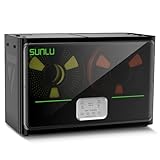
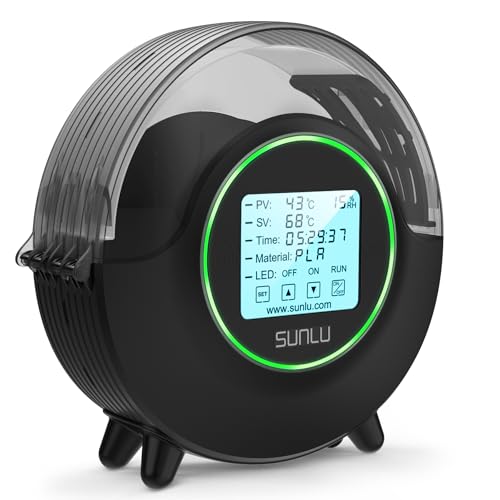
The SUNLU S2 wins on interface: one spool, a 4.6 in LCD touch screen and a 70°C ceiling in a 10.9 x 4 x 9.8 in footprint.
Best for: a single-spool workflow on a crowded desk Skip it if: you print two colours in one session
The S2 is the only single-spool pick in the set and the slimmest at 4 in deep. That matters on a dorm desk where every inch of front-to-back space is already spoken for. SUNLU lists a maximum temperature of 70°C, which is 20°C higher than the Comgrow and enough to work on nylon and TPU as well as the usual PLA, PETG and ABS. The 4.6 in LCD touch screen shows temperature, time, humidity, filament type and a countdown, which is more information than any other pick here surfaces at a glance. Compatibility runs across 1.75, 2.85 and 3 mm diameters, with the internal holder rated to a 210 x 85 mm spool. The obvious trade-off is capacity: one spool means you swap the roll every time you change colour, and a two-tone print becomes a manual choreography. It also carries a one-year warranty, which the Comgrow does not publish.
Pros:
- Slimmest footprint here at 4 in deep
- 70°C ceiling reaches TPU and nylon claim
- 4.6 in LCD touch screen with humidity readout
- One-year warranty published
- Wide diameter compatibility
Cons:
- Only one spool at a time
- No multi-material printing without a swap
- Heavier per spool than the Comgrow
3. Creality Space Pi Filament Dryer Plus — Best for families
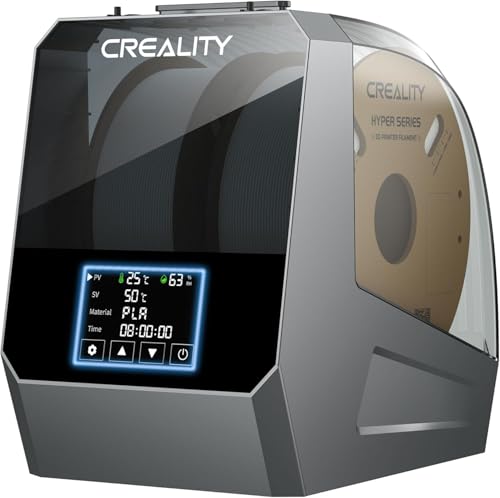
Creality's Space Pi Plus takes two spools with dual 360° PTC heating and four filament exit holes, at a mid-tier price and a 13.3 in wide body.
Best for: a shared household printer with parents and siblings queuing prints Skip it if: you have less than 14 inches of shelf depth
The Space Pi Plus is the pick I would recommend when a student is home from college and the family printer sees traffic from more than one user. It holds two 1 kg spools, has four filament holes and two PTFE guide tubes, and Creality lists a one-key temperature preset for up to 12 filament types. That last part matters when a sibling loads PETG and forgets to change the setting from ABS: the preset system reduces the number of wrong-temperature runs. The dryer weighs 4.19 lb and measures 13.3 x 8.6 x 11.8 in, which is the bulkiest two-spool option here and the reason it lands on a family shelf rather than a dorm desk. It is also the pick with the lowest sales rank of the set, meaning it sells faster than the other four here. The compromise is the vaguer temperature spec: Creality quotes a 160W PTC heater rather than a published ceiling in degrees, so you rely on the presets.
Pros:
- Two spools plus four exit holes for multi-printer setups
- Preset temperatures for 12 filament types
- Fastest seller of the five here
- LCD touch screen for direct control
- Lifetime technical support claim from Creality
Cons:
- Bulkiest two-spool option at 13.3 in wide
- No degree-Celsius ceiling published on the listing
- Heavier than the Comgrow by nearly a pound
4. Creality Space Pi X4 Filament Dryer — Best premium
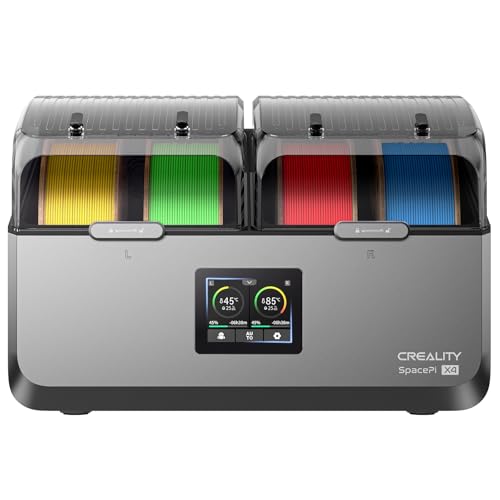
The Space Pi X4 is the one to buy for engineering coursework: four spools, dual independent chambers, and an 85°C claimed ceiling from 200W plus 200W PTC heaters.
Best for: an engineering student drying PC, PA or ASA for coursework Skip it if: you only own two spools and want a display
The X4 is the highest-temperature pick in this set, and the only one with two independently controlled chambers. That last feature is the real reason it earns the premium label. Two chambers means you can dry PLA at one temperature on the left while pushing PA or PAHT at a much higher temperature on the right, without a compromise setting in the middle. Creality says the twin 200W PTC heaters reach 85°C, which is high enough to move stubborn moisture out of engineering filaments that PLA-focused dryers cannot touch. Capacity is four spools. The published weight is 2.2 lb, which reads low for a four-spool box and is worth verifying on the listing page before ordering. This is the most expensive pick here and the second-slowest seller in the set, so it is a considered purchase rather than an impulse one. Students on standard PLA and PETG do not need it. Students printing nylon jigs for a robotics project do.
Pros:
- Highest temperature claim in the set at 85°C
- Two independent chambers for mixed filament runs
- Four spools of capacity
- Dual 200W PTC heater configuration
- Single or dual chamber modes for energy use
Cons:
- Most expensive pick here
- Overkill for a PLA-only workflow
- Published weight looks low for the class
5. SUNLU S4 3D Printer Filament Dryer — Most versatile
SUNLU's S4 is the pick for a heavy user: four spools, three circulation fans, eight filament exit holes and a 70°C ceiling, in an 18.1 in wide shell.

Best for: a maker-space regular running four spools and multiple printers Skip it if: your desk is under 19 inches wide
The S4 is the biggest, heaviest pick in the set at 8.82 lb and 12.2 x 18.1 x 8.66 in, and it earns the space by covering more scenarios than anything else here. SUNLU says its 350W PTC heater is 50% more powerful than the S2's, and three internal circulation fans push air across all four spools for even drying. The eight filament exit holes are the standout: you can feed two, three or four printers from the same dryer simultaneously, which is what a student running a small print-to-order side project actually needs. Temperature adjusts from 35°C to 70°C with a 0 to 99 hour timer, so it is the most granular timer in the set. The one-year warranty is published. The trade-off is that this is the slowest seller of the five here, meaning fewer buyers in the wider market are picking it up, which is worth noting before you commit to a premium four-spool box.
Pros:
- Four spools with eight filament exit holes
- 350W PTC heater and three circulation fans
- Timer range from 0 to 99 hours
- 70°C ceiling handles most consumer filaments
- One-year warranty published
Cons:
- Heaviest and widest pick at 8.82 lb, 18.1 in
- Slowest seller of the five here
- 70°C ceiling below the X4's 85°C claim
What actually decides a student's dryer?
Most guides for this category lead with wattage. That is not what decides it.
Spool count is the real deciding specification, because it maps directly to how you print. One spool means one filament in play. Two spools means either a colour swap without a reload, or a filament change while a print runs. Four spools means multi-material work, or feeding more than one printer from one box.
The second criterion is the temperature ceiling, and the split is sharp. Below 55°C, the dryer is a PLA and ABS tool. Between 55°C and 75°C, it adds PETG, TPU and nylon. Above 80°C, it opens up polycarbonate, PA and ASA. Everything else, the fans, the screen, the exit holes, is refinement.
- If you print PLA and one other filament, a 50 to 70°C two-spool box is the sweet spot.
- If you print engineering filaments for coursework, you need 80°C or higher.
- If you print multiple colours in one job, spool count decides before temperature does.
How much desk space will each one eat?
Desk footprint is the specification a dorm student underestimates most, so here it is laid out end to end:
- SUNLU S2 at 10.9 x 4 x 9.8 in, the slimmest at 4 in deep.
- Comgrow at 9 x 9.2 x 6.4 in, the shortest of the two-spool boxes.
- Creality Space Pi Plus at 13.3 x 8.6 x 11.8 in, the bulkiest two-spool option.
- SUNLU S4 at 12.2 x 18.1 x 8.66 in, the widest pick here.
- Creality Space Pi X4 dimensions not fully published on the listing.
Two practical implications follow. First, if your desk is under 19 in wide once you subtract the printer and the monitor stand, the S4 does not fit and the X4 becomes the four-spool default. Second, the SUNLU S2's 4 in depth is what lets it live under a monitor riser, which no other pick in this set can do.
Which filaments does each dryer actually handle?
Every listing publishes a compatibility claim, and they are not equivalent. The Comgrow names PLA, ABS and SILK. The SUNLU S2 names PLA, PETG, ABS, TPU, nylon, PA and PC, though the 70°C ceiling limits how effective it is on the last two. The Creality Space Pi Plus claims compatibility with 99% of FDM filament brands and 12 preset types. The Space Pi X4 explicitly names PLA, PETG, ABS, TPU, ASA, PC, PA and PAHT and backs it with the 85°C ceiling. The SUNLU S4 covers the same span as the S2, extended by the higher-wattage heater rather than a higher ceiling.
If your syllabus specifies polycarbonate or ASA for a mechanical part, only the Space Pi X4 in this set has both the claim and the temperature to back it. For every other filament on a student's shortlist, any two-spool or larger pick here works.
The verdict
The best RGB filament dryer for students is the Comgrow 3D Printer Filament Dryer Box. It is the cheapest of the five, holds two 1 kg spools in a 9 x 9.2 x 6.4 in footprint that fits under a monitor riser, and covers the filaments a first printer runs on. That combination is what a student on a semester budget needs and what the other four picks each break in one way or another.
The runner-up is the SUNLU Official Filament Dryer S2, and its exact advantage is the interface. A 4.6 in LCD touch screen showing humidity, temperature, time and filament type is more control than any other pick here surfaces, and the 70°C ceiling stretches usefulness into TPU and low-end nylon. If you print one spool at a time and your desk depth is the tightest constraint, the S2 is the better buy.
Two conditions flip the recommendation off Comgrow entirely. First, if your coursework needs polycarbonate, PA or ASA, jump to the Creality Space Pi X4 for the 85°C ceiling. Second, if you feed more than one printer from one dryer, the SUNLU S4's eight filament exit holes are the reason to spend up.
FAQ
Do students really need a filament dryer, or is silica gel enough?
Students really need a filament dryer once they move beyond PLA. Silica gel packets in a sealed tub keep PLA dry for a semester in most climates. PETG, nylon and TPU absorb moisture faster than passive desiccant can pull it back out, and once a spool has been open for a week in humid air, only active heat will restore it. If your syllabus lists any filament other than PLA, buy a dryer.
Is an RGB filament dryer worth it over a plain one?
Is an RGB filament dryer worth it depends on whether the lighting affects your workflow or just your desk aesthetic. None of the five picks here publish RGB lighting as a specification, so the practical answer is that you should choose on spool count, temperature ceiling and footprint first, then check individual listings for lighting features. Function beats colour on a tool you leave running overnight.
What temperature does PETG actually need to dry?
PETG actually needs a dryer that can hold 65 to 70°C for six to eight hours to restore a wet spool. The Comgrow's 50°C ceiling sits below that window, so it works better as a maintenance dryer for PETG than a rescue tool. The SUNLU S2, Creality Space Pi X4 and SUNLU S4 all reach 70°C or higher and are the safer PETG picks in this set.
Comgrow versus SUNLU S2: which is the right first buy?
Comgrow versus SUNLU S2 comes down to spool count against interface. The Comgrow is cheaper, holds two spools and covers PLA and ABS at up to 50°C. The S2 holds one spool, has a 4.6 in touch screen, reaches 70°C and carries a one-year warranty. If you already own two colours you swap between, buy the Comgrow. If you print one filament at a time and value the display, buy the S2.
What is the biggest mistake students make buying a filament dryer?
The biggest mistake students make is buying for spool count they do not use. A four-spool dryer sitting on a dorm desk with two of its bays empty is a poor use of both money and 18 in of desk. Start with a two-spool box like the Comgrow, learn which filaments you actually print through a semester, and upsize to the Space Pi X4 or SUNLU S4 only when you have hit the limit.
Start with the Comgrow if you are buying your first dryer this term. It is the pick that does the job for the filaments a student prints most, without asking your desk or your budget to stretch. The other four in this guide exist for real reasons, single-spool desks, family printers, engineering filaments, multi-printer feeds, and if one of those descriptions is you, buy accordingly. But the default answer for a student picking a dryer they will still be using in two years is the two-spool box that fits under the monitor and leaves room in the budget for a second roll of filament to actually dry inside it.