Best RGB Laptop Stand for Programmers by Spec

Five RGB laptop risers compared on cooling, height, weight and warranty. YICOSUN leads on portability. Tilted Nation wins if you want a USB hub.

By Samuel HarrisUpdated 15 min read
On this page
- Best RGB laptop stand for programmers at a glance
- How I narrowed the field to five
- What actually decides this for a programmer
- 1. YICOSUN Adjustable Laptop Cooling Stand — Best overall
- 2. Tilted Nation Gaming Laptop Cooling Pad with USB Hub — Best premium
- 3. JOYEKY 360° Rotating Laptop Stand, Grey — Best for beginners
- 4. JOYEKY 360° Rotating Laptop Stand, Black — Best for heavy use
- 5. Enermax Gaming Laptop Stand — Best budget pick
- Does RGB belong on a work stand?
- How much height do you really need?
- Cooling pad or plain riser: which wins?
- What the listings do not tell you
- The verdict
- FAQ
The best RGB laptop stand for programmers is the YICOSUN Adjustable Laptop Cooling Stand, because it pairs two fans with a 1.88 lb aluminum frame that folds flat for a laptop bag. If you want a USB hub and phone dock built in, the Tilted Nation Gaming Laptop Cooling Pad is the better buy, with a four-port hub and seven tilt levels between 20° and 40°.
Most guides that pit these stands against each other stop at colour modes and fan count. That is the wrong shortlist for a coder. Six of these hours a day sit on the stand, so the real questions are what it does to your neck, whether the fan drone survives a video call, and whether the base is stable enough to type on hard without wobble. Two of the five picks here are cooling pads with fans; three are passive risers with lights. The right answer depends on how hot your machine runs during a long build, and on how much desk you have to give up.
The best RGB laptop stand for programmers is not the loudest one, or the one with the most colour modes. It is the one that keeps the screen at eye height without shifting under a fast keyboard, and that you will still tolerate on day 300.
A note on the qualifier: none of these listings describe themselves as programmer-specific, so treat "for programmers" as a lens you apply to the specs rather than a promise the manufacturer makes. What matters here is sustained thermal load, screen height for long sessions, and stability under heavy typing. Judge each pick against those.
Best RGB laptop stand for programmers at a glance
| Pick | Cooling | Weight | Warranty | Price |
|---|---|---|---|---|
Best overall YICOSUN Adjustable Laptop Cooling Stand |
2 fans, RGB | 1.88 lb | Not listed | Check Price |
Best premium Tilted Nation Gaming Laptop Cooling Pad |
Fans 600–2800 RPM | Not listed | 2 year | Check Price |
Best for beginners JOYEKY 360° Rotating Stand, Grey |
Passive, RGB | 2.16 lb | 6 month | Check Price |
Best for heavy use JOYEKY 360° Rotating Stand, Black |
Passive, RGB | 2.16 lb | 6 month | Check Price |
Best budget pick Enermax Gaming Laptop Stand |
Vent holes, passive | 3 lb | 1 Year Warranty | Check Price |


How I narrowed the field to five
I started with a longer list of RGB risers and worked down through disqualification. Three cuts did the heavy lifting.
First, I cut every stand that would not fit a coder's screen size range. A 13-inch ultrabook and a 16-inch workstation both need to sit here. Every survivor lists a range that reaches at least 10 to 16 inches, and two of them cover up to 17.3 inches.
Second, I cut stands that only lit up and did nothing about heat. A programmer running a container stack or a slow build is generating heat for hours, and a passive stand that ignores airflow is a poor fit. Two of the survivors are active cooling pads; the three passive picks that stayed all publish either vent holes or a raised, open frame.
Third, I cut anything whose listing did not commit to real specs. What is left is a set where I can compare weights, warranties, tilt ranges and fan behaviour without guessing. That is the whole set for this post.
What actually decides this for a programmer
The specification most buyers compare first is the number of RGB modes. Ignore it. Six modes versus ten modes will not change how you feel at the end of a Thursday.
Three things actually decide this:
- Thermal headroom under sustained load. A build, a Docker daemon, a browser with fifty tabs. If your machine throttles, your compile times climb, and passive stands help less than active fans. Two picks here run fans: YICOSUN and Tilted Nation.
- Screen height under a real posture. Wrists straight, elbows at ninety, top of the screen at eye height. Enermax lists 20 different angles and 3 height levels, which is the widest published range in this set. Tilted Nation lists 7 tilt levels between 20° and 40°.
- Base stability. Both JOYEKY picks describe a larger, heavier base, and Enermax weighs 3 lb, the heaviest here. A stand that shifts under aggressive typing is a stand you stop using.
RGB is a tie-breaker after those three, not a deciding vote.
1. YICOSUN Adjustable Laptop Cooling Stand — Best overall
A featherweight aluminum riser with two fans and RGB, and the only pick under two pounds.
Best for: a coder who travels between desks and needs active cooling Skip it if: you want a USB hub built into the stand
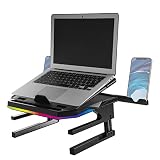
YICOSUN takes the top spot because it is the only stand here that combines active cooling with a portable frame. It weighs 1.88 lb and folds down to roughly 9.8 x 8.7 x 1.2 in, which fits a laptop sleeve. The frame is aluminum alloy, which the listing pairs with a foldable, ergonomic design, and the stand covers laptops between 10 and 16 inches.
Two fans and RGB lighting are the headline features YICOSUN advertises, aimed at keeping temperatures under control during long work sessions. As an active cooler you carry with you, nothing else in this set matches it: the other cooling pad here is heavier and larger, and the passive picks do nothing for a warm chassis.
The trade-off is what it does not carry. There is no published warranty on this listing, no USB hub, no phone dock, and it sits in the entry price band as the second-cheapest of the five. In practice, if your priority is a light, cool, quiet writing rig you can pack, that trade is easy. If you want a docking hub too, look at Tilted Nation.
Pros:
- Lightest pick here at 1.88 lb
- Active cooling from two fans
- Folds thin at 1.2 in for a laptop bag
- Aluminum alloy frame
- Fits 10 to 16 inch laptops
Cons:
- No published warranty on the listing
- No USB hub or phone holder
- Fan noise is not specified
2. Tilted Nation Gaming Laptop Cooling Pad with USB Hub — Best premium
The one with a four-port hub, a phone holder and the widest published fan range.
Best for: a home-office programmer who wants a USB-C and USB-A hub at hand Skip it if: your laptop is under 15.6 inches
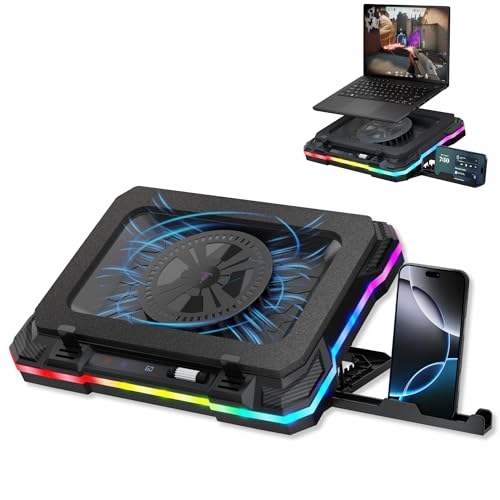
The Tilted Nation stand is the most expensive pick here and it justifies the position by doing the most jobs at once. Its cooling fans run between 600 and 2800 RPM, giving you a quiet floor for reading code and headroom for a full build. That variable range is the widest fan spec on any listing in this set.
The USB hub is what sets it apart for a working programmer: two USB-A 3.0 ports and two USB-C ports built into the stand, so a mouse dongle, a USB drive, a webcam and a phone cable all live on the riser instead of clogging the laptop's own sockets. A phone holder sits in the frame for a second screen when you are reading docs off it. Seven tilt levels between 20° and 40° cover most seated postures.
Two catches. First, it fits laptops from 15.6 to 19 inches, which rules it out for anyone on a 13 or 14 inch machine. Second, this listing does not publish a weight, so a truly portable setup is a gamble. The 2 year warranty is the longest in this set.
Pros:
- Fan speed 600–2800 RPM
- Four-port hub, two USB-A 3.0 and two USB-C
- Ten RGB modes
- 2 year warranty, the longest here
- Built-in phone holder
Cons:
- Only fits 15.6 to 19 inch laptops
- Weight not listed
- Highest price position in this set
3. JOYEKY 360° Rotating Laptop Stand, Grey — Best for beginners
A simple aluminum riser with 360° swivel and seven RGB modes, sized to fit a first laptop.

Best for: a first stand for a student learning to code Skip it if: you need active cooling for long compiles
The grey JOYEKY is the friendlier of the two identical-spec listings in this set, and it is the one I would put on a student desk. It weighs 2.16 lb, folds to about 9.45 x 9.45 x 1 in per the listing, and covers all 10 to 16 inch laptops, including the common MacBook Air, MacBook Pro, Dell XPS and Lenovo sizes a first-year programmer is likely to own.
Seven RGB modes and a 360° dual-axis base give it more flexibility than the passive Enermax at a lower barrier to entry. The aluminum alloy build and heavier base are what JOYEKY calls out for stability, and stability is what a beginner notices first when they start typing hard.
Where it loses ground: no fans. If your build times are climbing and your fan curve is already loud, this stand will not help. The 6 month warranty is the shortest in the set alongside its sibling. And because both JOYEKY listings share the same specs, the only real reason to pick this one over the black version is the colour of the desk it sits on.
Pros:
- 7 RGB light modes
- 360° dual-axis swivel base
- Folds to about 1 in thick
- Aluminum alloy frame
- Fits 10 to 16 inch laptops
Cons:
- Passive cooling only, no fan
- 6 month warranty, the shortest here
- Identical to the black JOYEKY on specs
4. JOYEKY 360° Rotating Laptop Stand, Black — Best for heavy use
Same riser as the grey model in a black finish, for a coder who swings the screen around to pair.

Best for: a programmer who pivots the screen to pair or present Skip it if: you want the longest warranty on the shelf
This black JOYEKY carries the same 2.16 lb weight, the same aluminum alloy frame and the same 10 to 16 inch fit as its grey twin. I am calling it out separately because the 360° swivel is what earns the "heavy use" label: a programmer who reviews code across the desk, pair-programs, or turns the screen for a quick presentation gets more from that base than they will from an extra tilt notch.
JOYEKY describes seven RGB light modes and a larger, heavier base that improves stability. Under fast typing on a mechanical keyboard, that base weight matters more than a specification sheet suggests, and the passive frame stays quiet in a call.
The compromises are the same as the grey model. Passive cooling means it will not rescue a throttling machine on a two-hour build. The 6 month warranty is short compared with the 1 year on Enermax and the 2 year on Tilted Nation. And the price position sits in the premium tier here without adding a fan, which is the awkward part: you are paying for the swivel and the finish, not extra cooling.
Pros:
- 360° dual-axis swivel for pair work
- Heavier base, improved stability
- 7 RGB light modes
- Aluminum alloy build
- Universal 10 to 16 inch fit
Cons:
- Premium price position without a fan
- 6 month warranty
- Same core spec as the cheaper grey version
5. Enermax Gaming Laptop Stand — Best budget pick
The cheapest of the five, and the one built for a big 17-inch screen at a fixed desk.

Best for: a coder with a 17-inch machine and a fixed desk Skip it if: you carry your setup in a backpack
Enermax is the cheapest pick here and, curiously, the most adjustable on paper. The listing describes 20 different angles and 3 height levels, plus a base that rotates 360°. That is the widest published range of angles in this set, which is a real advantage for a programmer trying to dial in the exact eye line that stops the afternoon neck ache.
It handles bigger machines than anything else here: fit spans 10 to 17.3 inches and the listing states support for laptops up to 10 kg, so a full workstation-class 17-incher goes on this stand without concern. Ventilation holes support airflow, though this is a passive design without fans. It weighs 3 lb, the heaviest in this set, and released in 2022 under model ELS001.
That weight is the honest catch. If you move desks, you feel it. RGB is present with six modes, which is fewer than the JOYEKY pair or Tilted Nation. The 1 Year Warranty sits between the JOYEKY 6 month and the Tilted Nation 2 year. For a fixed desk and a big screen, this is the most stand for the least money.
Pros:
- 20 tilt angles and 3 height levels
- Fits laptops up to 17.3 in
- Rated for laptops up to 10 kg
- 1 Year Warranty
- Cheapest of the five
Cons:
- Heaviest here at 3 lb
- Passive cooling, no fans
- 6 RGB modes, fewer than others in the set
Does RGB belong on a work stand?
Yes, with one condition: the lighting has to switch off or dim to something quiet. Most programmers work in low light and stare at a bright text editor for hours, so a stand pulsing green under the chassis becomes fatiguing fast.
Every pick here publishes multiple modes. Tilted Nation lists ten modes. Both JOYEKY picks and YICOSUN sit around seven, and Enermax lists six programmable modes. What matters is not the count but whether one of those modes is a low, steady colour, or off. Pick one, leave it alone, and let the stand do its actual job of holding the machine at eye height.
RGB earns its place in one workflow: streaming or recording. If you screen-record a lot of teaching content and the underlight looks good on camera, that is a real reason to want ten modes over six. For pure coding, it is decoration.
How much height do you really need?
The rule most ergonomics guides land on is simple: the top of the screen at eye level, wrists straight on the external keyboard. A laptop screen sits maybe 8 to 10 inches below its own keyboard, so a riser has to lift the machine by roughly that much to reach eye height for a seated adult.
- Enermax: 3 height levels and 20 angles.
- Tilted Nation: 7 tilt levels between 20° and 40°.
- Both JOYEKY picks: adjustable height and angle, exact range not specified.
- YICOSUN: height-adjustable, exact range not specified.
Two things to note. First, you almost always want an external keyboard and mouse when the laptop is on a stand, because the screen height that saves your neck destroys your wrists on the built-in keyboard. Second, tilt matters as much as raw height: a screen tilted a few degrees toward you cuts reflections and helps eye focus.
Cooling pad or plain riser: which wins?
Two of these picks run fans, three do not. The trade-off is straightforward.
An active cooling pad, like YICOSUN or Tilted Nation, moves air under the laptop and can drop chassis temperatures during a heavy build, which lets the CPU hold its boost clock for longer instead of throttling. That matters if you run local compiles, containers, virtual machines or LLM inference on the laptop. The Tilted Nation fan runs between 600 and 2800 RPM, so the low end stays quiet for reading and the high end kicks in for the hard work.
A plain riser, like Enermax or the two JOYEKY picks, is silent. It relies on the laptop's own fans and any vent holes in the frame, which suits work that is mostly editor, browser and terminal. If your build times are fine and your fan curve rarely spikes, you get better ergonomics from a solid passive stand than from a noisy fan running at half speed all day.
Rule of thumb: if you compile locally, get a fan. If you code against a cloud IDE, skip it.
What the listings do not tell you
Three things none of these listings publish, and all three matter for a coder.
First, fan loudness in decibels. YICOSUN and Tilted Nation both use the word "quiet", but no dB figure is given. On a video call, a cooling fan at full speed is audible on the other end. Plan to run it low unless you need the extra airflow.
Second, cable routing. A laptop on a stand ends up connected to power, an external monitor, a keyboard, a mouse, and often headphones. Only Tilted Nation publishes a USB hub on the stand itself. On the others, the cable rat's nest is yours to solve.
Third, long-term rattle. A larger, heavier base like the ones JOYEKY describes and the 3 lb Enermax help; a light, folding frame like YICOSUN's is a portability win but a stability compromise. If you type hard, sit the stand on a desk mat rather than bare wood or glass.
The verdict
The best RGB laptop stand for programmers is the YICOSUN Adjustable Laptop Cooling Stand. It is the only pick under two pounds that also brings active cooling, and at 1.2 in folded it belongs in a laptop bag as easily as on a desk. That combination is what a working coder actually uses: something that keeps the machine cool during a long build at home, and comes with you to a coffee shop without ceremony.
Two conditions flip the call. If you work from one desk and want the stand to double as a hub, the Tilted Nation Gaming Laptop Cooling Pad is worth the premium price position: four USB ports, a phone holder, a 600 to 2800 RPM fan range and a 2 year warranty are a genuinely different offer. If your laptop is a 17-inch workstation and you code with the machine bolted to a desk, the Enermax wins on 20 angles, 3 height levels and support up to 10 kg, for the lowest price in the set.
The two JOYEKY picks are the pick for someone who values a 360° swivel above cooling, and the beginner-friendliest stand here is the grey model.
FAQ
Is an RGB laptop stand actually useful for programming?
An RGB laptop stand is useful for programming when it does the ergonomics right first. The RGB itself is decoration, but the stand under it lifts the screen to eye height, saves your neck across a long day, and in the active-cooling picks here, helps the CPU hold its boost clock during a build. Set the lighting to a low steady colour and let the geometry do the work.
Which of these picks is best for a 13-inch MacBook?
For a 13-inch MacBook, three picks fit cleanly: YICOSUN, both JOYEKY stands and Enermax all list a 10 to 16 inch range or wider. Tilted Nation only fits 15.6 to 19 inch laptops, so it is the wrong stand for a 13-inch machine. I would start with YICOSUN because 1.88 lb pairs naturally with an ultraportable Mac and the fans help under sustained Xcode builds.
YICOSUN or Tilted Nation for daily coding work?
YICOSUN or Tilted Nation comes down to whether you travel. YICOSUN is 1.88 lb, folds to 1.2 in and covers 10 to 16 inch laptops, so it fits a mobile coder. Tilted Nation is heavier, fits 15.6 to 19 inch machines, and adds a four-port USB hub, a phone dock and a 2 year warranty. Fixed desk with a big screen: Tilted Nation. Anything else: YICOSUN.
How much does an RGB laptop stand cost?
The picks in this set span from an entry-tier Enermax as the cheapest of the five, up to a premium Tilted Nation as the most expensive. Both JOYEKY picks sit in the middle. Pricing on Amazon moves, so use the Check Price link on each pick to see the current figure rather than trusting a screenshot. The gap between cheapest and most expensive here is real but not dramatic.
What is the common mistake buyers make with laptop cooling stands?
The common mistake buyers make is choosing on RGB modes and fan count, then discovering the stand does not fit their laptop size, does not raise the screen high enough, or wobbles under fast typing. Check the size range, the height and tilt spec, and the base weight before the lighting. On this set, size disqualifies Tilted Nation for anyone under 15.6 inches immediately.
The right way to shop this category is to open the Check Price link on the pick that matches your desk situation and confirm the current fit and price against the live listing. YICOSUN suits the largest share of programmers here because most coders move between at least two work locations in a week, and a stand that folds thin enough for a laptop sleeve gets used at both. Add an external keyboard and mouse the same day you order the stand; the ergonomic case for a riser collapses if you keep typing on the laptop itself.