Best RGB NAS Cases: Pironman 5-MAX Leads Five
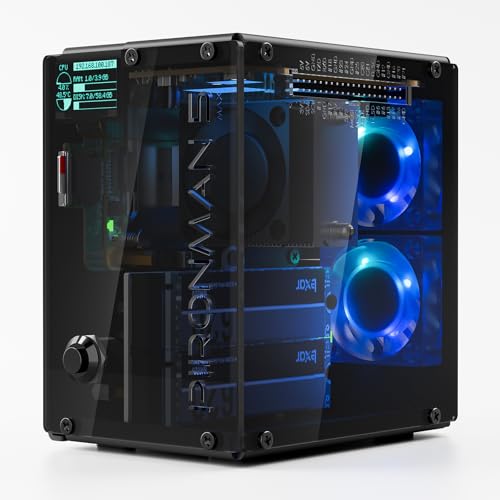
Five RGB-lit Raspberry Pi tower cases compared for NAS duty, from a dual-NVMe RAID 0/1 flagship down to a 6-month-warranty budget kit for the Pi 4.

By Samuel HarrisUpdated 16 min read
On this page
- Who this is not for
- Best RGB NAS cases at a glance
- How I screened these five cases
- What actually decides an RGB NAS build
- 1. SunFounder Pironman 5-MAX — Best overall
- 2. SunFounder Pironman 5 — Most versatile
- 3. Freenove Case Kit Pro — Best upgrade
- 4. iUniker PiTower — Best warranty
- 5. GeeekPi Mini Tower NAS Kit — Best budget pick
- Single drive or dual drive: which do you need?
- How loud are the RGB fans, really?
- What the listings do not tell you
- The verdict
- FAQ
The best RGB NAS build in this set is the SunFounder Pironman 5-MAX, a 1.17 lb Raspberry Pi 5 tower with dual NVMe M.2 slots, RAID 0/1 support, a PWM tower cooler and dual RGB fans. If your Pi is still a Model 4B, the GeeekPi Mini Tower NAS Kit is the only pick here that fits it, using an M.2 SATA SSD adapter rather than NVMe.
Who this is not for
Before the picks, a quick honest note. Amazon returned five Raspberry Pi tower cases with RGB lighting when I searched for the best RGB NAS. None of them is a sealed, multi-bay NAS appliance in the Synology or QNAP sense. Every one is an enclosure that turns a Raspberry Pi single-board computer into a small NAS-capable mini PC, adds storage slots, and lights the fans.
If you were expecting a four-bay hot-swap box with a web UI out of the box, close this tab and search for those instead. If you were looking for a compact, RGB-lit Pi build that can hold one or two SSDs and share files across your network, the five cases below are the right shortlist. The word "NAS" here means "Pi doing NAS duty in a case that also does other things".
Four of the five are Raspberry Pi 5 cases. Only the GeeekPi kit targets the Pi 4. That single fact decides a lot of the ranking.
Best RGB NAS cases at a glance
| Pick | Drives supported | Cooling and lights | Price |
|---|---|---|---|
Best overall SunFounder Pironman 5-MAX |
Dual NVMe M.2, RAID 0/1 claim | PWM tower + dual RGB fans | Check Price |
Most versatile SunFounder Pironman 5 |
Single NVMe M.2 (2230–2280) | Tower cooler + dual RGB fans | Check Price |
Best upgrade Freenove Case Kit Pro |
Dual NVMe M.2 slots | 5 ARGB PWM fans + 12 case LEDs | Check Price |
Best warranty iUniker PiTower |
Single NVMe via PCIe (claim) | Triple RGB cooling fans | Check Price |
Best budget pick GeeekPi Mini Tower NAS Kit |
M.2 SATA SSD (Pi 4 only) | ICE Tower PWM RGB fan | Check Price |


How I screened these five cases
The starting point was every RGB-lit Raspberry Pi case Amazon surfaces under the best RGB NAS search. My cut list came from three disqualifiers before I looked at anything else.
First, no drive support at all. A case with lights and no M.2 slot is not a NAS enclosure, so those went. Second, no way to keep the Pi cool under sustained transfers. NAS work is not bursty like a desktop; the CPU sits above idle for minutes, so passive-only cases were cut. Third, no visible lighting. RGB is the qualifier in the search, and cases that only claim status LEDs did not qualify.
What survived is five towers, all with at least one M.2 slot, at least one PWM fan with RGB, and an OLED status screen. Four target the Pi 5 and one targets the Pi 4. That last one is not a mistake in the shortlist; it is the only entry-level way in for readers who already own a Pi 4 and do not want to buy a new board.
Two survivors sit in the same premium price position from SunFounder, one in the mid tier from Freenove, and two in the entry tier. The best RGB NAS enclosure across the set is decided by drive count and RAID support, not by which one has the most LEDs.
What actually decides an RGB NAS build
Most best RGB NAS write-ups compare fan count and LED zones. That is the wrong first question. A NAS lives or dies on its storage layout.
Here is the real order of operations:
- How many drives can the case actually hold, and on what interface? NVMe M.2 is meaningfully faster than SATA M.2 over a Pi's PCIe lane, but only the Pi 5 exposes that lane cleanly.
- Can you run redundancy? One drive is storage. Two drives with RAID 1 is a NAS that survives a dead SSD. The Pironman 5-MAX is the only pick in this set whose listing calls out RAID 0/1 support directly.
- Does the cooling hold up under sustained load? A tower cooler plus a fan matters more than three fans without a heatsink block, because the Pi's SoC is the thermal bottleneck on file transfers.
- Then, and only then, the lights.
The best RGB NAS pick for you follows that chain. If the answer at step one is "I have a Pi 4", the ranking below skips to the GeeekPi at the bottom. If the answer is "Pi 5 and I want mirroring", the Pironman 5-MAX at the top is where you land.
1. SunFounder Pironman 5-MAX — Best overall
The only case here that combines dual NVMe slots, an explicit RAID 0/1 claim, and a serious tower cooler in one 1.17 lb aluminium body.
Best for: a Pi 5 NAS builder who wants dual NVMe RAID and a tower with lights Skip it if: you are still on a Raspberry Pi 4
Inside this set, the Pironman 5-MAX is the only listing that names dual NVMe M.2 SSD slots and RAID 0/1 in the same sentence. That single spec is what makes it the best RGB NAS pick here, because a second drive is what separates a file server from a fragile single point of failure. SunFounder positions it as a mini PC first and a NAS second, with the Hailo-8L AI accelerator, PWM tower cooler and dual RGB fans stated in the listing.
The chassis measures 3.66 x 6.1 x 5.31 in and weighs 1.17 lb, so it sits on a shelf without dominating it. A 0.96" OLED module surfaces CPU, memory, temperature and IP address, which is useful when the box is headless. SunFounder says the metal power button handles safe shutdown. Warranty is a 1 Year Guarantee, matching most of the set.
Against the standard Pironman 5, you gain the second NVMe slot and the RAID support. Against the Freenove, you lose two fans and 12 case LEDs, and gain a smaller footprint and the mirroring option.
Pros:
- Dual NVMe M.2 slots on a Pi 5 case
- Listing states RAID 0/1 support
- PWM tower cooler plus dual RGB fans
- 0.96" OLED for headless monitoring
- Compact 3.66 x 6.1 x 5.31 in footprint
Cons:
- The most expensive pick here
- Pi 5 only; will not fit a Pi 4
- Only one seller lists it
- RAID claim is manufacturer-stated, not independently confirmed
2. SunFounder Pironman 5 — Most versatile
The single-NVMe sibling to the flagship, at 0.84 lb, in a near-identical 3.7 x 6.1 x 5.3 in shell.

Best for: a single-drive Pi 5 mini PC that occasionally serves files Skip it if: you need two drives for mirroring
The regular Pironman 5 is what you buy when one drive is enough. SunFounder describes an expandable NVMe M.2 slot supporting 2230, 2242, 2260 and 2280 form factors, which covers almost every SSD a home builder would pick. The tower cooler and dual RGB fans return, and the fans carry dust filters according to the listing, which matters more on a NAS than on a desktop because these things run for weeks at a time.
At 0.84 lb it is a third of a pound lighter than the MAX, and the silver aluminium reads more mini-PC than gaming rig. The 0.96" OLED and safe-shutdown metal button carry over. It is not the best RGB NAS pick overall because it stops at one drive and the listing does not mention RAID, but as a versatile Pi 5 enclosure that occasionally shares folders across a home network, it earns its spot.
Against the MAX, you give up the second NVMe slot and the AI accelerator variant, and gain a slightly lower price position. Against the iUniker, you gain the wider M.2 form factor support and a named tower cooler.
Pros:
- Named support for 2230, 2242, 2260, 2280 SSDs
- Tower cooler plus dual RGB fans with dust filters
- 0.84 lb, the lightest Pi 5 pick here
- 0.96" OLED status screen included
- 1 Year Guarantee stated
Cons:
- Single NVMe slot only, no RAID
- Second-most expensive here
- Only one seller lists it
- Listing does not name a specific NAS OS
3. Freenove Case Kit Pro — Best upgrade
Five ARGB PWM fans, twelve case LEDs, dual M.2 slots, stereo speakers and dual HDMI in a 4.33 x 6.89 x 5.83 in shell.

Best for: a media-centric Pi 5 build with speakers and heavy lighting Skip it if: your NAS lives in a closet and no one sees it
The Freenove Case Kit Pro is the RGB-heaviest pick in this shortlist by a wide margin. Freenove lists five ARGB fans plus twelve case ARGB LEDs, all with controllable colour and brightness, and it pairs that with dual M.2 NVMe SSD slots. The listing quotes PCIe 2.0 at 500 MB/s max against an SDR104 card at 104 MB/s max, which is the correct comparison to make: it is why a Pi NAS on an M.2 SSD is worth building at all.
You also get a 0.96" OLED, stereo speakers, a 3.5 mm audio output and dual standard HDMI outputs, so this is closer to a media PC that also stores files than a headless NAS. The case is the largest here at 4.33 x 6.89 x 5.83 in, which is what you pay for five fans and a bigger internal volume.
Against the Pironman 5-MAX, you gain lights, fans and speakers, and lose the explicit RAID 0/1 claim. Against the iUniker, you gain a second M.2 slot and a lot more airflow, and lose the sub-entry price position.
Pros:
- Dual NVMe M.2 slots for two drives
- Five ARGB PWM fans, all controllable
- Twelve case ARGB LEDs on top
- Stereo speakers and dual HDMI outputs
- Listing quantifies NVMe vs SD speed uplift
Cons:
- Largest chassis in the set
- Five fans mean more noise potential
- Listing does not mention RAID
- Warranty field on the listing is unusually terse
4. iUniker PiTower — Best warranty
A budget-tier Pi 5 tower with a 1.3" OLED, triple RGB fans and a 1 Year Manufacture warranty.

Best for: a first Pi 5 NAS on a tight budget with a single NVMe drive Skip it if: you want dual NVMe or RAID
The iUniker PiTower earns the warranty award because its 1 Year Manufacture cover matches the premium Pironman cases despite sitting in the entry price position. The listing names triple RGB cooling fans, NVMe SSD and PCIe support via M.2 expansion, a smart safe shutdown power button, and an RTC. Notably, the OLED here is a 1.3-inch panel, larger than the 0.96" screens on the SunFounder and Freenove picks, and iUniker calls that out directly in the listing.
The trade-off is drive count. This is a single-drive case as described, so it is a place to put one NVMe SSD and share it, not a mirrored pair. Cooling is triple-fan without a named tower cooler in the specification list, so heavy sustained loads will lean on the fans more than on a heatsink block. All ports remain accessible according to the listing, which matters on a NAS because you may need to plug in a display to debug.
Against the GeeekPi, you get NVMe over SATA and a Pi 5 platform. Against the Freenove, you lose a drive slot and two fans, and gain a much smaller price position.
Pros:
- 1 Year Manufacture warranty at an entry price
- 1.3" OLED, larger than the 0.96" screens elsewhere
- Triple RGB cooling fans
- Safe shutdown power button and RTC
- All ports remain accessible
Cons:
- Single-drive design, no RAID
- No named tower cooler in the spec list
- NVMe support is described but not benchmarked
- Only one seller lists it
5. GeeekPi Mini Tower NAS Kit — Best budget pick
The only Raspberry Pi 4 case in the shortlist, using an M.2 SATA SSD adapter rather than NVMe.

Best for: an existing Raspberry Pi 4 owner adding a SATA SSD Skip it if: you own a Pi 5 or want NVMe speeds
The GeeekPi Mini Tower is the cheapest of the five and the only one targeting the Pi 4 Model B. GeeekPi is explicit that the included expansion board is M.2 SATA SSD only and does not support NVMe drives. It accepts 2280, 2260 and 2240 SATA SSDs up to 2 TB according to the listing.
The box includes an ABS mini tower case, the ICE Tower CPU cooling fan with PWM RGB, two acrylic side panels, a 0.96 inch OLED already mounted to the case, a GPIO edge expansion board and the SATA adapter. Warranty is 6 months, the shortest in the set, and the platform is a generation behind. That is why it earns the budget label rather than a higher rank: it is a way in, not a destination build.
Against every other pick, you lose NVMe speed, the Pi 5 platform, and half the warranty. You gain the lowest price position, a complete kit in one box, and a way to repurpose a Pi 4 already gathering dust.
Pros:
- The cheapest of the five
- ICE Tower cooler with PWM RGB fan included
- OLED comes pre-mounted to the case
- Full kit: case, cooling, SATA adapter, GPIO board
- Supports 2 TB M.2 SATA SSDs
Cons:
- SATA only, no NVMe support
- Raspberry Pi 4 only, no Pi 5 compatibility
- Warranty is 6 months, the shortest here
- No listed RAID support
Single drive or dual drive: which do you need?
This is the fork in the road, and it decides which of the best RGB NAS picks above is right for you.
A single drive build is simpler, cheaper and faster to set up. You buy one M.2 SSD, install a Pi NAS OS, share the folder and move on. You accept that a dead drive is a dead NAS. Backups live somewhere else. Any of the five picks handles this scenario: the Pironman 5, the iUniker PiTower, or the GeeekPi kit if you are on a Pi 4.
A dual drive build is what most people mean when they say NAS. Two SSDs configured as a mirror survive a single drive failure. Only two picks here name dual M.2 slots on their listings: the Pironman 5-MAX and the Freenove Case Kit Pro. Only the Pironman 5-MAX listing explicitly names RAID 0 and RAID 1 as a feature. On the Freenove, dual slots are shown but the software layer is on you.
The cutoff is uptime. If losing an evening to restore from backup is fine, one drive is enough. If the box is doing anything you cannot lose, two drives are the correct answer, and the best RGB NAS choice narrows to the Pironman 5-MAX.
How loud are the RGB fans, really?
The listings do not publish decibel figures for any of the five cases, so I can only tell you what the specifications imply rather than what you will hear.
Two things drive noise on these cases. The first is fan count. The Freenove Case Kit Pro carries five PWM ARGB fans; the two Pironman cases carry a PWM tower fan plus dual RGB fans; the iUniker carries triple RGB fans; the GeeekPi carries a single ICE Tower PWM RGB fan. More fans mean more airflow and more surface area radiating fan noise, even at the same RPM.
The second is thermal load. A NAS shares files over a network, which is a lighter load than gaming, and PWM controllers spin fans down when the Pi is idle. The two SunFounder cases specifically name a tower cooler, which shifts heat off the SoC into a finned block that the fans can move air across at lower speeds. The Freenove and iUniker listings describe cooling systems without naming a tower block in the specification list, so the fans do more of the work.
If a quiet living-room NAS is the goal, the Pironman 5 or 5-MAX with their tower coolers are the safer bet. If the box is going in a home office where a bit of hum is fine, the Freenove's five fans buy you more thermal headroom.
What the listings do not tell you
There are a few gaps every one of these listings shares, and it is worth naming them before you buy.
- No listing includes the Raspberry Pi itself. Every case in this set requires a Pi 5, or in the GeeekPi's case a Pi 4 Model B, bought separately.
- No listing includes an SSD. You add your own NVMe or SATA M.2 drive on top.
- No NAS software is specified. OpenMediaVault, Ubuntu with Samba, or one of the Pi-focused images is on you to install.
- Power supply details are thin. These cases add fans, lights and an OLED, all of which draw current. A weak Pi power adapter will cause brownouts.
- RAID, where mentioned, is a software claim. The Pironman 5-MAX listing names RAID 0/1 support, but the actual RAID layer is Linux mdadm or the NAS OS you choose.
None of this makes the picks bad. It means the best RGB NAS build in this shortlist is a kit-of-parts project, not an appliance. Budget for the Pi, the SSD or SSDs, the power supply and a few evenings of setup on top of the case itself.
The verdict
The best RGB NAS in this shortlist is the SunFounder Pironman 5-MAX. It is the only case here whose listing combines dual NVMe M.2 slots, a stated RAID 0/1 capability, a PWM tower cooler with dual RGB fans and an OLED status screen, all in a 1.17 lb chassis measuring 3.66 x 6.1 x 5.31 in. If mirroring your data matters, this is the pick.
The Freenove Case Kit Pro is the runner-up, and its exact advantage is scale. Five ARGB PWM fans, twelve case LEDs, dual M.2 slots, stereo speakers, dual HDMI and the largest internal volume in the set make it the right buy if the Pi is doing media playback as well as file duty. It gives up the explicit RAID claim, so you configure mirroring yourself in software.
Three conditions flip the recommendation. If you only need one drive and want to spend the least on a Pi 5 platform, the iUniker PiTower with its 1.3" OLED and 1 Year Manufacture warranty is the right buy. If your Pi is a Model 4B, the GeeekPi Mini Tower is your only path in. If you already own the standard Pironman 5, a second NVMe slot is not worth a full case swap unless you specifically want mirroring.
FAQ
Is a Raspberry Pi actually usable as a best RGB NAS build?
A Raspberry Pi actually works well as a small home NAS, especially a Pi 5 with an NVMe SSD attached through PCIe. Freenove quotes 500 MB/s max on PCIe 2.0 against 104 MB/s on an SD card, which is a five-times uplift. You will not saturate a 10-gigabit link, but for a household streaming media and backing up laptops over gigabit Ethernet, it is comfortable.
Which of these cases supports RAID for the best RGB NAS setup?
Which of these cases supports RAID, on paper, comes down to one listing. The SunFounder Pironman 5-MAX is the only pick here whose listing names RAID 0 and RAID 1 directly, and it is also the only case with dual NVMe slots and an explicit mirroring claim. The Freenove Case Kit Pro also has dual M.2 slots, so RAID is technically possible in software, but the listing does not commit to it.
Is the Pironman 5-MAX worth it over the standard Pironman 5?
The Pironman 5-MAX is worth it over the standard Pironman 5 in one specific case: you want two drives and mirroring. The MAX adds a second NVMe M.2 slot and the RAID 0/1 claim, plus a Hailo-8L AI accelerator variant. The standard Pironman 5 has one NVMe slot, weighs 0.84 lb against 1.17 lb, and costs less. Single-drive builds get no benefit from the upgrade.
What size M.2 SSD fits these cases?
What size M.2 SSD fits depends on the pick. The standard Pironman 5 supports 2230, 2242, 2260 and 2280 NVMe drives per its listing. The GeeekPi kit supports 2240, 2260 and 2280 M.2 SATA drives up to 2 TB, and explicitly does not support NVMe. The Pironman 5-MAX, Freenove and iUniker listings describe M.2 NVMe support without enumerating every form factor, so check before you commit to a 2230.
Pironman 5-MAX vs Freenove Case Kit Pro: which should I pick?
Pironman 5-MAX vs Freenove comes down to what the case is for. The MAX is a compact NAS-first tower at 3.66 x 6.1 x 5.31 in with an explicit RAID 0/1 claim and a stated tower cooler. The Freenove is a larger 4.33 x 6.89 x 5.83 in media-and-storage box with five ARGB fans, twelve LEDs, speakers and dual HDMI. Pick the MAX for mirrored storage, the Freenove for a living-room build.
If you are building your first Pi 5 NAS this weekend, start with the SunFounder Pironman 5-MAX, a pair of matching NVMe SSDs and a fresh install of OpenMediaVault. The dual slots and RAID 0/1 claim give you a mirror on day one, the OLED tells you the IP address without a monitor, and the tower cooler keeps the SoC steady while the initial rsync copies your data across. It is the pick in this shortlist that treats the Pi as a NAS first and a novelty second, which is what "best RGB NAS" should actually mean once you strip out the marketing.