Best Silent Filament Dryer: Comgrow Box Leads

Six filament dryers ranked by capacity, heat ceiling and desk footprint, with a clear winner for a quiet workspace and honest notes on which listings stay silent about noise.

By Samuel HarrisUpdated 14 min read
On this page
- Best silent filament dryer at a glance
- How I screened these six down
- 1. Comgrow 3D Printer Filament Dryer Box — Best overall
- 2. Polymaker Filament Dryer & Storage Box Polydryer for 1kg — Best for beginners
- 3. SUNLU Official Filament Dryer S4 — Best for pros
- 4. Official Creality Filament Dryer — Best large-capacity
- 5. Creality Filament Dryer Box 4 Spools — Runner-up
- 6. SUNLU E2 3D Printer Filament Dryer — Best premium
- Does any listing actually promise silence?
- What the heat ceiling really decides
- How much desk space does each one eat?
- When a bigger dryer wins
- The verdict
- FAQ
The best silent filament dryer for graphic designers is the Comgrow 3D Printer Filament Dryer Box, a 3.31 lb transparent unit with a 40 to 50°C range that stays modest on the desk. If you want a sealed store-and-feed setup for a first purchase, the Polymaker Polydryer is the better call at 2.87 lb. Here is the honest catch first: none of these six listings publishes a decibel figure. So "silent" is a judgment you make, not a spec any of them prints. This guide maps what each tier of price actually buys you across capacity, heat and footprint, so the quiet question stays yours to decide.
Best silent filament dryer at a glance
| Pick | Capacity | Max temp | Price |
|---|---|---|---|
Best overall Comgrow 3D Printer Filament Dryer Box |
2 spools | 50°C | Check Price |
Best for beginners Polymaker Polydryer |
1 spool | not listed | Check Price |
Best for pros SUNLU Filament Dryer S4 |
4 spools claim | 70°C claim | Check Price |
Best large-capacity Official Creality Filament Dryer |
4 spools | 85°C claim | Check Price |
Runner-up Creality Filament Dryer Box 4 Spools |
4 spools claim | 85°C claim | Check Price |
Best premium SUNLU E2 Filament Dryer |
1 spool | 110°C claim | Check Price |


How I screened these six down
I compared the published listings side by side and sorted them on the four things a shopper can actually check: how many spools each holds, how hot each gets, how much it weighs, and its footprint on a desk. That is the honest data. Everything else is marketing sentences, which I attribute rather than assert.
Here is what got cut from consideration in my head before the ranking even started:
- Anything with no stated capacity at all. Every pick here states a spool count or a feature claim I could quote.
- Duplicate specs with no difference. The two Creality units share the Space Pi X4 name, so I kept both but ranked them apart on price position and seller count.
- Claims I could not tie to a figure. "Fast drying" scores nothing here; "85°C" does.
A quick note on the term in the title. This is a category shoppers search as the best silent filament dryer for graphic designers, but the product data carries no noise rating for any of the six. So I ranked on what is measurable and treated quiet as a separate question you decide from the fan and heater design each listing describes.
1. Comgrow 3D Printer Filament Dryer Box — Best overall
The Comgrow is the pick for a quiet desk because it runs the lowest heat ceiling in the set and the smallest published footprint that still holds two spools.
Best for: a tidy desk running one or two spools at a time Skip it if: you need to dry engineering filaments hot
The Comgrow wins on restraint. Its 40 to 50°C range is the lowest maximum here, and a low heater ceiling means a low-effort fan, which is the closest thing to a silence argument the data gives me. Comgrow says the box stores two 1kg spools and works with PLA, ABS and silk. The unit weighs 3.31 lb and measures 9 x 9.2 x 6.4 in, so it sits on a desk without dominating it. The transparent shell lets you eyeball the spool without opening the lid.
Comgrow lists real-time temperature and humidity monitoring, with a timer from 6 to 12 hours. That is enough control for the materials most desk printers actually use. It is the cheapest of the six, and it sells faster than most of this set. The trade-off is honest: a 50°C ceiling will not dry nylon or PC, so if your work needs engineering materials, this is the wrong tool.
Pros:
- Lowest heat ceiling in the set at 50°C
- Small 9 x 9.2 x 6.4 in desk footprint
- Transparent shell for at-a-glance spool checks
- Timer from 6 to 12 hours per Comgrow
- Cheapest pick in this group
Cons:
- 50°C ceiling too low for nylon or PC
- No stated warranty
- No published noise figure
- Holds only two spools
2. Polymaker Filament Dryer & Storage Box Polydryer for 1kg — Best for beginners
The Polydryer is the easiest entry point because it links drying, sealed storage and direct feeding without breaking the seal.

Best for: your first dryer, with a sealed store-and-feed workflow Skip it if: you want more than one spool heated at once
The Polydryer sells itself on workflow, not raw heat. Polymaker describes a dock-plus-storage-box design that moves filament from drying to sealed storage to direct feeding with less exposure to room air. For a first purchase, that matters more than a high temperature number, because moisture creeping back into a spool overnight is the failure most beginners hit.
It weighs 2.87 lb and measures 11.4 x 9.25 x 4.72 in, the flattest profile in the set. Polymaker lists compatibility with PA Nylon, PLA, PVB, PETG, ABS, ASA and TPU across 1.75mm and 2.85mm. It is the second-cheapest here and the one buyers choose most often in this group. There is no published maximum temperature, though, so I cannot promise it dries hot-side materials well. It also handles one spool, so it trades throughput for a tidy, sealed system. For a starter desk, that trade is fine.
Pros:
- Sealed dry-store-feed workflow per Polymaker
- Flattest profile at 4.72 in deep
- Light at 2.87 lb
- Broad material compatibility claim
- Second-cheapest in the set
Cons:
- No published maximum temperature
- Single-spool capacity only
- No stated warranty
- No noise figure listed
3. SUNLU Official Filament Dryer S4 — Best for pros
The S4 is the pick for a busy bench because SUNLU says it holds four 1kg spools and feeds up to four printers at once.

Best for: running up to four spools feeding several printers Skip it if: your desk is short on depth
The S4 is built for volume. SUNLU lists a 450 x 210 x 211mm interior holding four 1kg spools for simultaneous drying, and it is the only pick here with a stated warranty, at 1 year. That warranty is a real reason to trust the spend when a unit runs for hours at a time. SUNLU claims heating up to 70°C, a triple-safe system with a 350W PTC heater and a backup thermal switch, plus humidity control that triggers between 30 and 50% RH.
It weighs 10.6 lb and measures 12.3 x 18 x 8.58 in. That 18-inch dimension is the catch: this is a wide box that will eat serious desk depth. It sits mid-priced in the set. Against the smaller picks, the S4 trades a quiet, compact footprint for throughput, and its bigger heater and fan almost certainly move more air than the Comgrow. If your bench feeds several printers, that is the deal you want.
Pros:
- Four-spool capacity per SUNLU
- Only pick with a stated warranty, 1 year
- 70°C heat claim covers more materials
- Triple-safe heater system per listing
- Humidity control claim, 30 to 50% RH
Cons:
- Widest body at 18 in
- Heaviest but the E2, at 10.6 lb
- No noise figure listed
- Bigger fan likely louder than compact picks
4. Official Creality Filament Dryer — Best large-capacity
The Space Pi X4 earns the capacity nod because its dual independent chambers can dry two filament types at once at different temperatures.
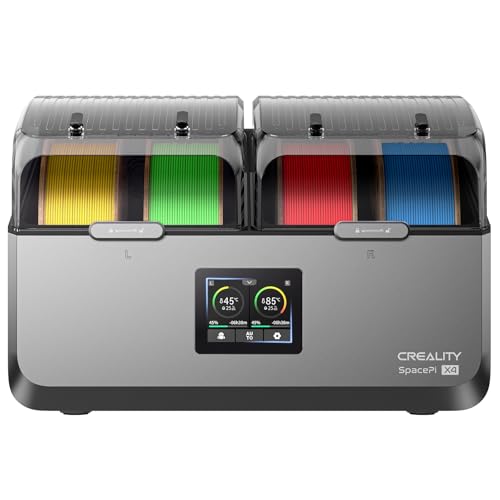
Best for: drying two filament types at once in split chambers Skip it if: the listing's blank dimensions worry you
The Space Pi X4 is the flexible one. Creality lists two independent chambers, each with its own 200W PTC heater, so you can dry PLA in one side and PETG in the other at different temperatures. That split control is genuinely useful when your print queue mixes materials. Creality claims up to 85°C and single- or dual-chamber modes for energy savings when you only need one side.
At 2.2 lb, it is the lightest unit in the set on paper, though the listing publishes no dimensions, which is a real gap when desk space is your constraint. It sits mid-priced. Creality warns that trays from other brands must be heat-resistant, so factor spool compatibility into your plan. Against the SUNLU S4, this Creality trades a stated warranty and a firm size figure for its dual-chamber trick. If mixed-material drying is your workflow, that trick is worth more than the missing numbers.
Pros:
- Dual independent chambers per Creality
- 85°C heat claim for engineering filaments
- Single or dual mode for energy saving
- Lightest listed weight at 2.2 lb
Cons:
- No published dimensions
- No stated warranty
- Third-party tray heat warning in listing
- No noise figure listed
5. Creality Filament Dryer Box 4 Spools — Runner-up
This second Space Pi X4 lands as runner-up because it adds a touch UI to the same dual-chamber design at a higher price position.

Best for: high-volume printing with a touch UI Skip it if: you want the lowest price in the set
This Creality shares the Space Pi X4 platform with the pick above but carries its own listing. Creality says it holds four 1kg spools or two 2kg spools, using dual independent 200W chambers to remove moisture faster than single-chamber boxes. The listing highlights a touch interface with a real-time display and custom temps from 50 to 60°C for PLA, PETG and TPU, plus a silicone-sealed enclosure that keeps humidity out during pauses.
It weighs 2.65 lb and reaches 85°C per Creality. Only one seller lists it, which can limit your options, and it sits in the higher price tier here. The listing publishes no dimensions and shows a warranty field of zero, so treat both as unknown. Against the official Creality unit above, this one trades a lower price and slightly more stock for its touch UI. If you value the interface and the sealed storage claim, it holds its place; if you want value, the picks above beat it.
Pros:
- Touch UI with real-time display per Creality
- Dual 200W chambers, 85°C claim
- Silicone-sealed enclosure claim
- Holds two 2kg spools per listing
Cons:
- Only one seller lists it
- Higher price position in the set
- No published dimensions
- No stated warranty and no noise figure
6. SUNLU E2 3D Printer Filament Dryer — Best premium
The E2 is the premium pick because SUNLU pairs drying with a 110°C annealing chamber for engineering parts.

Best for: annealing engineering parts as well as drying Skip it if: you only print PLA and PETG
The E2 does something no other pick claims. SUNLU describes a dry-and-anneal 2-in-1 design with a 110°C annealing chamber, the highest temperature figure in the set. Annealing relaxes internal stress in printed parts and, per SUNLU, unlocks tougher results from PA, PC and nylon variants. The listing cites a 500W PTC heater rated at 325W, reaching 70°C in about 30 minutes, with a dual-chamber design for energy saving.
It is the heaviest here at 17 lb and measures 10 x 7 x 14 in, so it stands tall rather than wide. It is the most expensive pick in this set and the slowest seller of the six. That price buys the annealing feature, not more spool capacity, since it handles a single spool. Against the Comgrow, the E2 trades quiet, cheap simplicity for a specialist function most desk designers will never use. If your work needs strengthened engineering parts, it is the only pick here that claims to do it.
Pros:
- Highest heat claim at 110°C
- Only pick with an annealing chamber
- 500W PTC heater per SUNLU
- Dual-chamber energy-saving design claim
Cons:
- Most expensive pick here
- Heaviest at 17 lb
- Single-spool capacity only
- No stated warranty or noise figure
Does any listing actually promise silence?
No. None of these six listings publishes a decibel figure, a fan-noise rating, or the word "silent" in any spec I can quote. So the honest answer for anyone searching the best silent filament dryer for graphic designers is that quiet is inferred, not certified.
Here is how I would judge it from the data you can see:
- Lower heat ceiling, lower effort. The Comgrow tops out at 50°C, which suggests a modest heater and fan versus a 500W unit.
- Smaller body, smaller fan. A compact box like the Comgrow or Polydryer has less air to move than the 18-inch SUNLU S4.
- Sealed passive storage helps. The Polydryer's dock-and-box design leans on sealing rather than constant heat, so it may run its fan less often.
If a silent desk is your priority, favour the low-heat, compact picks and accept that you are judging design, not a printed number. Ask the seller directly if noise is a dealbreaker.
What the heat ceiling really decides
Most buyers compare spool capacity first. That is not what decides a dryer for your materials. The maximum temperature is. It sets which filaments a unit can actually dry, and it is the number that separates a PLA desk toy from an engineering workhorse.
The spread across this set is wide:
- Comgrow tops out at 50°C, fine for PLA, ABS and silk.
- SUNLU S4 claims 70°C, which reaches nylon and TPU territory.
- Both Creality Space Pi X4 units claim 85°C for engineering filaments.
- SUNLU E2 claims 110°C, the only one that also anneals.
Match the ceiling to your queue. If you print PLA and PETG all day, the Comgrow's 50°C is enough and the extra heat elsewhere is wasted spend. If nylon or PC is in your rotation, you need 70°C or higher, which rules the Comgrow out. The Polydryer publishes no maximum at all, so treat its heat performance as unknown and lean on its sealing instead.
How much desk space does each one eat?
Footprint is the spec designers underrate. A dryer lives on the desk beside your screen, so depth and height matter as much as heat. I lined up the published figures.
- Comgrow: 9 x 9.2 x 6.4 in, 3.31 lb. Compact and low.
- Polymaker Polydryer: 11.4 x 9.25 x 4.72 in, 2.87 lb. The flattest here.
- SUNLU S4: 12.3 x 18 x 8.58 in, 10.6 lb. The widest by far.
- SUNLU E2: 10 x 7 x 14 in, 17 lb. Tall and heavy.
- Both Creality units: no dimensions published, 2.2 lb and 2.65 lb.
The takeaway is simple. The SUNLU S4's 18-inch width is the one to measure against your desk before buying. The Comgrow and Polydryer are the two that disappear into a corner. The two Creality boxes are light on paper but publish no size, so if your space is tight, treat that blank as a risk and confirm before you commit. A dryer you cannot fit is a dryer you will not use.
When a bigger dryer wins
The Comgrow wins the default, but the recommendation flips under clear conditions. Here are the ones worth knowing.
- If you run several printers at once, the SUNLU S4 wins. Four spools feeding four printers, per SUNLU, beats a two-spool box, and its 1-year warranty backs the longer hours.
- If your queue mixes materials daily, the Official Creality Space Pi X4 wins. Two independent chambers at different temperatures handle PLA and PETG side by side, which a single-chamber box cannot.
- If you print engineering parts that need strengthening, the SUNLU E2 wins. It is the only pick that claims annealing, at 110°C.
Each flip has a threshold you can check against your own bench: number of printers, materials in rotation, and whether your parts need post-processing. Below those thresholds, the extra heat, capacity and price buy you nothing, and the quiet, cheap Comgrow is the smarter desk companion.
The verdict
If your desk runs one or two spools of PLA or PETG and quiet matters, the Comgrow 3D Printer Filament Dryer Box is the pick. Its 50°C ceiling is the lowest here, which points to the least fan effort, and its 9 x 9.2 x 6.4 in footprint at 3.31 lb keeps the desk clear. It is also the cheapest of the six. The cutoff is your material list and printer count.
If you run several printers or drying takes hours a day, the SUNLU S4 is the better buy. Its exact advantage over the Comgrow is throughput plus protection: SUNLU claims four spools drying at once feeding up to four printers, and it is the only pick in this set with a stated warranty, at 1 year. That combination justifies the wider 18-inch body and the mid-tier price for a working bench.
Between those two sits the whole spread. The Polydryer suits a first purchase with its sealed workflow, the Creality Space Pi X4 units handle mixed materials, and the SUNLU E2 adds annealing for engineering parts. Pick on your queue, not on capacity alone. No listing here proves silence, so treat quiet as a design judgment.
FAQ
Is the cheapest filament dryer here good value?
The cheapest filament dryer here, the Comgrow, is strong value for a PLA and PETG desk. It holds two spools, monitors temperature and humidity, and keeps the smallest footprint at 9 x 9.2 x 6.4 in. You give up a high heat ceiling and any stated warranty. For most desk designers who never touch nylon, that is a fair trade for the lowest price in the set.
Is a premium filament dryer worth it for a designer?
A premium filament dryer is worth it only if your work needs it. The SUNLU E2, the priciest pick, adds a 110°C annealing chamber that strengthens engineering parts. If you print PLA and PETG for visuals and prototypes, that feature sits unused, and the cheaper Comgrow does the actual drying job. Match the spend to your material list before paying for annealing.
What maximum temperature do I need to dry nylon?
The maximum temperature to dry nylon sits above what the Comgrow's 50°C ceiling offers. The SUNLU S4 claims 70°C and both Creality Space Pi X4 units claim 85°C, which reach engineering-filament territory per their listings. The SUNLU E2 claims 110°C. If nylon or PC is in your rotation, choose a unit rated 70°C or higher and skip the low-heat boxes.
Comgrow or Polymaker Polydryer for a first dryer?
Between the Comgrow or Polymaker Polydryer for a first dryer, pick on workflow. The Comgrow heats to 50°C and holds two spools with a transparent shell. The Polydryer holds one spool but links drying, sealed storage and direct feeding without breaking the seal. If sealed storage matters most, choose the Polydryer; if you want two spools and a heat number, the Comgrow wins.
What is the biggest filament dryer buying mistake?
The biggest filament dryer buying mistake is chasing spool count while ignoring the heat ceiling and desk size. A four-spool box that only reaches PLA temperatures wastes capacity, and an 18-inch-wide unit like the SUNLU S4 can overwhelm a small desk. Check your material list against the maximum temperature, then measure the footprint against your space before you order anything.
Start by writing down two things: the filaments in your print queue and the depth of the space beside your monitor. Those two answers point you at a pick faster than any feature list. For a quiet PLA and PETG desk, the Comgrow is the sensible default because it does the core job at the lowest heat, the smallest footprint and the lowest price, and it leaves the noise question in your hands rather than pretending to have solved it. Everything above the Comgrow is a specialist upgrade you buy only when your work demands it.