Best Travel Mouse for Students on the Go

Seven compact mice compared on weight, connection type and how easily they vanish into a backpack, with a clear winner and five conditions that change the answer.

By Samuel HarrisUpdated 16 min read
On this page
- Best travel mouse for students at a glance
- The 30-second shortlist
- How I narrowed the field
- Does the travel label actually mean anything here?
- 1. Logitech M350s Pebble 2 — Best overall
- 2. Logitech M185 — Best for heavy use
- 3. ONE-UP Wireless Mouse — Best budget pick
- 4. Verbatim Mini Travel Mouse — Best for families
- 5. SABLUTE Wireless Mouse — Most versatile
- 6. HP X3000 G3 — Best upgrade
- 7. TECKNET Keyboard and Mouse Combo — Best premium
- Wireless or wired: which suits a backpack?
- What more money buys across these seven
- If your setup changes, so should your pick
- The verdict
- FAQ
The best travel mouse for students is the Logitech M350s Pebble 2, a 2.68 oz Bluetooth mouse that hops across three devices and slides flat into any laptop sleeve. If you want a battery in the box and USB-A simplicity, the Logitech M185 is the safer buy. Here's the honest version of this category: the trick isn't picking the smallest mouse. It's matching the connection type to the exact ports on your laptop, which is where most guides go quiet.
Best travel mouse for students at a glance
| Pick | Connection | Weight | Price |
|---|---|---|---|
Best overall Logitech M350s Pebble 2 |
Bluetooth, 3 devices | 2.68 oz | Check Price |
Best for heavy use Logitech M185 |
2.4G nano USB-A | 2.65 oz | Check Price |
Best budget pick ONE-UP Wireless Mouse |
2.4G nano USB-A | 2.25 oz | Check Price |
Best for families Verbatim Mini Travel Mouse |
Wired USB, retractable | 1.6 oz | Check Price |
Most versatile SABLUTE Wireless Mouse |
2.4G + USB-C adapter | 3 oz | Check Price |
Best upgrade HP X3000 G3 |
2.4G nano USB-A | Not listed 1600 DPI |
Check Price |
Best premium TECKNET Keyboard + Mouse |
2.4G, keyboard combo | 0.79 lb set | Check Price |




The 30-second shortlist
Short on time? Here are the three that cover most students, matched to how you actually work.
- Carry a laptop and a phone or tablet? Get the Logitech M350s Pebble 2. At 2.68 oz with Bluetooth switching across three devices, it moves between a MacBook and an iPad without swapping a receiver.
- Want one thing to work and never think about it? The Logitech M185 ships with an AA battery, uses a tiny nano receiver, and Logitech claims up to 1 year of battery life.
- Spending as little as possible? The ONE-UP is the cheapest of the seven, weighs 2.25 oz, and clicks quietly enough for a library.
Everything past this point is for readers who want the full picture. The best travel mouse for students depends on your ports, your budget, and whether you carry a tablet.
How I narrowed the field
I started with the connection type, because that disqualifies more mice than any other single factor. A gorgeous Bluetooth mouse is useless to a student whose laptop only has USB-C and whose phone won't pair reliably. So I sorted the field into three camps before anything else.
Here's the order I worked through:
- Killed anything with a mismatch risk. Wired mice that need a full-size USB-A port got flagged, not cut, because some desktops still want them.
- Weighed the carry cost. Anything over roughly 3 oz had to earn its bulk. The Verbatim mini came in lightest at 1.6 oz.
- Checked the warranty gap. Most of these list a 1-year limited warranty. Two stood out: the SABLUTE lists a 2-year extended term, and the TECKNET lists 3 years.
That leaves seven. The TECKNET is really a keyboard-and-mouse set, not a standalone mouse, so it earns its spot only for students who want both. Every other pick is a true single mouse. The best travel mouse for students, in my view, is the one whose receiver or radio matches your machine on day one.
Does the travel label actually mean anything here?
Partly. "Travel" isn't a certified spec, so treat it as a shopping cue, not a promise. What you can verify are the numbers, and those tell the real story.
Judge portability by three things you can check yourself:
- Weight. The Verbatim mini is 1.6 oz. The ONE-UP is 2.25 oz. The Pebble 2 is 2.68 oz. All slip into a pencil case.
- Thickness. The Pebble 2 stands 1.05 in tall and lies flat. The HP X3000 G3 is 1.54 in tall, a fuller shape that fills the palm but bulges more in a sleeve.
- Receiver storage. HP says the nano receiver tucks inside the X3000 G3, so you won't lose it in a backpack. That's a genuine travel feature.
None of these carries a formal "travel-grade" rating, and I won't pretend one does. The word tells you the maker aimed small. The figures tell you whether they hit it. For a student packing a mouse next to chargers and notebooks, weight under 3 oz and a stored receiver matter more than the marketing.
1. Logitech M350s Pebble 2 — Best overall
The Pebble 2 wins because it pairs across three devices over Bluetooth while staying the flattest, quietest mouse of the seven.
Best for: students juggling a laptop and a tablet Skip it if: you need a bundled AA battery in the box
What sets the Pebble 2 apart in this set is the Easy-Switch button. Logitech says it connects to up to three devices across Windows, macOS, iPadOS and ChromeOS, so you can move from a lecture laptop to an iPad for notes with one press. No other pick here does that. It's a 2023 release and the most expensive single mouse of the seven, so you're paying for the multi-device trick.
The body measures 1.05 x 4.2 x 2.31 in and weighs 2.68 oz. That flat 1.05 in height is the lowest profile in the group, which is why it packs so cleanly. Logitech also claims Silent Touch Technology removes 90% of click noise, useful in a shared study room. The middle button is customisable through the Logi Options+ app.
The trade-off: no USB receiver means it leans on Bluetooth, and Bluetooth pairing can be fussier than plugging in a nano dongle. It also carries a 1-year limited warranty, shorter than the SABLUTE and TECKNET.
Pros:
- Switches across 3 paired devices over Bluetooth
- Flattest body here at 1.05 in tall
- Light at 2.68 oz
- Logitech claims 90% quieter clicks
- Customisable middle button via Logi Options+
Cons:
- Most expensive single mouse in this set
- No AA battery details listed
- Bluetooth pairing can be fussier than a dongle
- Only a 1-year warranty
2. Logitech M185 — Best for heavy use
The M185 is the set-and-forget option: a nano-receiver mouse that ships with its battery and claims up to a year of life.

Best for: daily note-takers who want a battery included Skip it if: your laptop has no USB-A port
The M185 is the one I'd hand a student who just wants a mouse that works every morning. It's a 2013 design, the oldest here, but that's a point in its favour: the nano USB-A receiver and plug-and-play setup are proven. Logitech says the included AA battery lasts up to 1 year thanks to a sleep mode, so you're not scrambling for a replacement mid-semester.
It weighs 2.65 oz and measures 3.9 x 1.54 x 2.36 in, a compact contoured shape that Logitech calls ambidextrous. Rubber grips give it a firmer hold than the slick Pebble 2. Logitech quotes a wireless range up to 33 feet, more than any lecture-hall desk needs. It's mid-priced for this group and carries a 1-year limited warranty.
The catch is the receiver. It needs a USB-A port, and newer thin laptops often drop those. If your machine is USB-C only, look at the SABLUTE instead. It also lacks the Pebble 2's multi-device switching.
Pros:
- AA battery included in the box
- Logitech claims up to 1 year of battery life
- Contoured grip works either hand
- Range up to 33 feet
- Light at 2.65 oz
Cons:
- Requires a USB-A port
- Oldest design in the set
- No multi-device switching
- Only a 1-year warranty
3. ONE-UP Wireless Mouse — Best budget pick
The ONE-UP is the cheapest of the seven and still covers the basics: quiet clicks, a nano receiver, and a light 2.25 oz body.

Best for: first-year students on the tightest budget Skip it if: you dislike buying batteries separately
If money is the deciding factor, this is your mouse. It's the cheapest pick here and the specs are honest about what that buys. ONE-UP lists a 2.4G USB receiver that connects in about 3 seconds, a range up to 33 feet, and three DPI steps at 800, 1200 and 1600. The company also describes it as a silent mouse, aimed at library work and quiet dorms.
At 2.25 oz and 4.5 x 2.5 in, it's the second-lightest mouse in the group and slim enough to toss in a bag. The ambidextrous shell suits either hand. A single AA battery runs it, and a 10-minute sleep mode stretches that out.
Two honest gaps. The battery isn't included, so budget for one. And the listing quotes very old OS compatibility, so double-check it against your current laptop before buying. The warranty entry is thin, listed only as 1. For the price, it's a rational first mouse.
Pros:
- Cheapest pick in this set
- Light at 2.25 oz
- Three DPI steps: 800, 1200, 1600
- Quiet clicks for library use
- Ambidextrous shell
Cons:
- AA battery not included
- Listed OS support looks dated
- Warranty detail is unclear
- No multi-device switching
4. Verbatim Mini Travel Mouse — Best for families
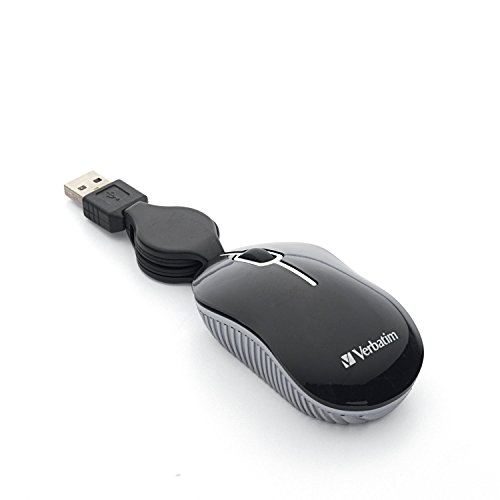
The Verbatim is the true pocket mouse: 1.6 oz, wired, with a retractable cable and no battery to ever charge.
Best for: shared dorm or family desktops Skip it if: you never want a cable
This is the odd one out, and that's why I like it for a shared setup. It's wired, so there's no receiver to lose, no battery to die, and nothing to pair. You plug it in and it works, which is exactly what you want on a family desktop that three people touch. Verbatim highlights a retractable USB cable that stops the tangle mess most wired mice create in a bag.
It's the lightest mouse here at 1.6 oz, with a tiny 1.69 x 1.1 x 3.03 in footprint. Verbatim says the optical sensor tracks smoothly for everyday notebook use, and it needs no batteries at all. It's the second-cheapest of the seven and carries a 1-year limited warranty.
The trade-offs are real. It's corded, so it ties up a USB-A port and won't help a student who wants a clean, cable-free desk. The listing also quotes very old Windows compatibility, so confirm it works with your machine. As a rugged, no-fuss backup, though, it's hard to beat.
Pros:
- Lightest pick at 1.6 oz
- No battery ever needed
- Retractable cable prevents tangles
- Second-cheapest here
- Nothing to pair or lose
Cons:
- Wired, so it ties up a USB-A port
- Listed OS support looks dated
- No wireless option
- Small shape suits small hands only
5. SABLUTE Wireless Mouse — Most versatile
The SABLUTE is the one that fits nearly any laptop, shipping with both a USB-A nano receiver and a USB-C adapter.

Best for: students with USB-C-only laptops Skip it if: you have large hands
Port anxiety is the reason this pick exists. SABLUTE includes a USB-A nano receiver plus a USB-C adapter, so it plugs into an older laptop or a modern USB-C-only one without a separate dongle purchase. That flexibility is unique in this group and makes it the safe answer when you don't know your laptop's ports.
It weighs 3 oz and SABLUTE lists a compact 4.09 x 2.68 in footprint with an asymmetrical shape built for right-handed small-to-medium hands. The company claims up to 90% noise reduction and three DPI levels at 800, 1200 and 1600, plus forward and back buttons for paging through documents. It's an entry-priced pick, and notably it lists a 2-year extended warranty, longer than most rivals here.
Two honest cons. The shape is right-hand-only, so lefties should skip it. And at 3 oz it's the heaviest single mouse in the set, giving up a little to the Pebble 2 and Verbatim on carry weight. For versatility, though, nothing else here matches it.
Pros:
- Ships with USB-A receiver and USB-C adapter
- 2-year warranty listed, longer than most
- Forward and back buttons
- Three DPI steps: 800, 1200, 1600
- Claims up to 90% quieter clicks
Cons:
- Right-hand-only shape
- Heaviest single mouse here at 3 oz
- No Bluetooth or multi-device switching
- Fits small-to-medium hands best
6. HP X3000 G3 — Best upgrade
The X3000 G3 is the endurance pick: HP claims up to 15 months on one AA battery and stores the receiver inside the mouse.

Best for: students who hate replacing batteries Skip it if: you want the smallest possible mouse
If you forget about batteries entirely, the X3000 G3 is built for you. HP quotes up to 15 months of use on a single AA, the longest battery claim in this set. That's roughly a full academic year and a half between swaps. The nano receiver stores inside the mouse, so it won't vanish in transit, which is a genuine travel touch.
This 2022 release measures 1.54 x 3.73 x 2.24 in, a fuller, contoured body with side grips for control. HP lists a 1600 DPI optical sensor and multi-surface LED tracking that it says works on almost any desk. It connects over 2.4 GHz USB-A up to 30 feet and works across Windows, Mac and Chromebook. It sits in the premium price tier with a 1-year warranty.
The trade-offs are size and ports. This is the bulkiest single mouse here at 1.54 in tall, so it's less pocketable than the flat Pebble 2. It also needs a USB-A port. And HP doesn't list a weight, which is why the table shows DPI instead.
Pros:
- HP claims up to 15 months battery life
- Receiver stores inside the mouse
- 1600 DPI optical sensor
- Side grips for a firm hold
- Multi-surface LED tracking
Cons:
- Bulkiest single mouse in the set
- Requires a USB-A port
- No published weight figure
- Only a 1-year warranty
7. TECKNET Keyboard and Mouse Combo — Best premium
The TECKNET isn't just a mouse: it's a slim wireless keyboard and mouse set for students who want a full desk kit in one box.

Best for: students who want a keyboard too Skip it if: you only need a mouse
This is the outlier, and I've kept it in for one reason: some students want a proper typing setup in a dorm, not just a mouse. The TECKNET pairs an ultra-slim mini keyboard with a matching mouse. TECKNET describes scissor-switch keys shaped to your fingertips and 12 multimedia hotkeys for volume, playback and browsing.
The set weighs 0.79 lb and the keyboard measures 11.2 x 4.72 in, so this is a desk kit, not a pocket item. It connects over 2.4 GHz up to 49 feet, the longest range quoted here, and lists 1600 DPI with quiet clicks. The standout is the warranty: 3 years, the longest in this group. It's the most expensive pick here, which fits, since you're buying two devices.
The obvious con is that it's a combo. If you already own a keyboard, you're paying for one you don't need. The keyboard is also a mini layout, not full-size, so touch-typists used to a number pad will notice. For a fresh dorm setup, though, it's the most complete option.
Pros:
- Includes a matching wireless keyboard
- Longest warranty here at 3 years
- 12 multimedia hotkeys
- Range up to 49 feet
- Quiet 1600 DPI mouse
Cons:
- Most expensive pick in the set
- Overkill if you own a keyboard
- Mini keyboard, not full-size
- Not pocket-portable
Wireless or wired: which suits a backpack?
This is the fork in the road. Get it right and the rest is detail. Six of these seven are wireless; the Verbatim is the lone wired pick, and that's a feature, not a flaw, for the right buyer.
Wireless splits again into two types:
- Bluetooth (the Pebble 2). No dongle, pairs to phones and tablets, but pairing can drop or need re-linking.
- 2.4G nano receiver (M185, ONE-UP, SABLUTE, HP, TECKNET). Plug the dongle into USB-A, done. More reliable, but it eats a port and needs a battery.
Wired (the Verbatim) means no battery, no pairing, no lost dongle. The cost is a permanent cable and a tied-up port. For a backpack that gets thrown around, fewer moving parts can be the smarter call.
The quiet complication is USB-C. If your laptop dropped USB-A, a 2.4G mouse needs an adapter, which the SABLUTE bundles and the others don't. Check your ports before you buy anything with a dongle.
What more money buys across these seven
Spend more and you're mostly buying convenience, not tracking quality. Every mouse here handles cursor movement fine for coursework. Here's what the extra actually gets you.
- Entry tier (ONE-UP, Verbatim, SABLUTE): the basics done honestly. Light bodies, quiet clicks, and in the SABLUTE's case a USB-C adapter and a 2-year warranty that punch above the price.
- Mid tier (M185): a proven design with the AA battery in the box and Logitech's up-to-1-year battery claim.
- Premium tier (HP, Pebble 2, TECKNET): here you buy features. The HP adds a 15-month battery claim and an internal receiver dock. The Pebble 2 adds three-device Bluetooth switching. The TECKNET adds a whole keyboard and a 3-year warranty.
The lesson: the priciest single mouse, the Pebble 2, justifies itself only if you switch between devices. If you don't, the cheaper M185 does the core job for less.
If your setup changes, so should your pick
The right mouse follows your machine, not your mood. Run through these quick flips before you commit.
- If your laptop is USB-C only, then the SABLUTE is the answer, because it's the only pick that bundles a USB-C adapter.
- If you carry a tablet alongside your laptop, then the Pebble 2 earns its price with three-device Bluetooth switching.
- If you hate buying batteries, then the M185 ships with one and the HP claims up to 15 months per AA.
- If a housemate uses the same desktop, then the wired Verbatim needs no pairing and can't be left un-charged.
- If you also need a keyboard, then the TECKNET combo saves you a second purchase.
The threshold that matters most is your port layout. A student on a modern USB-C laptop should not default to a 2.4G mouse without checking for an adapter first.
The verdict
The best travel mouse for students is the Logitech M350s Pebble 2. It's the flattest body here at 1.05 in tall, weighs just 2.68 oz, and its Easy-Switch button jumps across three Bluetooth devices, so a student with a laptop and a tablet stops swapping dongles. Logitech's claimed 90% quieter clicks make it the natural choice for shared study spaces. That combination is why it leads.
Two conditions flip the recommendation. First, if your laptop is USB-C only and you don't want to gamble on Bluetooth, the SABLUTE is the smarter buy: it's the only pick bundling a USB-C adapter, and it lists a 2-year warranty. Second, if you want a mouse that ships ready to go with an AA battery and Logitech's up-to-1-year battery claim, the M185 is the safe, proven pick at a lower price.
The runner-up overall is the M185, and its exact advantage over the Pebble 2 is simplicity: a nano receiver you plug in once and a battery in the box, with no pairing to manage. The Pebble 2 wins on flexibility. The M185 wins on never having to think about it.
FAQ
Is a travel mouse worth it for students?
A travel mouse is worth it for students who spend hours on a laptop, since a proper mouse beats a trackpad for editing documents and browsing. Logitech even cites a study claiming mouse users were more productive than touchpad users. At 2.68 oz for the Pebble 2, it adds almost nothing to your bag while saving your wrist.
Which travel mouse for students gives the best value?
The best-value travel mouse for students is the ONE-UP, the cheapest of these seven at 2.25 oz with quiet clicks and three DPI steps. If you want a stronger warranty for a little more, the SABLUTE lists a 2-year term plus a USB-C adapter. Both handle everyday coursework fine, so the choice comes down to your budget and your laptop's ports.
Do these mice work with a MacBook or Chromebook?
These mice work with a MacBook or Chromebook in most cases, but check the details. The Pebble 2 lists macOS, ChromeOS, Windows and iPadOS support. The HP X3000 G3 and TECKNET both list Mac and Chromebook compatibility. Two picks, the ONE-UP and Verbatim, quote older operating systems in their listings, so confirm current support before buying either.
Pebble 2 or M185: which should a student pick?
Pebble 2 or M185 comes down to devices and ports. Choose the Pebble 2 if you switch between a laptop and a tablet, since it pairs to three devices over Bluetooth and packs flatter at 1.05 in. Choose the M185 if you want a nano receiver, an included AA battery, and Logitech's up-to-1-year battery claim without any pairing steps.
What's the biggest mistake buying a travel mouse?
The biggest mistake is ignoring your laptop's ports. A 2.4G mouse like the M185 or HP needs a USB-A port, which many thin laptops no longer have. If you're USB-C only, the SABLUTE bundles an adapter or a Bluetooth mouse like the Pebble 2 sidesteps the problem. Check the ports first, then pick the mouse.
Start by looking at the side of your laptop and counting the ports. That one glance decides more than any spec sheet. If you see USB-A, almost any pick here works and the Pebble 2's three-device switching gives you room to grow into a tablet later. If you see only USB-C, the SABLUTE's bundled adapter removes the guesswork on day one. The Pebble 2 stays my default because it's the flattest, quietest, most flexible mouse of the seven, and for a student moving between rooms and devices, flexibility is what you'll actually use.