Best Wireless Mouse for Content Creators Who Travel
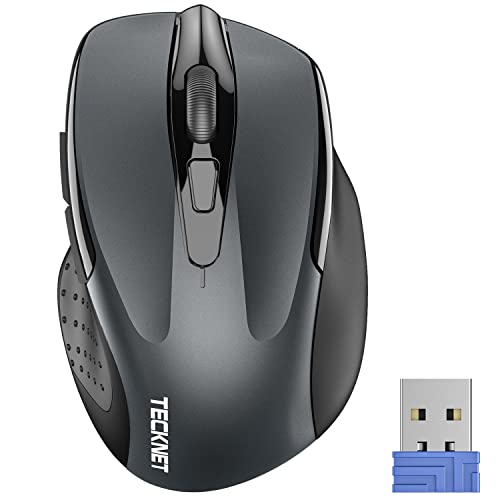
Six wireless mice compared on published specs alone: sensitivity steps, weight, connection type and warranty length. TECKNET's TK-MS009 leads, with the Dell MS3320W and Logitech M196 taking the lighter, Bluetooth-first cases.

By Samuel HarrisUpdated 16 min read
On this page
- Best wireless mouse for content creators at a glance
- How I ranked these six on published specs
- Does DPI actually matter for editing work?
- 1. TECKNET Wireless Mouse — Best overall
- 2. Dell Wireless Mouse MS3320W — Best premium
- 3. TECKNET RGB Bluetooth Ergonomic Mouse Rechargeable — Best for heavy use
- 4. Logitech M196 Compact Ambidextrous Bluetooth Wireless Mouse — Best for families
- 5. Logitech M317 Compact Ambidextrous 2.4 GHz Wireless Mouse — Best for beginners
- 6. Rii Wireless Noiseless Mouse — Best budget pick
- Dongle or Bluetooth: which connection suits your rig?
- What the listings do not tell you about creator work
- When a different pick wins
- The verdict
- FAQ
The best wireless mouse for content creators here is the TECKNET TK-MS009, because it pairs five sensitivity steps up to 2600 DPI with a 3 oz body and no charging cable to remember. If you'd rather skip the USB dongle entirely, the Dell MS3320W runs on Bluetooth at just 2.24 oz. Most buyers compare these mice on shape and grip photos, which is the least useful signal in the listing. Contour claims are unmeasured marketing. Sensitivity range, weight, connection type and warranty length are published numbers you can actually line up side by side, and they split this field cleanly.
Best wireless mouse for content creators at a glance
| Pick | Max DPI | Weight | Price |
|---|---|---|---|
Best overall TECKNET Wireless Mouse |
2600 (5 steps) | 3 oz | Check Price |
Best premium Dell Wireless Mouse MS3320W |
Not published | 2.24 oz | Check Price |
Best for heavy use TECKNET RGB Bluetooth Ergonomic Mouse |
4800 (6 steps) | 4.8 oz | Check Price |
Best for families Logitech M196 Compact Ambidextrous |
Not published | 2.65 oz | Check Price |
Best for beginners Logitech M317 Compact Ambidextrous |
Not published | 3.2 oz | Check Price |
Best budget pick Rii Wireless Noiseless Mouse |
3600 fps claim | 2.12 oz | Check Price |



How I ranked these six on published specs
I weighted four things, in this order.
- Adjustable sensitivity, weighted heaviest. A mouse with published DPI steps lets you set a slow, precise cursor for masking and a fast one for scrubbing a timeline. Two of the six publish those steps. Four do not.
- Connection type, weighted second. A 2.4GHz dongle costs you a port. Bluetooth costs you a pairing menu. One pick offers both.
- Weight, weighted third. Every mouse here sits between 2.12 oz and 4.8 oz, which is a real spread when you're clicking for six hours.
- Published warranty, weighted last. It ranges from one year to 36 months across this set, and it's the cleanest proxy for what the maker expects the plastic to survive.
Why that order? Because the first two are the only specs in this data that change what the mouse can do. Weight changes how it feels. Warranty changes what happens after it breaks. Nothing in these listings tells you about switch durability, polling rate or sensor model, so I didn't pretend otherwise.
Two things I deliberately ignored. RGB lighting, which looks good in a photo and does nothing for a cut. And "ergonomic" as a word, since every one of these six listings uses it and none of them defines it.
Does DPI actually matter for editing work?
DPI is the number of cursor steps the sensor reports per inch of movement. Higher is not better. It's faster.
That distinction matters more for creators than for gamers. Colour grading a curve, feathering a mask, dragging a keyframe by two frames: those all want a slow cursor. Cutting across a long timeline wants a fast one. The useful spec isn't the ceiling. It's whether you can switch.
Here's the split in this set:
- The TECKNET TK-MS009 lists 800/1200/1600/2000/2600 DPI, five steps.
- The TECKNET TK-MS055 lists 800/1200/1600/2400/3200/4800 DPI, six steps.
- The Dell MS3320W, both Logitechs and the Rii publish no DPI figure at all.
That's the whole reason a 3 oz entry-position mouse leads this guide. The four mice without published steps aren't necessarily worse sensors. They just give you one speed and ask you to fix the rest in your operating system settings, which is a coarser adjustment and a menu trip every time.
If you spend most of your day in a browser and a text editor, none of this changes your life. If you spend it in Premiere, Resolve or Photoshop, a DPI button under your thumb is the single most useful thing on this page.
1. TECKNET Wireless Mouse — Best overall
Five published sensitivity steps and a 3 oz body make this the most adaptable mouse in the set for people who switch between precise and fast work.
Best for: editors on a laptop who want adjustable sensitivity without a charging cable Skip it if: your laptop has no spare USB-A port
What separates the TK-MS009 from the other five is a number nobody else at this price position publishes: 800/1200/1600/2000/2600 DPI across five steps. That's the spec that lets you drop the cursor to a crawl for a mask edge, then bump it back up to cross a 40-minute timeline. Four of the six picks here don't tell you their sensitivity at all.
It weighs 3 oz and measures 4.21 x 2.68 x 1.54 in, which puts it mid-pack for both. TECKNET says the receiver holds a connection up to 49 feet, the longest claimed range in this group, and that the power-saving mode plus a physical on/off switch stretches battery life to 24 months. Both are the maker's claims, not measured figures. The published warranty is 12 months.
The trade-off is the dongle. This is 2.4GHz only, no Bluetooth, so it occupies a USB-A port permanently. On a thin laptop with two ports and a card reader already plugged in, that's a genuine problem, and it's why the Dell takes the premium slot below.
Pros:
- Five published DPI steps, 800 to 2600
- 3 oz body, no charging cable needed
- Physical on/off switch to preserve battery
- 49 feet claimed receiver range, longest here
- Second-cheapest of the six
Cons:
- 2.4GHz dongle only, no Bluetooth pairing
- 12-month warranty, shortest in this set alongside two others
- Only one seller lists it
- Thickest of the six at 1.54 in
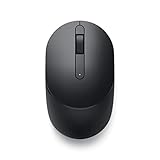
2. Dell Wireless Mouse MS3320W — Best premium
The lightest full-size pick here at 2.24 oz, with Bluetooth and a three-year advanced exchange warranty behind it.

Best for: creators switching between a desktop and a tablet on Bluetooth Skip it if: you want published sensitivity steps before you buy
The MS3320W is the most expensive pick here, and what you're paying for shows up in two places. It's Bluetooth, so no port is consumed, and it's backed by a three-year Advanced Exchange Service warranty, the strongest support term in this group. It also runs on AA power, so there's no charging cable to pack.
At 2.24 oz and 1.5 x 4.1 x 2.4 in, it's the second-lightest and the flattest of the picks with full published dimensions. That flat profile is what makes it slide into a laptop sleeve rather than a bag pocket. Released in 2020, it's the oldest design here, and Dell publishes no feature bullets on this listing at all, which is unusual and worth knowing before you buy.
That silence is the real cost. There's no published DPI figure, no stated range, no battery-life claim. You're buying on the brand and the warranty rather than on specifications, and against the TECKNET TK-MS009 you're paying more for less disclosed capability.
Pros:
- Bluetooth, so no USB port sacrificed
- 2.24 oz, second-lightest of the six
- Three-year advanced exchange warranty
- Flattest published profile at 1.5 in
- AA powered, nothing to recharge
Cons:
- No published DPI, range or battery figure
- Highest price position in the set
- No feature detail published on the listing at all
- 2020 design, the oldest here
3. TECKNET RGB Bluetooth Ergonomic Mouse Rechargeable — Best for heavy use
Six DPI steps to 4800, dual-mode connection and an 800mAh rechargeable cell make this the pick for someone who never puts the mouse down.

Best for: long timeline sessions at a fixed desk with a rechargeable battery Skip it if: you carry your mouse in a jacket pocket
This is the only pick in the group that gives you both connection types. TECKNET lists 2.4GHz USB and Bluetooth 5.0, so you can keep the dongle in a desktop and pair the same mouse to a laptop. It also has the widest published sensitivity range here: 800/1200/1600/2400/3200/4800 DPI across six steps, a full step more than the overall winner.
The battery is a built-in 800mAh cell rather than an AA, and TECKNET says a smart sleep mode kills the RGB and powers down after inactivity. The published warranty is 36 months, matching the Dell as the longest in this set. There are 11 backlight modes, cycled from the scroll wheel, which is decorative rather than functional.
The catch is bulk. At 4.8 oz it's more than double the weight of the Rii, and TECKNET publishes no dimensions for it. A larger sculpted shell with a thumb rest is comfortable at a desk and awkward in a bag, so this is a stay-put mouse. It's also the second-most expensive here.
Pros:
- Six DPI steps, 800 to 4800, widest range in this set
- Both 2.4GHz and Bluetooth 5.0
- 36-month published warranty
- 800mAh rechargeable cell, no AA batteries
- Auto sleep to cut idle drain
Cons:
- 4.8 oz, the heaviest pick by a wide margin
- No published dimensions anywhere on the listing
- Needs recharging rather than a battery swap
- Only one seller lists it
- RGB adds nothing to editing work
4. Logitech M196 Compact Ambidextrous Bluetooth Wireless Mouse — Best for families
A 2.65 oz ambidextrous Bluetooth mouse with a 12-month battery claim and no dongle to lose in a shared house.

Best for: a shared machine where nobody wants to hunt for a dongle Skip it if: you need more than a one-year warranty
Two things make the M196 the shared-desk pick. It's ambidextrous, so a left-handed housemate picks it up and it works identically, and it's dongle-free Bluetooth, so there's nothing small to vanish behind a monitor. Logitech says it pairs in seconds with no port needed.
It's the newest design here, released in 2024, and weighs 2.65 oz. Logitech claims 12-month battery life from the included AA cell with an auto-sleep feature, and states the plastic parts contain 66% certified post-consumer recycled content in the off-white finish. The published dimensions read 0.1 x 3.9 x 2.36 in, and that first figure is clearly a listing error rather than the real height, so treat the footprint as roughly 3.9 by 2.36 in.
The weakness is the warranty: one year limited hardware, against three years from both the Dell and the TECKNET TK-MS055. For a mouse three people will handle daily, that's the wrong end of the range. There's also no published sensitivity figure, so you're adjusting cursor speed in system settings.
Pros:
- Bluetooth only, no dongle to misplace
- Ambidextrous shell suits left and right hands
- 2.65 oz, third-lightest here
- 12-month battery claim with auto sleep
- 2024 release, newest design in this group
Cons:
- One-year warranty, weakest of the six
- No published DPI figure
- Listed height of 0.1 in is plainly a data error
- Off-white finish shows grime faster than black
5. Logitech M317 Compact Ambidextrous 2.4 GHz Wireless Mouse — Best for beginners
A three-year warranty on a plug-and-play dongle mouse, which is the simplest possible first wireless mouse.
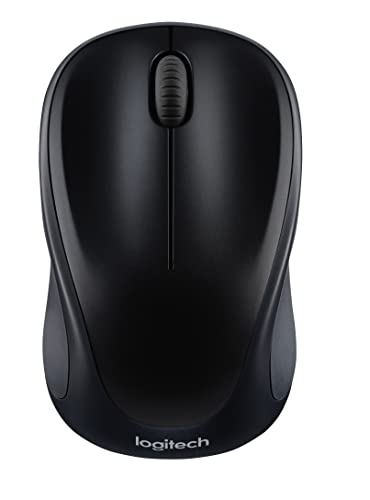
Best for: a first wireless mouse with the longest warranty in this set Skip it if: you want Bluetooth or a rechargeable cell
The M317 asks nothing of you. Plug the USB receiver in, it works, and Logitech backs it with a three-year manufacturer warranty. That's the joint-longest support term here and it's attached to the simplest product, which is a fair definition of a beginner pick.
Logitech lists line-by-line scrolling, optical tracking, soft rubber grips and a one-year battery claim. The receiver holds a connection up to 33 feet, the shortest claimed range in this set. It weighs 3.2 oz and measures 3.72 x 3.73 x 2.17 in, which is nearly square in footprint: the stubbiest shape of the six, and worth noting if you have large hands.
Against the winner it loses on sensitivity, with no published DPI figure, and against the M196 it loses on connection, since this is 2.4GHz dongle only. It sits in the middle of the price positions here without leading on any spec except warranty. That's a narrow case, but it's a real one.
Pros:
- Three-year manufacturer warranty
- Ambidextrous with soft rubber side grips
- One-year battery claim on a single cell
- Genuine plug-and-play, no pairing menu
- Works across Windows, macOS, Chrome OS and Linux
Cons:
- No published DPI or sensitivity steps
- 33 feet claimed range, shortest here
- Dongle occupies a USB-A port
- 3.2 oz and near-square footprint feels stubby
- Mid price position with no leading spec beyond warranty
6. Rii Wireless Noiseless Mouse — Best budget pick
The cheapest and lightest pick at 2.12 oz, with silent switches that matter if you record audio at your desk.
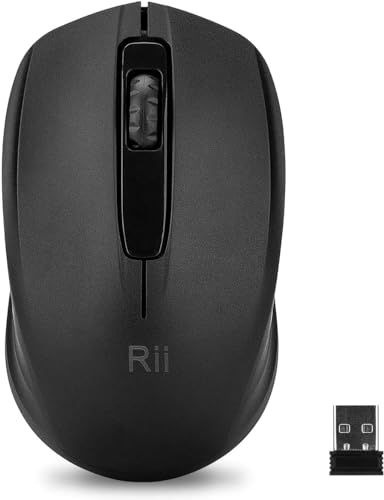
Best for: a quiet second mouse for a shared edit bay or a spare bag Skip it if: you work on macOS
Two specs earn the Rii its place. It's the cheapest of the six and the lightest at 2.12 oz, and it's the only pick here built around silent clicks. If you record voiceover at the same desk you edit at, a noiseless switch stops your own clicking from landing on the take.
Rii states a 1000Hz frequency, a frame rate up to 3600fps and 2.4GHz range up to 10m. Note what's missing there: frame rate is not DPI, so there's no sensitivity figure to compare against the TECKNET picks. The published dimensions read 0.04 x 3.92 x 2.48 in, another obvious listing error in the height field.
The disqualifier for many creators is in the compatibility line. Rii lists Windows, Android and Linux, with no mention of macOS, and every other pick here names macOS explicitly. The AA battery isn't included either, and the published warranty is one year. Buy this as a second mouse, not your main one.
Pros:
- Cheapest of the six picks
- 2.12 oz, the lightest here
- Silent switches, useful near a microphone
- Nano receiver stays put in a laptop port
- 1000Hz frequency claim published
Cons:
- No macOS listed in supported systems
- AA battery not included
- One-year warranty
- No DPI figure published, only a frame rate claim
- Listed 0.04 in height is a data error
Dongle or Bluetooth: which connection suits your rig?
This is the decision most people get wrong, and it has nothing to do with signal quality.
A 2.4GHz dongle wins when your machine has ports to spare and you switch machines rarely. It works before the operating system loads, which matters if you ever boot into a recovery screen or a BIOS. It also needs no pairing, so a fresh install doesn't cost you ten minutes.
Bluetooth wins when ports are scarce or you move between devices. On a laptop with two USB-C ports and a dock, giving up a port to a mouse dongle is genuinely painful. Bluetooth also lets a tablet join the party.
Here's how the six divide:
- 2.4GHz dongle only: TECKNET TK-MS009, Logitech M317, Rii RM100+S
- Bluetooth only: Dell MS3320W, Logitech M196
- Both: TECKNET TK-MS055
That last row is the interesting one. Only one pick in this set covers both cases, which is a strong argument for the TK-MS055 if you run a desktop and a laptop and refuse to own two mice. Just remember it's 4.8 oz, so it's the wrong pick to carry.
What the listings do not tell you about creator work
Read these six listings closely and you notice what's absent. None of them publishes a switch rating, a sensor model, a polling rate or a programmable-button count. Those are the specs that separate a mouse you'll click 400,000 times a year from one you'll replace.
Three gaps worth planning around:
- Button count is undocumented. Editing shortcuts live on side buttons. No listing here states how many buttons it has or whether they can be remapped, so assume basic left, right and scroll until the box tells you otherwise.
- Software support is unstated. Logitech has a configuration app; the listings here don't confirm these models work with it. Don't buy expecting per-application profiles.
- Height data is unreliable. Two picks list a height of 0.1 in and 0.04 in respectively. Those are data-entry errors, not flat mice, and they mean the footprint figures are the only dimensions you can trust on those two.
The practical response is to treat warranty as your insurance against everything you can't see. That's why the three-year terms on the Dell MS3320W and the TECKNET TK-MS055 carry real weight in my ranking, even though a warranty tells you nothing about how the mouse feels.
When a different pick wins
The best wireless mouse for content creators changes with your setup, and three specific conditions flip it.
If every USB port on your machine is full, the TECKNET TK-MS009 is off the table and the Dell MS3320W takes over. Bluetooth costs you a pairing step once and gives you a port back forever.
If you edit at one fixed desk for more than four hours a day, weight stops mattering and the TECKNET TK-MS055 wins. Six DPI steps to 4800, both connection types, an 800mAh rechargeable cell and a 36-month warranty. The 4.8 oz that disqualifies it as a travel mouse is irrelevant when it never leaves the mousepad.
If you record voiceover or podcast audio at the same desk, the Rii RM100+S moves up regardless of price. Silent switches are the only feature here that solves a problem the others cannot, and at 2.12 oz you can keep it in the bag as a second mouse. The catch stays the catch: no macOS in its listed compatibility.
One more threshold. If more than one person uses the machine and one of them is left-handed, choose from the two ambidextrous picks: the Logitech M196 or the M317. Shape symmetry is the one spec that either fits a hand or doesn't.
A note on the search term itself: nothing in these six listings is built or certified for creative work specifically. There's no colour-accuracy angle, no editing-suite integration. Judge them as good general-purpose mice and match the specs to your workflow.
The verdict
Three price positions, three answers.
At the entry positions, the TECKNET TK-MS009 is the pick and it's my overall winner. Five published DPI steps from 800 to 2600 is a capability nothing else cheap here offers, and at 3 oz with a claimed 24-month battery life it asks almost nothing of you. Accept the dongle and the 12-month warranty and you're getting the most adjustable cursor in this group for near the least money. The Rii RM100+S sits alongside it as the cheapest option, worth taking only for its silent switches, and only if you're not on macOS.
In the middle, both Logitechs trade specifications for support. The M317's three-year manufacturer warranty is the longest term in this set, and the M196's Bluetooth-plus-ambidextrous combination is the right answer for a shared machine. Neither publishes a DPI figure, so both hand cursor-speed control back to your operating system.
At the premium end, the split is clear. The Dell MS3320W is the travel choice: 2.24 oz, Bluetooth, three-year advanced exchange. The TECKNET TK-MS055 is the desk choice: 4800 DPI across six steps, dual-mode connection, 36-month warranty, and 4.8 oz you'll only forgive if the mouse never moves. Pick by where you work, not by which number is bigger.
FAQ
Is a wireless mouse for content creators worth it over a wired one?
A wireless mouse for content creators is worth it mainly for desk space and travel. You lose nothing meaningful in the specs published here, and you gain a bag-friendly device. The trade is power management: the AA-powered picks in this set claim 12 to 24 months, while the TECKNET TK-MS055 needs recharging from its 800mAh cell instead.
Which offers better value, the TECKNET TK-MS009 or the Logitech M317?
Better value between the TECKNET TK-MS009 and the Logitech M317 depends on what you want protected. The TECKNET costs less and publishes five DPI steps to 2600, so you get adjustable sensitivity the Logitech doesn't document. The M317 costs more and carries a three-year warranty against TECKNET's 12 months. Buy capability or buy coverage.
How much DPI do I need for video editing and photo work?
How much DPI you need depends on screen size more than software. A lower setting near 800 gives fine control for masking and keyframes; something nearer 2000 to 2600 crosses a 4K timeline faster. That's exactly why the two TECKNET picks matter here: they're the only ones in this set that publish switchable steps rather than a single fixed speed.
Do I need Bluetooth or is a USB dongle fine for the best wireless mouse for content creators?
Bluetooth or a USB dongle both work for the best wireless mouse for content creators, so decide on ports. If your laptop has spare USB-A, a dongle is simpler and needs no pairing. If your ports are all occupied by drives and card readers, choose the Dell MS3320W or Logitech M196, both Bluetooth-only.
What's the most common mistake when buying a wireless mouse for creative work?
The most common mistake is buying on shell photos and the word "ergonomic", which every listing in this category uses without defining. Grip comfort is real but unmeasurable from a product page. Check the numbers you can verify instead: weight, footprint, published sensitivity steps, connection type and warranty length. Those four specs separated all six picks above.
Start with your ports, not your hand. Count the free USB-A slots on the machine you actually edit on, then pick the connection type that doesn't cost you one, and only then compare sensitivity and weight. That single check eliminates half this list in ten seconds. The TECKNET TK-MS009 remains the sensible default because it's the only inexpensive pick that gives you a cursor-speed button rather than a system-settings slider, and a button you can hit mid-edit beats a menu you have to leave the timeline for.