Best Ergonomic Travel Mouse by Weight and Grip

A vertical Logitech leads, a folding TECKNET undercuts everything on weight, and a trackball hides in a travel case. Here's which ergonomic travel mouse belongs in which bag.

By Samuel HarrisUpdated 18 min read
On this page
- How I cut the shortlist down to seven
- Best ergonomic travel mouse at a glance
- Vertical, symmetrical or trackball: which shape travels best?
- 1. Logitech Lift Vertical Ergonomic Wireless Mouse — Best overall
- 2. UGREEN Ergonomic Wireless Mouse — Best upgrade
- 3. Lenovo Yoga Pro Mouse — Best for heavy use
- 4. Logitech M350s Pebble 2 Bluetooth Wireless Mouse — Best for families
- 5. Anker 2.4G Wireless Ergonomic Mouse — Most versatile
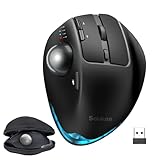
- 6. SABLUTE Wireless Trackball Mouse — Best for quiet operation
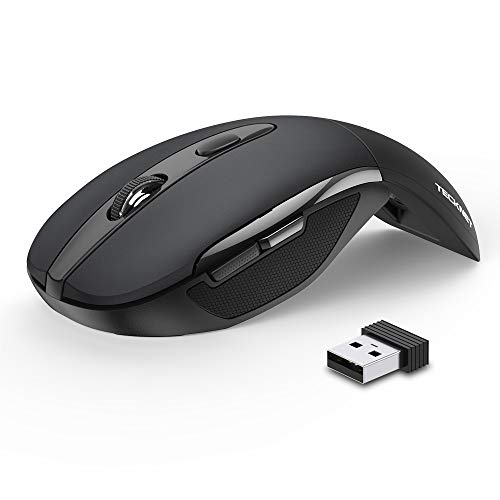
- 7. TECKNET Folding Wireless Mouse — Best budget pick
- How much does an ergonomic travel mouse really weigh?
- What the listings do not tell you about travel
- Which pick fits your bag and your wrist?
- The verdict
- FAQ
The best ergonomic travel mouse is the Logitech Lift Vertical Ergonomic Wireless Mouse, a 4.41 oz vertical body with a 57-degree tilt that fits small to medium right hands without hogging a laptop pocket. If you want the same vertical shape without paying the top price position, the UGREEN Ergonomic Wireless Mouse at 6 oz with dual Bluetooth and 2.4G wireless is the smarter buy.
How I cut the shortlist down to seven
Ergonomics and travel pull in opposite directions. A vertical mouse relaxes the forearm but tends to be tall and bulky. A slim pebble slides into a sleeve but leaves your wrist flat on the desk. A trackball spares your shoulder but weighs a full pound. So the shortlist had to cover all three shapes.
Three cuts shaped the field.
- Wired-only picks were dropped. A cable on a hotel desk is a snag risk and a cord to coil. Every survivor here is wireless, and five of the seven offer Bluetooth so they pair without a USB dongle.
- Body shape had to match a real hand position. That meant a vertical tilt, a properly contoured symmetrical body, or a thumb-controlled trackball. Flat two-button pucks were out, even the pretty ones.
- Portability had to be documented. Weight and dimensions from
specs[]had to be published, so you can weigh the pick against your bag before buying. The SABLUTE trackball only made the cut because it ships with its own travel case.
That left seven bodies across three shapes: three vertical mice, three symmetrical or contoured designs, and one trackball. Prices span the entry, mid and premium positions in this set, so there is a serious pick at every level.
Best ergonomic travel mouse at a glance
| Pick | Shape | Weight | Price |
|---|---|---|---|
Best overall Logitech Lift Vertical Ergonomic Wireless Mouse |
Vertical, 57° tilt | 4.41 oz | Check Price |
Best upgrade UGREEN Ergonomic Wireless Mouse |
Vertical | 6 oz | Check Price |
Best for heavy use Lenovo Yoga Pro Mouse |
Symmetrical, contoured | 3.52 oz | Check Price |
Best for families Logitech M350s Pebble 2 Bluetooth Wireless Mouse |
Slim pebble | 2.68 oz | Check Price |
Most versatile Anker 2.4G Wireless Ergonomic Mouse |
Vertical | 4.48 oz | Check Price |
Best for quiet operation SABLUTE Wireless Trackball Mouse |
Thumb trackball, 0°/18° | 1 lb | Check Price |
Best budget pick TECKNET Folding Wireless Mouse |
Folding flat | 1.87 oz | Check Price |



Vertical, symmetrical or trackball: which shape travels best?
Ergonomics splits into three body shapes here, and each one packs differently. Pick the shape before you pick the brand.
- Vertical mice hold the hand in a handshake position. Three picks in this set are vertical: the Logitech Lift, the UGREEN and the Anker. They are the tallest bodies in the group, so they eat pocket space, but the wrist rotation you save is real.
- Symmetrical or contoured bodies sit closer to a flat pebble but keep a shaped grip and a thumb rest. The Lenovo Yoga Pro is the full-sized version. The Logitech M350s Pebble 2 is the ultra-slim version.
- A thumb trackball keeps the mouse still while your thumb moves the cursor. The SABLUTE is the only one in this set, and it is heavy at 1 lb, which is why it ships with a travel case rather than expecting you to shove it in a sleeve.
Here's the trick with travel: the shape that suits your wrist at your desk may not be the shape that suits your wrist in a coffee shop with 8 inches of table. If your travel surface is small, a trackball or a slim pebble wins because you barely move your arm. If you are working four hours from a hotel room desk, a vertical body earns its space in your bag.
1. Logitech Lift Vertical Ergonomic Wireless Mouse — Best overall
A properly certified vertical mouse at a genuine travel weight, sized for small to medium right hands.
Best for: small to medium right hands that want a proper vertical tilt on the road Skip it if: you're left-handed or your bag is already stuffed
The Lift is the pick that reconciles ergonomics and travel better than anything else here. Logitech gives you a 57-degree vertical tilt in a body that measures 3 x 5.6 x 3.4 in and weighs 4.41 oz. Compare that with the SABLUTE trackball at 1 lb: the Lift is roughly a quarter of the weight and takes up much less pocket space. It is a 2022 release, and the model number 910-006466 is the graphite right-handed version.
Logitech says the mouse is "ergo-certified", designed and tested against criteria set out by ergonomists, and describes a softly textured grip with a snug thumb rest. It also claims a SmartWheel for scrolling and whisper-quiet clicks, though the listing does not publish a decibel figure. The best ergonomic travel mouse for most people has to fit a real hand: this one is explicitly built for small to medium right hands, which is the trade-off. Larger paws will overhang, and lefties need to look elsewhere. A 1-year manufacturer warranty rounds it out, shorter than the SABLUTE's 2-year and much shorter than the TECKNET's 36-month claim.
Pros:
- 57-degree vertical tilt eases wrist rotation
- Light for a vertical body at 4.41 oz
- Ergo-certified by Logitech's own testing
- Compact 3 x 5.6 x 3.4 in footprint
- Silent-click claim from the manufacturer
Cons:
- Right-handed only in this graphite version
- Sized for small to medium hands, not large
- The most expensive pick here
- 1-year warranty, shorter than two rivals
2. UGREEN Ergonomic Wireless Mouse — Best upgrade
A vertical mouse from the entry price tier with Bluetooth and 2.4G on the same body.

Best for: shoppers who want a vertical shape without paying premium tier Skip it if: you need a left-handed body
The UGREEN is the second-cheapest here and the only vertical mouse in the set that sits in the entry price band, which is why it earns the upgrade label over the Anker. UGREEN publishes a weight of 6 oz and dimensions of 0.04 x 4.72 x 3.39 in, plus a 1-year manufacturer warranty. Model 65042.
Where it earns its keep against cheaper flat mice is connectivity. UGREEN says the mouse pairs over Bluetooth or 2.4G wireless with a range up to 10 m, and can switch between three devices. It lists four DPI levels at 1000, 1600, 2000 and 4000, and describes PTFE glide feet and quiet-click buttons. The vertical handshake position is the same idea as the Lift, though UGREEN does not claim third-party ergonomic certification and does not publish the tilt angle.
The trade-off against the Lift is size and weight: the UGREEN is heavier by 1.59 oz and larger in footprint, so it takes up more room in a laptop sleeve. Against the Anker vertical, it wins on Bluetooth support and a documented DPI ladder that goes up to 4000. It is the pick if you want a vertical body but the Lift's price position is a stretch.
Pros:
- Vertical body at an entry price position
- Bluetooth and 2.4G on one mouse
- Four DPI levels up to 4000
- PTFE glide feet claim from UGREEN
- Pairs with up to three devices
Cons:
- Heavier than the Lift at 6 oz
- No published tilt angle
- Right-handed body only
- No third-party ergonomic certification claimed
3. Lenovo Yoga Pro Mouse — Best for heavy use
A full-sized symmetrical body with USB-C charging and a metal scroll wheel, built for long sessions.

Best for: all-day workers who want a full-sized symmetrical body and USB-C charging Skip it if: you're left-handed or want a strong vertical tilt
The Yoga Pro is the pick when travel means a working week in a hotel, not a two-hour flight. Lenovo lists it as a right-handed ergonomic design with six buttons, a two-way metal scroll wheel, USB-C recharging and dual-mode Bluetooth 5.1 pairing. Weight is 3.52 oz, dimensions 0.1 x 5 x 2.8 in, warranty 1 year, model GY51P42818, released 2024.
Lenovo claims a full-sized body with soft side material and a placed thumb rest, plus a blue optical sensor rated for "almost any surface". Multi-device switching is via a bottom pairing button. What separates this pick for heavy use is the combination of size and rechargeability: at 3.52 oz it is light enough for a bag, big enough that your palm does not cramp after three hours, and the USB-C port means one cable does laptop, phone and mouse. None of the AAA-battery picks here can say that.
The trade-off is shape. The Yoga Pro is contoured but not vertical, so it will not deliver the wrist relief of the Lift or the UGREEN. It is also right-handed only. The listing does not publish DPI figures or a specific battery life claim, which is a gap next to the UGREEN and TECKNET.
Pros:
- Full-sized symmetrical body suits long sessions
- USB-C rechargeable, no AAA batteries needed
- Six programmable buttons
- Bluetooth 5.1 dual-device pairing
- Light for its size at 3.52 oz
Cons:
- Right-handed only
- Not a vertical body, so less wrist tilt
- Premium price position
- No published DPI or battery life figures
4. Logitech M350s Pebble 2 Bluetooth Wireless Mouse — Best for families
The lightest of the shaped picks and the friendliest for a shared household laptop.

Best for: shared laptops that hop between Windows, macOS, iPad and Chromebook Skip it if: you have larger hands or want a vertical body
The Pebble 2 is not the deepest ergonomic body here, but it is the pick if the mouse belongs to a household rather than a person. Logitech publishes a weight of 2.68 oz, dimensions of 1.05 x 4.2 x 2.31 in, a 1-year limited hardware warranty, and model 910-007168. The 2023 release. It sits in the entry price band, third-cheapest of the seven.
Logitech says the Pebble 2 pairs over Bluetooth to up to three devices across Windows, macOS, iPadOS and ChromeOS, and switches with an Easy-Switch button. Silent Touch Technology is claimed to cut click noise by 90% on the listing. The body is made with recycled plastic per Logitech. A middle button is customisable through the Logi Options+ app for shortcuts.
What earns this the families label is that OS-hop. If four people share one mouse across a Chromebook, an iPad and two laptops, no other pick in this set matches its cross-OS pairing with the exact same low-profile shape. The trade-off is ergonomics: it is a slim pebble, not a contoured or vertical body, so anyone with a proper wrist complaint should look at the Lift or the UGREEN instead. Large hands will find it fiddly.
Pros:
- Slim 2.68 oz body slips into any sleeve
- Pairs across Windows, macOS, iPadOS, ChromeOS
- Easy-Switch button between three devices
- Silent Touch Technology claim from Logitech
- Recycled-plastic build per the listing
Cons:
- Not a proper ergonomic shape for wrist relief
- Small footprint suits smaller hands
- 1-year warranty is short in this set
- No published DPI figures
5. Anker 2.4G Wireless Ergonomic Mouse — Most versatile
The other vertical option, at a mid price position, with a documented DPI ladder.

Best for: a right-handed desk setter looking for a low-cost vertical mouse Skip it if: you want Bluetooth or a rechargeable battery
The Anker sits between the Lift and the UGREEN as the mid-priced vertical in the set. Anker publishes dimensions of 3.15 x 3.98 x 3.23 in and a weight of 4.48 oz, essentially the same as the Lift on the scale. Model AK-98ANWVM-UBA. Size is listed as 4.72" long by 2.94" wide.
Anker claims 800, 1200 and 1600 DPI optical tracking, next and previous side buttons for browsing, and an eight-minute auto power-off to save battery. It runs on 2 AAA batteries (not included), and the listing describes 2.4G wireless via a USB receiver, not Bluetooth. That is the split between this pick and the UGREEN: the UGREEN adds Bluetooth and a higher DPI ceiling; the Anker sticks to a dongle. For travel that means one more thing to lose, but also nothing to pair, which some people prefer at a coffee-shop desk.
The most versatile label is about hand support rather than feature count: the Anker's dimensions land between the compact Lift and the taller UGREEN, so it is a reasonable fit for medium to large right hands where the Lift feels small. The trade-offs are real: no Bluetooth, no rechargeable battery, and the listing does not publish a warranty length, which is a gap next to the SABLUTE's 2-year and the TECKNET's 36-month claims.
Pros:
- Vertical body at a mid price position
- Three-step DPI at 800, 1200, 1600
- Side buttons for browser back and forward
- Auto power-off after 8 minutes
- Roomier than the Lift for medium to large hands
Cons:
- 2.4G dongle only, no Bluetooth
- AAA batteries, not rechargeable
- No published warranty length
- Only one seller lists it
6. SABLUTE Wireless Trackball Mouse — Best for quiet operation
The only trackball here, with an adjustable tilt and a carry case that reframes the weight problem.

Best for: hotel-desk workers who want thumb-trackball control and a carry case Skip it if: your carry-on is already at the weight limit
The SABLUTE is the outlier in the set and the pick for a very specific reader. SABLUTE lists a 0-degree or 18-degree adjustable ergonomic tilt, five DPI levels from 800 to 4800, thumb trackball control, rechargeable battery with an on-off backlight, and Bluetooth plus USB-receiver pairing to three devices at once. It comes with a travel case, weighs 1 lb, and carries a 2-year warranty. Model F-35.
For travel, the trick with a trackball is that the mouse itself never moves. On a 6-inch tray-table or the arm of an airline seat, that is a huge advantage over any body that needs a mousepad's worth of space. SABLUTE describes the operation as silent, which is why this pick earns the quiet-operation label, though the listing does not publish a decibel figure. The 18-degree tilt is a milder ergonomic angle than the Lift's 57 degrees, but the wrist stays planted rather than swept, which is what protects the shoulder over an eight-hour day.
The obvious trade-off is weight. At 1 lb, the SABLUTE is more than five times the weight of the TECKNET and more than three times the Lift. It is packing that costs. Against the rest of the set, the 2-year warranty is the joint-longest published here.
Pros:
- Only trackball in the set, cursor moves without arm motion
- Adjustable 0° or 18° tilt claim
- Five DPI steps from 800 to 4800
- 2-year warranty, joint-longest here
- Ships with a travel case
Cons:
- 1 lb, heavier than every other pick
- Only one seller lists it
- Trackball takes a few days to learn
- No published dimensions in the listing
7. TECKNET Folding Wireless Mouse — Best budget pick
Folds flat, weighs almost nothing, and carries the longest warranty claim in the set.
Best for: packing light, with a mouse that folds flat into a laptop sleeve Skip it if: you have large hands or need Bluetooth
The TECKNET is the cheapest of the seven and the lightest at 1.87 oz. Folded, its footprint is 4.21 x 2.68 x 1.52 in. TECKNET describes a folding ergonomic body with soft rubber grips that fits either hand, three DPI settings at 1000, 1500 and 2000, 2.4G wireless with a 10 m range claim, and compatibility with Windows, macOS, ChromeOS and Linux. Model M017. It runs on 2 AAA batteries with a claimed 24-month battery life and auto-sleep, and TECKNET states a 36-month warranty and a 5-million-click endurance test.
The fold trick is what earns this the budget label. Unlike every other pick, it collapses into a much smaller shape and slides into a laptop sleeve pocket that would not fit a Pebble 2, let alone a Lift. For someone who carries a mouse only occasionally and does not want to pay for premium ergonomics, this is the sensible starter.
The trade-offs are honest. It is 2.4G only, no Bluetooth, so you lose a USB port on a laptop. The folding body is not a serious ergonomic shape: it is a compromised curve, not a vertical or contoured grip. Large hands will find it cramped. But at this price position, and with a 36-month warranty claim that outlasts every other pick here, it earns its slot.
Pros:
- Cheapest of the seven
- Lightest here at 1.87 oz
- Folds flat for a laptop sleeve
- 36-month warranty claim, longest in the set
- Ambidextrous body per TECKNET
Cons:
- 2.4G dongle only, no Bluetooth
- Folded shape is a light ergonomic compromise
- AAA batteries, not rechargeable
- DPI tops out at 2000
How much does an ergonomic travel mouse really weigh?
Weight is the specification a travel buyer should look at first, and the seven picks here spread across a wide range. In order:
- TECKNET Folding Wireless Mouse: 1.87 oz
- Logitech M350s Pebble 2: 2.68 oz
- Lenovo Yoga Pro Mouse: 3.52 oz
- Logitech Lift: 4.41 oz
- Anker 2.4G Wireless Ergonomic Mouse: 4.48 oz
- UGREEN Ergonomic Wireless Mouse: 6 oz
- SABLUTE Wireless Trackball Mouse: 16 oz (1 lb)
The gap from top to bottom is roughly 8.5 times. In practice, anything under 5 oz disappears in a bag. Between 5 and 8 oz, you notice it in the outer pocket of a laptop sleeve. At 1 lb, you notice it on the airline scale, which is why the SABLUTE ships with its own case: it wants you to plan for it, not stuff it in.
The catch is that low weight buys shape compromises. The lightest two here, the TECKNET and the Pebble 2, are the least ergonomic bodies in the set. The heaviest, the SABLUTE, is arguably the most ergonomic. So weight is a constraint, not the point. Set your bag's budget first, then pick the best ergonomic shape that fits inside it.
What the listings do not tell you about travel
The specifications and feature claims cover the mouse. They do not cover the trip. A few things worth thinking through before you buy:
- The dongle. Four of these picks include a 2.4G USB receiver. On modern thin laptops, that occupies one of your two USB-C ports through an adapter. If you already run out of ports on the road, favour the Bluetooth-capable picks: the Lift, the Yoga Pro, the M350s, the SABLUTE and the UGREEN all support Bluetooth per their listings.
- AAA batteries versus USB-C. The Lenovo Yoga Pro and the SABLUTE recharge over USB. The Anker and the TECKNET need AAA cells you have to remember to pack. Airport newsagents charge more for two AAAs than most people expect.
- The mousepad question. Optical mice struggle on glass and gloss. The Yoga Pro claims multi-surface tracking, and the UGREEN describes PTFE glide feet, but a small cloth mousepad in your bag still helps. A trackball sidesteps this problem, because the ball rolls, not the mouse.
- Hand size fit. Logitech explicitly designs the Lift for small to medium right hands. Larger hands should look at the Anker or the Yoga Pro. This is on the listing, not something to guess.
- Left-handers. Most of this set is right-handed only. The TECKNET describes itself as ambidextrous. If left-handed use matters, that shrinks the field fast.
Which pick fits your bag and your wrist?
Match the pick to the trip. A few if/then rules for the common cases:
- If your bag is already at the weight limit, the TECKNET at 1.87 oz is the choice, folded flat into a sleeve pocket.
- If your wrist actively hurts by the end of a workday, the Logitech Lift's 57-degree vertical body is where to start, provided your hand is small to medium and right-handed.
- If you work in hotel rooms for a week at a time, the Lenovo Yoga Pro's USB-C charging removes one item from your packing list.
- If the mouse is shared across a household of laptops and iPads, the Logitech M350s Pebble 2 hops between Windows, macOS, iPadOS and ChromeOS.
- If your travel desk is tiny, the SABLUTE trackball needs no space to swipe, at the cost of 1 lb in your bag.
- If you want the best ergonomic travel mouse shape (vertical) without the top price, the UGREEN is the value pick.
- If you refuse to pair anything and just want a dongle to work, the Anker keeps things simple.
The verdict
The Logitech Lift Vertical Ergonomic Wireless Mouse is the winner because it is the only pick here that combines a proper 57-degree vertical tilt, an ergo-certification claim from the manufacturer, and a 4.41 oz weight that a laptop sleeve can absorb. It is a travel mouse that treats your wrist like a workstation would. That is the whole job, and nothing else in this set does all three at once.
Two conditions flip the pick. First, if the Lift's price position is a stretch, the UGREEN is the runner-up: it delivers the same vertical shape and adds Bluetooth plus 2.4G at the second-cheapest position in the set, at the cost of 1.59 oz of extra weight and no published tilt angle. Second, if your travel week means eight-hour hotel sessions rather than airport hops, the Lenovo Yoga Pro's USB-C charging and full-sized symmetrical body make the case that you should prefer stamina over tilt.
Below those, the Pebble 2 wins the shared-laptop case, the SABLUTE wins the tiny-desk case, the Anker wins the medium-to-large right hand at mid price, and the TECKNET wins on sheer pack weight. Pick the constraint that matters most on your trip and the best ergonomic travel mouse for you follows from the list above.
FAQ
Is an ergonomic travel mouse worth it over a normal one?
An ergonomic travel mouse is worth it if you spend more than a couple of hours a day at a keyboard away from your desk. A vertical body like the Logitech Lift's 57-degree tilt takes the twist out of your forearm, and a trackball like the SABLUTE removes arm sweep entirely. If you only mouse for email, a slim Pebble 2 is fine.
Which is the best ergonomic travel mouse for small hands?
The best ergonomic travel mouse for small hands is the Logitech Lift, which Logitech explicitly designs for small to medium right hands. Its 3 x 5.6 x 3.4 in body is more compact than the UGREEN and the Anker verticals. Small hands should skip the Lenovo Yoga Pro's full-sized shape and the SABLUTE trackball, which suit larger palms.
What's the difference between the Logitech Lift and the UGREEN?
The Logitech Lift and the UGREEN are both vertical mice, but they differ on three things. The Lift weighs 4.41 oz and publishes a 57-degree tilt with ergo-certification claim, sitting at the top price position. The UGREEN weighs 6 oz, adds Bluetooth plus 2.4G and four DPI levels up to 4000, and lands in the entry price band without publishing its tilt angle.
Can I use a folding mouse like the TECKNET on a laptop trip?
Yes, a folding mouse like the TECKNET is built for laptop trips. It folds flat to 4.21 x 2.68 x 1.52 in and weighs 1.87 oz, the lightest here. TECKNET claims 24 months of battery life from 2 AAA cells, 2.4G wireless with a 10 m range, and a 5-million-click endurance test. No Bluetooth, so you use one USB port.
What should I avoid in an ergonomic travel mouse?
Avoid mice with no published weight or dimensions, because you cannot plan around a spec that does not exist. Avoid 2.4G-only mice if you are already short on USB ports on a thin laptop. Avoid a full trackball for a carry-on-only trip: at 1 lb, the SABLUTE is deliberate luggage, not something you toss in a pocket at the last minute.
The mouse you actually use on the road is the one that fits your bag without a fight, so start with the weight and dimensions and work back to shape from there. The Logitech Lift earns the top slot because it manages to be a serious vertical mouse and still weigh 4.41 oz, which is the balance most travellers need. Order it, use it for a week at your normal desk before your next trip, and let your wrist tell you whether the 57-degree tilt is the correction you needed all along. If it isn't, the UGREEN and the Pebble 2 are ready to catch you.