Best Silent Trackball Mouse: Quiet Thumb Control

Seven trackballs compared on click noise claims, tilt angle, DPI range and warranty length, with the Logitech Ergo M575S leading on posture and quiet clicks.

By Samuel HarrisUpdated 17 min read
On this page
- How I screened these seven trackballs
- Best silent trackball mouse at a glance
- What does silent actually mean on a trackball?
- Thumb control, tilt angle and why posture decides this
- 1. Logitech Ergo M575S Wireless Bluetooth Trackball Mouse — Best overall
- 2. Logitech MX Ergo S Advanced Wireless Trackball Mouse — Best premium
- 3. Nulea Wireless Trackball Mouse (M511) — Most versatile
- 4. TECKNET Wireless Trackball Mouse — Best for quiet operation
- 5. Nulea M501 Wireless Trackball Mouse — Best upgrade
- 6. SABLUTE Wireless Trackball Mouse — Best budget pick
- 7. SANWA Wired Trackball Mouse — Best minimal setup
- Which trackball fits your desk and hand size?
- What the listings will not tell you about silent clicks
- The verdict
- FAQ
The best silent trackball mouse for most desks is the Logitech Ergo M575S, a thumb-controlled wireless trackball that Logitech describes as "now with quiet" clicks and pairs that with a certified ergonomic shell. If you want a steeper 20-degree tilt and USB-C charging, the Logitech MX Ergo S Advanced is the pick, with Logitech claiming 80% quieter clicks and a 24-hour charge from one minute at the cable.
How I screened these seven trackballs
I started with the trackball corner of the mouse category and looked for listings that specifically claim silent, quiet or noiseless operation in their feature bullets or product name. Seven survived that filter and made this shortlist. Every one is a thumb-controlled trackball, which matters: finger-operated trackballs and thumb-operated trackballs feel completely different, and mixing them in one ranking would be dishonest.
What I compared, in order of weight:
- Whether the silence claim covers the whole mouse or just the main buttons.
- Published tilt angle, since posture is what a trackball is for.
- DPI range, so cursor speed can match monitor size.
- Connection options: Bluetooth, 2.4 GHz dongle, wired.
- Warranty length, which is one of the few durability signals a listing gives you.
- Weight and dimensions, where published.
I did not test these units. What I did was read every specification and every feature bullet in the seven listings and line them up so you can see which claims are real spec sheet numbers and which are marketing. Where a brand says "50% less strain" or "80% quieter", I treat that as a claim, not a measurement.
Best silent trackball mouse at a glance
| Pick | Tilt & silence claim | Warranty | Price |
|---|---|---|---|
Best overall Logitech Ergo M575S |
Sculpted shape "now with quiet" clicks |
1 year | Check Price |
Best premium Logitech MX Ergo S Advanced |
20-degree tilt 80% quieter clicks claim |
1 year | Check Price |
Most versatile Nulea M511 |
21.7-degree tilt stand "true silent" whole-mouse claim |
12 months | Check Price |
Best for quiet operation TECKNET TK-MS023 |
16-degree tilt silent mouse claim |
36 months | Check Price |
Best upgrade Nulea M501 |
Contoured shell no explicit silence claim |
12 months | Check Price |
Best budget pick SABLUTE TM286M |
Ergonomic shell durable micro-switch buttons |
2 years | Check Price |
Best minimal setup SANWA GMATB128BK |
Wired body silent click buttons claim |
1 year | Check Price |


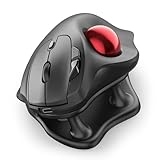


What does silent actually mean on a trackball?
Silence on a trackball is not one number. It is several small sources of sound, and the listings almost never cover all of them.
The obvious source is the left and right click. SANWA calls its buttons "noiseless left and right", TECKNET describes a "silent mouse", and Logitech says the MX Ergo S Advanced has "80% quieter clicks". None of those numbers come with a decibel figure or a reference point.
The second source is the scroll wheel. A ratcheting wheel clicks through detents, and a smooth wheel does not. Only the Nulea M511 explicitly promises silence "from the trackball to every button and scroll wheel". Every other pick here only claims quiet buttons.
The third source is the trackball itself rolling in its socket, which nobody publishes a figure for. Expect a soft rumble that varies with the ball surface.
The best silent trackball mouse for most rooms is one where the listing addresses all three sources rather than one. That is why the Nulea M511's "true silent control" language is worth attention, and why the Logitech pair's ergonomic credentials still beat the field on the rest of the decision.
Thumb control, tilt angle and why posture decides this
Every product here is a thumb-controlled trackball. That is the whole point: your hand stays planted, the ball moves the cursor, and your forearm stops sliding across the desk. Posture, not click volume, is why most buyers actually reach for a trackball.
Tilt angle is the specification I would compare first:
- Logitech MX Ergo S Advanced: 20-degree tilt, with Logitech claiming a 27% reduction in muscle strain.
- Nulea M511: 21.7-degree tilt stand, the steepest published here.
- TECKNET TK-MS023: 16-degree vertical angle, with the brand claiming a 50% strain reduction.
- Logitech Ergo M575S: sculpted shape with no numeric tilt figure, but a claimed 25% forearm muscle strain reduction.
- Nulea M501, SABLUTE TM286M, SANWA GMATB128BK: contoured shells, no tilt angle published.
A steeper tilt puts your wrist in a more neutral position, which is the whole reason to buy a vertical or semi-vertical trackball. If tilt is your priority, the MX Ergo S Advanced and the Nulea M511 are the two picks that publish a real figure. If click silence outranks tilt, the Nulea M511 is the only listing here that promises silence across the wheel as well as the buttons.
1. Logitech Ergo M575S Wireless Bluetooth Trackball Mouse — Best overall
The Ergo M575S is the safest silent trackball buy because Logitech pairs a certified ergonomic shell with a "now with quiet" click update on a shape that has been refined across generations.
Best for: shared offices and late-night sessions where every click carries Skip it if: you want a rechargeable battery instead of AA cells
The M575S is a 2024 refresh (model 910-007392) of a trackball that has been sold in one form or another for years, and Logitech has kept the same sculpted shape that the Ergo Lab team designed. The pitch is a 25% reduction in forearm muscle strain, certified by ergonomists, on a mouse that connects over Bluetooth or a Logi Bolt receiver. Three customisable buttons and Smart Actions in the Logi Options+ app cover shortcut work.
Against the rest of this set, the M575S is the most expensive pick here and only Logitech's MX Ergo S Advanced sits above it. What you buy at this position is the Ergo Lab certification, the software stack and the assurance of a widely-stocked spare. The trade-off is that Logitech does not publish a numeric tilt angle for the M575S the way it does for the MX Ergo S, so if steep tilt is your priority you should skip up to that pick.
Pros:
- Certified ergonomic shape with 25% forearm strain claim
- "Now with quiet" click update on a mature design
- Logi Options+ app with Smart Actions and shortcuts
- Bluetooth pairing on the 2024 refresh
- 1-year limited hardware warranty from a major brand
Cons:
- The most expensive pick in this set alongside the MX Ergo S
- No published tilt angle to compare against the Nulea or TECKNET
- Only two sellers list it right now
2. Logitech MX Ergo S Advanced Wireless Trackball Mouse — Best premium
The MX Ergo S Advanced is the pick when tilt angle, USB-C charging and quieter clicks all matter at once, and it is the only trackball here to publish all three.

Best for: medium to large hands that want tilt adjustment and USB-C charging Skip it if: you rarely spend more than an hour a day at the desk
Logitech pitches the MX Ergo S (model 910-007259) as its flagship trackball, and the numbers back that up. The 20-degree tilt angle is the deciding specification: it is the only Logitech pick here with a published tilt figure, and Logitech claims a 27% forearm strain reduction against a flat mouse. Six customisable buttons, precision-mode toggling and Logi Options+ integration handle the productivity side. The 80% quieter click claim is Logitech's own, referenced against an unnamed baseline in its footnote.
Charging is USB-C, and Logitech states up to 24 hours of use from a single one-minute top-up or 120 days from a full charge. The rubber grip is soft, the shell is sculpted for medium-to-large hands, and this is the priciest pick in the seven. That is the trade-off: everything the M575S has, plus the tilt, plus the rechargeable cell, at the top of the range.
Pros:
- 20-degree tilt with a 27% strain reduction claim
- USB-C fast charge, 24 hours from a minute at the cable
- Six customisable buttons and precision-mode toggle
- 80% quieter clicks claim on the 2024 refresh
- Ergonomist-certified for medium to large hands
Cons:
- The highest price position of the seven picks
- Cable for USB-C charging is not included in the box
- Sculpted for medium-to-large hands, less suited to smaller ones
3. Nulea Wireless Trackball Mouse (M511) — Most versatile
The Nulea M511 is the only pick here that promises silence across the trackball, every button and the scroll wheel, on top of the steepest published tilt in the set.

Best for: buyers who want a tilt stand and silence across every button and the scroll wheel Skip it if: you need a brand with a long service history
The M511 weighs 4.51 oz across a 5.35 by 4.06 in footprint, and its listing pitch is "true silent control": Nulea explicitly says the silence covers "the trackball to every button and scroll wheel". That coverage is unique among the seven listings in this shortlist. The 21.7-degree tilt stand is the steepest published tilt figure here, edging out the MX Ergo S by 1.7 degrees.
Connection is either Bluetooth or the bundled USB receiver, and the DPI selector runs 400, 800, 1200 and 1600 in four steps. The 12-month warranty matches Logitech's, and only one seller lists the M511 today, which is worth noting if buyer choice matters to you. The trade-off against the Logitech pair is brand-service reach: Nulea is a specialist rather than a household name, so if you want a shop that stocks spare receivers and mice under one roof, the M575S wins that argument.
Pros:
- Steepest published tilt in this set at 21.7 degrees
- "True silent" claim covering ball, buttons and wheel
- Four DPI steps from 400 to 1600
- Bluetooth plus USB receiver for either laptop or desktop
- 4.51 oz light body for a tilt-stand design
Cons:
- Only one seller listing the mouse currently
- Warranty is 12 months against the SABLUTE's 2 years
- Younger brand than Logitech or SANWA
4. TECKNET Wireless Trackball Mouse — Best for quiet operation
The TECKNET TK-MS023 pairs an explicit silent-mouse claim with the longest warranty in this shortlist, at 36 months, on a light 2.12 oz body.

Best for: hot-desk workers who switch between a laptop, tablet and desktop Skip it if: you want a heavy, planted feel under your palm
The TK-MS023 is the lightest pick published here at 2.12 oz across a 5 by 4 in footprint. TECKNET calls it a "silent mouse with adjustable DPI" and lists five DPI steps from 100 up to 1200. The 16-degree vertical angle is shallower than the Logitech MX Ergo S or the Nulea M511, but TECKNET claims a 50% muscle strain reduction against a flat mouse, and it is the only pick in the seven to publish a triple-connection setup: two Bluetooth channels plus a 2.4 GHz receiver, switchable at a button tap.
The 36-month warranty is the standout figure, longer than either Logitech's 12 months or Nulea's, and it is the reason the TK-MS023 earns the quiet-operation slot rather than a budget label. The 500 mAh cell is claimed to charge in 15 minutes for a day of use. The trade-off is heft: this is the lightest mouse in the set, and a light trackball can feel less anchored under an active thumb than a Logitech.
Pros:
- 36-month warranty, longest in this shortlist
- Silent-mouse feature bullet from the manufacturer
- Triple-device pairing across BT1, BT2 and 2.4 GHz
- Five DPI steps from 100 to 1200
- 500 mAh cell with a 15-minute quick-charge claim
Cons:
- 16-degree tilt is shallower than the Nulea M511
- 2.12 oz body may feel light under an active thumb
- Only one seller currently lists it
5. Nulea M501 Wireless Trackball Mouse — Best upgrade
The M501 is the pick when you want Nulea's ergonomic layout and multi-device pairing without stretching to the tilt-stand M511 above it.

Best for: spreadsheet and CAD users who need multi-device pairing on a mid-range budget Skip it if: silent clicks are your single non-negotiable
The M501 weighs the same 4.51 oz as the M511 but sits on a slightly larger 5.51 by 4.37 in footprint, and it drops the 21.7-degree tilt stand for a plainer curved shell. What you keep is the six-button layout, three-device pairing over Bluetooth or 2.4 GHz dongle, and the four-step DPI selector. This is the only pick in the set that Amazon files under Input Devices then Trackballs rather than the general mouse category, which suggests a slightly more enthusiast positioning.
Here is the honest part: the M501 listing does not use the word "silent" or "quiet" in its bullets. That does not mean the clicks are loud, but it means Nulea does not promise silence the way the M511 does, or Logitech does with the MX Ergo S. If click volume is your primary constraint, the M511 or the Ergo M575S are safer buys. Where the M501 wins is price position against the Logitech pair while keeping the six-button layout that a productivity shortcut user wants.
Pros:
- Six programmable buttons for productivity shortcuts
- Three-device pairing over Bluetooth or 2.4 GHz
- Rechargeable battery for wire-free use
- Filed under the specialist Trackballs category
- 12-month warranty
Cons:
- No explicit silent or quiet click claim in the listing
- No published tilt angle
- Larger 5.51 by 4.37 in footprint than the M511
6. SABLUTE Wireless Trackball Mouse — Best budget pick
The SABLUTE TM286M is the cheapest of the seven and still ships with a 2-year warranty, longer than either Logitech pick here.

Best for: first-time trackball buyers testing the layout without spending much Skip it if: you want a published weight figure and a stated tilt angle
The TM286M sits at the entry position in this set and covers the basics: thumb control, five DPI settings, 2.4 GHz plus Bluetooth for up to three devices, and a rechargeable cell with a USB charging port. The 2-year warranty is unusual at this price band and is one of the reasons this pick earns the budget slot rather than being cut.
Where the SABLUTE thins out is in the detail specifications. No weight figure is published, no tilt angle is stated, and the silence question is not directly answered: SABLUTE describes "durable micro-switch buttons" but does not use the words silent or quiet in its bullets. Dedicated forward and back buttons cover browser navigation. The trade-off, then, is straightforward: you are paying the lowest price in the seven for the fewest published specifications. If you already know a thumb trackball works for you and want a spare or a second desk unit, this earns its slot.
Pros:
- Cheapest of the seven picks in this shortlist
- 2-year warranty, longer than either Logitech pick
- Three-device pairing over 2.4 GHz plus Bluetooth
- Five DPI settings for varied task speeds
- Dedicated forward and back navigation buttons
Cons:
- No published weight figure
- No stated tilt angle
- No explicit silent or quiet click claim in the listing
7. SANWA Wired Trackball Mouse — Best minimal setup
The SANWA GMATB128BK is the pick when a cable simplifies your life, and it publishes the clearest silent-click claim of any wired option here.

Best for: a fixed desk where a wired connection removes battery worry Skip it if: you move between rooms or want Bluetooth pairing
The GMATB128BK is the only wired pick in the seven, and it stands out on that alone. USB-C and USB-A ports are both supported. The mouse weighs 5.78 oz across a 1.86 by 4.13 by 5.07 in body, which is the heaviest and tallest in this shortlist by a clear margin, and that mass matters: a wired trackball you never move can afford to plant itself. SANWA describes "noiseless left and right buttons" specifically, and offers four DPI steps between 600 and 1600. Programmable buttons round it out.
Compatibility is Windows 11 back to 7 and macOS 10.13 to 10.15. Note the macOS ceiling: if you run a recent version of macOS, check the manufacturer's compatibility page before you buy. The trade-off is obvious against the six wireless picks above: no Bluetooth, no dongle, no travel case. What you get is a mouse that never needs charging, a 1-year worry-free warranty and lifetime technical support from the brand.
Pros:
- Wired connection removes any charging worry
- Explicit silent-click claim on left and right buttons
- Heaviest published body at 5.78 oz for a planted feel
- Programmable buttons with a 4-step DPI selector
- USB-C or USB-A port options
Cons:
- No Bluetooth or wireless option at all
- macOS support listed only up to 10.15
- Heaviest and tallest body in this shortlist
Which trackball fits your desk and hand size?
The published dimensions tell you more than most feature bullets do. Line them up and the picks fall into three shapes:
- Compact and light: TECKNET TK-MS023 at 2.12 oz across 5 by 4 in. Best on a hot desk or in a laptop bag.
- Medium footprint: Nulea M511 at 4.51 oz across 5.35 by 4.06 in, and Nulea M501 at the same weight across 5.51 by 4.37 in. Sit-and-stay desk mice.
- Heavy and planted: SANWA GMATB128BK at 5.78 oz across 1.86 by 4.13 by 5.07 in, the only wired pick and the only one with a published depth figure.
Logitech does not publish comparable weight and dimension figures on either the M575S or the MX Ergo S in this dataset, which is a gap worth noting. What Logitech does publish is the ergonomist-certified hand fit: the M575S is described as "a good fit for most hand sizes", the MX Ergo S is sculpted for medium to large hands specifically. If your hand is on the smaller side, the M575S's broader fit is the safer starting point.
Colour options are narrower than a standard mouse round-up. Only the SANWA and both Nulea models publish a red ball. If a colour-matched setup matters to you, that shortens your list quickly.
What the listings will not tell you about silent clicks
There is a limit to what a feature bullet can promise, and silence is where that limit is clearest. Three things are worth knowing before you commit.
First, "silent" is not a regulated word. TECKNET, SANWA, Logitech and Nulea all use it or a variant, and none of them attach a decibel figure to the claim. Logitech's "80% quieter" language comes with a footnote in its own listing that does not name the reference product publicly. Read each claim as a manufacturer statement, not a lab number.
Second, silence rarely covers the whole mouse. The Nulea M511's "trackball to every button and scroll wheel" phrasing is the exception here, not the rule. Most claims cover the primary left and right clicks only, which is why a ratcheting scroll wheel on an otherwise silent mouse can still register in a quiet room.
Third, the trackball itself rolling in the socket produces sound that no listing here addresses. It is quieter than a mouse skate across a desk, but it is not silent. If a room needs to be completely quiet, the wired SANWA on a soft mat is closer to that ideal than any wireless pick that adds a scroll wheel and a battery door.
The takeaway: the best silent trackball mouse for a shared office is one whose claim covers all three sources rather than one, and where the shape lets your hand relax so you press the buttons more gently in the first place.
The verdict
The best silent trackball mouse for most desks is the Logitech Ergo M575S. It carries an ergonomist certification, a 25% forearm strain reduction claim, Logi Options+ software, and the "now with quiet" click update that gives this whole category its shortlist. It sits at the top of the price range in this set, and that is the trade-off you make for the shape refinement, the software stack and the brand's spare-parts network.
Two conditions flip the pick. If you want a published tilt angle, USB-C charging and Logitech's steepest strain-reduction claim, step up to the Logitech MX Ergo S Advanced with its 20-degree tilt hinge. If your first constraint is silence that covers the scroll wheel and every button rather than only the primary clicks, the Nulea M511 is the only listing here that promises exactly that, at the steepest published tilt in the field.
For a spare unit at a smaller outlay, the SABLUTE TM286M covers the basics with a 2-year warranty. For a permanent desk where a wired connection removes battery management entirely, the SANWA GMATB128BK is the cleanest minimal setup.
FAQ
Is a silent trackball mouse actually quieter than a regular mouse?
A silent trackball mouse is quieter than a standard clicking mouse because the manufacturers dampen the microswitch under the primary buttons, and because a trackball removes the sound of a mouse dragging across the desk surface. What you still hear is the ball rolling in the socket, and any scroll wheel detents. The Nulea M511 is the only pick here whose silence claim covers the wheel as well.
Is the Logitech Ergo M575S worth it over the cheaper picks?
The Logitech Ergo M575S is worth the higher price if you spend most of your day at the desk and value the Ergo Lab ergonomic certification, the Logi Options+ software with Smart Actions, and the "now with quiet" click update on a mature sculpted shape. If you are testing whether a thumb trackball suits you at all, the entry-price SABLUTE TM286M is the smarter first step at a fraction of the outlay.
What tilt angle do the picks here publish?
The tilt angles published here run from 16 degrees on the TECKNET TK-MS023, through Logitech's 20-degree hinge on the MX Ergo S Advanced, to 21.7 degrees on the Nulea M511's tilt stand. The Logitech Ergo M575S, the Nulea M501, the SABLUTE TM286M and the SANWA GMATB128BK do not publish a numeric tilt angle. A steeper tilt places your wrist in a more neutral position for long sessions.
Logitech MX Ergo S Advanced or Nulea M511: which wins on ergonomics?
Choosing between the MX Ergo S Advanced and the Nulea M511 comes down to fit and silence coverage. The MX Ergo S publishes a 20-degree tilt with a 27% strain reduction claim and is sculpted for medium-to-large hands, on the highest price rung. The Nulea M511 publishes a slightly steeper 21.7-degree tilt stand and is the only pick with a silence claim across every button and the scroll wheel.
What should I avoid when buying a silent trackball?
Avoid listings that use the word silent in the title but do not repeat it in the feature bullets, and avoid mice that publish neither a tilt angle nor a weight figure, since those two numbers tell you most of what the shell will feel like. Watch macOS compatibility notes on wired picks like the SANWA, whose listing states support up to macOS 10.15, and check that the connection type matches the ports on your computer.
The trackball category rewards patience. A cursor that used to sweep across a monitor is now driven by your thumb, and that motion takes a week to feel natural. Start with the Logitech Ergo M575S if you want the safest first buy and a shape that fits most hands, or the Nulea M511 if silence across the scroll wheel matters as much as silence at the buttons. Keep the box for a fortnight and revisit the fit after your thumb has learned the geometry. The mouse that fits your hand quietly on day fourteen is the one worth keeping, regardless of the noise it made on day one.