Best External SSD for Graphic Designers Who Travel

A working designer's shortlist of five portable SSDs, ranked on sustained transfer speed, warranty length, and how the drive handles a full-project scratch load rather than a one-off benchmark.

By Samuel HarrisUpdated 14 min read
On this page
- Best external ssd for graphic designers at a glance
- How I narrowed the field to five drives
- What actually decides an SSD for design work
- 1. SSK Portable SSD 250GB — Best overall
- 2. Crucial X10 1TB Portable SSD — Best premium
- 3. PNY Elite USB 3.1 Gen 1 960GB Portable SSD — Best upgrade
- 4. WD_BLACK P40 Game Drive SSD 1TB — Most versatile
- 5. Orlian 250GB External Portable SSD — Best budget pick
- Does 'for graphic designers' mean anything here?
- How much capacity does a working designer need?
- USB-C, Thunderbolt and the port on your laptop
- What the product listings do not tell you
- The verdict
- FAQ
The best external SSD for graphic designers is the SSK SD500, a 1.06 oz pocket drive rated at 1050MB/s read and 1000MB/s write over USB 3.2 Gen 2, backed by a three-year manufacturer warranty. If you shoot on location or work in a coffee shop, the Crucial X10 wins instead: its IP65 rating and 9.8 ft drop resistance are the only environmental specs published in this set. Get the wrong drive and a Photoshop scratch disk stalls mid-brush; get the right one and the drive disappears into your workflow.
Best external ssd for graphic designers at a glance
| Pick | Capacity | Rated read | Price |
|---|---|---|---|
Best overall SSK Portable SSD 250GB |
250GB | 1050MB/s claim | Check Price |
Best premium Crucial X10 1TB Portable SSD |
1TB | 2100MB/s claim | Check Price |
Best upgrade PNY Elite USB 3.1 Gen 1 960GB |
960GB | USB 3.1 Gen 1 | Check Price |
Most versatile WD_BLACK P40 Game Drive 1TB |
1TB | 2000MB/s claim | Check Price |
Best budget pick Orlian 250GB Portable SSD |
250GB | 500MB/s claim | Check Price |





How I narrowed the field to five drives
Amazon's search for the best external SSD for graphic designers returns hundreds of listings that ignore the qualifier entirely. My screen mapped to the buyer, not the marketing copy.
Three profiles drove the shortlist:
- The mobile freelancer who edits INDD, PSD and AI files across two machines and needs a drive light enough to forget.
- The location shooter who moves raw photography off cards on set and needs a drive that survives rain and a drop from a stool.
- The studio contractor who wants sustained speed for a Photoshop scratch disk or an After Effects cache and does not care about weight.
Anything without a published read speed, a stated warranty or a listed weight was cut, because a designer buying blind on those three fields is the person who ends up with a slow drive and no recourse. Five drives cleared the bar. The PNY Elite made it despite thin specifications because its 960GB capacity at a mid price position fills a real gap between the two 250GB entries and the two premium 1TB drives.
What actually decides an SSD for design work
Most guides compare peak read speed. That is not what decides it for design work. Sustained write is what decides it, because that is what happens when Lightroom ingests 400 raw files or After Effects flushes a RAM preview to disk. A drive that hits 2000MB/s for two seconds and then drops to 200MB/s is worse in real use than a drive that holds 800MB/s all afternoon.
Three specifications reveal how a drive will actually behave:
- Rated write speed, not just read. Read numbers are the marketing headline. The SSK SD500 is one of the few here to publish both: 1050MB/s read and 1000MB/s write.
- SLC cache size. SSK is the only listing here that quantifies it, claiming 25% of available capacity allocated as high-speed cache. That figure sets the wall you hit on a large transfer.
- Warranty length. Three years signals the manufacturer expects sustained endurance. The WD_BLACK P40 leads the set at five years; SSK and Crucial X10 both publish three; Orlian publishes twelve months; PNY does not publish a warranty length in the listing.
Peak read is fine for the box. For daily design work, the three above matter more.
1. SSK Portable SSD 250GB — Best overall
A featherweight 10Gbps drive with the fullest published spec sheet in this set, and the best fit for a designer who moves between machines every day.
Best for: freelance designers who move project folders between a laptop and a studio machine Skip it if: you need to keep a full year of client archives on one drive
The SSK SD500 wins on the fields that matter for design work. It publishes both a read figure (1050MB/s) and a write figure (1000MB/s), where several drives in this set publish only the read. It weighs 1.06 oz, the lightest here alongside the Orlian, and measures 0.5 x 2.7 x 1.48 in, so it lives in the pen slot of a laptop sleeve rather than a bag pocket. SSK covers it with a three-year manufacturer warranty and ships both a USB-C and a USB-A cable in the box, so plugging into an older studio iMac takes no adapter hunt.
SSK also names its cache behaviour: 25% of available capacity as SLC cache, which is a claim, not a measurement, but it is more disclosure than any other listing here offers. The obvious trade-off is capacity. 250GB holds a handful of active client projects, not an archive, so plan on a second drive or a NAS for anything older than the current sprint.
Pros:
- Both read and write speeds published
- Three-year manufacturer warranty
- 1.06 oz, easy to forget in a sleeve
- USB-C and USB-A cables both included
- Cache allocation stated in the listing
Cons:
- 250GB fills fast on photography projects
- No IP rating for weather or dust
- No stated drop resistance
2. Crucial X10 1TB Portable SSD — Best premium
The only drive here with a published IP rating, and the fastest read figure in the set at 2100MB/s.

Best for: designers who work on location and need weatherproofing Skip it if: you rarely leave a desk and would rather spend less
The Crucial X10 is the most expensive pick here and the case for it is environmental. Crucial publishes an IP65 dust and water resistance rating and a 9.8 ft drop resistance figure. No other drive in this set publishes either. For a designer photographing on a beach, a building site or in a wet studio, that is the differentiator, not the 2100MB/s read claim.
The physical numbers back the location use case. It weighs 1.13 oz and measures 0.39 x 1.96 x 2.55 in, which is the thinnest body in this set. It connects over USB-C and USB-A, with the listing naming Windows, Mac, iPad Pro, Chromebook, Android and Linux compatibility. Crucial covers it with a three-year limited warranty and bundles three months each of Mylio Photos and Acronis True Image, which are the only value-adds worth noting in the set.
The trade-off is the price position against the WD_BLACK P40, which publishes a five-year warranty for the same 1TB capacity and a slightly lower read claim. Choose Crucial for the weatherproofing, WD_BLACK for the warranty length.
Pros:
- IP65 dust and water resistance published
- 9.8 ft drop resistance claim
- 2100MB/s read claim, the highest here
- Broad OS list including iPad Pro and Chromebook
- 0.39 in thick, the thinnest body in this set
Cons:
- Most expensive pick in this set
- Three-year warranty, shorter than WD_BLACK's five
- No write speed published
3. PNY Elite USB 3.1 Gen 1 960GB Portable SSD — Best upgrade
Fills the awkward capacity gap between 250GB and 1TB at a mid price position, useful when a designer wants nearly a terabyte without paying the premium band.

Best for: designers stepping up from a spinning USB drive on a budget Skip it if: you need documented sustained write speeds before you buy
The PNY Elite is the least documented listing in this set, and that is what you are trading for its capacity-to-price position. It is 960GB at a mid price band. The listing names USB 3.1 Gen 1, which is a slower interface than the USB 3.2 Gen 2 in the SSK, and PNY does not publish a specific MB/s figure, a weight, dimensions or a warranty length in the fields I can quote. For a designer moving up from a hard disk drive, the step change to any SATA-class SSD will still feel dramatic, and the capacity is real.
The honest read is this. If you archive project folders and rarely need to open them at speed, the PNY Elite is the right shape and price. If you plan to run a Photoshop scratch disk or an After Effects cache from it, the missing write specification is a real gap in the evidence and you should look at the SSK or the WD_BLACK instead. It sells at a mid price band in this set, so it is the compromise pick between capacity and cost, not the fastest.
Pros:
- 960GB capacity at a mid price position
- USB-C compatibility across Windows and Mac
- Fills the gap between 250GB and 1TB drives
- Compact form factor for portability
Cons:
- No published read or write speed figure
- No stated warranty length in the listing
- USB 3.1 Gen 1, slower interface than the SSK
- No weight or dimensions published
4. WD_BLACK P40 Game Drive SSD 1TB — Most versatile
The longest warranty in this set at five years, and the only drive that crosses over to PS5 and Xbox Series X|S without caveats.

Best for: designers who also game or edit console footage on the same drive Skip it if: weight in a laptop bag is the deciding factor
The WD_BLACK P40 is the crossover pick. WD publishes a 2000MB/s read speed over USB 3.2 Gen 2x2, a two-meter drop rating, and a five-year limited warranty that is the longest of any drive in this set. It weighs 2.72 oz and measures 0.51 x 4.21 x 2 in, which makes it the heaviest and largest body here, and that is the price of the shock-resistant structure WD specifies.
For a designer whose work overlaps with video editing off a PS5 or Xbox Series X|S capture card, the console compatibility is a genuine second use. The RGB lighting customises through the WD_BLACK Dashboard on Windows and is easy to ignore on a Mac. Released in 2022, this is the oldest drive in the set, but the interface remains current and the warranty terms are stronger than the newer picks.
The trade-off against the Crucial X10 is straightforward. WD gives you two more years of warranty and console credentials; Crucial gives you an IP65 rating and a lighter body. Choose on which of those you need.
Pros:
- Five-year limited warranty, longest here
- 2000MB/s read claim over USB 3.2 Gen 2x2
- Two-meter drop resistance published
- Native PS5 and Xbox Series X|S compatibility
- Shock-resistant structure specified
Cons:
- 2.72 oz, the heaviest drive in this set
- No IP rating for dust or water
- RGB dashboard is Windows only
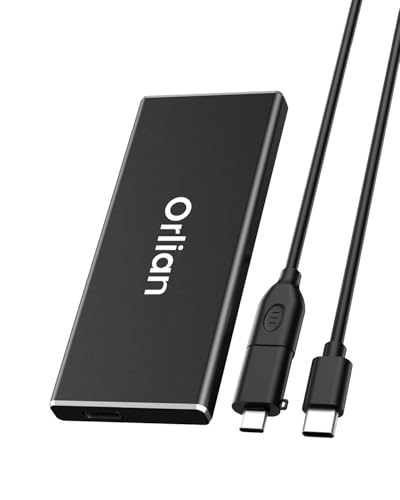
5. Orlian 250GB External Portable SSD — Best budget pick
The cheapest pick here, useful for reference libraries and coursework, not for a scratch disk.
Best for: students shuttling coursework and reference libraries Skip it if: your working files routinely exceed 100GB
The Orlian is the cheapest of the five and the shortest on warranty at 12 months. Orlian publishes a 500MB/s read claim over USB 3.1 Gen 2, which is roughly half the SSK's rated read and a quarter of the Crucial X10's. For moving finished PDFs, packaging a font library, carrying a reference photo archive between machines, that is enough speed and enough capacity.
The listing names an aluminium alloy body with waterproof, dustproof and shockproof claims, without an IP grade to anchor them, so treat those as manufacturer statements rather than certified ratings. Orlian ships the drive with a USB-A cable, a USB-A to Type-C converter, a USB-A to Type-C cable and a storage bag, which is more in the box than any other pick here. It weighs 1.12 oz, tied with the SSK for the lightest published weight in the set.
Do not run a Photoshop scratch disk from it. The rated speed will bottleneck a serious design session. As a second drive for archives and hand-offs, it earns its place.
Pros:
- Cheapest pick in this set
- 1.12 oz, tied for lightest here
- Aluminium alloy body with cooling claim
- Bundle includes converter, cable and storage bag
- USB-C and USB-A both usable
Cons:
- 12-month warranty, shortest in the set
- 500MB/s claim, the slowest published here
- Environmental claims without an IP grade
- No published dimensions in the listing
Does 'for graphic designers' mean anything here?
Honest answer: not really, and any listing that promises otherwise is guessing. None of the five drives is designed for graphic design specifically. They are portable SSDs, and what matters for design work is what matters for any professional file workload: sustained speed, capacity headroom, warranty length and durability. Read the qualifier "for graphic designers" as shorthand for a drive that survives a demanding creative workflow, not as a certified feature.
That is why my picks lean on the specifications you can verify. The SSK publishes read and write. The Crucial X10 publishes environmental ratings. The WD_BLACK publishes the longest warranty. Those are the fields a designer's use actually exercises.
How much capacity does a working designer need?
Capacity is where the wrong buy hurts most, so anchor it to real files. A single high-resolution Photoshop file with layers can push 2GB. A packaged InDesign brochure with linked assets often runs 500MB to 5GB. A Lightroom catalogue with a year of raw shoots pushes past 200GB before you notice.
Rough shapes to compare against your work:
- 250GB (SSK, Orlian): the current sprint and last month's active project. Not an archive.
- 960GB to 1TB (PNY, Crucial X10, WD_BLACK): a full year of client work for a solo freelancer, or a working scratch disk plus a decent asset library.
- Anything larger: not in this set. Buy in twos rather than one giant drive, so a failure loses half your work, not all of it.
The one habit that matters more than capacity choice is a second copy. A portable SSD is a working drive, not a backup, whatever the marketing suggests.
USB-C, Thunderbolt and the port on your laptop
Every drive in this set connects over USB-C, and every listing except the PNY names USB-A compatibility as well. None of the five is a Thunderbolt drive. That matters if you own a Mac and expected 40Gbps: you will not get it from these drives, but you will not need it for most design workflows either.
The interface generation is what to check on your laptop:
- USB 3.2 Gen 2 (10Gbps): what the SSK is rated for.
- USB 3.2 Gen 2x2 (20Gbps): what the WD_BLACK P40 and Crucial X10 need to hit their peak speeds.
- USB 3.1 Gen 1 (5Gbps): the PNY's stated interface.
If your laptop only offers a 5Gbps port, a 2000MB/s drive will run at roughly a quarter of its rated speed. Match the drive to the port, not to the box copy.
What the product listings do not tell you
Four things designers care about are absent from every listing here, and it is worth naming them so you do not go looking:
- Sustained write behaviour past the SLC cache. Only the SSK quantifies its cache allocation, and none publishes what happens after it fills.
- File-system format out of the box. Most drives ship exFAT, which reads and writes on Mac and Windows without extra software. Confirm before you commit.
- Encryption support. None of these listings names hardware encryption, so plan on software-level FileVault or BitLocker if client contracts require it.
- Thermal throttling under load. Metal bodies help. The Orlian names aluminium alloy; the others do not describe the case material in fields I can quote.
Buy for the specifications published, and treat the silent fields as risks to manage.
The verdict
If you edit design files on a laptop and move between two machines, the SSK SD500 is the right default. It publishes both read and write speeds, weighs 1.06 oz, ships with both cables you might need, and carries a three-year warranty. That combination is more useful, day to day, than a higher peak-read figure on a heavier drive.
The two-track flips are clear. If you work on location, in weather, or on a construction site, the Crucial X10 is the better buy. Its IP65 rating and 9.8 ft drop resistance are the only environmental credentials published in this set, and its 0.39 in body is the slimmest here. The cutoff is whether the drive leaves a controlled environment: below that threshold, take the SSK for the money you save and the lighter body; above it, pay the premium for the X10.
Two more conditions steer the choice. If you double up as a console gamer or edit capture footage, the WD_BLACK P40 gives you five years of warranty and native PS5 compatibility. If your budget is fixed and the drive is for archives rather than scratch, the Orlian earns its place at the lowest price position here.
FAQ
Is an external SSD worth it for graphic design?
An external SSD is worth it for graphic design when your working files sit on a laptop's internal drive and you routinely fill it. Portable SSDs like the SSK SD500 read at 1050MB/s, which is fast enough to open layered Photoshop files directly from the drive. They also give you a physical hand-off medium for client work when uploads are slow.
What speed do I actually need for a Photoshop scratch disk?
The speed you actually need for a Photoshop scratch disk depends on your file sizes, but a rated 1000MB/s write is a sensible floor for a working drive. The SSK SD500 publishes 1000MB/s write. Below that figure, brush strokes on large files can lag while the scratch disk catches up. Sustained speed matters more than peak numbers, because scratch writes run continuously.
SSK SD500 or Crucial X10, which is better for design work?
The SSK SD500 or Crucial X10 choice comes down to where you work. The SSK is lighter at 1.06 oz, publishes both read and write speeds, and costs less. The Crucial X10 publishes an IP65 rating and a 9.8 ft drop resistance the SSK lacks, and carries a 2100MB/s read claim. Studio designers should pick SSK; location designers should pick Crucial.
Will these SSDs work with an iPad Pro or M-series Mac?
These SSDs will work with an iPad Pro and any M-series Mac over USB-C. The Crucial X10 and Orlian listings name iPad Pro compatibility explicitly. The SSK, WD_BLACK and PNY all use standard USB-C interfaces that M-series Macs read natively, though you may need to reformat from NTFS to exFAT or APFS for Mac-optimised write performance. Check the format before you commit files.
How long should an external SSD for design work last?
An external SSD for design work should last three to five years of daily use, matching the warranty terms published in this set. WD_BLACK offers five years on the P40. SSK and Crucial each offer three years. Orlian publishes 12 months. Endurance depends on total bytes written, not calendar age, so a scratch disk fails sooner than an archive drive under equivalent conditions.
Order a drive today, format it to your operating system's native file system before you copy a single client file across, and set up a second copy on a cloud service or a NAS the same afternoon. That second copy is not optional. The SSK SD500 earns the top pick because it publishes the specifications a designer needs to check, not because it is the fastest number on paper. It is small enough to forget, fast enough to run a working session, and covered long enough to see through a laptop's replacement cycle. Match the drive to the port on your machine and the environment you carry it into, and it disappears into the workflow.