Best Flash Drive for Writers: Maspen 64GB Leads

A working writer needs two drives, not one fast one. Here is how five USB sticks compare when the file that matters is a novel draft, not a movie.

By Samuel HarrisUpdated 14 min read
On this page
- Best flash drive for writers at a glance
- Who this pick is not for
- 1. Maspen 2 Pack 64GB USB Flash Drive — Best overall
- 2. SANDISK 128GB Ultra Flair USB 3.0 — Best premium
- 3. SamData 32GB USB Flash Drives 2 Pack — Best for families
- 4. Aiibe 128GB USB Flash Drive — Most versatile
- 5. Maspen USB Flash Drive 32GB — Best budget pick
- How I screened five sticks down to a shortlist
- Why a second stick beats a faster stick
- USB 2.0 or USB 3.0: does it matter for a manuscript?
- What the listings do not tell you about drive lifespan
- The verdict
- FAQ
The best flash drive for writers is the Maspen 2 Pack 64GB USB 2.0, because a manuscript needs two copies and this listing ships two identical 64GB sticks in one box at 9.07 g each. If your archive already includes research video and scans, the 128GB SanDisk Ultra Flair at 4.5 g and up-to-150MB/s claimed read speed is the better single-drive buy. Neither costs you much, and the deciding question is not speed.
Best flash drive for writers at a glance
| Pick | Capacity | Interface | Price |
|---|---|---|---|
Best overall Maspen 2 Pack 64GB |
64GB × 2 | USB 2.0 | Check Price |
Best premium SanDisk 128GB Ultra Flair |
128GB | USB 3.0 | Check Price |
Best for families SamData 32GB 2 Pack |
32GB × 2 | USB 2.0 | Check Price |
Most versatile Aiibe 128GB |
128GB | USB 2.0 | Check Price |
Best budget pick Maspen 32GB |
32GB | USB 2.0 | Check Price |





Who this pick is not for
A quick honesty note before the picks. Amazon returned these five listings for the phrase, but the word "writers" does not appear in any specification field. USB flash drives are not manufactured with novelists in mind. They are manufactured for anyone who needs to move files off a computer. What follows is a shortlist judged for a writer's actual use case, which is small text files backed up often, not raw video ingested fast.
If you write in Scrivener, Word, Google Docs offline, or a plain-text editor, your typical project folder is well under a gigabyte. A 32GB drive holds hundreds of them. A 128GB drive holds thousands. Capacity is not your bottleneck. Losing the only copy of chapter fourteen is your bottleneck, and no listing here solves that on its own: your habit of copying to a second drive does. That habit is easier when you already own a second drive, which is why the pack of two wins.
Skip this whole category if you already back up to a cloud service you trust and never work offline. A flash drive is for the plane, the cabin, the coffee shop with bad Wi-Fi, and the paranoid corner of your desk.
1. Maspen 2 Pack 64GB USB Flash Drive — Best overall
Two 64GB sticks in one box is the right answer for a writer, because the second one is the backup you will otherwise forget to buy.
Best for: a working writer who wants two identical backup sticks in rotation Skip it if: you routinely move large video files and need USB 3.0 speed
The case for this pick is set composition, not raw performance. Of the five listings here, only two ship as a pack of two, and this is the larger-capacity of the pair at 64GB per stick. Each drive weighs 9.07 g and measures 0.45 x 2.25 x 0.72 in, which is keychain-sized without being so tiny it disappears in a coat pocket. Maspen says the swivel cap is a 360° metal design with a matt surface, and the ring slot on the body means a lanyard or a keyring holds it without an adapter.
The interface is USB 2.0, which is where a writer has to be honest about needs. A 200,000-word manuscript in Word is a few megabytes. Transferring one takes a second. The USB 3.0 speed argument only applies when you move gigabytes at a time, and most manuscript work does not. The trade-off this pick makes against the SanDisk is real: you get half the total capacity per stick and a slower interface, in exchange for a spare drive that lives in a different drawer.
Pros:
- Two identical drives for rotation backups
- 64GB per stick, enough for a full career of drafts
- 9.07 g each, easy to clip to a keyring
- Swivel cap protects the connector without a loose lid
- Mid-priced position for a two-pack
Cons:
- USB 2.0 interface, slow for video or photo libraries
- No published transfer-speed figure
- Warranty field listed but not quantified
- No stated encryption or password protection
2. SANDISK 128GB Ultra Flair USB 3.0 — Best premium
If you only carry one drive, carry this one, because 128GB and USB 3.0 give a writer with research files somewhere to put them.

Best for: a writer whose drive also carries research video, audio and scans Skip it if: you only need to move Word files and would rather have a spare stick
This is the most expensive pick here and the one with the most published detail. The 4.5 g weight is by far the lightest in the set, and the dimensions of 0.26 x 0.52 x 1.67 in make it the smallest body too. SanDisk says the interface delivers up to 150MB/s read, and describes writes as up to 15x faster than USB 2.0 drives. Those are the manufacturer's claims, not measured figures, but the 3.0 interface is verified in the specifications. It ships in a durable metal casing per SanDisk's listing, and it is the only pick here with a stated warranty period, at 1 year.
The other detail that matters for a writer is password protection. SanDisk's listing describes an easy-to-use password feature using 128-bit AES encryption, supported on Windows 7, 8, 10 and macOS 10.x. If you carry chapters of a manuscript you have not shown anyone, that matters more than transfer speed. The honest weakness is redundancy: this is one drive, not two, and a lost stick is a lost drive.
Pros:
- 128GB capacity, the largest single-stick option here
- USB 3.0 interface with SanDisk's up-to-150MB/s claim
- 4.5 g and 1.67 in long, the smallest body in the set
- 1 year warranty, the only stated warranty here
- Password protection claim with 128-bit AES
Cons:
- Only one drive, no built-in backup
- The most expensive pick in the set
- Encryption feature is Windows and macOS only per the listing
- Small casing is easier to lose
3. SamData 32GB USB Flash Drives 2 Pack — Best for families
A blue stick and a black stick, 32GB each, for the household where two people write on the same computer.

Best for: a household sharing one computer, where each writer wants a coloured stick Skip it if: your manuscript archive is already past 20GB
SamData's play is simple and it works. The pack contains two 32GB drives in different colours, one blue and one black, and the listing suggests the colour split lets two people separate their files at a glance. For a family where a parent drafts a memoir and a teenager writes school essays on the same laptop, that is more useful than an extra 96GB nobody needs. Each drive weighs 12 g, measures 0.39 x 2.28 x 0.75 in, and has a small LED that SamData says lights when connected and flashes during writes. That indicator is useful when the household rule is "wait for the light before you pull it out".
The compromise is capacity. 32GB per stick is the smallest published capacity in the set, tied with the budget Maspen. For pure text that is far more room than a decade of writing needs; for scans of old photos or hours of interview audio it fills up. SamData's listing states a 12-month warranty. The interface is USB 2.0, and Windows and macOS support is claimed for the versions listed. Against the top pick, you trade capacity for the colour-coding.
Pros:
- Two colours make user separation obvious
- LED indicator shows write activity
- 12-month stated warranty on the listing
- 12 g each, keychain-friendly
- Entry-priced two-pack
Cons:
- 32GB each is the smallest capacity option here
- USB 2.0 only
- No stated encryption or password protection
- Listing describes the model field with an unrelated string
4. Aiibe 128GB USB Flash Drive — Most versatile
One 128GB stick with a retractable connector and a claim of working across laptops, TVs and car audio.

Best for: a writer plugging into a TV, a car stereo and a laptop from the same stick Skip it if: you want two drives so you can leave one at home
The Aiibe fills the gap between the two-packs and the SanDisk. It is a single 128GB drive at 7 g, measuring 0.35 x 2.6 x 0.79 in, which makes it the longest body in the set. The design is retractable rather than swivel-capped, so there is no loose cap to lose. Aiibe describes the drive as compatible with TVs, desktops, notebook computers, car audio systems and other devices, and says the default format is exFAT, which is the format that reads on both Windows and macOS without reformatting. For a writer who reads drafts back through a car stereo on a long drive, or plays research video on a hotel TV, that matters.
Where Aiibe falls short of the SanDisk is interface and warranty. The listing describes 128GB with a USB 2.0 interface, so the extra capacity does not come with extra speed. No warranty period is quantified in the specifications, and no encryption feature is claimed. It sits in the premium price position without carrying the SanDisk's speed or warranty, which is why it wins on versatility rather than outright.
Pros:
- 128GB single-stick capacity
- Retractable body, no cap to lose
- 7 g weight for a full-size stick
- exFAT default format per the listing
- Broad compatibility claim across TVs and car audio
Cons:
- USB 2.0 despite the premium price position
- No stated warranty period
- 2.6 in long body, easier to snap in a laptop port
- No encryption or password feature claimed
5. Maspen USB Flash Drive 32GB — Best budget pick
The cheapest of the six, one 32GB stick, LED indicator, for the writer who needs a stick this week.
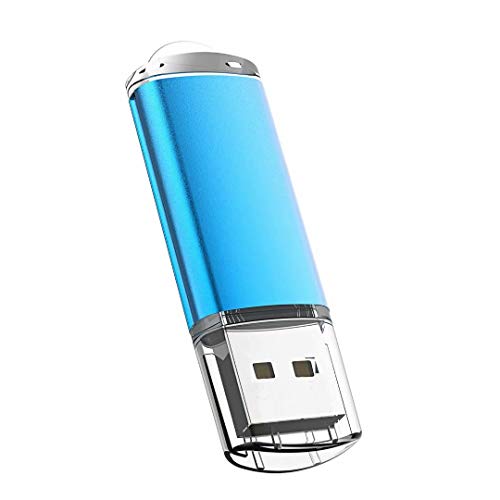
Best for: a student writer who needs one cheap stick for turning in coursework Skip it if: you are backing up a full novel and need redundancy
The 32GB Maspen is the cheapest pick in this set and the answer to a very specific question: what is the minimum viable flash drive for a writer who does not yet have one. It is a single stick, 0.7 x 0.32 x 2.24 in, blue, with a matt metal casing that Maspen describes as anti-skid and anti-fingerprint. There is an LED inside, described as solid red when connected and flashing when the drive is being written to, which is a small but genuinely useful cue for a nervous ejector.
The trade-offs are the ones you expect at the bottom of the price ladder. It ships as one stick, so it does not solve the redundancy problem the two-pack Maspen solves at the top of this ranking. No weight is published, no warranty period is quantified, and the interface is USB 2.0. For a student handing in a Word document, none of that matters. For an author with three novels in progress and a folder of scanned notebooks, it does.
Pros:
- The cheapest option in this set
- LED status light for writes
- Matt anti-fingerprint casing per the listing
- Plug-and-play across Windows and macOS versions listed
- 2.24 in body, standard keyring size
Cons:
- Only one drive, no built-in backup
- 32GB, the smallest capacity tier here
- No published weight figure
- No stated warranty period
How I screened five sticks down to a shortlist
I compared the published specifications side by side and ranked them for a writer's use case, not a videographer's. The screen was simple.
- Capacity had to hit at least 32GB. Every listing here clears that.
- The interface had to be USB-A, which every stick in the set uses.
- I gave weight to any listing that either ships as a pack of two, or publishes a warranty period, or names an encryption feature. Those three attributes protect a manuscript.
- I discounted transfer-speed claims where they were not backed by an interface figure. Speed only counts if the USB version supports it.
The pair of two-packs plus the SanDisk clear the bar on protection. The two single-drive 128GB picks clear the bar on capacity. Ranking then came down to which best-flash-drive-for-writers profile each one fits, and the two-pack won because redundancy is the single biggest predictor of not losing your work.
Why a second stick beats a faster stick
Most best-flash-drive-for-writers guides lead with speed. That is not what decides it. The scenario a writer actually fears is not a slow copy, it is a lost draft. A slow copy costs seconds. A lost draft costs a chapter, sometimes a book.
Redundancy beats speed on this axis for three reasons:
- Text files are small. A 300,000-word novel in Word is well under 50MB. Even USB 2.0 moves that in a heartbeat.
- Drive failures are silent. A stick works right up until it does not, and the failure is usually noticed at the worst moment.
- Two cheap drives cost less than one premium drive in this set. The Maspen two-pack sits mid-priced; the SanDisk sits at the top.
The cutoff is honest: if your working files are only text and PDFs, buy the two-pack. If your working files include hours of interview audio or footage, buy the single 128GB stick and pair it with a cloud backup you actually check.
USB 2.0 or USB 3.0: does it matter for a manuscript?
For manuscript work in Word, Scrivener, LibreOffice or Google Docs offline, USB 2.0 is enough. A short story is kilobytes. A finished novel with tracked changes is single-digit megabytes. USB 2.0 moves those instantly.
USB 3.0 matters when the file changes shape. Research audio at CD quality is roughly 10MB per minute. A ninety-minute interview is close to a gigabyte. A batch of high-resolution photo scans of old letters can be several gigabytes. Once you cross that line the SanDisk's up-to-150MB/s claim starts to matter, because the difference between a two-minute copy and a twenty-minute copy shapes whether you actually make the backup.
Four of the five picks here are USB 2.0. Only the SanDisk publishes USB 3.0 in the specifications. That is the real reason it earns the premium slot, not the metal body.
What the listings do not tell you about drive lifespan
Flash memory wears out. Every cell has a finite number of write cycles, and none of these listings publish an endurance figure. In practice this matters less than you would think for a writer, because saving a Word document a hundred times a day is still a small number of writes against modern flash. It matters more if you use the drive as a working disk rather than a backup destination.
The habit that extends any of these drives:
- Treat the stick as a backup target, not a live working drive.
- Eject cleanly. Do not yank a drive during a write, which is what the LED sticks warn about.
- Keep one stick as your rolling backup and one stick as an archive you rarely touch. This is the argument for the two-pack again.
Here's the trick with warranty periods. Only two picks publish one: the SanDisk at 1 year, and the SamData at 12 months. That does not mean the others fail sooner. It means the others make no promise, and you should factor that into which drive holds the copy you cannot afford to lose.
The verdict
The best flash drive for writers is the Maspen 2 Pack 64GB, because a working writer needs two drives and this listing puts them in one order. Each stick holds 64GB at 9.07 g, which is more than any manuscript archive needs, and the pack format means the backup habit is built into the purchase. Skip it if your work already includes hours of research video or high-resolution scans.
If you carry one drive rather than two, the SanDisk 128GB Ultra Flair is the runner-up on a specific, checkable advantage: it is the only pick here that publishes USB 3.0, the only one with a stated 1 year warranty, and the only one that describes password protection with 128-bit AES. Those three together justify the premium price position for a writer whose files are not only text.
For a household sharing a computer, the SamData 32GB two-pack in blue and black earns its slot on colour-coding alone. For a stick that plugs into a car stereo or a TV, the Aiibe 128GB is the compatibility play. For a first flash drive under pressure, the 32GB Maspen is the cheapest way in.
FAQ
How much storage does a writer actually need on a flash drive?
How much storage a writer actually needs is smaller than most listings suggest. A finished novel in Word with tracked changes is single-digit megabytes. Ten years of drafts, notes and correspondence rarely crosses 5GB. Any pick here at 32GB or more is well past the requirement. Buy for redundancy or for research-file capacity, not for headline gigabytes.
Is a USB 3.0 flash drive worth it for a writer?
A USB 3.0 flash drive is worth it when your files include audio, video or high-resolution scans. For text alone, USB 2.0 moves a manuscript in under a second, so the extra speed goes unused. The SanDisk 128GB Ultra Flair is the only USB 3.0 pick in this set and it also carries a 1 year warranty, which is the second reason to consider it.
Should I pick the Maspen 2 Pack or the SanDisk Ultra Flair?
Should I pick the Maspen 2 Pack or the SanDisk? Choose the Maspen two-pack when your files are mostly text and redundancy is the priority: two 64GB sticks in rotation. Choose the SanDisk 128GB when you carry research audio or scans, want USB 3.0, and want the 1 year warranty and password protection claim. The cutoff is whether your archive is bigger than 32GB.
Do these flash drives work on both Windows and Mac?
Do these flash drives work on both Windows and macOS? Each listing describes compatibility with Windows 7, 8, 10 and macOS versions listed, plus older Windows editions. The Aiibe 128GB ships formatted in exFAT, which reads on both platforms without reformatting. Other drives may ship in FAT32, which also reads on both, but has a 4GB single-file size limit worth knowing about.
What is the biggest mistake writers make when buying a flash drive?
The biggest mistake writers make when buying a flash drive is buying one drive and calling that a backup. One stick is a single point of failure, and flash memory fails silently. The fix is either a two-pack, or one drive paired with a cloud service you actually check weekly. The best flash drive for writers is the one you have already duplicated.
A last practical note. Pick a drive today, then set a five-minute rule: at the end of every writing session, copy the working folder to the stick before you close the laptop. If you bought the Maspen two-pack, alternate the sticks by day of the week and keep one in a different room. If you bought the SanDisk, turn on the password feature and pair it with cloud backup. The winner earns its place because it makes the habit easier, not because it moves bytes faster; the ranking would look different for a filmmaker, but a writer's file is small, quiet and irreplaceable, and two 64GB sticks respect all three of those facts.