Best KVM Switch by Port Count and Resolution

Five KVM switches compared on port layout, stated resolution ceiling and physical footprint, with a named winner and the exact conditions that flip the pick to something cheaper or wider.

By Samuel HarrisUpdated 14 min read
On this page
- Best kvm switch for content creators at a glance
- How I matched five switches to four desk profiles
- Why the resolution number is not what decides it
- 1. UGREEN 8K@60Hz HDMI Displayport KVM Switch 3 Monitors 2 — Best overall
- 2. GREATHTEK USB3.0 KVM Switch HDMI 4K@60Hz for 4 Computers — Best for heavy use
- 3. Btyrehes CCONG 8K@60Hz HDMI Displayport KVM Switch 3 — Best for families
- 4. Jancane 4K KVM Switch HDMI 2 Port Box — Most versatile
- 5. CMSTEDCD HDMI KVM Switch 1 Monitors 2 Computers 4K@60Hz — Best budget pick
- How much desk does each one actually take?
- Which switch wins for your setup?
- What these listings never tell you
- The verdict
- FAQ
The best kvm switch for content creators is the UGREEN AK704, because two DisplayPort 1.4 outputs plus one HDMI 2.x port drive three monitors from two machines at a stated 8K@60Hz. If you need four computers on one screen instead of two computers on three, the GREATHTEK S7415H-A takes over. Most buyers here compare resolution ceilings first. That comparison rarely changes the answer, because four of these five already clear 4K@60Hz. Port layout does the deciding.
Best kvm switch for content creators at a glance
| Pick | Ports in / monitors out | Stated max resolution | Price |
|---|---|---|---|
Best overall UGREEN 8K@60Hz HDMI Displayport KVM Switch |
2 computers / 3 monitors (2 DP + 1 HDMI) | 8K@60Hz claim, 4K@240Hz claim | Check Price |
Best for heavy use GREATHTEK USB3.0 KVM Switch HDMI 4K@60Hz |
4 computers / 1 monitor (HDMI) | 3840x2160@60Hz claim | Check Price |
Best for families Btyrehes CCONG 8K@60Hz HDMI Displayport KVM Switch |
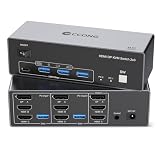
2 computers / 3 monitors (1 DP + 2 HDMI) | 8K@60Hz claim, 4K@120Hz claim | Check Price |
Most versatile Jancane 4K KVM Switch HDMI 2 Port Box |
2 computers / 1 monitor (HDMI) | 4K@60Hz claim | Check Price |
Best budget pick CMSTEDCD HDMI KVM Switch 1 Monitors 2 Computers |
2 computers / 1 monitor (HDMI) | 4K@60Hz claim | Check Price |




How I matched five switches to four desk profiles
I did not rank these by score. I sorted them by the desk they belong on, because a four-port switch and a triple-monitor switch are not competing for the same buyer.
Four profiles came out of the specifications:
- Two machines, three screens. Only two picks do this: the UGREEN AK704 and the CCONG CC-TA203-HHD-8K. They differ on one detail, which port goes where.
- Four machines, one screen. Only the GREATHTEK S7415H-A. Nothing else in this set handles more than two computers.
- Two machines, one screen, mixed sources. The Jancane V806-A1 lists consoles alongside PCs in its compatibility claims.
- Two machines, one screen, smallest footprint. The CMSTEDCD unit measures 0.63 x 3.86 x 2.36 in and weighs 2.12 oz.
Anything that could not fill a profile cleanly got dropped from consideration. That is also why the winner is not the cheapest: the cheapest pick here solves the narrowest problem. Note the modifier in the search too. Nothing in these listings addresses capture cards, stream decks or audio routing, so nobody buying a kvm switch for content creators should assume the box knows what a production workflow is.
Why the resolution number is not what decides it
Every listing here leads with a resolution figure. Four of the five claim at least 4K@60Hz, and two claim 8K@60Hz. So the headline number separates almost nothing.
Three things separate them instead.
- Which connector carries which signal. The UGREEN lists two DisplayPort 1.4 outputs and one HDMI 2.x. The CCONG flips that: one DisplayPort, two HDMI. Identical resolution claims, opposite cable drawers.
- USB generation. The GREATHTEK lists three USB 3.0 ports plus one USB-C. The CMSTEDCD lists two USB 2.0 ports at a claimed 480Mbps. Both switch a keyboard fine. Only one moves footage off a drive without you noticing.
- How many machines it takes. Two is the norm across four picks. Four is the exception.
Here's the trick with resolution claims on a switch. The number describes what the chipset passes through, not what your monitor accepts or what your cable can carry. An 8K@60Hz claim on a box feeding a 1440p panel buys you headroom, nothing visible. So treat the figure as a ceiling, then choose on ports. That is the single change that makes the best kvm switch for content creators an easier decision than the spec sheets suggest.
1. UGREEN 8K@60Hz HDMI Displayport KVM Switch 3 Monitors 2 — Best overall
The only pick here that puts two DisplayPort 1.4 outputs on a triple-monitor switch, which matches how most high-refresh panels are actually wired.
Best for: a two-machine desk running three monitors, two of them DisplayPort Skip it if: your monitors are HDMI-only, or you need more than two computers
Two picks in this set drive three monitors from two computers. This one is the one whose port mix leans DisplayPort, and that matters more than the shared 8K@60Hz claim. UGREEN lists two DisplayPort 1.4 ports plus one HDMI 2.x, along with a 4K@240Hz claim that the other triple-monitor pick does not make. If your main and secondary panels are gaming or colour-accurate monitors, they are probably DisplayPort, and that is the connector this switch gives you twice.
The body measures 1.57 x 6.18 x 2.83 in, so it is the most compact of the two triple-monitor options by a wide margin. UGREEN describes an aluminium housing, and lists four USB 3.0 ports for shared peripherals. Switching happens two ways: a button on the unit or a wired desktop controller. The listing also claims driver-free operation across Windows, macOS and Linux.
Two costs. It sits in the most expensive tier of this group, and it is the only pick where more than one seller lists the item, which is a mixed signal rather than a bad one. It also publishes no warranty term, while the cheapest pick here publishes 2 year coverage.
Pros:
- Two DisplayPort 1.4 outputs, unique in this set
- Three monitors from two computers
- Smallest triple-monitor body at 1.57 x 6.18 x 2.83 in
- Four USB 3.0 ports claimed for peripherals
- 4K@240Hz claim not matched elsewhere here
Cons:
- Sits in the most expensive tier of the five
- No warranty term published in the listing
- Only one HDMI output, so HDMI-only setups run short
- Caps out at two computers
2. GREATHTEK USB3.0 KVM Switch HDMI 4K@60Hz for 4 Computers — Best for heavy use
The only pick in this set that handles four computers, and the only one pairing that with three USB 3.0 ports plus USB-C.

Best for: juggling four machines through one screen with USB 3.0 peripherals Skip it if: you need more than one monitor active at a time
Port count is the whole argument. Every other pick here stops at two computers. This one takes four, feeding a single HDMI monitor at a claimed 3840x2160@60Hz, with the listing noting compatibility down to 4K@30Hz and 1080p. If your desk has a work laptop, a personal desktop, an editing machine and a test box, this is the only unit in the group that covers all four without daisy-chaining.
The USB side backs that up. GREATHTEK lists three USB 3.0 ports and one USB-C port shared across all four machines, naming flash drives and cameras alongside keyboard and mouse. That is the strongest published USB spec of the five, and it matters if you move files rather than just click. Switching works from white front-panel buttons or an included wired remote keypad.
It is also the heaviest and longest unit here at 1 lb and 3 x 8.3 x 0.9 in, which is a lot of front-of-desk real estate for a slim box. And the trade-off against the winner is blunt: one monitor. Four machines, one screen. No warranty term appears in the listing either.
Pros:
- Four computers, unmatched in this set
- Three USB 3.0 ports plus one USB-C claimed
- Front buttons and an included wired keypad
- Roughly mid-range for this group on price
Cons:
- Single monitor output only
- Heaviest pick at 1 lb
- Long 8.3 in footprint across the desk
- No published warranty term
3. Btyrehes CCONG 8K@60Hz HDMI Displayport KVM Switch 3 — Best for families
Same triple-monitor trick as the winner, with the port mix reversed: two HDMI outputs and one DisplayPort.
Best for: a triple-monitor desk where two screens are HDMI Skip it if: desk space is tight, or you want a published warranty
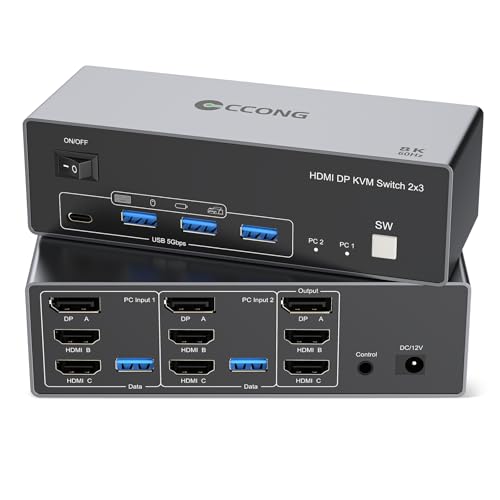
This is the HDMI-leaning half of the triple-monitor pair. The listing describes one DisplayPort 1.4 output and two HDMI 2.x outputs, with an 8K@60Hz claim and a 4K@120Hz claim. That layout suits a household or a shared desk where the monitors arrived at different times and two of them only speak HDMI. Televisions, older panels and most budget displays fall in that camp.
Everything else mirrors the winner closely. Two computers, four USB 3.0 ports claimed, button or desktop-controller switching, and a driver-free claim covering Windows, macOS and Linux. Weight is 0.77 lb and the listed size is 14 cm.
The footprint is where it loses. At 1.75 x 9.5 x 7.5 in it is by far the largest box of the five, roughly the area of a hardback book, and it is also the tallest. That is a real cost on a desk already holding three monitor stands. It sits in the most expensive tier alongside the winner while claiming a lower 4K refresh ceiling, 4K@120Hz against 4K@240Hz. Only one seller lists it, and no warranty term is published.
Pros:
- Two HDMI 2.x outputs for HDMI-heavy desks
- Three monitors from two computers
- Four USB 3.0 ports claimed
- Lighter than the four-port pick at 0.77 lb
Cons:
- Largest footprint here at 1.75 x 9.5 x 7.5 in
- Lower 4K refresh claim than the winner at the same price tier
- Only one seller lists it
- No published warranty term
4. Jancane 4K KVM Switch HDMI 2 Port Box — Most versatile
The only pick whose listing names consoles as sources, and the only one that ships both HDMI and USB cables in the box.

Best for: swapping a console and a PC through one 4K screen Skip it if: you run more than one monitor
Source flexibility is the pitch. Jancane's listing names PS4, PS4 Pro, PS3, Xbox One, Nintendo Switch, TV boxes, PCs and laptops as supported inputs, which is the broadest source list in this group. Two computers share one HDMI monitor at a claimed 4K@60Hz, and the listing also calls out printer sharing alongside keyboard and mouse.
The bundle helps. Two HDMI cables and two USB cables are included per the listing, so nothing else needs buying on day one. That is worth noting because none of the other four picks lists bundled display cables. Switching is a single button, and the compatibility claim covers Windows 10, 8 and 8.1 with a driver-free note.
The body is 1.18 x 7.87 x 4.72 in, which is the second-largest area here despite being a two-port, one-monitor unit. That is a lot of box for a modest job. It is the second-cheapest of the five, and the listing publishes no weight, no warranty term and no USB generation, so you cannot tell whether the shared USB ports are 2.0 or 3.0. Against the winner, the gap is simple: one monitor instead of three.
Pros:
- Broadest named source list, consoles included
- Two HDMI and two USB cables included
- Second-cheapest pick here
- Printer sharing named in the listing
Cons:
- Single monitor output only
- USB generation not published
- Large 7.87 x 4.72 in footprint for a two-port box
- No weight or warranty term listed
5. CMSTEDCD HDMI KVM Switch 1 Monitors 2 Computers 4K@60Hz — Best budget pick
The cheapest of the five, the smallest by a distance, and the only one publishing a 2 year warranty.

Best for: a laptop-plus-desktop single-screen setup that travels Skip it if: you plug in an external drive and need USB 3.0 speeds
Size and warranty carry this one. At 0.63 x 3.86 x 2.36 in and 2.12 oz, it is a fraction of every other box here, small enough to live behind a monitor stand or ride in a laptop bag. It is also the only pick in the set with a stated warranty term, 2 year, which is a meaningful gap when the other four publish nothing.
Two computers share one HDMI monitor at a claimed 4K@60Hz. Switching works from the button on the body or from a wired desktop controller, so you are not reaching behind the desk. CMSTEDCD describes plug-and-play operation with no driver install.
The USB spec is the honest limit. The listing states two USB 2.0 ports at up to 480Mbps, and names a wired keyboard and mouse as the intended load. That is fine for control, slow for a drive full of footage, and it is the clearest functional gap between this and the GREATHTEK. Only one seller lists it. There is one monitor output and no DisplayPort at all, so a triple-monitor desk is out of reach entirely. Buy it as a compact peripheral swapper, not as a hub.
Pros:
- Cheapest of the five
- Smallest and lightest at 2.12 oz
- Only pick with a published 2 year warranty
- Button and wired-controller switching
Cons:
- USB 2.0 only, claimed 480Mbps
- Single HDMI monitor, no DisplayPort
- Only one seller lists it
- Two computers maximum
How much desk does each one actually take?
Footprint gets ignored in every spec comparison, then becomes the thing you notice daily. These five differ enormously.
- CMSTEDCD: 0.63 x 3.86 x 2.36 in, 2.12 oz. Hides anywhere.
- UGREEN AK704: 1.57 x 6.18 x 2.83 in. Compact for a triple-monitor unit.
- Jancane V806-A1: 1.18 x 7.87 x 4.72 in. Wide and flat.
- GREATHTEK S7415H-A: 3 x 8.3 x 0.9 in, 1 lb. Long and the heaviest.
- CCONG CC-TA203-HHD-8K: 1.75 x 9.5 x 7.5 in, 0.77 lb. The largest area, and the tallest.
The CCONG occupies roughly nine times the desk area of the CMSTEDCD. That is worth checking against your actual desk before the port count wins the argument. Weight matters differently. A 1 lb unit stays put when you tug a stiff HDMI cable, while a 2.12 oz box will skate across the desk. So the heavy option is not automatically the worse one, and the featherweight is best mounted or tucked away rather than left loose.
Which switch wins for your setup?
The recommendation flips on three checkable conditions. Read your own desk against them.
- Count your monitors. Three active screens narrows you to two picks immediately, the UGREEN and the CCONG. One screen opens the field to all five.
- Count your computers. More than two, and only the GREATHTEK S7415H-A qualifies. This is the hardest cutoff in the set, because no amount of resolution headroom adds a third input.
- Check the back of your monitors. Two or more DisplayPort connections point to the UGREEN. Two or more HDMI connections point to the CCONG. Get this backwards and you are buying adapters.
One more flip worth naming. If you move large files across the shared USB ports, the GREATHTEK's three USB 3.0 ports and USB-C beat the CMSTEDCD's claimed USB 2.0 at 480Mbps, regardless of what your monitor count says. Anyone shortlisting a kvm switch for content creators on the strength of file transfer should start there, because it is the one published number in this group that separates fast from slow rather than fine from fine.
What these listings never tell you
Read the specifications closely and the gaps are as informative as the figures.
- Hotkey switching is unmentioned. All five describe a button or a wired controller. Nobody lists keyboard-shortcut switching, which is the feature power users assume is standard.
- Audio routing is absent. No listing here names a separate audio output or microphone passthrough. If your headset plugs into the machine rather than the switch, expect to move it.
- Warranty is mostly blank. Four of five publish no term. The CMSTEDCD's 2 year is the exception.
- USB generation is inconsistent. Two picks name USB 3.0, one names USB 2.0, and the Jancane names neither.
- EDID handling goes undescribed. Nothing here explains what happens to a monitor's identity data when you switch away, which is the usual cause of windows rearranging themselves.
None of this makes any pick bad. It means the safest purchase is the one whose published ports match your hardware exactly, since undocumented behaviour is where surprises live.
The verdict
If you run two computers and three monitors, the UGREEN AK704 is the pick, and the deciding detail is its two DisplayPort 1.4 outputs against the CCONG's one. If you run four computers and one monitor, the GREATHTEK S7415H-A is the only choice in this group, and its three USB 3.0 ports plus USB-C make it the better file-mover as well.
The cutoff is your monitor count. At three screens, two picks survive and the port mix decides between them. At one screen, price and footprint decide, and the CMSTEDCD unit wins on both: cheapest, 2.12 oz, and the only 2 year warranty published here. The Jancane V806-A1 sits between them, earning its place on source breadth rather than specifications, since it is the only listing naming consoles and a printer.
The CCONG's exact advantage over the winner is two HDMI 2.x outputs instead of one. If your third and second monitors are HDMI-only televisions or older panels, that is decisive and no adapter beats it. Its cost is the largest body in the set at 1.75 x 9.5 x 7.5 in. Start with the UGREEN unless one of those three conditions applies to you.
FAQ
Is the cheapest kvm switch here good enough?
The cheapest kvm switch in this set, the CMSTEDCD unit, is good enough for a single HDMI monitor and two computers sharing a wired keyboard and mouse. Its limit is the claimed USB 2.0 ports at 480Mbps, which suit control devices rather than external drives. It is also the only pick publishing a 2 year warranty, so the low position does not mean thin support.
Is a triple-monitor kvm switch worth it over a single-monitor one?
A triple-monitor kvm switch is worth it only if you actually run three screens on both computers. Otherwise you pay the premium tier for outputs that stay empty. The UGREEN AK704 and the CCONG unit are the only two here that do it, and both sit at the top of this group's price positions. One screen means the cheaper two-port boxes do the same job.
Do I need DisplayPort or HDMI on a kvm switch?
Whether you need DisplayPort or HDMI depends entirely on what your monitors accept. Check the back panels first. The UGREEN AK704 lists two DisplayPort 1.4 outputs and one HDMI 2.x, while the CCONG lists one DisplayPort and two HDMI. Same 8K@60Hz claim, opposite cable requirements. Buying the wrong mix means adapters, and adapters are where resolution claims quietly stop applying.
UGREEN AK704 or GREATHTEK S7415H-A: which should I buy?
Choose between the UGREEN AK704 and the GREATHTEK S7415H-A on machine count. The UGREEN takes two computers and drives three monitors. The GREATHTEK takes four computers and drives one. There is no overlap. If USB throughput matters, the GREATHTEK lists three USB 3.0 ports plus USB-C, which is the strongest published USB spec of the five.
What mistake do first-time kvm switch buyers make?
The most common kvm switch mistake is shopping on the resolution figure. Four of these five already claim 4K@60Hz or better, so that number separates almost nothing. Port layout, machine count and USB generation decide the purchase. The second mistake is ignoring footprint: the CCONG unit at 1.75 x 9.5 x 7.5 in takes roughly nine times the desk area of the CMSTEDCD.
Start by counting connectors, not by reading resolution claims. Write down how many computers sit on your desk, how many monitors they feed, and which connector each monitor uses. That list points at exactly one of these five, usually within a minute. For most desks it points at the UGREEN AK704, because two computers and three monitors is the common shape and two DisplayPort 1.4 outputs match how modern panels are wired. If your count comes back as four machines, the GREATHTEK is your answer instead, and no other pick here can pretend otherwise.