Best 4 Port KVM Switch: GREATHTEK S7415H-A Leads

Seven KVM switches compared on video standard, USB generation and switching method. The GREATHTEK S7415H-A wins on the combination most desks need, but two picks beat it on refresh rate and one on cable count.

By Samuel HarrisUpdated 18 min read
On this page
- Best 4 port KVM switch at a glance
- How I ranked these seven listings
- What actually decides a 4 port KVM switch purchase?
- HDMI, DisplayPort or VGA: which port matters most?
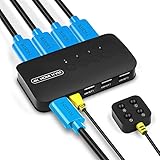
- 1. GREATHTEK USB3.0 KVM Switch HDMI — Best overall
- 2. JCYMELE 4 Port KVM Switch for 4 Computers 1 Monitor — Best premium
- 3. CMSTEDCD 4K120Hz KVM Switch — Best minimal setup
- 4. DGODRT 4K HDMI KVM Switch — Best upgrade
- 5. upxuntek 4 Port HDMI KVM Switch — Best for pros
- 6. DGODRT VGA KVM Switch 4 Port — Best budget pick
- 7. UGREEN USB 3.0 Switch 2 Computers Sharing USB C & A — Runner-up
- Does USB 3.0 change anything on a KVM switch?
- What the listings do not tell you
- When a different pick wins
- The verdict
- FAQ
The best 4 port KVM switch is the GREATHTEK S7415H-A, which pushes 3840x2160 at 60Hz across four computers while three USB 3.0 ports and a USB-C port hand your keyboard, mouse and drives to whichever machine is live. If your monitor takes DisplayPort and runs faster than 60Hz, the JCYMELE SW246 is the better buy at a claimed 4K@144Hz. Most shoppers compare port counts. Port counts are identical across this set by definition. What separates these boxes is the video standard and the refresh ceiling behind it.
Best 4 port KVM switch at a glance
| Pick | Video | USB sharing | Price |
|---|---|---|---|
Best overall GREATHTEK USB3.0 KVM Switch HDMI |
HDMI, 4K@60Hz claim | 3x USB 3.0 + 1x USB-C | Check Price |
Best premium JCYMELE 4 Port KVM Switch DisplayPort |
DisplayPort, 4K@144Hz claim | 4x USB 3.0 | Check Price |
Best minimal setup CMSTEDCD 4K120Hz KVM Switch |
HDMI 2.1, 8K@60Hz claim | 4x USB 3.0, 5Gbps claim | Check Price |
Best upgrade DGODRT 4K HDMI KVM Switch |
HDMI, 4K@30Hz claim | 3 USB devices | Check Price |
Best for pros upxuntek 4 Port HDMI KVM Switch |
HDMI, 4K@60Hz claim | USB 2.0 hub | Check Price |
Best budget pick DGODRT VGA KVM Switch 4 Port |
VGA, 1920x1440 claim | 3 USB 2.0 devices | Check Price |
Runner-up UGREEN USB 3.0 Switch 4 Port |
None, USB only | 3x USB A + 1x USB-C | Check Price |




How I ranked these seven listings
I weighted four criteria, in this order.
- Video standard and refresh ceiling, weighted heaviest. A switch that caps your monitor is a downgrade you paid for. This is the one specification you cannot work around later.
- USB generation second. A USB 2.0 hub throttles an external SSD. A USB 3.0 hub with a 5Gbps claim does not.
- Switching method third. Every pick here offers panel buttons, and most add a wired remote or controller, so this separated less than I expected.
- Physical footprint last. It matters, but only after the first three are settled.
Why that order? Because the failure modes are ranked the same way. A wrong video standard means the box does not work with your monitor at all. A slow hub means your drive copies at a crawl. A clumsy switching method is an annoyance. A bulky case is furniture.
One entry sits in the set on a technicality. The UGREEN CM662 lives under Networking Products rather than KVM Switches, and it is a USB switcher for two computers with four output ports, not a four-computer video switch. It is here because it keeps appearing next to genuine four-port boxes in this category, and because for one specific buyer it is the correct answer.
What actually decides a 4 port KVM switch purchase?
The deciding factor in a 4 port KVM switch is the connector on the back of your monitor, and the refresh rate that connector will carry through the box.
Every pick here handles four inputs. That number is in the product name and it is never the constraint. The constraint is the chain: your graphics card outputs a standard, the switch accepts it, and your monitor accepts what comes out. Break any link and you are looking at a black screen or a resolution you did not pay for.
Three concrete thresholds decide it:
- Below 4K@60Hz. The DGODRT KS604H claims 4Kx2K@30Hz. Fine for spreadsheets and remote sessions, visibly stuttery for cursor movement on a large panel.
- At 4K@60Hz. The GREATHTEK S7415H-A and the upxuntek UPXUN-K5 both claim this ceiling. It matches the majority of 4K monitors sold for desk work.
- Above 60Hz. Only two picks claim more. The CMSTEDCD GMXUS-SW241 states HDMI 2.1 with 8K@60Hz, and the JCYMELE SW246 states DisplayPort at 4K@144Hz.
Note what a KVM switch does not do: it does not upgrade your monitor. If your panel tops out at 1080p, the 8K claim on the CMSTEDCD buys you nothing today.
HDMI, DisplayPort or VGA: which port matters most?
Five of these seven use HDMI. One uses DisplayPort. One uses VGA. Only the UGREEN carries no video at all.
HDMI is the default and the safe bet. The GREATHTEK, both DGODRT models in HDMI form, the CMSTEDCD and the upxuntek all take HDMI in and HDMI out. Laptops, mini PCs, consoles and most monitors speak it. The DGODRT KS604H listing claims compatibility with laptops, PCs, Blu-ray players, monitors, TVs and projectors.
DisplayPort is the specialist choice. The JCYMELE SW246 is the only DisplayPort pick in this set, and it is also the only one claiming 144Hz. If your monitor is a gaming panel and your machines have DisplayPort outputs, this is the pick. If any of your four computers is HDMI-only, it is the wrong one.
VGA is legacy, and legacy is sometimes exactly right. The DGODRT KS204V claims resolution up to 1920x1440 and DDC support with auto-identification. Nobody buys VGA for a new build. People buy it because a test bench, a till system or a piece of lab equipment still has that blue connector, and replacing four of them is not happening.
Here's the trick with mixed setups: check every computer, not just the newest. The switch has to match your oldest output, or you are buying adapters, and adapters are where refresh rates quietly disappear.
1. GREATHTEK USB3.0 KVM Switch HDMI — Best overall
The GREATHTEK S7415H-A pairs a claimed 4K@60Hz HDMI path with the widest USB port mix in this set, which is the combination most four-computer desks actually need.
Best for: four modern desktops on one 4K 60Hz monitor Skip it if: your monitor runs above 60Hz and you want to use it
What sets this one apart within the set is the USB side. GREATHTEK lists three USB 3.0 ports plus one USB-C port, and that USB-C port is unique here. Nothing else in this lineup offers a USB-C peripheral connection at all. If your keyboard, your webcam or your drive terminates in USB-C, that saves an adapter.
The video claim is 3840x2160 at 60Hz, with backward compatibility stated down through 3840x2160@30Hz and 1080p. That ceiling is the practical sweet spot: high enough that a 4K desk monitor runs at its native smoothness, common enough that you are not paying for headroom you cannot use.
The case measures 3 x 8.3 x 0.9 in and weighs 1 lb. That is a long, flat bar rather than a cube, which suits sitting behind a monitor stand. GREATHTEK states two switching methods: white front-panel buttons or an included wired remote keypad, so you can park the keypad next to your mouse.
The trade-off against the rest of this set is refresh rate. Two picks here claim higher ceilings, and one of them claims 144Hz. This is also the second most expensive pick, and only one seller lists it.
Pros:
- Only pick here with a USB-C peripheral port
- Three USB 3.0 ports for drives and cameras
- Claimed 4K@60Hz with stated 30Hz and 1080p fallbacks
- Slim 0.9 in profile hides behind a monitor stand
- Wired remote keypad plus panel buttons
Cons:
- Refresh ceiling stops at 60Hz
- Second-highest price position in this set
- Only one seller lists it
- No warranty stated on the listing
2. JCYMELE 4 Port KVM Switch for 4 Computers 1 Monitor — Best premium
The JCYMELE SW246 is the only DisplayPort pick here and the only one claiming 4K at 144Hz, which makes it the single answer for a high-refresh panel.

Best for: a high-refresh DisplayPort monitor and heavy USB traffic Skip it if: your machines only output HDMI
DisplayPort is the reason this pick exists. JCYMELE claims ultra-clear 4K resolution at up to a 144Hz refresh rate through the DisplayPort connection, and no other switch in this set makes that claim on that connector. For anyone who bought a fast monitor and then discovered a cheap switch had quietly dropped them to 60Hz, this is the fix.
The USB side is four USB 3.0 ports, matching the CMSTEDCD for count and beating the GREATHTEK by one. JCYMELE describes it as sharing keyboard, mouse, USB drives and other peripherals across the connected computers. Control is by front-panel button or an included external controller.
This is the heaviest unit here at 2.6 lb, in a 5.91 x 2.68 x 1.5 in body. That is a chunky brick rather than a slim bar, which is worth knowing if your plan was to tuck it under a monitor foot. The listing states a 2 year warranty, one of only two picks in this set that publish one.
Two trade-offs. It is the most expensive pick here, and DisplayPort narrows compatibility: laptops and mini PCs frequently ship HDMI-only, and a DisplayPort switch does not help them.
Pros:
- Claimed 4K@144Hz, the highest refresh rate in this set
- Four USB 3.0 ports for peripherals and drives
- 2 year warranty stated
- External controller plus front-panel button
Cons:
- Highest price position in this set
- DisplayPort only, so HDMI-only machines need adapters
- Heaviest unit here at 2.6 lb
- Only one seller lists it
3. CMSTEDCD 4K120Hz KVM Switch — Best minimal setup
The CMSTEDCD GMXUS-SW241 claims HDMI 2.1 at 8K@60Hz in a 0.83 in slab, and it ships with the fullest accessory bundle in the set.

Best for: a thin desk edge and four USB 3.0 peripherals Skip it if: you cannot spare a wall socket for the power brick
This is the thinnest pick in the group at 0.83 in tall, across a 9.33 x 3.31 in footprint. Long and flat, deep blue, and low enough to sit in front of a monitor without blocking anything. If desk clearance is the problem you are solving, start here.
CMSTEDCD claims HDMI 2.1 with 8K@60Hz output and four USB 3.0 ports rated at up to 5Gbps. The listing also names an EDID function, which is the part most buyers skip and then regret: EDID handling is what stops a switched-away computer from forgetting your monitor's resolution and reshuffling your windows. Plug and play across Windows, Mac and Linux is stated.
The bundle is the deepest here. The listing itemises a 12V1A power supply, a controller, an IR cable, four USB 3.0 cables, a manual and an after-sales card, with up to 24 months of after-sales service and a 2 year warranty on the specifications.
The trade-off is that power supply. Unlike the picks that claim no external power, this one occupies a socket. It is also the most expensive pick here, and the 8K claim outruns what most desk monitors can accept, so you may be paying for headroom that sits idle.
Pros:
- Thinnest body in the set at 0.83 in
- Four USB 3.0 ports, 5Gbps claim
- EDID function named on the listing
- 2 year warranty and a stated 24 month service window
- Ships with four USB 3.0 cables and a controller
Cons:
- Needs the included 12V1A power supply and a free socket
- Highest price position alongside the JCYMELE
- 8K ceiling is headroom most monitors cannot use
- Only one seller lists it
4. DGODRT 4K HDMI KVM Switch — Best upgrade
The DGODRT KS604H includes four 2-in-1 KVM cables and claims no external power supply, so it is the cheapest route from four bare computers to one working screen.

Best for: getting four PCs onto one screen with no cable shopping Skip it if: you need 60Hz or higher on a 4K panel
The bundled cabling is the story. DGODRT states four 2-in-1 KVM cables in the box, each carrying video and USB in one run, which cuts the cable count on your desk in half compared with buying separates. It also claims no drivers to install and no additional power supply required, so this box does not eat a wall socket.
Video is the compromise. The listing claims 4Kx2K@30Hz, and 30Hz on a large 4K panel is noticeably less fluid for cursor and window movement than the 60Hz claims elsewhere in this set. For text work, terminal sessions and remote desktops it is perfectly usable. For anything with motion it is a step down.
USB sharing covers three devices, described as keyboard, mouse, printer or scanner. Switching is by panel button or wired remote. The body is 3.74 x 6.3 x 5.51 in, a squarer shape than the flat bars above it, so plan for a bit more desk depth.
Two sellers list it, which is more than most picks here. The trade-off against the rest of the set is straightforward: you get the cables and the low price position, and you give up refresh rate and USB 3.0 speed.
Pros:
- Four 2-in-1 KVM cables included
- No external power supply claimed
- Second-cheapest pick in this set
- Two sellers stock it
- Panel button plus wired remote
Cons:
- 4K claim caps at 30Hz
- USB sharing limited to three devices, no USB 3.0 claim
- Deeper 5.51 in footprint than the flat picks
- No warranty stated on the listing
5. upxuntek 4 Port HDMI KVM Switch — Best for pros
The upxuntek UPXUN-K5 weighs 3.99 oz in an aluminium alloy shell and still claims 4K@60Hz, making it the pick for anyone short on space.

Best for: a travel bag or a cramped shelf Skip it if: you plug external drives into the switch's hub
Size is the differentiator. At 0.65 x 5.16 x 2.13 in and 3.99 oz, this is the smallest HDMI pick here, and the aluminium alloy unibody is claimed to help heat dissipation as well as durability. Compared with the 2.6 lb JCYMELE, it is a different class of object entirely. It fits a laptop sleeve pocket.
The video claim matches the overall winner: HDMI up to 4K@60Hz. Getting that ceiling in a case this small is the interesting part, and it means you are not trading resolution for portability. Four KVM cables are stated as included, and switching runs through front-panel buttons or a wired remote.
The catch is the hub. upxuntek describes a built-in USB 2.0 hub for keyboards, mice, printers, drives and scanners. USB 2.0 is fine for input devices and adequate for a printer. It is slow for an external SSD, and if you routinely move large files between machines through the switch, the picks with 5Gbps USB 3.0 claims will finish first.
Its trade-off against the set is that hub generation, plus a single listing seller and no published warranty.
Pros:
- Lightest HDMI pick at 3.99 oz
- Claimed 4K@60Hz despite the small body
- Aluminium alloy shell, heat dissipation claim
- Four KVM cables included
- Third-cheapest pick here
Cons:
- USB 2.0 hub only, slow for external drives
- No warranty stated on the listing
- Only one seller lists it
- Small case gives less room between ports for thick cables
6. DGODRT VGA KVM Switch 4 Port — Best budget pick
The DGODRT KS204V is the only VGA option here, and the cheapest pick in the set, which makes it the answer for legacy hardware nothing else will match.

Best for: older machines and lab gear that still run VGA Skip it if: any of your computers is HDMI-only
VGA is a deliberate choice, not an oversight. Test benches, industrial controllers, point-of-sale terminals and older servers still ship with that connector, and swapping four of them out costs more than the switch. This is the only pick in the set that speaks their language natively.
DGODRT claims resolution up to 1920x1440, support for super widescreen displays, and DDC with high-quality auto-identification. Compatibility is listed across Windows 11, 10, 8, 8.1, 7, XP, Vista, Mac and Linux, which is the broadest operating-system list here and reflects the age of hardware this box is aimed at. USB sharing covers three devices for keyboard, mouse, scanner or printer.
Four KVM cables and a wired desktop controller are stated as included, so switching happens without reaching behind the desk. At 3.53 oz it is the lightest unit in the group, though the listed 7.4 x 3.07 x 7.01 in dimensions reflect the packaged bundle rather than a slim chassis.
The trade-off is plain. No 4K, no USB 3.0, no HDMI. It is the cheapest of the seven and two sellers list it, and it wins only when VGA is a requirement rather than a compromise.
Pros:
- Cheapest pick in this set
- Only VGA option here, native for legacy hardware
- Claimed 1920x1440 with DDC auto-identification
- Widest stated operating-system compatibility
- Four cables and a desktop controller included
Cons:
- No HDMI and no 4K support
- USB 2.0 device sharing only
- Bulkiest listed dimensions in the set
- No warranty stated on the listing
7. UGREEN USB 3.0 Switch 2 Computers Sharing USB C & A — Runner-up
The UGREEN CM662 switches four USB devices between two computers with no video path at all, which is either exactly what you need or completely wrong.

Best for: two computers sharing four USB devices, no video switching Skip it if: you need to switch a monitor at all
Read the configuration carefully, because it is the opposite of the others. UGREEN describes a 2-in, 4-out USB switcher: two computers, four shared USB devices. The four in the name is the peripheral count, not the computer count, and there is no monitor in the chain.
Where it earns a place is peripheral quality. The listing states one USB-C port and three USB A ports, data transfer up to 5Gbps, backward compatibility with USB 2.0, and an optional USB-C power supply for high-draw devices like hard drives and headsets. A wired controller and two USB 3.0 cables are stated in the box. It is listed under Networking Products rather than KVM Switches, and it carries a 2025 release date, the only pick here with one published.
At 0.75 lb and 0.71 x 4.84 x 2.09 in it is compact and flat. UGREEN also notes that a USB-C input device needs a USB-C to USB adapter bought separately.
The trade-off is fundamental: no video switching, and half the computer capacity of everything else. Two sellers list it.
Pros:
- USB-C plus three USB A output ports
- 5Gbps transfer claim with USB 2.0 backward compatibility
- Optional USB-C power input for high-draw devices
- Wired controller and two USB 3.0 cables included
- Newest listing in the set, 2025
Cons:
- No video switching whatsoever
- Handles two computers, not four
- USB-C input needs an adapter bought separately
- No warranty stated on the listing
Does USB 3.0 change anything on a KVM switch?
Yes, but only for some devices. Here's where the generation actually shows up.
- Keyboard and mouse. No difference. USB 2.0 carries input devices without breaking a sweat.
- Printer or scanner. Barely any difference for documents.
- Webcam. USB 3.0 helps at higher resolutions and frame rates.
- External SSD or hard drive. Large difference. The 5Gbps USB 3.0 claims on the CMSTEDCD, JCYMELE and UGREEN listings are roughly ten times the theoretical USB 2.0 figure.
Three picks here publish explicit USB 3.0 port counts: four on the CMSTEDCD, four on the JCYMELE, and three plus a USB-C port on the GREATHTEK. The upxuntek states a USB 2.0 hub. Both DGODRT models describe sharing three USB devices without a stated 3.0 claim.
So the question is simple. Do you move files through the switch, or just type and click through it? If a drive lives on the hub, pay for USB 3.0. If it does not, the money is better spent on refresh rate.
What the listings do not tell you
Four things I could not confirm from these listings, and each one is worth checking before you commit.
Hotkey switching. Every pick here documents panel buttons and most add a wired remote or controller. None of these listings states keyboard hotkey switching, the two-tap shortcut some KVM users rely on. If that is your habit, verify it on the product page before ordering.
Cable length. Four picks state included cables: both DGODRT models, the upxuntek and the CMSTEDCD. None publishes a length. A switch behind a monitor with a 3 ft run to a tower on the floor is a problem you find out about after unboxing.
Audio. No pick in this set publishes a separate audio jack. HDMI and DisplayPort carry audio in the video stream, so a monitor with speakers should be covered, but a dedicated headset output is not documented anywhere here.
Multi-monitor. Every pick is one display. If you run dual screens on four machines, none of these is the right shape, and a single-display switch cannot be made to do that job.
Two picks publish a warranty: the CMSTEDCD GMXUS-SW241 and the JCYMELE SW246, both at 2 year. The other five listings state none. That gap is a real consideration when only one seller lists four of these seven products.
When a different pick wins
The GREATHTEK is the default, not the universal answer. Here are the flips.
- If your monitor runs above 60Hz on DisplayPort, the JCYMELE SW246 wins on its claimed 144Hz. Nothing else here reaches it.
- If desk clearance is under an inch, the CMSTEDCD GMXUS-SW241 wins at 0.83 in, provided you have a spare wall socket for its 12V1A supply.
- If you have no KVM cables and no plans to buy any, the DGODRT KS604H wins on its four bundled 2-in-1 cables, and you accept 30Hz.
- If the switch travels, the upxuntek UPXUN-K5 wins at 3.99 oz in an aluminium shell, and you accept a USB 2.0 hub.
- If any machine is VGA-only, the DGODRT KS204V is the only pick that works, full stop.
- If you have two computers and no video to switch, the UGREEN CM662 wins, because it is built for that exact job.
The verdict
If you have four computers with HDMI outputs and a 4K monitor that tops out at 60Hz, buy the GREATHTEK S7415H-A. It claims 3840x2160 at 60Hz, gives you three USB 3.0 ports plus the only USB-C peripheral port in this set, and fits behind a monitor stand at 0.9 in tall. That combination covers the common case without asking you to compromise on either video or peripheral speed.
If your monitor is a DisplayPort panel running faster than 60Hz, buy the JCYMELE SW246 instead. Its claimed 4K@144Hz is the only high-refresh figure here, it matches the CMSTEDCD on four USB 3.0 ports, and it publishes a 2 year warranty that the GREATHTEK does not. You pay the highest price position in the set and you carry a 2.6 lb brick, but you keep the refresh rate you already bought.
The cutoff is 60Hz. At or below it, HDMI and the GREATHTEK. Above it, DisplayPort and the JCYMELE. The JCYMELE's exact advantage over the winner is 84Hz of headroom and a published warranty; the winner's advantage back is the USB-C port, a slimmer body and a lower price position.
FAQ
Is a 4 port KVM switch worth it over unplugging cables?
A 4 port KVM switch is worth it the moment you switch machines more than once or twice a day. Reaching behind a monitor to swap an HDMI cable and two USB plugs takes maybe twenty seconds and wears the connectors. A panel button or a desktop controller takes one press. Four of these seven picks also include the cables you would otherwise buy separately.
Which 4 port KVM switch offers the best value here?
The best value in this set is the DGODRT KS604H. It sits second-cheapest, includes four 2-in-1 KVM cables, and claims no external power supply, so nothing else needs buying. You accept a 4K@30Hz ceiling and three shared USB devices rather than USB 3.0 ports. If 30Hz would bother you, the upxuntek UPXUN-K5 is the next step up.
Will a 4K@60Hz switch work with a 1080p monitor?
A 4K@60Hz switch works with a 1080p monitor, yes. The GREATHTEK listing explicitly states compatibility with lower resolutions including 3840x2160@30Hz and 1080p. The switch passes whatever your graphics card sends and your monitor accepts; it never forces a resolution upward. Buying above your current panel simply leaves headroom for a future monitor upgrade.
GREATHTEK or CMSTEDCD: which 4 port KVM switch should I pick?
Between GREATHTEK and CMSTEDCD, choose on power and thickness. The CMSTEDCD GMXUS-SW241 is thinner at 0.83 in, adds a fourth USB 3.0 port, names an EDID function and publishes a 2 year warranty, but needs its 12V1A supply plugged into a socket. The GREATHTEK S7415H-A skips that brick, adds a USB-C port, and costs less.
What mistake do first-time KVM buyers make?
The most common mistake is checking only the monitor's connector and forgetting the computers. All four machines must output the standard your switch accepts. One HDMI-only laptop kills a DisplayPort plan; one VGA-only bench PC kills an HDMI plan. Check every output before ordering, because adapters in the chain often drop refresh rate silently.
Start with your monitor's back panel and your slowest computer's video output, then match the switch to whichever of those two is more limited. That one check eliminates most of this list in under a minute. For a typical four-desktop HDMI setup on a 60Hz 4K panel, the GREATHTEK S7415H-A is the sensible default, because it is the only pick that hits that video ceiling while also giving you USB 3.0 and a USB-C port in a body slim enough to disappear behind the stand.