Best Portable Gaming Laptop for Writers: DUNHOO Leads

Six laptops, one deciding number: what the machine weighs in your bag. The DUNHOO takes the top spot at 3.5 lb, but three of these picks run RTX-class graphics for a pound more. Here's where the line falls.

By Samuel HarrisUpdated 17 min read
On this page
- Best portable gaming laptop for writers at a glance
- How I screened these six laptops by buyer profile
- Does the word "gaming" tell you anything useful here?
- 1. DUNHOO Laptop, 15.6 Inch — Best overall
- 2. Lenovo LOQ Essential — Best minimal setup
- 3. NIMO 17.3 FHD Light Gaming AI-Laptop — Best upgrade
- 4. ASUS TUF Gaming F16 — Best for pros
- 5. GIGABYTE Gaming A16 — Runner-up
- 6. ASUS TUF Gaming A16 32GB — Best premium
- What weight actually costs you in graphics
- How much storage does a writer's archive need?
- What these listings do not tell you
- The verdict
- FAQ
The best portable gaming laptop for writers is the DUNHOO 15.6-inch, because at 3.5 lb and 0.81 in thick it's the only pick here you'd genuinely forget was in your bag. If you want real discrete graphics without much extra bulk, the Lenovo LOQ Essential runs an RTX 4050 at 4.18 lb. One number splits this whole field, and it isn't the GPU. It's the 1.35 lb gap between the lightest and heaviest machines, which is the difference between a laptop you take to the café and one that stays on the desk.
Best portable gaming laptop for writers at a glance
| Pick | Screen | Weight | Price |
|---|---|---|---|
Best overall DUNHOO Laptop, 15.6 Inch |
15.6" FHD 1920x1080 | 3.5 lb | Check Price |
Best minimal setup Lenovo LOQ Essential |
15.6" FHD IPS 144Hz | 4.18 lb | Check Price |
Best upgrade NIMO 17.3 FHD Light Gaming |
17.3" FHD 1920x1080 | 4.6 lb | Check Price |
Best for pros ASUS TUF Gaming F16 |
16" FHD+ 16:10 144Hz | 4.85 lb | Check Price |
Runner-up GIGABYTE Gaming A16 |
16" WUXGA 1920x1200 165Hz | 4.85 lb | Check Price |
Best premium ASUS TUF Gaming A16 32GB |
16" WUXGA 165Hz 7ms | 4.85 lb | Check Price |






How I screened these six laptops by buyer profile
I didn't start from benchmarks. I started from four kinds of writer, then asked which of these six listings actually serves each one.
- The commuter. Writes in transit, on trains, in borrowed chairs. Every ounce counts. Only one machine here lands under 4 lb.
- The one-machine buyer. Drafts by day, plays by night, owns nothing else. Needs discrete graphics and a body that still fits a bag.
- The desk writer. Screen real estate beats portability. A 17.3-inch panel is a feature, not a burden.
- The writer-plus. Edits video, runs local AI tools, keeps a large research archive. Memory and storage decide it.
Those four profiles map cleanly onto the price positions in this set. The cheapest pick serves the commuter. The two mid-priced picks serve the one-machine buyer. The two most expensive serve the writer-plus. The NIMO sits oddly, near the bottom on price but near the top on screen size, which is what makes it interesting.
Nothing was screened out for being "bad". These are six current listings in traditional laptops, and each one wins for somebody. What I did cut was any attempt to rank them purely on GPU tier, because a writer who never opens a game gains nothing from an RTX 5050 and loses a pound of carry weight paying for it.
Does the word "gaming" tell you anything useful here?
Here's the awkward part, and I'd rather say it early than bury it. The word "writers" in a search for a portable gaming laptop for writers doesn't map to any published specification. No listing in this set states a keyboard travel figure, a battery life claim in hours, or a hinge cycle rating. So nobody can honestly tell you which of these six is the best typing machine, and I'm not going to pretend otherwise.
What "gaming" does tell you is real, though. It means a discrete GPU, a fast panel, and a cooling system built for sustained load. Three of these six list NVIDIA or AMD discrete graphics: the Lenovo LOQ Essential and ASUS TUF F16 both list an RTX 4050, the GIGABYTE A16 lists an RTX 5050, and the ASUS TUF A16 lists a Radeon RX 7700S with 8GB. The other two are integrated-graphics machines wearing "light gaming" in the title.
That distinction matters more than any writing feature. A discrete GPU accelerates video export, local AI transcription, and anything with a timeline in it. Refresh rates here run from an unstated figure on the DUNHOO up to 165Hz on both 16-inch premium picks. High refresh isn't a typing benefit. It's a scrolling benefit, and if you read long documents all day, you'll notice it.
- Discrete graphics in this set: four of six
- 144Hz or faster panels: four of six
- Panels taller than 16:9: three of six
- Machines under 4 lb: one of six
1. DUNHOO Laptop, 15.6 Inch — Best overall
The only pick here under 4 lb, which is the whole argument for a writer who actually carries their laptop.
Best for: writers who carry a laptop daily and game lightly Skip it if: you want modern discrete graphics
At 3.5 lb, the DUNHOO undercuts the next-lightest machine here by 0.68 lb, and at 0.81 in it's the thinnest of the six. Those two numbers are the reason it takes the top spot in a category defined by the word portable. The footprint is 14.1 x 9.06 in, which slides into a bag sized for a 14-inch machine even though the panel is 15.6 inches at 1920x1080.
DUNHOO says the processor is a Core M3-6Y30, dual-core with four threads and a stated ceiling of 2.2GHz, paired with 8GB of DDR3 memory and a 256GB SSD. The listing also describes an M.2 slot supporting SATA drives, so storage isn't a dead end. Ports listed are two USB-A 3.0, mini HDMI, a 3.5mm jack and a DC barrel. Wireless is WiFi 5 and Bluetooth 4.2 per the listing.
The 180-degree hinge is genuinely useful when you're writing at a low table or handing a draft across a desk. And the 2-year manufacturer warranty is the longest stated term in this set, matched only by the NIMO.
The trade-off is blunt. This is the only pick with no discrete graphics claim and the oldest silicon here, and it's also the slowest seller of the six. You're buying portability and a warranty, not frame rates.
Pros:
- Lightest pick here at 3.5 lb
- Thinnest chassis in the set, 0.81 in
- 2-year manufacturer warranty, longest stated term
- 180-degree hinge and M.2 expansion slot
- Cheapest of the six
Cons:
- No discrete graphics listed at all
- 256GB SSD is the smallest storage here
- 8GB of DDR3, the slowest memory type in this set
- Slowest seller of the six
- Only one seller lists it
2. Lenovo LOQ Essential — Best minimal setup
The lightest machine here with real discrete graphics, and the one buyers choose most often in this group.
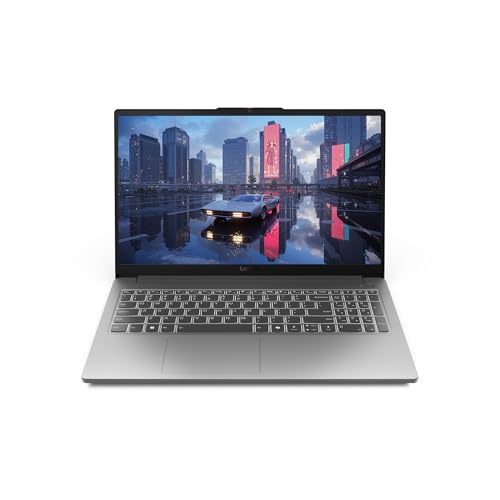
Best for: one-machine buyers who want RTX graphics under 4.2 lb Skip it if: you keep 30 browser tabs open
If you want one laptop for drafting and gaming, this is the sensible middle. The LOQ Essential weighs 4.18 lb, which is 0.67 lb lighter than the three 4.85 lb machines further down this list, and it still lists an NVIDIA GeForce RTX 4050 alongside an Intel Core i5-12450HX. That combination at that weight is the single most balanced spec sheet in the set.
Lenovo describes the 15.6-inch FHD IPS panel as 300 nits with 100% sRGB coverage and a 144Hz refresh rate. The 100% sRGB figure is the one writers who also handle images should care about, because it's the difference between guessing at a colour and trusting it. The body measures 0.9 x 9.29 x 14.2 in and the listing dates the model to 2025. Lenovo also mentions rapid-charge battery and three months of PC Game Pass with EA Play.
Where it pinches is memory and storage: 8GB and 512GB. For a writer running a browser, a word processor and a research PDF stack, 8GB is workable but not generous, and it's the same figure as the much cheaper DUNHOO. The warranty is 1 year limited parts and labour, half the DUNHOO's stated term. This is the pick that sells fastest here, and the compromise it makes is headroom.
Pros:
- RTX 4050 graphics at just 4.18 lb
- 100% sRGB and 300 nits claimed on a 144Hz panel
- Sells faster than every other pick here
- 2025 model with current-generation HX processor
Cons:
- 8GB memory is tight for heavy multitasking
- 512GB SSD fills fast with video or archives
- 1-year warranty, half the DUNHOO's term
- No stated memory upgrade path
3. NIMO 17.3 FHD Light Gaming AI-Laptop — Best upgrade
The biggest screen and the biggest storage jump for the second-cheapest position in this set.
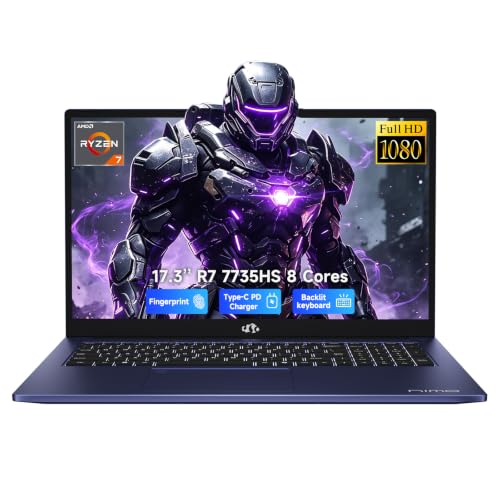
Best for: desk-bound writers who want the biggest screen Skip it if: the laptop lives in a backpack
This is the value oddity of the group, and I'd look hard at it. The NIMO is the second-cheapest pick here yet ships with 16GB of DDR5 memory at 5600MHz and a 1TB PCIe 4.0 SSD, double the memory and double the storage of the Lenovo above it. NIMO says the processor is an eight-core AMD Ryzen 7 7735HS with Radeon 680M integrated graphics on RDNA 2.
The 17.3-inch 1920x1080 panel is the largest here by 1.3 inches. For split-screen work, a manuscript on one side and notes on the other, that extra area does more for daily writing than any GPU in this roundup. NIMO also states a 2-year manufacturer warranty with a 90-day return window and final assembly in the United States.
At 4.6 lb and 15.7 in wide, it's the second-heaviest and by far the widest machine here, and that width is what kills it as a travel laptop. Many 15-inch sleeves won't take it. The graphics are integrated, so it sits behind the four discrete-GPU picks for anything genuinely demanding.
Read it as a desktop replacement that happens to fold. On that basis, the memory and storage it gives you for its price position is the strongest value case in the set.
Pros:
- Largest display here at 17.3 inches
- 16GB DDR5 5600MHz and 1TB PCIe 4.0 SSD
- Eight-core Ryzen 7 7735HS
- 2-year warranty with 90-day return window stated
Cons:
- Widest chassis here at 15.7 in
- Integrated graphics only, no discrete GPU
- 4.6 lb makes daily carrying a chore
- Only one seller lists it
4. ASUS TUF Gaming F16 — Best for pros
A 16:10 panel and a 115W GPU power ceiling, which is the taller page view plus the harder-working graphics.

Best for: writers who want a taller 16:10 page view Skip it if: 8GB of memory sounds tight
Aspect ratio is the underrated writer's specification, and the TUF F16 is where this set starts taking it seriously. The 16-inch FHD+ panel is 16:10, not 16:9, which means more vertical lines of text visible at once without shrinking the font. ASUS lists it as an IPS-level 144Hz display with 100% sRGB and Adaptive-Sync.
Inside, ASUS pairs an Intel Core 5 210H with an RTX 4050 and states a Max TGP of 115W plus NVIDIA Advanced Optimus. That 115W figure is the highest power ceiling quoted in this roundup, and it's the reason two laptops with the same GPU name can behave very differently. Memory is 8GB DDR5 with a 512GB PCIe Gen4 SSD. ASUS also claims MIL-STD-810H testing and describes Arc Flow Fans, four exhaust vents, five heat pipes and an anti-dust filter.
Two of these listings are stocked by more than one seller, and this is the one with the wider availability at two offers.
The weight is 4.85 lb, tied for heaviest here, in a 0.88 x 13.9 x 9.88 in body. And 8GB of memory on a machine at this price position is the clearest gap in the sheet, especially against the cheaper NIMO's 16GB. Warranty is 1 year.
Pros:
- 16:10 aspect ratio shows more text per screen
- Highest stated GPU power ceiling here, 115W
- MIL-STD-810H durability testing claimed
- Detailed cooling design with anti-dust filter
- Two sellers list it, the widest availability here
Cons:
- 8GB memory at a mid price position
- Tied heaviest in the set at 4.85 lb
- 512GB storage with no stated upgrade path
- 1-year warranty only
5. GIGABYTE Gaming A16 — Runner-up
The newest GPU generation in this roundup, in a 19.45mm chassis that folds completely flat.

Best for: buyers who want the newest GPU generation here Skip it if: you need more than 512GB of local storage
The GIGABYTE is the forward-looking pick. It's the only machine in this set listing an NVIDIA GeForce RTX 5050, which GIGABYTE describes as built on the Blackwell architecture, paired with an Intel Core i7-13620H and 16GB of DDR5 memory. That i7 plus 16GB combination is the strongest processor-and-memory pairing here outside the premium ASUS.
The display is 16-inch WUXGA at 1920x1200 and 165Hz, matching the highest refresh rate in this roundup and giving you the same taller 16:10 shape as the two other 16-inch picks. GIGABYTE quotes a 19.45mm slim chassis with a 180-degree laid-flat hinge, which makes it and the DUNHOO the only two picks here that open all the way. The listing also mentions GiMATE, its onboard AI assistant.
Measured, the body is 0.91 x 14.1 x 10.3 in at 4.85 lb, so the "slim" framing describes thickness rather than overall bulk. It's the second-most expensive pick here, and for that position you get only 512GB of storage, the same as the two mid-priced machines and a third of the NIMO's 1TB. Warranty is 1 year manufacturer. That storage figure is what pushes it behind the Lenovo for one-machine buyers.
Pros:
- Only RTX 5050 in this set
- Intel Core i7-13620H with 16GB DDR5
- 165Hz WUXGA 1920x1200 panel
- 180-degree hinge, 19.45mm stated thickness
- 2025 model year
Cons:
- 512GB storage at a premium price position
- 4.85 lb and 10.3 in deep, no travel advantage
- 1-year warranty
- Only one seller lists it
6. ASUS TUF Gaming A16 32GB — Best premium
32GB of memory and a 1TB SSD, the biggest headroom in this roundup by a wide margin.

Best for: writers who also edit video or run local AI tools Skip it if: you want a published warranty term
This is the machine for the writer whose work outgrew writing. 32GB of memory is double what any other pick here offers and quadruple the DUNHOO, Lenovo and F16, and the 1TB SSD matches the NIMO for the largest storage in the set. If you're transcribing interviews locally, cutting video, or keeping years of research on the drive, that's the spec that changes your day.
ASUS lists an eight-core Ryzen 7 7735HS with an AMD Radeon RX 7700S carrying 8GB of dedicated memory, and the listing positions that GPU above an RTX 4060. The 16-inch WUXGA 1920x1200 panel is quoted at 165Hz with a 7ms response, 100% sRGB, anti-glare, FreeSync Premium and a MUX switch. Ports listed are two USB-A 3.2, one USB-C 3.2, one USB-C USB4, HDMI 2.1 FRL and RJ45 Ethernet. USB4 is the one that matters long-term, since it opens the door to a single-cable desk setup. ASUS also lists a backlit keyboard, Dolby Atmos, AI noise cancellation, fast charging and a bundled USB-C hub.
The gaps are real. At 1.06 in it's the thickest machine here, and it's tied heaviest at 4.85 lb. No warranty term appears in its specifications at all, which is a notable blank next to the DUNHOO's stated 2 years. It's also the most expensive pick here.
Pros:
- 32GB RAM, double any other pick here
- 1TB SSD and Radeon RX 7700S with 8GB
- USB4 port plus HDMI 2.1 and Ethernet
- 165Hz anti-glare WUXGA panel with MUX switch
- Bundled USB-C hub accessory
Cons:
- No warranty term stated in the specifications
- Thickest chassis in the set at 1.06 in
- Most expensive pick here
- Tied heaviest at 4.85 lb
What weight actually costs you in graphics
Line these six up by weight and a pattern falls out immediately. It's the cleanest trade in the whole set.
- 3.5 lb: integrated graphics, 256GB storage, 2-year warranty
- 4.18 lb: RTX 4050, 512GB, 8GB memory
- 4.6 lb: integrated graphics, 1TB, 16GB memory, 17.3-inch panel
- 4.85 lb: discrete graphics on all three, 512GB to 1TB, 8GB to 32GB memory
The jump from 3.5 lb to 4.18 lb buys you a discrete RTX 4050 and doubles your storage. That's the best-value 0.68 lb in this roundup, no contest. The next jump, from 4.18 lb to 4.85 lb, buys you a taller panel, a faster refresh rate, and in one case 32GB of memory. It does not buy you a fundamentally better writing machine.
So the honest reading is that 4.18 lb is the sweet spot for a portable gaming laptop for writers, and every pick above it is buying capability at the cost of carrying comfort. Only you know whether that's a fair swap. A writer who works at the same desk every day should ignore weight entirely and buy on memory and screen. A writer who moves between three locations a week should treat 4.85 lb as a hard ceiling and probably stop at 4.18.
How much storage does a writer's archive need?
Text is tiny. A million-word manuscript is smaller than one phone photo. So if you only write, 256GB on the DUNHOO is genuinely enough, and I'd not spend a cent more chasing capacity.
The storage question gets serious when the work stops being text. Interview audio, screen recordings, PDF research libraries, a Steam install or two: those fill a drive fast. Here's how the set divides:
- 1TB: NIMO and ASUS TUF A16
- 512GB: Lenovo LOQ Essential, ASUS TUF F16, GIGABYTE A16
- 256GB: DUNHOO
Three of the six sit at 512GB, including the second-most expensive pick, which is the weakest part of the GIGABYTE's sheet. The DUNHOO is the only listing here that explicitly mentions an M.2 slot supporting SATA drives, so it's the one where a cheap upgrade is spelled out. Nothing else in this set states an accessible drive bay, which doesn't mean they lack one, only that you shouldn't assume it.
My rule: if a games library is going on the machine, start at 1TB. If it's writing plus a browser, 512GB will outlast the laptop.
What these listings do not tell you
Six listings, and several things a writer would want to know appear in none of them. Worth knowing before you commit.
Battery life in hours. Not stated on any pick. Lenovo mentions rapid charge and ASUS mentions fast charging on the premium A16, but no runtime figure exists here. Gaming laptops with discrete GPUs generally run shorter than integrated machines, and that's the single biggest unknown for anyone writing away from an outlet.
Keyboard feel. The premium ASUS A16 and the NIMO list backlit keyboards. No listing gives key travel, layout details, or whether there's a numeric pad, though the 17.3-inch NIMO almost certainly has room for one.
Fan noise. The ASUS F16 claims cooling "without extra noise", which is a marketing phrase rather than a decibel figure. Nobody publishes a number. If you write in quiet rooms, this is a real risk with any discrete-GPU machine.
Screen brightness. Only the Lenovo states a figure, at 300 nits. Everything else is silent, which matters if you write near windows.
Webcam and microphone quality. The premium ASUS lists a webcam with AI noise cancellation. The others don't specify.
None of this disqualifies anything. It just means the reasonable move is to buy on the numbers that are published, weight, memory, storage, panel size, and treat the rest as things you'll discover.
The verdict
Three price tiers, three different right answers for a portable gaming laptop for writers.
At the entry tier, the DUNHOO wins on the specification the category name promises. 3.5 lb, 0.81 in thick, 2-year warranty. Nothing else here is close on carry weight, and if you write in cafés, on trains and in hotel rooms, that beats every GPU in this roundup. Its stablemate at this tier, the NIMO, is the opposite bet: 4.6 lb and 15.7 in wide, but 16GB of DDR5, a 1TB SSD and a 17.3-inch panel. Buy the DUNHOO to carry, the NIMO to sit still.
The middle tier belongs to the Lenovo LOQ Essential. RTX 4050 graphics at 4.18 lb, with a 300-nit 100% sRGB 144Hz panel, is the best-balanced sheet here and the reason it sells faster than the rest of this set. The ASUS TUF F16 counters with a 16:10 aspect ratio and a stated 115W GPU ceiling, so pick it if screen shape and sustained load matter more than the 0.67 lb you'd save.
At the premium tier, the ASUS TUF A16 with 32GB and 1TB is the only pick here with genuine long-term headroom, and its USB4 port is the most future-proof connector in this comparison. The GIGABYTE beats it on GPU generation with the RTX 5050 but stops at 512GB.
The cutoff is simple: 4.2 lb. Below it, portability wins. Above it, buy on memory.
FAQ
Is a gaming laptop worth it for writing?
A gaming laptop is worth it for writing only if something in your work needs the graphics. Video editing, local AI transcription, or games in the evening all justify it. Pure prose does not. The DUNHOO at 3.5 lb with integrated graphics handles a manuscript fine, while the ASUS TUF A16 with 32GB earns its keep on timeline work.
Which is the cheapest capable pick here for a writer?
The cheapest capable pick here is the DUNHOO, which sits at the bottom of this set on price while offering 8GB of memory, a 256GB SSD and the longest stated warranty at 2 years. The NIMO sits just above it and quadruples the storage to 1TB with 16GB of DDR5, making it the better value if you don't need to carry the machine.
Lenovo LOQ Essential or ASUS TUF F16 for a writer?
Choosing the Lenovo LOQ Essential or ASUS TUF F16 comes down to weight against screen shape. Both list an RTX 4050. The Lenovo weighs 4.18 lb, 0.67 lb lighter, and states 300 nits brightness. The F16 gives you a 16-inch 16:10 panel that shows more text lines and a 115W GPU ceiling. Travel a lot, take the Lenovo.
How much RAM does a portable gaming laptop for writers need?
RAM for a portable gaming laptop for writers starts at 8GB, which covers a word processor, a browser and a PDF reader without drama. Three picks here ship 8GB. Move to 16GB, as the NIMO and GIGABYTE do, if you keep many tabs open alongside research files. Go to 32GB, as the premium ASUS does, only for video or local AI work.
What mistake do writers make buying a gaming laptop?
The mistake writers make buying a gaming laptop is ranking picks by GPU tier and ignoring the chassis. Three machines here weigh 4.85 lb, and one is 1.06 in thick. A laptop you leave at home because it's heavy writes nothing. Screen aspect ratio matters too: the 16:10 panels here show more lines of text than the 16:9 ones.
Start with the weight column in the table above, then work rightward. If 3.5 lb and a 2-year warranty answer your problem, the DUNHOO ends the search today and leaves your budget alone. If your work has grown past text, the Lenovo at 4.18 lb is the smallest package here with real graphics inside it. What makes the DUNHOO the right default isn't its spec sheet, it's that a writing machine gets used in proportion to how little you notice carrying it, and this is the only pick in this group that clears that bar.