Best Premium KVM Switch: UGREEN AK704 Leads

Five KVM switches compared on the specs that matter to a design workstation: monitor count, refresh rate, USB 3.0 bandwidth and switching method. The UGREEN AK704 takes the top spot.

By Samuel HarrisUpdated 14 min read
On this page
- Best premium kvm switch for graphic designers at a glance
- How I screened these five KVM switches
- Does a KVM switch protect colour accuracy?
- 1. UGREEN 8K@60Hz HDMI Displayport KVM Switch 3 Monitors 2 Computers — Best overall
- 2. AOOCOO HDMI Displayport KVM Switch 3 Monitor 4 Computer — Best premium
- 3. JCYMELE 4K@144Hz KVM Switch 2 Monitors 2 Computers — Best warranty
- 4. Hearvo USB 3.0 HDMI KVM Switch for 2 Computers 1 Monitor — Most versatile
- 5. CMSTEDCD HDMI KVM Switch 1 Monitors 2 Computers — Best budget pick
- How many monitors do you actually need to switch?
- USB 3.0 versus USB 2.0: what it costs you
- When a different pick wins
- The verdict
- FAQ
The best premium KVM switch for graphic designers is the UGREEN AK704, because it carries three video outputs, two DisplayPort 1.4 plus one HDMI 2.1, at a claimed 8K@60Hz with four USB 3.0 ports behind them. If you cycle four machines rather than two, the AOOCOO triple-monitor switch is the better buy. Most guides compare these boxes on maximum resolution. That number is the least useful thing on the listing, because every switch here clears 4K. What splits them is how many screens travel with the switch and how fast the USB side runs.
Best premium kvm switch for graphic designers at a glance
| Pick | Monitors / Computers | Video spec | Price |
|---|---|---|---|
Best overall UGREEN 8K@60Hz HDMI Displayport KVM Switch |
3 monitors 2 computers |
8K@60Hz claim 2x DP 1.4 + HDMI |
Check Price |
Best premium AOOCOO HDMI Displayport KVM Switch |
3 monitors 4 computers |
8K@60Hz / 4K@144Hz claim | Check Price |
Best warranty JCYMELE 4K@144Hz KVM Switch |
2 monitors 2 computers |
4K@144Hz / 8K@60Hz claim | Check Price |
Most versatile Hearvo USB 3.0 HDMI KVM Switch |
1 monitor 2 computers |
4K@60Hz, HDCP 2.2 | Check Price |
Best budget pick CMSTEDCD HDMI KVM Switch |
1 monitor 2 computers |
4K@60Hz claim | Check Price |




How I screened these five KVM switches
I lined up the published specifications for all five side by side and threw out the resolution column first. Every one of these claims 4K@60Hz or better, so it decides nothing. What survived as a useful filter was the combination of video outputs, USB generation and physical footprint.
Three screens matter here. A designer running a canvas display, a palette display and a reference display needs a switch that carries all three, and only two of the five do: the UGREEN AK704 and the AOOCOO. The other three carry one or two.
USB generation matters second. Two switches publish USB 3.0 at a claimed 5Gbps, one names USB 2.0 at 480Mbps, and the difference shows up the moment you plug a card reader or a scratch drive into the hub rather than the machine.
One honest caveat before the picks: nothing in this data identifies a switch as built for design work specifically. There is no colour-management specification, no ICC handling, no bit-depth figure on any of these listings. So treat "for graphic designers" as your own judgement call about screen count and bandwidth, not a claim any manufacturer here makes.
Does a KVM switch protect colour accuracy?
Nobody selling these five publishes a word about colour. That is worth knowing before you buy the best premium KVM switch for graphic designers and expect it to behave like a calibrated splitter.
A KVM switch sits between your graphics card and your panel. It passes the signal through, and the panel does the colour work. Nothing in these listings states the bit depth passed, the chroma subsampling at each resolution, or whether HDR metadata survives the hop.
Two things in the data are relevant anyway:
- The Hearvo switch names HDCP 2.2, which matters if you review protected footage on the same display you design on.
- The Hearvo listing also claims Adaptive EDID, which it says automatically optimises display settings. EDID is the handshake that tells your computer what the monitor can do. When it breaks, resolutions vanish from your display list.
Here's the trick with EDID on any switch: check your resolution and refresh rate after the first switch, not before. A box that reports 8K@60Hz on the carton can still hand your Mac a 4K@30Hz option if the handshake drops. And note the AOOCOO listing's own caveat, that the HDMI leg and the DisplayPort legs support different refresh-rate ceilings. The headline figure is the best case on one port, not all three.
1. UGREEN 8K@60Hz HDMI Displayport KVM Switch 3 Monitors 2 Computers — Best overall
Three screens, two machines, four USB 3.0 ports and an aluminium body: this is the most complete package here for a two-computer design desk.
Best for: a two-machine triple-monitor desk running 8K@60Hz Skip it if: you only run one display
Within this set, the AK704 is the only switch that pairs three video outputs with a two-computer input count. That combination is the one most freelancers actually need: a work laptop and a personal tower, feeding the same three panels. UGREEN says the layout is two DisplayPort 1.4 ports plus one HDMI 2.1, with a claimed ceiling of 8K@60Hz or 4K@240Hz, and four USB 3.0 ports shared across both machines.
It is also the largest box of the five at 1.57 x 6.18 x 2.83 in, and the listing names an aluminium shell. Bigger is not automatically worse here, because the extra width is where a third output goes.
Switching runs two ways, a button on the unit and a desktop controller, and the listing states plug-and-play support across Windows, macOS and Linux with no driver.
The trade-off against the AOOCOO is input count. Two computers is the ceiling, so a studio machine plus a render box plus two laptops will not all fit. Against the single-monitor picks, it takes more desk space and more cables to commission.
Pros:
- Only two-computer pick here carrying three monitors
- Four USB 3.0 ports shared across both machines
- Two DisplayPort 1.4 plus one HDMI 2.1
- Button and desktop controller switching
- Aluminium housing named on the listing
Cons:
- Two computers only, half the AOOCOO's input count
- Largest footprint of the five at 6.18 in wide
- No warranty term published on the listing
- Premium price position without the four-input capability
2. AOOCOO HDMI Displayport KVM Switch 3 Monitor 4 Computer — Best premium
Four computers across three screens is a capability nothing else here offers, and it comes with cables in the box.
Best for: studios cycling four computers across three screens Skip it if: you cannot supply 2 DP plus HDMI from every machine
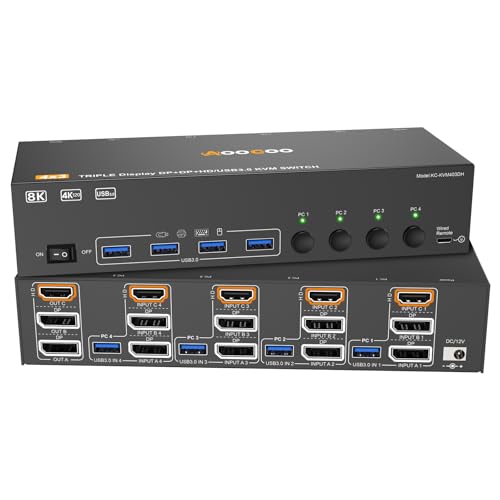
The AOOCOO is the most expensive pick here, and the reason is input count. Four desktops sharing three monitors and four USB 3.0 ports is a small-studio configuration, not a home-office one. AOOCOO claims 8K@60Hz and 4K@144Hz on the video side, using two DisplayPort 1.4 outputs plus HDMI 2.1.
The listing includes a wired remote, a power adapter and four USB 3.0 cables. That last item matters more than it sounds: a four-input switch needs a lot of cable, and commissioning one from an empty drawer is a separate shopping trip.
Read AOOCOO's own fine print carefully. It states that each computer needs two DisplayPort connections plus HDMI, and that machines running both discrete and integrated graphics need both sets of ports available. Four machines each giving up three video outputs is a real inventory check.
It is the second-smallest box here at 0.79 x 3.94 x 1.97 in, which is the surprise given the port count. The trade-off against the UGREEN pick is the missing published warranty term and the cable burden.
Pros:
- Four computers, three monitors, unique in this set
- Four USB 3.0 ports at claimed 5Gbps
- Wired remote and power adapter included
- Four USB 3.0 cables supplied in the box
- Compact at 3.94 in wide despite the port count
Cons:
- Needs 2 DP plus HDMI free on every one of four machines
- Refresh-rate ceiling differs between HDMI and DisplayPort legs
- No warranty term published
- Most expensive pick here
- Only one seller lists it
3. JCYMELE 4K@144Hz KVM Switch 2 Monitors 2 Computers — Best warranty
A published 2 year warranty and an external 12V supply make this the safest dual-monitor buy of the five.

Best for: dual-monitor setups that need 4K@144Hz and a stated 2 year warranty Skip it if: you need a third screen
Two of these five listings publish a warranty term, and the JCYMELE is the one that pairs its 2 year cover with a dual-monitor layout and USB 3.0. That is a narrow but real advantage. Switches fail at the power stage more often than the video stage, and a stated term is the only thing here that speaks to that.
JCYMELE claims 4K@144Hz and 8K@60Hz on DisplayPort, with backward support down through 4K@120Hz, 4K@60Hz and 2K. Two computers share two monitors and up to four USB devices.
The external 12V DC adapter is worth calling out. JCYMELE's stated reason is a stable operating environment for USB devices through the switch, and that is the practical difference between a hub that holds a bus-powered drive and one that drops it mid-copy.
At 5.91 x 2.68 x 1.5 in it sits between the UGREEN pick and the small single-monitor boxes. Switching runs from a Select button or a desktop controller.
The loss against the top two is obvious: two screens, not three. If your reference panel is a fixed part of how you work, this is one output short.
Pros:
- Published 2 year warranty
- 4K@144Hz and 8K@60Hz DisplayPort claims
- Four USB 3.0 devices shared across two computers
- External 12V adapter for stable USB power
- Select button plus desktop controller
Cons:
- Two monitors only, one short of the top picks
- DisplayPort only, no HDMI output
- Requires a mains outlet for the adapter
- Only one seller lists it
4. Hearvo USB 3.0 HDMI KVM Switch for 2 Computers 1 Monitor — Most versatile
The only pick here with a USB-C port on the hub, and the only one naming HDCP 2.2.

Best for: one 4K@60Hz display plus a USB-C peripheral Skip it if: you need more than one monitor switched
The Hearvo S7232H does one screen, and it does the USB side better than anything else at its price position. Its four USB 3.0 ports break down as three USB-A plus one USB-C, and that USB-C port is unique in this group. If your tablet, card reader or audio interface is USB-C native, this is the only switch here that takes it without a dongle.
Hearvo claims 4K@60Hz over HDMI with HDCP 2.2 support, and names Adaptive EDID as the thing keeping the display handshake stable across switches. Transfer speed is stated at up to 5Gbps.
It is the second-cheapest of the five and the second-slimmest at 0.8 x 5 x 2.4 in. Switching runs from the on-unit button or a wired remote.
Where it loses is scope. One monitor is one monitor, and a designer who works across a canvas and a palette screen will need two of these or a different box entirely. There is also no warranty term on this listing, which the cheaper CMSTEDCD does publish. Only one seller stocks it.
Pros:
- Only pick with a USB-C port on the hub
- HDCP 2.2 named on the listing
- Adaptive EDID for stable display handshakes
- USB 3.0 at claimed 5Gbps
- Second-cheapest of the five
Cons:
- Single monitor only
- HDMI only, no DisplayPort path
- No warranty term published
- Only one seller lists it
5. CMSTEDCD HDMI KVM Switch 1 Monitors 2 Computers — Best budget pick
The cheapest and lightest switch here at 2.12 oz, with a published 2 year warranty behind it.

Best for: a single 4K@60Hz monitor with a wired keyboard and mouse Skip it if: you plug a card reader or drive into the switch
This is the cheapest of the five and the only budget option publishing a warranty term. Two years of stated cover on the least expensive box in a set is unusual, and it is the main reason this pick earns a place over a nameless alternative.
CMSTEDCD claims 4K@60Hz over HDMI for two computers sharing one monitor, one keyboard and one mouse. Physically it is tiny: 2.12 oz and 0.63 x 3.86 x 2.36 in, the smallest and lightest here by a clear margin. If it needs to live behind a monitor arm or travel in a laptop bag, nothing else competes on bulk.
Now the real limit. The USB side is 2.0, stated at up to 480Mbps, against 5Gbps on three of the other four picks. For a wired keyboard and mouse that is fine. For a card reader shifting a shoot's worth of raw files, it is roughly a tenth of the bandwidth, and you will feel every transfer. Switching runs from the unit's button or a wired desktop control.
Pros:
- Cheapest of the five
- Published 2 year warranty
- Lightest and smallest at 2.12 oz
- Two switching methods including wired control
- 4K@60Hz claim over HDMI
Cons:
- USB 2.0 at 480Mbps, far slower than the USB 3.0 picks
- Two USB ports only, half the count of most picks here
- Single monitor, single keyboard and mouse
- Only one seller lists it
How many monitors do you actually need to switch?
This is the question that decides which best premium KVM switch for graphic designers suits you, and it is not the same as how many monitors you own.
Work through it in order:
- Count the displays your primary machine drives today.
- Ask which of those you genuinely need on the second machine. A reference panel often stays with one computer.
- Count the video outputs free on your weakest machine, not your strongest. That number caps everything.
- Add one output per screen you want switched, then check the connector types match.
The trap is step three. The AOOCOO listing spells it out: three-screen switching wants two DisplayPort plus HDMI from each computer, and a machine with both discrete and integrated graphics may need both port groups live. A laptop with one HDMI port and one USB-C output cannot feed a three-monitor switch no matter what the switch supports.
If two screens is honestly enough, the JCYMELE saves you money and adds a warranty term. If one screen is enough, the Hearvo or the CMSTEDCD ends the decision quickly.
USB 3.0 versus USB 2.0: what it costs you
Four of these five publish USB 3.0. One publishes USB 2.0. That gap is the single largest practical difference in the set, and it is invisible in the resolution numbers everyone compares.
- USB 3.0 here is stated at up to 5Gbps: Hearvo, UGREEN, AOOCOO and JCYMELE.
- USB 2.0 is stated at up to 480Mbps: CMSTEDCD.
A keyboard and mouse need almost nothing. A CF card reader, an external SSD scratch disk, a tablet, a scanner or a colour probe all want the faster bus. Route those through a 480Mbps hub and every file move becomes the slowest part of your day.
Port count follows the same split. The UGREEN, AOOCOO, JCYMELE and Hearvo picks each name four USB ports. The CMSTEDCD names two. Two ports is a keyboard and a mouse, with nothing left over.
One more thing the listings expose: only the JCYMELE and AOOCOO name an included power adapter. External power is what keeps a bus-hungry drive from dropping off the hub when you switch machines.
When a different pick wins
The UGREEN AK704 is the default, but three specific conditions flip it.
If you run four machines, the AOOCOO is the only answer here. Nothing else in this set exceeds two computers, so the UGREEN pick is simply not in the running.
If a published warranty term is your deciding factor, take the JCYMELE. Only two of these five state one, and the JCYMELE pairs its 2 year cover with USB 3.0, an external 12V adapter and 4K@144Hz claims. The UGREEN and AOOCOO listings publish no term at all.
If your peripherals are USB-C, the Hearvo is the only pick with a USB-C port on the hub. That single connector can matter more than a third video output, especially with a laptop-first setup.
And a fourth, quieter flip. If the switch has to disappear behind a monitor arm, the CMSTEDCD at 2.12 oz and 0.63 in thick is in a different size class from the 6.18 in wide UGREEN. Skip this category entirely if you switch machines less than once a week, because a physical HDMI swap costs nothing.
The verdict
The UGREEN AK704 is the best premium KVM switch for graphic designers because it does the thing a design desk needs and almost nothing else in this set does: it carries three monitors between two computers with four USB 3.0 ports behind them. Two DisplayPort 1.4 outputs plus HDMI 2.1, a claimed 8K@60Hz ceiling, button and desktop-controller switching, and stated support across Windows, macOS and Linux. Its cost is bulk, at 1.57 x 6.18 x 2.83 in, and a listing that publishes no warranty term.
Two conditions flip that recommendation. If you cycle four computers rather than two, the AOOCOO's four-input, three-monitor layout has no competition here, and it ships with four USB 3.0 cables and a power adapter to commission it. If a stated warranty is what you weigh, the JCYMELE's 2 year term plus its 4K@144Hz DisplayPort claims and external 12V supply make it the lower-risk dual-monitor buy.
Set aside colour claims entirely. None of these five publishes a colour-management specification, so buy on screen count, USB generation and connector match, then verify your resolution and refresh rate after the first switch.
FAQ
Is a premium KVM switch worth it for design work?
A premium KVM switch is worth it when the switch carries more screens than a cheaper one can. The UGREEN AK704 and AOOCOO both handle three monitors; the entry picks handle one. If you work across a canvas screen and a palette screen, that gap is the whole purchase. If one display covers your workflow, spend less.
What do the cheaper KVM switches here give up?
The cheaper KVM switches here give up video outputs and USB bandwidth. The CMSTEDCD switches one monitor over two USB 2.0 ports at a stated 480Mbps. The Hearvo switches one monitor but upgrades to four USB 3.0 ports at 5Gbps, including USB-C. Neither carries a second or third display, which is the main thing the premium picks add.
Will these KVM switches support 4K at 144Hz?
These KVM switches support 4K at 144Hz on two of five listings. JCYMELE claims 4K@144Hz and 8K@60Hz over DisplayPort, and AOOCOO claims 8K@60Hz with 4K@144Hz. The UGREEN AK704 claims 8K@60Hz or 4K@240Hz. The Hearvo and CMSTEDCD picks stop at a claimed 4K@60Hz, which suits standard editing panels.
UGREEN AK704 or AOOCOO: which triple-monitor switch?
Between the UGREEN AK704 or AOOCOO, count your computers. Both carry three monitors and four USB 3.0 ports. The UGREEN handles two machines in a wider 6.18 in aluminium body; the AOOCOO handles four in a 3.94 in box and includes four USB 3.0 cables plus a wired remote. Two machines means UGREEN, four means AOOCOO.
What mistake do first-time KVM switch buyers make?
The mistake first-time KVM switch buyers make is counting monitors instead of counting free video outputs on their weakest computer. AOOCOO states three-monitor switching needs two DisplayPort plus HDMI from every machine. A laptop with one HDMI port cannot feed a triple-monitor switch. Check the ports on both computers before choosing the switch.
Start with your port inventory, not the product page. Open both computers' display settings, write down every free video output and its connector type, then match that list against the picks above. That single step eliminates most of this category in about two minutes. If both machines can give up two DisplayPort and one HDMI, the UGREEN AK704 is the right default, because three switched screens across two computers is the configuration most design desks actually run, and it is the only pick here that delivers it with four USB 3.0 ports and an aluminium shell.