Best Dual Monitor KVM Switch: Refresh Rate Decides
Six KVM switches compared on published resolution ceilings, USB hub layout, video standard and physical footprint, with the laptop-plus-desktop question answered first.

By Samuel HarrisUpdated 16 min read
On this page
- Best dual monitor KVM switch for content creators at a glance
- How the six were screened, and why weights matter
- Does a KVM switch actually suit content creators?
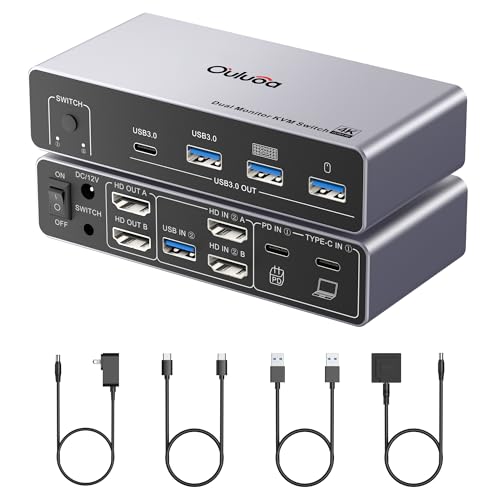
- 1. Ouluoa USB C KVM Switch 2 Monitors 1 Desktop and 1 Laptop — Best overall
- 2. UGREEN 8K@60Hz DisplayPort KVM Switch — Runner-up
- 3. JCYMELE 4K@144Hz KVM Switch 2 Monitors 2 Computers — Best for heavy use
- 4. CMSTEDCD 8K HDMI KVM Switch 2 Monitors 2 Computers — Best for beginners
- 5. Hearvo USB 3.0 HDMI KVM Switch — Best budget pick
- 6. TobenONE KVM Switch 2 Monitors 2 Computers — Best premium
- HDMI or DisplayPort: which video standard should you pick?
- What more money buys across these six
- How much desk space will each one take?
- The verdict
- FAQ
The best dual monitor KVM switch for content creators is the Ouluoa USB C KVM Switch, because it pushes 4K@60Hz across two HDMI displays while feeding a laptop up to 100W of power through one cable. If both of your machines are desktops with DisplayPort outputs, the UGREEN 8K@60Hz DisplayPort switch is the better buy. The deciding specification here is the published resolution and refresh ceiling: 4K@60Hz, 4K@144Hz and 8K@60Hz all appear in this set, and that single figure splits the six into two very different groups.
Best dual monitor KVM switch for content creators at a glance
| Pick | Video ceiling (claim) | USB hub | Price |
|---|---|---|---|
| 4K@60Hz over USB-C | 3x USB-A 3.0 1x USB-C |
Check Price | |
| 8K@60Hz, 4K@240Hz | 3x USB-A 3.0 1x USB-C |
Check Price | |
Best for heavy use JCYMELE 4K@144Hz KVM Switch |
8K@60Hz, 4K@144Hz | 4x USB 3.0 | Check Price |
Best for beginners CMSTEDCD 8K HDMI KVM Switch |
8K@60Hz, 4K@120Hz | 4x USB 3.0 | Check Price |
Best budget pick Hearvo USB 3.0 HDMI KVM Switch |
4K@60Hz, HDCP 2.2 | 3x USB-A 3.0 1x USB-C |
Check Price |
Best premium TobenONE KVM Switch 2 Monitors 2 Computers |
4K@60Hz or 1440p@120Hz | 2x USB-A 3.0 10Gbps dock |
Check Price |




How the six were screened, and why weights matter
I judged these six on four criteria, weighted in this order.
- Published video ceiling, weighted heaviest. This is the one number that decides whether your panels run at their native settings or fall back. It is printed on every listing, and it varies wildly across the set.
- Video standard and source type. HDMI, DisplayPort or USB-C is not a preference, it is a compatibility gate. Get it wrong and nothing works.
- USB hub layout. Four ports beats three, and a USB-C port in the hub matters if your card reader or dock is USB-C.
- Published warranty and footprint, weighted lightest. Only two of the six list a warranty term, so this criterion separates a small number of picks rather than ranking all of them.
Why that order? Because the video ceiling is the only spec you cannot fix later. A thin hub can be extended with a cheap powered hub sitting behind the monitor. A missing DisplayPort cannot be added at all. Footprint sits last because every one of these six is between 0.8 in and 1.5 in tall, so none of them dominates a desk.
One thing I did not weight: port count on the video side. All six are two-port switches. That is the category, not a differentiator.
Does a KVM switch actually suit content creators?
Here is the honest answer. None of these six listings publishes a specification aimed at editing, colour work or streaming, so no product in this set can be claimed to serve creative work specifically. What the listings do publish is video bandwidth, USB throughput and power delivery, and those three things happen to be exactly what a creative desk leans on hardest.
Judge it yourself against three checks:
- Colour pipeline. No listing here states colour depth, chroma subsampling or HDR pass-through. If you grade footage on a calibrated panel, assume nothing and verify with the manufacturer before you commit.
- Refresh rate for timeline scrubbing. The JCYMELE claims 4K@144Hz and the UGREEN claims 4K@240Hz. The Ouluoa and Hearvo top out at 4K@60Hz in their published claims. That gap is real and it is stated.
- Card and drive throughput. Every one of these six advertises USB 3.0 at 5Gbps except the TobenONE, which claims a 10Gbps dock. Fast card offloads live on that number.
The pattern in this set is that the switches built around USB-C laptop docking publish the most useful supporting specs, while the DisplayPort switches publish the highest video figures. You pick a side.
1. Ouluoa USB C KVM Switch 2 Monitors 1 Desktop and 1 Laptop — Best overall
The only pick here that combines dual 4K@60Hz HDMI output with 100W laptop charging over a single USB-C cable, which is the exact shape of a laptop-plus-desktop creative desk.
Best for: running one USB-C laptop and one desktop across two 4K screens Skip it if: both machines are desktops without USB-C video output
Ouluoa built this as a docking station first and a switch second, and that framing is why it wins. The listing states 4K@60Hz output over the USB-C port, two HDMI displays, three USB 3.0 ports and one USB-C port on the hub, all at 5Gbps. Power delivery is where it separates from the field: the title claims 100W PD, the feature bullet says 80W, and either figure is enough to keep a working laptop topped up while it drives two panels. No other pick in this set publishes a PD figure at all.
The body measures 1.3 x 5.24 x 2.52 in, making it the second-shortest footprint here after the Hearvo. A wired remote and USB cable are included, and Ouluoa says the external 12V adapter means the unit never draws power from a computer's USB ports. That matters when you hang a bus-powered SSD off the hub.
The trade-off is reach. This is the second-most-expensive pick in the set, only one seller lists it, and its published 4K@60Hz ceiling is beaten on paper by three others here. If your panels are 144Hz, you are buying the wrong box.
Pros:
- Only pick publishing a PD charging figure
- 4K@60Hz across two HDMI displays
- Three USB-A 3.0 ports plus one USB-C
- Wired remote and USB cable included
- External 12V adapter, not bus-powered
Cons:
- Two listed power figures, 100W and 80W, that disagree
- Published ceiling sits below four other picks here
- Only one seller stocks it
- No warranty term published
- No weight listed
2. UGREEN 8K@60Hz DisplayPort KVM Switch — Runner-up
The highest published refresh figures in this set, at 4K@240Hz and 8K@60Hz over DP 1.4, in an aluminium body.

Best for: two DisplayPort desktops driving high refresh rate panels Skip it if: either machine only outputs HDMI
UGREEN's numbers are the most aggressive here. The listing claims DP 1.4 support up to 8K@60Hz, with backward compatibility down through 4K@240Hz, 144Hz, 120Hz, 60Hz and 30Hz to 1080p. Nothing else in this roundup claims 240Hz. If you cut and preview on a fast panel, that is the specification that matters and this is the pick that publishes it.
The hub is four ports, three USB-A 3.0 plus one USB-C, matching the Ouluoa and Hearvo layout. Two switching modes are listed: a panel button and a desktop controller. Compatibility covers Windows, macOS and Linux per the listing. The aluminium shell is the only metal body named in this set.
At 1.76 lb it is the heaviest of the six, and the 1.18 x 6.18 x 2.83 in footprint is wider than most. Three sellers stock it, more than any other pick except the TobenONE. The catch is the connector: DisplayPort only, no HDMI, no USB-C video input. It sits roughly mid-range for this set on price, which makes the gamble cheap if your outputs match, and worthless if they do not.
Pros:
- Highest published refresh figures here, 4K@240Hz
- 8K@60Hz claim over DP 1.4
- Aluminium body, the only metal shell in this set
- Four USB 3.0 ports including USB-C
- Windows, macOS and Linux listed
Cons:
- Heaviest pick at 1.76 lb
- DisplayPort inputs only, no HDMI path
- Widest of the four sub-3 in bodies at 6.18 in
- No warranty term published
3. JCYMELE 4K@144Hz KVM Switch 2 Monitors 2 Computers — Best for heavy use
One of only two picks here with a published warranty, paired with a 4K@144Hz claim and four USB 3.0 ports.

Best for: all-day switching where a published warranty matters Skip it if: your monitors are HDMI-only
A KVM switch gets pressed dozens of times a day, and the button is the part that fails. That is why the 2 year warranty here counts. Only this pick and the TobenONE publish a warranty term at all, and this one is the cheaper of the two by price position.
The claims are strong. JCYMELE lists 4K@144Hz and 8K@60Hz over DisplayPort, with backward compatibility down through 4K@120Hz, 4K@60Hz and 2K. Four USB 3.0 devices can be shared between two computers, extended and copy modes are both supported, and switching works either from the Select button or the included desktop controller. Plug-and-play, no drivers, per the listing. A 12V DC adapter is included so USB devices get stable external power.
The footprint is 5.91 x 2.68 x 1.5 in, which makes it the tallest box here at 1.5 in. It sits roughly mid-range on price. The limitation is the same as the UGREEN's: DisplayPort inputs only. Against the Ouluoa it gives up USB-C docking and any published charging capability, so a laptop still needs its own power brick.
Pros:
- 2 year warranty published
- 4K@144Hz and 8K@60Hz claims
- Four USB 3.0 ports shared across both machines
- Extended and copy display modes listed
- Desktop controller and 12V adapter included
Cons:
- Tallest unit in this set at 1.5 in
- DisplayPort only, no HDMI or USB-C input
- No laptop charging capability published
- Only one seller lists it
- No weight figure published
4. CMSTEDCD 8K HDMI KVM Switch 2 Monitors 2 Computers — Best for beginners
The cheapest true dual-monitor pick here, and the only entry-priced one with an 8K@60Hz HDMI claim.

Best for: a first HDMI setup on a tight budget Skip it if: you need USB-C laptop charging
HDMI is the connector most people already have cables for, and that is what makes this the easy first purchase. CMSTEDCD lists two HDMI ports, four USB 3.0 ports at 5Gbps, and support for both copy and extended modes. The resolution claim is 8K@60Hz and 4K@120Hz, backward compatible with 4K@60Hz and 1080p. That is a higher published ceiling than the Ouluoa's, from the second-cheapest pick in the set.
Switching happens two ways, from the panel buttons or from the included wired controller. A 12V power adapter comes in the box, and the listing is unusually blunt about why: host USB ports supply limited current and cannot run power-hungry devices like external hard disks. Useful honesty.
The body is 1.42 x 5.91 x 2.56 in, near the middle of this group on every dimension. Colour is Deep Blue, which stands out on a desk more than the silver and grey options here.
The trade-offs are the ones you would expect at this price position. There is no published warranty, only one seller lists it, and there is no USB-C video input, so a USB-C-only laptop needs a separate adapter. Against the JCYMELE you also give up the 4K@144Hz figure and the 2 year cover.
Pros:
- Second-cheapest pick in this set
- 8K@60Hz and 4K@120Hz claims over HDMI
- Four USB 3.0 ports at 5Gbps
- Copy and extended modes both supported
- Wired controller and 12V adapter included
Cons:
- No warranty term published
- No USB-C video input for modern laptops
- No weight figure listed
- Only one seller stocks it
5. Hearvo USB 3.0 HDMI KVM Switch — Best budget pick
The cheapest and slimmest unit here at 0.8 in tall, but it drives one monitor, not two.

Best for: two computers sharing a single screen and peripherals Skip it if: you genuinely need two monitors
Read the specification carefully before you buy this one. Hearvo lists it as a switch for 2 computers and 1 monitor, so it does not do what the other five picks do. I have kept it in because plenty of people searching for a best dual monitor KVM switch for content creators actually run one big panel plus a laptop screen, and for them this is the cheapest route in.
What it publishes is solid. 4K@60Hz with HDCP 2.2, which matters for protected streaming sources and is the only HDCP figure named in this set. Four USB 3.0 ports at 5Gbps, three USB-A and one USB-C. Adaptive EDID, which Hearvo says automatically optimises display settings to prevent flicker after a switch. Two switching methods: an on-unit button and a wired remote.
At 0.8 x 5 x 2.4 in it is easily the smallest box here, thin enough to sit under a monitor stand. Model S7232H, black finish.
The single-display limit is the whole story. If your setup needs two external panels, this is not the pick, and no feature makes up for the missing port. There is also no published warranty and only one seller stocks it.
Pros:
- Cheapest of the six
- Slimmest body at 0.8 in tall
- Only pick naming HDCP 2.2 support
- Adaptive EDID to reduce flicker on switch
- Four USB 3.0 ports including USB-C
Cons:
- Single monitor only, not a dual-display switch
- 4K@60Hz ceiling, the lowest published here
- No warranty term published
- Only one seller lists it
6. TobenONE KVM Switch 2 Monitors 2 Computers — Best premium
A 10Gbps dock with EDID emulation, auto-wake and a 2 year manufacturer warranty, built for Thunderbolt and USB4 laptops.

Best for: Thunderbolt or USB4 laptops docked beside a desktop Skip it if: you want the smallest box on the desk
TobenONE is the most expensive pick here, and it earns part of that with two things nothing else in this set publishes. First, the hub is claimed at 10Gbps, double the 5Gbps every other pick lists. Second, compatibility is stated for Thunderbolt 5, 4 and 3 plus USB4, along with Windows, ChromeOS and Linux. If you offload cards or run a fast external SSD, that throughput figure is the one to weigh.
Video is dual HDMI at 4K@60Hz or 1440p@120Hz per the listing. TobenONE also claims stable EDID emulation and auto-wake, specifically to stop black screens and rearranged desktop layouts after switching. The 2 year manufacturer warranty matches the JCYMELE's cover. Three sellers stock it, tying the UGREEN for the widest availability here.
It weighs 1.05 lb and measures 1.06 x 7.95 x 3.4 in, making it by far the largest footprint in this comparison. That 7.95 in width is two inches wider than the Hearvo.
The problem is the price-to-video ratio. You pay the most in this set and get a 4K@60Hz ceiling, the same figure as the cheapest pick and well below the UGREEN and JCYMELE claims. Buy it for the dock and the compatibility list, not the pixels. No PD wattage is published either, which is a gap in a laptop-focused product.
Pros:
- 10Gbps hub, double the rest of this set
- Thunderbolt 5/4/3 and USB4 compatibility listed
- 2 year manufacturer warranty
- EDID emulation and auto-wake claimed
- Three sellers stock it
Cons:
- Most expensive pick, with a 4K@60Hz ceiling
- Largest footprint here at 7.95 in wide
- No PD wattage published despite laptop focus
- Only two USB-A ports named in the hub
HDMI or DisplayPort: which video standard should you pick?
This decision comes before every other one, because a switch with the wrong inputs is a paperweight. Check the back of both computers and the back of both monitors first.
- Both machines output HDMI. The CMSTEDCD is the cheap route, claiming 8K@60Hz and 4K@120Hz. The TobenONE is the expensive route with dual HDMI at 4K@60Hz plus its 10Gbps dock.
- Both machines output DisplayPort. The UGREEN claims 4K@240Hz and the JCYMELE claims 4K@144Hz. These two publish the highest refresh figures in the set, and neither accepts HDMI.
- One is a USB-C laptop. The Ouluoa is the only pick that takes USB-C video and also pushes power back to the laptop. The TobenONE names Thunderbolt and USB4 support.
Adapters exist, but a DisplayPort-to-HDMI adapter can cap refresh rate or drop the resolution entirely, and troubleshooting that after the fact is miserable. Match the connector at purchase.
One more note. Four of the six here include an external 12V adapter, and three listings explicitly say a computer's own USB ports cannot supply enough current for bus-powered drives. If you plan to hang an SSD off the hub, external power is not optional.
What more money buys across these six
Moving up the price ladder in this set buys three specific things, and it is worth knowing which one you are paying for.
The entry positions buy you the video ceiling and nothing else. The CMSTEDCD publishes an 8K@60Hz claim with four USB 3.0 ports and a wired controller, and it costs less than four other picks. The Hearvo is cheaper still, but it only drives one display. Neither publishes a warranty.
The middle positions buy service and refresh headroom. The JCYMELE adds a 2 year warranty to a 4K@144Hz claim. The UGREEN adds an aluminium shell and the 4K@240Hz figure. Neither adds USB-C video input or charging.
The premium positions buy the docking function. The Ouluoa adds PD charging and USB-C video. The TobenONE adds a 10Gbps hub, EDID emulation, auto-wake, a 2 year warranty and a Thunderbolt compatibility list. Both then publish a 4K@60Hz video ceiling, which is lower than what the cheaper CMSTEDCD claims.
That is the counterintuitive part. In this set, spending more moves money away from pixels and toward convenience. Decide which you actually need.
How much desk space will each one take?
Every unit here is small, but the spread is wider than you would guess. Sorted by width:
- Hearvo S7232H: 0.8 x 5 x 2.4 in, the thinnest and shortest
- Ouluoa: 1.3 x 5.24 x 2.52 in
- JCYMELE: 5.91 x 2.68 x 1.5 in, the tallest at 1.5 in
- CMSTEDCD: 1.42 x 5.91 x 2.56 in
- UGREEN: 1.18 x 6.18 x 2.83 in, heaviest at 1.76 lb
- TobenONE: 1.06 x 7.95 x 3.4 in, the largest footprint
The TobenONE is nearly three inches wider than the Hearvo, which is the difference between tucking a switch behind a monitor arm and giving up a strip of desk. Weight is published for only two picks: the UGREEN at 1.76 lb and the TobenONE at 1.05 lb. Heavier is not worse here, since a box that stays put when you press its button is easier to live with than one that slides.
Remember the cable tail too. Four of these ship with a 12V adapter, so budget for a wall socket and a power brick near the desk, not just the switch itself.
The verdict
Split by budget tier, because that is where this set separates most cleanly.
At the entry tier, the CMSTEDCD 8K HDMI KVM Switch is the pick. It publishes an 8K@60Hz and 4K@120Hz claim, four USB 3.0 ports and a wired controller, all from the second-cheapest position in this set. The Hearvo is cheaper and thinner at 0.8 in, but it drives one monitor, so it only qualifies if you run a single external panel.
At the middle tier, choose by connector. The JCYMELE gives you a 4K@144Hz claim plus a 2 year warranty, which is the best service-to-spec ratio here. The UGREEN gives you a 4K@240Hz claim and an aluminium shell. Both are DisplayPort only.
At the premium tier, the Ouluoa USB C KVM Switch takes it, and it takes the overall win too. It is the only pick that accepts USB-C video and sends up to 100W of power back to a laptop, which collapses a laptop-plus-desktop desk into one cable. The TobenONE's exact advantage over it is throughput and cover: a 10Gbps hub against 5Gbps, plus a 2 year manufacturer warranty the Ouluoa does not publish. Pay for that if you offload memory cards daily. Otherwise the Ouluoa does the same job in a smaller box.
FAQ
Is a dual monitor KVM switch worth it for creative work?
A dual monitor KVM switch is worth it if you regularly move between two machines and hate rewiring peripherals. The gain is measurable in cables saved and desk space reclaimed. That said, none of these listings publishes colour depth or HDR pass-through data, so verify those with the manufacturer if you grade footage on a calibrated panel.
Which is the best value dual monitor KVM switch for content creators here?
The best value dual monitor KVM switch for content creators in this set is the CMSTEDCD. It sits at the second-cheapest price position yet claims 8K@60Hz and 4K@120Hz over HDMI, with four USB 3.0 ports at 5Gbps and a wired controller in the box. You give up a published warranty and any USB-C video input at that price.
Ouluoa or TobenONE: which USB-C switch should I buy?
Between the Ouluoa and TobenONE, pick the Ouluoa if power delivery matters and the TobenONE if data throughput does. Ouluoa publishes up to 100W PD in a 1.3 x 5.24 x 2.52 in body. TobenONE publishes a 10Gbps hub, Thunderbolt 5/4/3 and USB4 compatibility, and a 2 year warranty, but measures 7.95 in wide.
Will a DisplayPort KVM switch work with my HDMI monitor?
A DisplayPort KVM switch needs DisplayPort sources and outputs to work as specified. The UGREEN and JCYMELE here are DisplayPort only. An adapter may connect an HDMI monitor, but it can cap the refresh rate well below the 4K@240Hz or 4K@144Hz these listings claim. Match connectors at purchase instead.
Do these switches need their own power adapter?
These switches need their own power adapter in most cases. Four of the six listings here include a 12V DC adapter, and three explicitly state that a computer's USB ports cannot supply enough current for high-power devices like external hard disks. Plan a wall socket near the desk if you intend to run bus-powered drives through the hub.
Start with your connectors, not your budget. Check what both computers output and what both monitors accept, then pick from the two or three switches in this set that actually match. For most people running a USB-C laptop alongside a desktop, the Ouluoa is the right default, because it is the only pick here that carries video, data and up to 100W of power down a single cable, which is the whole reason to own a switch instead of a second keyboard. If your machines both speak DisplayPort and your panels run fast, take the UGREEN and its 4K@240Hz claim instead.