Best RGB Vertical Mouse by Grip Angle and DPI

A ranked shortlist of six RGB vertical mice, sorted by grip angle, DPI ceiling and how the lighting actually behaves during long sessions at a desk.

By Samuel HarrisUpdated 15 min read
On this page
- Best RGB vertical mouse at a glance
- How I screened this shortlist
- 1. TECKNET TK-MS055 — Best overall
- 2. Nulea M504 — Best upgrade
- 3. AOC F-35 — Most versatile
- 4. Attoe F-18 — Best for pros
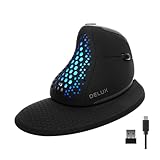
- 5. DELUX Seeker M618XSD — Best minimal setup
- 6. Razer Pro Click V2 — Best premium
- What actually decides a vertical mouse purchase
- How does RGB behave on a vertical mouse?
- Wired, 2.4GHz or Bluetooth: which mode should you pick?
- What to check before you click buy
- The verdict
- FAQ
The best RGB vertical mouse in this set is the TECKNET TK-MS055, a 4.8 oz dual-mode wireless mouse with 11 RGB backlight modes, six DPI steps up to 4800, and a 36-month warranty that no other pick in this group matches. The Razer Pro Click V2 is the alternate pick when you need 18-zone lighting and five-device connectivity, and it is the only 2025-released model here.
The price-band map in this group runs from entry through premium. Entry gets you a working vertical shape, a single RGB pattern set and one or two wireless modes. Mid adds triple-mode connectivity, programmable buttons and higher DPI ceilings. Premium buys per-zone lighting, longer battery windows and, in one case, a live OLED readout on the shell.
Best RGB vertical mouse at a glance
| Pick | Grip angle / DPI | RGB behaviour | Price |
|---|---|---|---|
Best overall TECKNET TK-MS055 |
Vertical, up to 4800 DPI | 11 modes, sleep-off claim | Check Price |
Best upgrade Nulea M504 |
57°, up to 3200 DPI | 11 modes, wired constant | Check Price |
Most versatile AOC F-35 |
52°, up to 4800 DPI | RGB on cuts battery to 40+ hr claim | Check Price |
Best for pros Attoe F-18 |
Vertical, up to 24000 DPI | RGB with gaming preset claim | Check Price |
Best minimal setup DELUX Seeker M618XSD |
Vertical, up to 7200 DPI | Auto-off on grip claim | Check Price |
Best premium Razer Pro Click V2 |
Vertical, 6 buttons | 18-zone with underglow | Check Price |



How I screened this shortlist
I started from the criteria a vertical mouse buyer actually applies, weighted them, and then let the published specifications settle the order.
The criteria, in weight order:
- Vertical grip angle, because that is the whole point. Two picks state a specific angle (AOC at 52°, Nulea at 57°). The rest describe a vertical or handshake shape without a degree figure.
- RGB behaviour, because a mouse that pulses at full brightness through a meeting is worse than one with no lighting. Modes, zones and any auto-dim claim were all weighed.
- DPI range, because a 4800 ceiling suits office work and light gaming while 24000 targets a different buyer entirely.
- Connectivity, because a single wired port and a three-host Bluetooth radio serve very different desks.
- Warranty, because on a mouse you use eight hours a day, the difference between 2 months and 36 months is real.
Two were cut in draft. A pick with no stated grip angle and no RGB modes count would not have survived the first filter, but every product here publishes at least one of those. The final six all put RGB in the marketing copy, and each has at least one specification that pulls a specific buyer toward it.
1. TECKNET TK-MS055 — Best overall
The TECKNET wins on a rare combination for the money: dual-mode wireless, six DPI steps and the longest warranty in this group.
Best for: a first vertical mouse with lighting that a shared desk can tolerate Skip it if: you need programmable macro buttons
At 4.8 oz, the TK-MS055 sits between the lightest pick here (AOC at 3.68 oz) and the heaviest wireless one (DELUX at 5.82 oz). TECKNET publishes six DPI steps: 800, 1200, 1600, 2400, 3200 and 4800. That is one more step than the AOC and two more than the Nulea, and the low end reaches 800, which matters if you edit photos and want fine cursor control.
TECKNET says the mouse offers 11 RGB backlight modes: four colour patterns, seven solid colours and an off state, cycled from the scroll button. It connects over 2.4GHz USB or Bluetooth 5.0, and TECKNET says the 800mAh cell drops into sleep and kills the RGB after inactivity. The 36-month warranty is the longest in this set by twelve months.
The trade-off is that you get no stated grip angle in the specifications, no programmable buttons and no per-zone lighting. This is the value pick, not the customisation pick.
Pros:
- 36-month warranty, longest in this group
- Six DPI steps from 800 to 4800
- Dual-mode wireless with Bluetooth 5.0
- 11 RGB modes with a claimed sleep-off state
- The cheapest of the six
Cons:
- No published grip angle
- No programmable buttons
- Battery capacity is fixed at 800mAh with no swap option
2. Nulea M504 — Best upgrade
The Nulea is the wired option, and if you never move your mouse between machines that is a feature.

Best for: desk-bound work with a fixed USB cable and no battery to manage Skip it if: you need to move between machines wirelessly
The M504 states a 57° grip angle, the steepest here. That is a real difference from the AOC's 52°: the steeper the angle, the closer the hand sits to a full handshake position, which some wrists prefer and some find too extreme. Nulea sizes the shell for medium hands and publishes a weight of 6.38 oz, which is the heaviest in the group. On a desk mat, that heft steadies small cursor moves.
Four DPI steps are available: 800, 1200, 2400 and 3200. That is a lower ceiling than the wireless picks, but a 3200 ceiling suits most office work. Nulea says the RGB is an 11-mode outline around the shell, and because the mouse is wired via a 5.9 ft USB cable, the lighting never drains a battery, so the auto-dim tricks the wireless picks rely on are not needed.
The trade-off against the winner is mobility. You cannot pair it to a tablet, you cannot roam to another desk, and the cable will sit in your peripheral vision.
Pros:
- 57° grip angle, the steepest published here
- No battery to charge, ever
- 11 RGB modes on a constant power source
- 2-year warranty
- Plug and play, no driver install
Cons:
- Wired only
- Lowest DPI ceiling in the shortlist at 3200
- Heaviest in the group at 6.38 oz
3. AOC F-35 — Most versatile
The AOC balances a stated grip angle, triple-mode connectivity and the lightest body in this set.

Best for: small to medium hands switching between three devices Skip it if: you have a large hand and want a wrist rest
At 3.68 oz, the F-35 is the lightest pick here by more than an ounce. AOC states a 52° vertical angle, which is a shallower handshake than the Nulea's 57° and closer to what a first-time vertical user tolerates without practice. AOC sizes the shell for small to medium hands and gives a footprint of 0.1 x 4.33 x 2.91 in in the listing.
DPI runs 1000, 1600, 2400, 3200 and 4800. AOC claims 200 hours of battery life without RGB and 40+ hours with the lighting active, which is the clearest statement in this group of what the lights actually cost you. The mouse supports Bluetooth 5.4, a 2.4GHz receiver and a USB wired mode, and the buttons are programmable, which no other pick under the premium tier here offers.
The trade-off is size. Large hands will overhang the shell, and the warranty runs 12 months plus a 45-day return window, shorter than TECKNET's three years.
Pros:
- Stated 52° grip angle
- Lightest in the set at 3.68 oz
- Triple-mode connectivity including Bluetooth 5.4
- Programmable buttons at a mid price position
- Clear RGB-on battery figure claim
Cons:
- Sized for small to medium hands only
- 12-month warranty is short for the price position
- Low DPI floor of 1000 is coarser than the 800 on two rivals
4. Attoe F-18 — Best for pros
The Attoe is the gaming-shaped vertical mouse in the set, with 12 programmable buttons, a thumb rocker and a 24000 DPI sensor claim.

Best for: gamers who want a vertical shape with a thumb rocker Skip it if: you want a long warranty
The F-18 weighs 3.88 oz and measures 0.04 x 4.3 x 2.8 in. Attoe says the sensor is a PMW3325 with five presets: 1600, 2400, 3200, 4800 and 24000 DPI. That top step is more than five times the ceiling of the TECKNET and every other pick here. Whether you can use it is a separate question, but it exists.
Twelve programmable buttons and a five-direction thumb rocker separate this from the office picks. Attoe says the rocker replaces five traditional keys, which suits FPS and MOBA setups where a bind-heavy loadout otherwise pushes onto the keyboard. Connectivity is triple-mode: dual Bluetooth 5.0, 2.4GHz and USB-C wired.
The trade-off is the warranty. Attoe lists 2 months, the shortest in this set by a wide margin. On a mouse a gamer clicks thousands of times a day, that is the specification to weigh hardest. If the switches survive the first 90 days, they will likely survive years, but the paper cover is thin.
Pros:
- 24000 DPI sensor claim
- 12 programmable buttons
- 5-direction thumb rocker
- Triple-mode connectivity with USB-C
- Lightweight at 3.88 oz
Cons:
- 2-month warranty, shortest here
- No published grip angle in degrees
- Gaming shape is a poor match for pure office use
5. DELUX Seeker M618XSD — Best minimal setup
The DELUX puts the DPI value, battery and connection mode on an OLED screen on the shell itself, which is unique in this set.

Best for: a tidy desk where the OLED replaces on-screen widgets Skip it if: you want continuous ambient RGB while working
The Seeker is 5.82 oz with a footprint of 3.23 x 6.54 x 3.82 in, sized for large hands. The DPI ceiling is 7200, one step above the AOC and TECKNET but well below the Attoe. DELUX says the OLED shows real-time DPI, battery percentage, connection mode and charging state, which removes the need for a taskbar widget or a driver overlay.
Two features push this into "minimal setup" territory. First, the magnetic detachable wrist rest is the only one in this group. Second, DELUX says a sensor turns the RGB off when your hand grips the shell. In other words, the lighting exists for people looking at your desk, not for you, which is exactly right for a work mouse. A thumb wheel handles horizontal scrolling for spreadsheets and timelines.
The trade-off against the Razer is the ecosystem. DELUX's driver software is functional; Synapse and its per-zone control are on a different tier. And no warranty is listed.
Pros:
- OLED on the shell shows DPI, battery and mode
- Detachable magnetic wrist rest
- Auto-off RGB on grip claim
- Silent-click switches
- Thumb wheel for horizontal scrolling
Cons:
- No warranty listed
- Large-hand shell overwhelms small hands
- Premium price position without a stated grip angle
6. Razer Pro Click V2 — Best premium
The Razer is the only 2025-released mouse in this set and the only one with 18-zone lighting and five-device switching.

Best for: a five-device setup with per-zone lighting Skip it if: you want the lightest mouse on the list
At 0.9 lb, the Pro Click V2 is the heaviest pick here by a clear margin. It is a six-button vertical mouse with an integrated base support that lifts the wrist off the desk, which is a different comfort model to the DELUX's detachable pad. Razer says 18 lighting zones plus a full underglow are individually addressable through Chroma, with 16.8 million colours per zone.
Connectivity spans 2.4GHz HyperSpeed Wireless, Bluetooth with three host slots and wired mode, up to five paired devices. Razer says the battery runs up to six months without lighting and that five minutes on USB-C returns three working days of use. Synapse 4 also drives an AI prompt shortcut for summarising and drafting, which is either useful or ignorable depending on your workflow.
The trade-off is weight and price position. This is the most expensive pick here and the only one that crosses half a kilo. If you fly with your peripherals, look elsewhere. If your mouse lives on one desk, the extra grams stabilise the shape.
Pros:
- 18 lighting zones plus full underglow
- Up to 5 paired devices with three Bluetooth hosts
- 2-year manufacturer warranty
- Long claimed battery life on USB-C fast charge
- Released 2025, the newest here
Cons:
- Heaviest in the group at 0.9 lb
- The most expensive pick here
- Synapse install required for full per-zone control
What actually decides a vertical mouse purchase
Most roundups for this shape compare DPI. That is the wrong first question.
The deciding specification is grip angle. A vertical mouse works by rotating your forearm out of pronation, and how far it rotates is set by the shell. The cutoff sits around 55°: below it, your hand feels tilted but familiar; above it, you feel a proper handshake, and the first week takes adjustment. The AOC's 52° is the gentle end. The Nulea's 57° is the committed end. Everything else in this set states "vertical" without a degree and lands somewhere in between.
Ask yourself two questions before anything else. Is this your first vertical mouse? Then pick shallow, closer to 52°. Are you switching because a flat mouse aggravated your wrist? Then pick steep, closer to 57°, and give it a fortnight.
DPI matters after that, and even then only within reason. A 4800 ceiling handles a 1440p monitor with room to spare. A 24000 ceiling is a gaming spec, not a productivity one, and choosing on it alone will leave you with the wrong shape.
How does RGB behave on a vertical mouse?
RGB on a vertical mouse behaves differently to RGB on a flat one, because the lighting wraps a shell you can see from above, not one you cover with your palm.
Three behaviours matter:
- Constant modes: the light stays on until you switch it. Nulea's wired 11-mode outline works this way, and because the mouse is wired the battery cost is zero.
- Sleep-off: the mouse cuts the RGB after inactivity to save the cell. TECKNET states this on the TK-MS055.
- Grip-off: a sensor kills the lighting the moment you touch the mouse. DELUX states this on the Seeker, which is the right behaviour for a work mouse where the RGB is for the room, not the user.
Zones is the other axis. Five of the six picks describe RGB as a single-zone effect around the shell outline. The Razer is the exception with 18 addressable zones plus an underglow, and if you want notification colours mapped to apps through Chroma, that is the only pick in the set that does it.
AOC gives the clearest RGB battery cost: 200 hours claimed without lighting, 40+ hours with it active. On the others, assume the lights will cut your uptime roughly in half.
Wired, 2.4GHz or Bluetooth: which mode should you pick?
The connectivity split in this group is clean, and the choice comes down to how many devices need the mouse and whether you tolerate a cable.
Options by pick:
- Wired only: Nulea. USB 2.0, 5.9 ft cable, no driver install.
- Dual-mode wireless: TECKNET. 2.4GHz plus Bluetooth 5.0, no wired fallback.
- Triple-mode: AOC, Attoe, DELUX and Razer. Wired, 2.4GHz and Bluetooth in one unit.
If your mouse never leaves the desk, wired is the honest answer. There is no battery to manage, no receiver to lose, and the RGB never sleeps mid-task. If you split time between a laptop and a tablet, Bluetooth with a second 2.4GHz fallback is the safety net, because Bluetooth alone can drop under interference and the receiver saves the day. If you run three monitors on one machine and a work laptop on another, five-device pairing on the Razer is the only pick here that spans the full spread.
Battery is the hidden variable. Razer claims six months without RGB. AOC claims 200 hours without RGB and 40+ with it. TECKNET states an 800mAh cell with sleep behaviour but no hour figure. Nulea sidesteps the question entirely.
What to check before you click buy
A few small details separate a good vertical mouse from one you return in a week.
- Hand size. AOC sizes the F-35 for small to medium hands; DELUX sizes the Seeker for large hands; Nulea targets medium hands specifically. Measure from wrist crease to middle fingertip and match that number to the shell dimensions in the listing.
- Dominant hand. Every pick here is right-handed. Left-handed vertical mice exist as separate products and cannot be substituted.
- Warranty. Range is wide: Attoe at 2 months, AOC at 12 months, Nulea and Razer at 2 years, TECKNET at 36 months, DELUX unlisted. A vertical mouse takes side pressure the shape a flat mouse never sees, so switches and thumb buttons wear differently. A longer warranty is worth real weight.
- Weight. The lightest here is 3.68 oz (AOC) and the heaviest is 0.9 lb (Razer). If you move the mouse across two screens all day, weight compounds.
- RGB control. If lights annoy you mid-focus, verify the mouse can turn them off from a button on the shell, not just in software.
The verdict
The TECKNET TK-MS055 is the best RGB vertical mouse in this shortlist for most buyers. It publishes six DPI steps up to 4800, offers dual-mode wireless with Bluetooth 5.0, weighs 4.8 oz, and carries a 36-month warranty that no other pick in this group matches. Its 11 RGB modes cover the ambient and per-colour looks a shared desk actually needs, and the sleep-off claim protects the 800mAh cell during breaks. It is also the cheapest of the six.
Two conditions flip the recommendation. If you want per-zone lighting mapped to apps, five-device pairing and the newest hardware in the set, the Razer Pro Click V2 is the pick, with 18 zones, three Bluetooth hosts and a 2025 release date. If you want the steepest published grip angle and a wired power source that never has to sleep the RGB, the Nulea M504 answers, at 57° and 11 constant lighting modes. Everything else in the set serves a narrower buyer: the AOC for small hands and triple-mode switching, the Attoe for gaming with a thumb rocker, the DELUX for a wrist rest and an on-shell OLED.
FAQ
Is an RGB vertical mouse worth it over a plain vertical mouse?
Is an RGB vertical mouse worth it? Yes, if the lighting turns off when you grip the shell or after inactivity, because then it costs nothing during work. DELUX states auto-off on grip, TECKNET states sleep-off, and Nulea uses a wired connection so battery is not a factor. If a mouse only offers constant RGB with no dim option, treat it as decorative and price it accordingly.
What DPI do I actually need on a vertical mouse for office work?
The DPI you need for office work is between 1200 and 2400 on a 1080p or 1440p monitor. Every pick in this shortlist meets that comfortably. Higher ceilings matter for 4K displays and for gaming, where 3200 to 4800 is a useful working range. The Attoe F-18's 24000 DPI is a gaming spec, not a productivity one, and lower steps are what you will actually use day to day.
TECKNET TK-MS055 vs Razer Pro Click V2: which should I buy?
Between the TECKNET TK-MS055 and the Razer Pro Click V2, pick the TECKNET if you want the longest warranty in the set (36 months versus 2 years), the lightest wireless pick of the two (4.8 oz versus 0.9 lb) and the cheapest price position. Pick the Razer if you need 18-zone lighting, five-device pairing across three Bluetooth hosts, and the newest hardware, released 2025.
How does grip angle change how a vertical mouse feels?
Grip angle changes the feel because it sets how far your forearm rotates out of pronation. A 52° angle like the AOC F-35 keeps your hand tilted but familiar. A 57° angle like the Nulea M504 is a full handshake and takes a week or two of adjustment. Steeper reduces wrist twist more but is harder to adopt if you have used flat mice for years.
Do I need software to use RGB on these mice?
Software is not required to change RGB on most of these mice, because the lighting mode cycles from a button on the shell. TECKNET describes an 11-mode cycle through the scroll button, and Nulea and DELUX handle modes on-device. The Razer Pro Click V2 is the exception: full 18-zone per-zone control needs Razer Synapse 4 installed. Basic on-off works without any driver on every pick.
Start with grip angle, then work outward. If 52° feels comfortable in your hand at a desk, the AOC F-35 or the TECKNET TK-MS055 will settle in fast. If you know from a previous vertical mouse that you prefer the steeper handshake, the Nulea M504 is the natural fit. Buyers stalling on price should default to the TECKNET, which sits at the entry position but ships with the longest warranty and the fullest DPI range in this group. That combination is the reason it is the winner: it does the boring things well, and it costs less than the picks that do fewer of them.