Best USB C Flash Drive for a Phone-First Workflow

A ranked look at six dual-connector USB-C drives, judged on published specs rather than marketing speed claims. The Lexar D40E leads, with a cheaper JOIOT and a 2-pack alternative for anyone who keeps losing drives.

By Samuel HarrisUpdated 18 min read
On this page
- Best usb c flash drive for everyday use at a glance
- How I screened these six drives
- What actually decides a USB-C flash drive purchase?
- Does the everyday use label mean anything here?
- Dual connectors: what the two ends really get you
- 1. Lexar D40E 128GB Dual USB 3.2 Gen 1 Type-C Jump Drive — Best overall
- 2. Lexar 128GB JumpDrive Dual Drive D400 USB 3.2 Type-C & Type-A — Best for beginners
- 3. SSK 128GB USB C Flash Thumb Drive up to 550MB/s Dual USB — Best premium
- 4. myemuun 2-Pack 128GB USB C Flash Drive Dual Type C + USB A — Best large-capacity
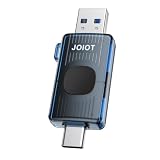
- 5. JOIOT 32GB USB C Flash Drive Dual USB 3.0 Type C + USB A — Runner-up
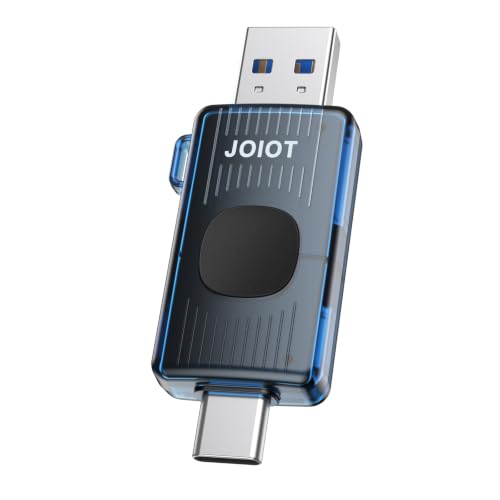
- 6. JOIOT 64GB USB C Flash Drive USB 3.2 Gen 1 up to 110MB/s — Best budget pick
- How long will 128GB last you?
- Lexar D40E vs SSK SD301: which one wins?
- The verdict
- FAQ
The best usb c flash drive for everyday use is the Lexar D40E 128GB, because it pairs a 26 g metal body with a 3-year limited warranty and dual Type-C and Type-A ends. If you'd rather have a swivel cover than a cap to lose, the Lexar D400 128GB and its five-year limited warranty is the better buy. Both give you 128GB, and both plug straight into a phone without an adapter.
This guide is not for you if you edit video off the drive itself. Sustained 4K work belongs on a proper portable SSD, and no thumb drive in this set is built for it. It's also the wrong page if you need hardware encryption certified for work, or a rugged drive rated for water and crush. What follows suits a specific person: someone who fills a phone with photos, needs them somewhere else by Sunday, and wants one small object that fits both a phone and a laptop.
Best usb c flash drive for everyday use at a glance
| Pick | Capacity | Warranty | Price |
|---|---|---|---|
Best overall Lexar D40E 128GB Dual USB 3.2 Gen 1 Type-C |
128GB | 3-year limited | Check Price |
Best for beginners Lexar 128GB JumpDrive Dual Drive D400 |
128GB | Five-year limited | Check Price |
Best premium SSK 128GB USB C Flash Thumb Drive Dual C+A |
128GB | 3 years | Check Price |
Best large-capacity myemuun 2-Pack 128GB USB C Flash Drive |
128GB × 2 | Not listed | Check Price |
| 32GB | 1 year | Check Price | |
Best budget pick JOIOT 64GB USB C Flash Drive Retractable |
64GB | 1 year | Check Price |


How I screened these six drives
I started from the listing data and cut on what was published rather than what was promised. Every drive here carries both a USB-C and a USB-A connector, because a single-ended C drive forces an adapter the moment you sit at an older laptop.
The screen ran in this order:
- Dual connectors, no adapter. All six pass. Any C-only stick was out.
- A stated capacity of 32GB or more. Below that, a phone's camera roll fills the drive in a weekend.
- A published warranty term, or a clear reason to include the pick anyway. Four of six state one. The myemuun 2-pack earns its place on count instead.
- Published physical figures. Four of six give weight or dimensions, which is what tells you whether the thing lives on a keyring.
What that leaves is a spread rather than a repeat: two Lexar drives with metal housings and stated warranties, one heavier zinc-alloy SSK, one retractable budget stick, one basic 32GB, and a twin pack.
The clearest gap in the whole set is documentation. Lexar publishes model numbers, gram weights, temperature ranges and warranty lengths. The myemuun 2-pack publishes a model number, a colour and a count, and nothing about size, weight or warranty. That difference doesn't make a drive slow. It does change what you can check before you buy, which is the whole reason a spec sheet exists.
What actually decides a USB-C flash drive purchase?
Most guides to the best usb c flash drive for everyday use lead with read speed. That's the wrong opening move. Every read figure here is the manufacturer's own claim, measured on their host and their interface, and Lexar's own bullet says as much: performance varies by host device, interface and usage conditions.
Three things decide it instead.
The connector arrangement. A drive that only has a C end is a drive you can't use on a desktop tower. All six here have both ends, but they solve the exposure problem differently. Lexar's D400 uses a swivel; the JOIOT 64GB uses a push-pull retractable body; others rely on caps.
Capacity against what you actually shoot. A modern phone photo runs a few megabytes. A minute of high-bitrate video runs into the hundreds. If you record video at all, 32GB stops being a storage device and becomes a shuttle.
Whether the drive survives your pocket. This is where weight and material matter more than throughput. The Lexar D40E is 26 g with a metal enclosure and a stated 0° to 50° C operating range. The SSK SD301 is 1.31 oz in zinc alloy. The JOIOT 32GB uses a plastic enclosure by its own listing.
Here's the trick with thumb drives: the spec that fails you is almost never speed. It's the cap you lost in month two, or the 32GB you filled in month three.
Does the everyday use label mean anything here?
Not in a way any of these listings can promise. "Everyday use" is a phrase shoppers type, not a specification a manufacturer certifies, and none of these six drives is rated or tested against it. Amazon's search returns dual-connector drives when you ask for it, which is a reasonable proxy but not the same thing.
So judge it yourself with three checks:
- Does the connector stay covered when it's loose in a bag? A retractable or swivel body answers yes without a separate cap.
- Is there a stated warranty, and how long? Four of these publish one, ranging from 1 year to five years.
- Is the housing metal or plastic? Metal doesn't guarantee survival, but it's what the durability-focused listings here specify.
That's what I mean by everyday: something that goes in and out of ports several times a week for years, not something rated for a job site. No pick below is claimed to be waterproof, dustproof or crush-resistant, because none of these listings claims it.
Dual connectors: what the two ends really get you
The point of a dual-end drive is that it removes a step. Photos come off an iPhone or Android phone through the C end, then go into a laptop through whichever end that laptop has. No dongle, no cloud upload, no waiting on a slow home connection.
Where the design choices diverge:
- Swivel bodies rotate one connector into the housing to expose the other. Lexar's D400 works this way, and there's no cap to lose. The trade is a longer body.
- Retractable push-pull slides the connector in and out, which is what JOIOT uses on the 64GB drive to keep dust off.
- Twin-end sticks with caps are the slimmest, and the caps are the first thing to go missing.
One practical warning about the C end. Some phone cases have deep cutouts, and a wide drive body can catch on the case edge before the connector seats. The SSK SD301 measures 0.34 x 3.07 x 0.81 in, which is the broadest body in this set. The Lexar D40E is 0.04 x 2.77 x 0.67 in and slimmer at the port. If you use a thick case, the narrower body is the safer choice.
1. Lexar D40E 128GB Dual USB 3.2 Gen 1 Type-C Jump Drive — Best overall
The D40E is the pick I'd hand to almost anyone: 128GB, a metal shell, 26 g on a keyring, and a 3-year limited warranty behind it.
Best for: someone moving phone photos to a laptop most weeks Skip it if: you need a drive that survives being sat on
What separates the D40E inside this set is how much Lexar publishes about it. You get the model number LJDD400E's sibling LJDD40E128G-BNSNG, a 26 g weight, dimensions of 0.04 x 2.77 x 0.67 in, and a stated operating range of 0° to 50° C (32°F to 122°F). Nobody else here gives you a temperature range at all. Lexar claims transfer speeds up to 100MB/s, noting internally that results depend on the host and interface, and it also claims 256-bit AES encryption through bundled security software.
Against the rest, this is the balanced middle. It's the fourth-cheapest of the six, so you pay more than either JOIOT drive and less than the SSK or the twin pack. The 3-year limited warranty sits between JOIOT's 1 year and the D400's five. And at 0.67 in wide, it's the second-narrowest body here, which matters at a phone port.
The trade-off is protection. Champagne silver metal resists scuffs, but there's no swivel to shield the connectors the way the D400 has, and no rugged rating anywhere in the listing. Only one seller lists it, too.
Pros:
- 128GB with a 3-year limited warranty
- Metal enclosure, 26 g, keyring-friendly
- Stated 0° to 50° C operating range
- Slim 0.67 in width suits cased phones
- 256-bit AES encryption software claimed
Cons:
- Claimed 100MB/s is the slowest headline in the set
- No swivel or retractable connector cover
- Only one seller lists it
- Shorter warranty than the Lexar D400
2. Lexar 128GB JumpDrive Dual Drive D400 USB 3.2 Type-C & Type-A — Best for beginners
The five-year limited warranty and swivel housing make this the drive to buy if you have a history of losing caps.

Best for: a first flash drive that won't lose its cap Skip it if: you want the smallest possible body
The D400 is the only pick here with a five-year limited warranty, which is the longest published term in the set by two years. It's also the lightest at 17.8 g, released in 2023, and finished in titanium with a metal housing and swivel design that Lexar says adds protection. Lexar claims USB 3.2 Gen 1 performance up to 130MB/s and bundles its DataShield security software. Compatibility is stated for Android, PC and Mac.
For a first drive, the swivel is the feature that earns the pick. There is nothing to detach, so the drive that goes into a bag is the same drive that comes out. Compare that with the twin-pack, which relies on caps, or the JOIOT 32GB, whose plastic body is the only non-metal enclosure among the picks that state a material.
Two honest marks against it. The published dimensions of 0.4 x 5.45 x 4 in describe packaging rather than a pocket profile, so you can't size it against a phone case from the listing alone. And a swivel adds a moving hinge, which is one more thing to loosen over five years than a fixed body has. It sits third-cheapest here, so it undercuts the D40E without being an entry-level buy.
Pros:
- Five-year limited warranty, longest in this set
- Lightest pick at 17.8 g
- Swivel metal housing, no cap to lose
- Claimed up to 130MB/s over USB 3.2 Gen 1
- DataShield security software included
Cons:
- Listed dimensions reflect packaging, not the drive body
- Swivel hinge is a moving part that can loosen
- Only one seller lists it
- No stated temperature range, unlike the D40E
3. SSK 128GB USB C Flash Thumb Drive up to 550MB/s Dual USB — Best premium
The heaviest and most expensive pick here, bought for one reason: SSK claims read speeds of 550MB/s, several times any other drive in this roundup.

Best for: moving multi-gigabyte video files regularly Skip it if: you want something that hides on a keyring
SSK positions the SD301 as an SSD-class stick rather than a conventional thumb drive. The listing claims USB 3.2 Gen 2 with read speeds up to 550MB/s and write speeds up to 500MB/s, described as ten times faster than a traditional USB 3.0 stick. Housing is high-grade zinc alloy, which SSK says resists falling and abrasion, and the warranty runs 3 years. Capacity is 128GB.
That claim is the whole case for spending here, and it's a claim, not a figure I verified. If it holds up on your machine, a folder of video that takes minutes on a 100MB/s drive lands in a fraction of the time. That's a real difference when you're doing it weekly rather than twice a year.
The physical cost is significant. At 1.31 oz and 0.34 x 3.07 x 0.81 in, this is the largest and heaviest pick in the set, and the widest at the connector. On a phone with a thick case, that width is the first thing to cause trouble. It's also the most expensive drive here, and for that you get the same 128GB and a shorter warranty than the cheaper Lexar D400. Only one seller lists it.
Pros:
- Claimed 550MB/s read, highest headline here
- Claimed 500MB/s write speed
- Zinc alloy housing rated against drops and abrasion
- 3-year warranty at 128GB
Cons:
- Most expensive pick for the same 128GB
- Heaviest at 1.31 oz, widest at 0.81 in
- Speed figures are manufacturer claims only
- Shorter warranty than the cheaper Lexar D400
4. myemuun 2-Pack 128GB USB C Flash Drive Dual Type C + USB A — Best large-capacity
Two 128GB drives in one box, which is the only way to get 256GB of total storage in this set.

Best for: keeping one drive at home and one in a bag Skip it if: you want published dimensions and a warranty
This is the only multi-drive pick here, and the count changes what you can do. One drive lives in a laptop bag; the other stays in a desk drawer holding a backup copy of the same folders. That redundancy is worth more in practice than a faster single drive, because the way most people lose files is losing the object, not outrunning its write speed. Both units have USB-C and USB-A connectors, come in black and blue, and are listed as model myemuun-U128 with no adapter needed.
The honest problem is documentation. This listing publishes a size, a colour, a count and a model number, and that's it. No weight. No dimensions. No warranty term. Every other pick here states at least a warranty, and the two Lexar drives state a gram weight as well. You're buying on count and connector layout, not on a spec sheet.
It sits fifth-cheapest of the six, so it costs more than the D40E for two drives that tell you less about themselves. Against the SSK, you trade a claimed speed advantage for a spare unit. Against the D400, you trade five years of warranty coverage for a second drive. Decide which of those failures you're actually planning for.
Pros:
- Two drives at 128GB each, 256GB total
- Only multi-unit pick in this roundup
- Dual USB-C and USB-A on both drives
- Two colours make the pair easy to tell apart
Cons:
- No warranty term published
- No weight or dimensions published
- No stated transfer speed figure
- Costs more than the single-drive Lexar D40E
5. JOIOT 32GB USB C Flash Drive Dual USB 3.0 Type C + USB A — Runner-up
A 32GB shuttle for documents and installers, at the second-cheapest position in the set.

Best for: carrying documents and a bootable installer Skip it if: you shoot 4K video
Small capacity has a legitimate use, and this is it. A 32GB drive is enough for a working folder, a set of PDFs, a tax archive or a Windows installer, and it's the drive you don't panic about lending. JOIOT lists a body of 63.5 x 17.8 x 8.4 mm, which the listing renders as 2.5 x 0.7 x 0.3 inch, a plastic enclosure it calls premium, USB 3.0 with backward compatibility to USB 2.0, and support for Windows, Android, Linux and macOS. Warranty is 1 year.
It's also the only pick here with more than one seller listing it, which is a small point in its favour if availability matters to you.
Where it loses is capacity and material. 32GB is a quarter of what four other picks give you, and one long 4K clip can consume a meaningful chunk of it. Plastic is the only non-metal housing among the picks that name a material, so it's less likely to shrug off a keyring's worth of abuse than the D40E. The 1-year warranty is the shortest term published here, matched only by the other JOIOT drive. Choose it because 32GB is genuinely all you need, not because it's cheap.
Pros:
- Second-cheapest pick in this set
- Compact 63.5 x 17.8 x 8.4 mm body
- Backward compatible with USB 2.0 ports
- Works across Windows, macOS, Linux and Android
- Two sellers list it, unlike most picks here
Cons:
- 32GB is the smallest capacity of the six
- Plastic enclosure, not metal
- 1-year warranty is the shortest here
- No published weight figure
6. JOIOT 64GB USB C Flash Drive USB 3.2 Gen 1 up to 110MB/s — Best budget pick
The cheapest of the six, with a retractable push-pull body and 64GB, which makes it the obvious spare.
Best for: a spare drive for the glovebox or a school bag Skip it if: 64GB won't cover your photo library
This drive is the cheapest here and, unusually for that position, it solves a real problem. The push-pull retractable mechanism means the connector hides inside the body when you're not using it, which JOIOT says keeps out dust and damage. That's the same benefit the D400's swivel delivers, at the lowest price position in this roundup.
JOIOT claims read speeds up to 110MB/s over USB 3.2 Gen 1, which puts the headline figure above the Lexar D40E's claimed 100MB/s despite costing less. Compatibility is listed for Windows, macOS, Linux and Android, with no drivers or apps required, and the listing calls out USB-C iPhone 15, 16 and 17 models specifically. It's 64GB in blue, with a 1-year warranty.
The gaps are what you'd expect at this position. No weight is published, no dimensions, and no housing material, so you can't judge whether it survives a keyring or fits past a thick phone case. 64GB is half what the Lexar drives and the SSK give you. And the 1-year warranty means if it fails in year two, you're buying again. As a second drive that lives permanently in a car or a bag, none of that matters much.
Pros:
- Cheapest pick in this roundup
- Retractable push-pull body, no cap to lose
- Claimed up to 110MB/s over USB 3.2 Gen 1
- 64GB, double the JOIOT 32GB
- Named compatibility with USB-C iPhone models
Cons:
- 1-year warranty, shortest term here
- No published weight, dimensions or material
- 64GB is half the capacity of four other picks
- Retractable slider is a moving part on the cheapest drive
How long will 128GB last you?
Nobody publishes a photo count on a flash drive box, so here's how to work it out with numbers you can check on your own phone.
Open your camera roll, note the file size of one recent photo and one recent minute of video, then divide. That's the whole calculation. A drive's capacity only means something against your own shooting habits.
Rough shape of the answer for most people:
- Documents and spreadsheets only: 32GB is plenty, and the JOIOT 32GB covers you for years.
- Phone photos, no video: 64GB holds a lot of stills. The JOIOT 64GB is the sensible spare.
- Photos plus casual video: 128GB is the floor. Four picks here meet it.
- Regular high-bitrate video: 128GB becomes a shuttle you clear weekly, which is where the SSK's claimed 550MB/s read earns its keep.
One thing worth knowing about capacity labels. Lexar's own listing states that 1MB equals 1,000,000 bytes, and operating systems usually count in binary units, so the figure your computer reports will read lower than the number on the box. That's arithmetic, not a fault, and it applies to every drive here.
Lexar D40E vs SSK SD301: which one wins?
These two sit at opposite ends of the set and both hold 128GB, so the choice is clean.
Pick the Lexar D40E if the drive lives on you. It's 26 g against the SSK's 1.31 oz, 0.67 in wide against 0.81 in, and it's the only drive in this roundup with a published operating temperature range of 0° to 50° C. It also sits at the fourth-cheapest position while the SSK is the most expensive here. Metal housing, 3-year limited warranty, 256-bit AES encryption software claimed.
Pick the SSK SD301 if the drive is a tool at a desk. SSK claims 550MB/s read and 500MB/s write against Lexar's claimed 100MB/s. If you regularly push tens of gigabytes across, that gap changes how you spend your afternoon. Zinc alloy housing, 3-year warranty, same 128GB.
The cutoff is how much data moves in one session. Under a few gigabytes at a time, the speed difference is seconds you won't notice, and the D40E's smaller body and lower price win. Above that, and especially with video, the SSK's claimed throughput is the only spec in this comparison that meaningfully changes your workflow.
The verdict
If you want one drive for photos, documents and the occasional transfer between a phone and a laptop, buy the Lexar D40E 128GB. It's the best usb c flash drive for everyday use in this set because it publishes what matters and gets the physical details right: 26 g, 0.67 in wide, metal housing, a stated 0° to 50° C range, and a 3-year limited warranty. Nothing here balances size, capacity and documentation as evenly.
If you move large video files week in and week out, buy the SSK SD301. Its claimed 550MB/s read and 500MB/s write are several times any other headline figure here, and that is the one specification in this roundup that changes how long you sit waiting. You pay the most for it and you carry the largest body, at 1.31 oz and 0.81 in wide.
The cutoff is roughly a few gigabytes per session. Below it, the D40E's smaller body and lower price win every time. Above it, throughput decides.
Two conditions flip the winner. If you have a habit of losing caps, the Lexar D400 and its five-year limited warranty is the better default. If your real risk is losing the drive itself, the myemuun 2-pack gives you a second unit and a second copy, which no single drive can.
FAQ
Is a USB-C flash drive worth it over cloud storage?
A USB-C flash drive is worth it when your upload speed is the bottleneck or the files are large. Moving 40GB of video to a laptop takes minutes over a cable and hours over a slow home connection. There's no monthly fee and no account. Cloud sync is better for small files you edit across devices; a drive is better for bulk transfers and offline copies.
What capacity should I buy for everyday use?
For everyday use, 128GB is the sensible default if you take phone photos and any video, and four picks here offer it. Choose 64GB, like the JOIOT retractable drive, only for a spare or a document shuttle. 32GB suits PDFs, spreadsheets and bootable installers. Check one photo and one minute of video on your own phone, then divide into the capacity.
Will these drives work with my iPhone and my old laptop?
These drives work with both because each one carries a USB-C connector and a USB-A connector in the same body. The C end plugs into USB-C iPhone models and Android phones; the A end plugs into older laptops and desktop towers. JOIOT names iPhone 15, 16 and 17 specifically. No adapter, no app, no driver installation on Windows, macOS, Linux or Android.
Lexar D40E or Lexar D400: which should I choose?
Choose the Lexar D40E if you want the slimmer body and a published temperature range of 0° to 50° C, plus stated dimensions of 0.67 in across. Choose the D400 if you'd rather have the swivel housing with no cap to lose and the five-year limited warranty, the longest term in this roundup. Both are 128GB metal-housed Lexar drives, and the D400 is the lighter of the two at 17.8 g.
What mistake do people make buying flash drives?
The most common mistake is buying on the advertised read speed alone. Those figures are manufacturer claims measured on their own hardware, and Lexar's listing says outright that performance varies by host device and interface. The specs that actually fail you are capacity you outgrew and a connector cover you lost. Check warranty length and body design before you compare megabytes per second.
Start with the Lexar D40E 128GB and keep the decision simple. It's the drive that asks the least of you: nothing to install, both connectors on one body, small enough that it stays on a keyring instead of in a drawer, and 128GB of room to fill before you think about it again. Buy a second drive only when you know what the first one didn't cover, whether that's the SSK's claimed throughput for video work or a spare unit from the myemuun pair. One drive that lives in your pocket beats three that live in a box, and three years of Lexar warranty coverage buys you a long time to find out.