Best 14-Inch Laptop for CAD: Who Should Skip This Class
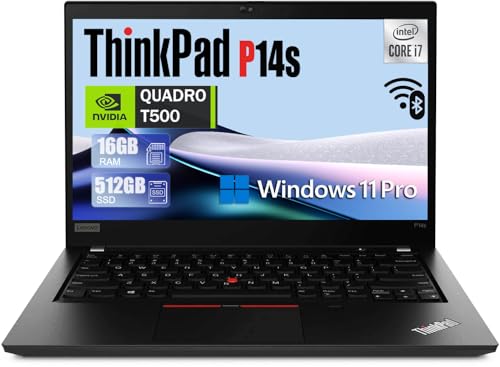
A 14-inch chassis rarely leaves room for a workstation GPU. Here is which of these five actually earns the CAD label, and which four you should treat as productivity machines with a different job.

By Samuel HarrisUpdated 14 min read
On this page
- Best 14 inch laptop for CAD at a glance
- Who this class is not for, and where to go instead
- Which of these five actually qualifies for CAD?
- 1. Lenovo ThinkPad P14s Gen 2 — Best overall
- 2. Lenovo ThinkPad P14s — Best premium
- 3. Dell Latitude 5420 — Best budget pick
- 4. HP 14-inch Ultra Light Laptop — Most versatile
- 5. HP 14" Laptop 2025 — Best value everyday pick
- How I cut the field from forty listings to five
- What a Quadro T500 realistically handles
- How to read a renewed workstation listing
- What the listings do not tell you about thermals
- The verdict
- FAQ
The best 14 inch laptop for CAD in this set is the Lenovo ThinkPad P14s Gen 2, because it pairs an Intel Core i7-1185G7 with an NVIDIA Quadro T500, 16GB DDR4 and a 512GB SSD in a 2.8 lb chassis. If you need more memory headroom for larger assemblies, the Lenovo ThinkPad P14s with 40GB RAM and a 1TB SSD is the better buy. Before you scroll, read the next section: only two of these five are workstations at all.
Best 14 inch laptop for CAD at a glance
| Pick | GPU | RAM + Storage | Price |
|---|---|---|---|
Best overall Lenovo ThinkPad P14s Gen 2 |
NVIDIA Quadro T500 | 16GB DDR4 512GB SSD |
Check Price |
Best premium Lenovo ThinkPad P14s |
NVIDIA Quadro T500 4GB | 40GB RAM 1TB SSD |
Check Price |
Best budget pick Dell Latitude 5420 |
Intel integrated | 16GB DDR4 256GB SSD |
Check Price |
Most versatile HP 14-inch Ultra Light |
Intel Graphics | 16GB DDR4 416GB total |
Check Price |
Best value everyday pick HP 14" Laptop 2025 |
Intel integrated | 16GB DDR4 628GB total |
Check Price |


Who this class is not for, and where to go instead
Let's be honest about the modifier. This is a 14-inch chassis category, and only two of the five picks here ship with a professional GPU rated for CAD workloads. If you drive SolidWorks assemblies over a thousand parts, render photoreal visualisations in Keyshot, or lean on Revit families all day, a 14-inch machine is the wrong tool. You want a 16-inch or 17-inch workstation with an RTX A-series or Ada GPU, faster memory and thicker cooling.
The best 14 inch laptop for CAD is a machine for a specific slice of the audience:
- Students learning AutoCAD, Fusion 360 or Revit at coursework scale.
- Engineers and architects who mostly review drawings on the road and author on a desktop.
- Consultants who need to open native files, mark them up and hand them back.
If you fall outside those three profiles, close this page and shop 16-inch mobile workstations instead. The Quadro T500 in the two ThinkPads here is a 4GB entry workstation GPU. It is certified for CAD software, and that certification is genuinely useful, but its ceiling is low. Two of the remaining picks run Intel integrated graphics with no workstation certification. They are productivity laptops, not CAD laptops, and I have graded them on that basis.
Which of these five actually qualifies for CAD?
Two do. The Lenovo ThinkPad P14s Gen 2 and the Lenovo ThinkPad P14s both carry the NVIDIA Quadro T500, and Lenovo's listing for the premium model calls out AutoCAD and 3D modelling explicitly. The other three run Intel integrated graphics.
Here is the split, written plainly:
- Workstation-class, T500 GPU: ThinkPad P14s Gen 2 and ThinkPad P14s.
- Productivity, integrated graphics: Dell Latitude 5420, HP 14-inch Ultra Light, HP 14" 2025.
That is the deciding criterion in this best 14 inch laptop for CAD roundup, and it is the one to fix in your head before comparing anything else. RAM matters. Storage matters. Screen matters. None of them matter if the GPU cannot drive the viewport.
1. Lenovo ThinkPad P14s Gen 2 — Best overall
The only pick here that pairs a certified workstation GPU with a current-generation Core i7, and it weighs 2.8 lb.
Best for: part-time CAD users on AutoCAD 2D and light 3D assemblies Skip it if: you run SolidWorks assemblies above a few hundred parts
The P14s Gen 2 is the strongest CAD candidate in this set on straight specifications. Lenovo pairs the Intel Core i7-1185G7 with the NVIDIA Quadro T500, 16GB DDR4 and a 512GB SSD, then puts it in a 0.7 x 13 x 8.94 in chassis that weighs 2.8 lb. That combination is the whole point of a mobile workstation: certified graphics in a bag you can carry all day. Lenovo's listing notes the T500 is aimed at CAD, 3D modelling and creative applications, so treat it as an entry workstation GPU rather than a gaming card. The 14" Full HD panel and HDMI 2.0 output cover a two-monitor desk setup.
The trade-off is honest. This is a renewed unit with a 90-day warranty, and 16GB of RAM is the floor for serious CAD work in 2024, not the ceiling. If you routinely open thousand-part assemblies, the premium P14s with 40GB is the machine you actually want.
Pros:
- Certified NVIDIA Quadro T500 professional GPU
- Intel Core i7-1185G7, the strongest CPU in this set
- 2.8 lb, the lightest pick here
- HDMI 2.0 for a proper external monitor
- Windows 11 Pro and fingerprint reader for shared workflows
Cons:
- 90-day warranty on a renewed unit
- 16GB RAM is workable, not comfortable
- T500 ceiling caps large assemblies
2. Lenovo ThinkPad P14s — Best premium
The RAM upgrade turns a 14-inch workstation into a genuinely comfortable modelling machine.

Best for: modellers who want 40GB RAM headroom in one chassis Skip it if: you need a fresh full manufacturer warranty
This is the most expensive pick here and also the slowest seller of the five, which tells you it is a niche buy. The specification sheet says why it exists: 40GB RAM, a 1TB PCIe NVMe SSD, and the NVIDIA Quadro T500 4GB professional GPU. Lenovo calls out AutoCAD, 3D modelling and Adobe workflows on the listing, and the 14" Full HD IPS anti-glare panel is claimed at 300 nits with wide viewing angles. That is a working display, not a compromise.
The CPU is an Intel Core i5-1135G7, a step behind the i7 in the Gen 2 pick above. In CAD terms, that matters less than you think: many modelling operations are single-threaded, and the i5-1135G7 has strong single-core performance. The 40GB of memory is what buys you room. It lets you keep a large assembly, a browser stack, a Teams call and a reference model open without paging.
Weight is 3.99 lb, up from 2.8 lb on the Gen 2. You feel that in a rucksack. Warranty is listed as 1, and the listing describes SnowBell-upgraded RAM and SSD with the seller's own coverage. Read the fine print before you buy.
Pros:
- 40GB DDR4, the largest memory pool in this set
- 1TB PCIe NVMe SSD
- NVIDIA Quadro T500 4GB, workstation certified
- 300-nit IPS anti-glare panel per the listing
- Backlit keyboard, fingerprint reader, privacy shutter
Cons:
- 3.99 lb is heavy for 14 inches
- Core i5 CPU, one tier below the Gen 2 pick
- Third-party memory upgrade complicates warranty
- The slowest seller of the six by a wide margin
3. Dell Latitude 5420 — Best budget pick
The cheapest pick here, and a fair 2D drafting machine, but the integrated GPU rules out serious 3D.

Best for: students learning CAD workflows on 2D drawings Skip it if: you touch rendered 3D at all
The Latitude 5420 is the cheapest of the five and, by a distance, the one buyers choose most often here. That popularity is easy to explain: it is a familiar business chassis with an Intel Quad-Core i5-1145G7, 16GB DDR4 and a 256GB SSD, in a 3 lb body that measures 0.76 x 12.8 x 8.35 in. Windows 11 Pro is on the drive. For an accounting student who also opens the odd DWG, this is a lot of laptop for the money.
For CAD specifically, be clear about the ceiling. There is no discrete GPU on the listing, so you are relying on Intel integrated graphics. That is fine for 2D AutoCAD, xref-heavy Revit review, PDF markup and Fusion 360 sketching. It is not fine for shaded 3D assemblies, rendering, or anything that expects a certified driver. The 256GB SSD is small once you install a CAD suite and its libraries, so plan on external storage from day one. Warranty is 30 days as a renewed unit, so treat it accordingly.
Pros:
- Cheapest of the five
- Intel Core i5-1145G7, competent CPU
- 3 lb chassis, easy to carry daily
- Windows 11 Pro included
- Popular renewed model with plenty of parts availability
Cons:
- Integrated graphics, no workstation certification
- 256GB SSD fills up fast with CAD libraries
- 30-day renewed warranty is the shortest here
- No stated screen brightness on the listing
4. HP 14-inch Ultra Light Laptop — Most versatile
A capable study laptop that will open a DWG viewer, not a CAD machine.

Best for: study, office work and the odd viewer session Skip it if: you actually author models rather than review them
I include this one honestly. The HP 14-inch Ultra Light runs an Intel Processor N150 with Intel Graphics, 16GB DDR4 and a split 416GB storage arrangement listed as 128GB UFS plus a 288GB docking set. The bundle adds Office 365 for a year and Copilot. Weight is 3.24 lb, dimensions on the specification block read 3 x 19 x 12 in although the manufacturer's feature copy states 12.76 x 8.86 x 0.71 in for the item itself, so read the listing carefully before you commit.
Port selection is generous for the size: one USB Type-C, two USB Type-A, HDMI 1.4b, a card reader and a headphone combo jack. Warranty is 1 Year, longer than the two renewed workstations. For a student who spends most of their time in a browser, Word and a DWG viewer, that is a defensible pick. For CAD authoring, the N150 CPU and integrated graphics are the wrong tools. Treat this as a productivity laptop that can display a drawing, not a machine that will drive one.
Pros:
- 1 Year warranty, the longest in this set
- 16GB DDR4 RAM for everyday multitasking
- Copilot AI and a year of Office 365 included
- 3.24 lb travel weight
- Full port selection with HDMI and card reader
Cons:
- Intel N150 CPU is efficiency-tier, not workstation
- Integrated graphics, no CAD certification
- Storage split across UFS and a dock is fiddly
- Listing dimensions contradict the feature copy
5. HP 14" Laptop 2025 — Best value everyday pick
A bundle-heavy productivity laptop that keeps a CAD viewer open cleanly, and nothing more.

Best for: a general-purpose 14-inch machine that keeps CAD viewers open Skip it if: your coursework requires a certified GPU
The 2025 HP is the second-cheapest here and includes a bundle that stretches the value case: 16GB DDR4, a total of 628GB across 128GB UFS and a 500GB external drive, a Marxsol six-in-one USB-C dock, Windows 11 Pro, Wi-Fi 6 and what HP describes as lifetime Office 2024. The chassis is Sky Blue, 3.24 lb, and 0.71 x 12.8 x 8.86 in.
The processor is a Quad Core Intel N150, which HP claims boosts up to 3.6 GHz. That is a low-power part designed for browsing, documents and video. For CAD work, the story is the same as the HP Ultra Light above: it opens a DWG in a viewer, it displays a 3D model that someone else authored, and it lets a student annotate a drawing. It will not push viewport frames in a shaded assembly, and it has no professional GPU driver certification. Buy it for the bundle and the everyday computing, not for the CAD label.
Pros:
- Windows 11 Pro plus lifetime Office 2024 bundle
- 628GB of total storage across UFS and external
- Six-in-one USB-C dock included
- Wi-Fi 6 for faster campus networks
- 3.24 lb, matches the Ultra Light for portability
Cons:
- Intel N150 is efficiency-class, not workstation
- No dedicated GPU, no CAD certification
- Storage split across internal UFS and an external drive
- No published warranty in the specification block
How I cut the field from forty listings to five
Three disqualifications took the shortlist down fast:
- Under 16GB of RAM. CAD suites, a browser stack and a chat tool will not fit inside 8GB without paging. Anything with less did not survive.
- HDD or eMMC-only storage. SSDs are the floor. A CAD file open on a mechanical drive is a slow scrub. UFS storage counts, mechanical does not.
- No published dimensions or weight. A 14-inch category needs both figures, and listings that hide either got cut.
What survived clusters into two groups, and the roundup reflects that. The two ThinkPad P14s variants are workstation-class picks with the Quadro T500, one on a Core i7 with 16GB and one on a Core i5 with 40GB. The Dell Latitude 5420 is the popular budget business chassis. The two HPs are entry productivity laptops with generous bundles. None of the survivors is dishonestly labelled: every product section names the GPU class and what that means for a best 14 inch laptop for CAD shortlist.
What a Quadro T500 realistically handles
The T500 is an entry professional GPU. Certified drivers, professional application support, and 4GB of memory on the premium P14s pick. Here is what that means in practice for a best 14 inch laptop for CAD user:
- AutoCAD 2D drawings of any realistic complexity: comfortable.
- AutoCAD 3D with hidden line or basic shaded views: comfortable.
- Revit models at a small firm scale, single building: workable, watch the family count.
- Fusion 360 parts and small assemblies: comfortable.
- SolidWorks parts and assemblies up to a few hundred components: workable.
- SolidWorks assemblies above a thousand components: reach for a bigger workstation.
- Keyshot, V-Ray, Lumion or serious real-time rendering: wrong tool.
The T500 will not embarrass itself on a certified driver path. It will simply run out of headroom faster than an RTX A2000 or A3000 in a 16-inch chassis. If your work sits in the top three lines above, one of the two ThinkPads is the right pick. If it sits in the bottom two, shop a different size class.
How to read a renewed workstation listing
Three of these five machines are renewed units. That is not a warning, it is a category, and it comes with rules.
- Warranty length is the tell. The Latitude 5420 lists 30 Days. The ThinkPad P14s Gen 2 lists 90 days. The premium P14s lists 1, and the feature copy explains a third-party seller upgraded the RAM and SSD and covers those parts. Read that carefully before you buy.
- Battery health is rarely stated. Renewed listings sometimes cite a percentage of original capacity. None of these does. Plan on replacing the battery inside a year if you rely on all-day use.
- Cosmetic condition varies. Amazon Renewed grades exist but are not always surfaced in the title. Check the product page detail before ordering.
- Configuration is fixed. You cannot add RAM to order on a renewed listing. What is in the title is what ships.
None of this rules out a renewed workstation. It just means you should treat the warranty line as a first-class specification, not a footnote.
What the listings do not tell you about thermals
A 14-inch chassis has a thermal budget, and the manufacturers of these machines all quote peak clocks that the cooling cannot hold indefinitely. HP's copy on the 2025 model claims up to 3.6 GHz on the N150 with Turbo Boost. Lenovo's copy on the premium P14s calls the machine AI-ready and desktop-class. Both are marketing sentences. Under a sustained CAD workload, every one of these laptops will throttle down from its peak to whatever the fan can dissipate.
Practical implications:
- Run demanding CAD sessions on mains power, not battery. Both ThinkPads will step down clocks on battery to preserve runtime.
- Keep the intake vents clear. A cushion or a duvet becomes a heat trap fast.
- Consider a laptop stand with a small fan when the workload gets heavy. The Quadro T500 does not need it, but sustained CPU load benefits.
The listings do not disclose sustained clock speeds because manufacturers do not publish them. Treat that silence as normal, and set expectations against the CPU class rather than the boost figure.
The verdict
If you want the best 14 inch laptop for CAD in this set, buy the Lenovo ThinkPad P14s Gen 2. The Core i7-1185G7 and NVIDIA Quadro T500 in a 2.8 lb chassis is the strongest CAD-appropriate specification here, and the 512GB SSD gives you enough room for a CAD suite and a working project library.
Two conditions flip the pick. If your workload is memory-bound rather than CPU-bound, meaning you routinely open large Revit models or SolidWorks assemblies that push past 16GB, buy the premium P14s with 40GB and a 1TB SSD instead. The Core i5-1135G7 is a step behind the i7, but the extra memory buys you more real work than the CPU tier costs you. If your work is entirely 2D and you are on a strict budget, the Dell Latitude 5420 at 3 lb with 16GB and a 256GB SSD will draft, mark up and export drawings without complaint.
The cutoff is the GPU. Certified workstation graphics decide who is in this category. The two HPs and the Dell are honest productivity laptops. They belong on a study desk, not on a modelling job.
FAQ
Is a 14-inch laptop powerful enough for CAD work?
A 14-inch laptop is powerful enough for a specific slice of CAD work: 2D drafting, review of authored models, small parts and assemblies, and coursework. The two ThinkPad P14s picks here carry the NVIDIA Quadro T500 professional GPU, which is certified for CAD software. For large assemblies, photoreal rendering or full-time modelling, a 16-inch workstation is a better fit.
Which 14 inch laptop for CAD is worth the money?
The 14 inch laptop for CAD worth the money in this set is the Lenovo ThinkPad P14s Gen 2. It is the only pick that combines a Core i7-1185G7 with the Quadro T500, 16GB DDR4 and a 512GB SSD in a 2.8 lb body. The 90-day renewed warranty is the compromise. Every other pick either lacks the GPU or costs more without matching that CPU.
Does the NVIDIA Quadro T500 handle AutoCAD and SolidWorks?
The NVIDIA Quadro T500 handles AutoCAD comfortably in both 2D and light 3D, and SolidWorks parts and small assemblies without trouble. Lenovo's listing calls the T500 out for CAD, 3D modelling and Adobe applications. Its ceiling is the 4GB memory pool on the premium pick, so assemblies above a few hundred components will feel it before the CPU does.
ThinkPad P14s Gen 2 or ThinkPad P14s with 40GB, which is right for me?
ThinkPad P14s Gen 2 or the 40GB P14s comes down to which resource you run out of first. The Gen 2 pairs a faster Core i7-1185G7 with 16GB. The premium P14s pairs a Core i5-1135G7 with 40GB and a 1TB SSD. Pick the Gen 2 for CPU-bound single-part work. Pick the 40GB model when large assemblies fill memory.
What should I avoid in a CAD laptop listing?
Avoid a CAD laptop listing that hides the GPU, quotes only a boost clock, or splits storage across internal UFS and a bundled external drive. Two of the picks here run Intel integrated graphics with no workstation driver certification, which is fine for productivity and viewing but wrong for authoring. Read the warranty line carefully on any renewed unit before you buy.
Start with the workload, not the chassis. Write down the software you use most, the file size you typically open, and the number of hours a day you spend authoring rather than reviewing. If authoring wins, the ThinkPad P14s Gen 2 is the default answer and the 40GB P14s is the upgrade path. If reviewing wins, the Dell Latitude 5420 covers the job for less. The 14-inch class is honest about what fits inside a slim aluminium shell: a certified entry GPU, a fast mainstream CPU, and enough memory to work on one thing at a time. Match that reality to your actual week, and the pick becomes obvious.