Best Compact External SSD for Students by Speed

Five pocket SSDs compared on the figures that actually matter for coursework: write speed, weight, capacity and published warranty length. The Samsung T7 leads, but two cheaper picks make sense for specific bags.

By Samuel HarrisUpdated 15 min read
On this page
- Best compact external SSD for students at a glance
- Why write speed decides this, not read speed
- Does the compact external SSD for students fit the modifier?
- How I screened these five and what got cut
- 1. Samsung T7 Portable SSD 1TB Titan Gray — Best overall
- 2. Kingston XS1000 1TB SSD — Best warranty
- 3. Samsung T9 Portable SSD 1TB — Best for families
- 4. SSK Portable SSD 250GB — Best budget pick
- 5. SUNEAST Portable SSD Nano 256GB — Most versatile
- How much capacity does coursework actually need?
- What the listings do not tell you
- The verdict
- FAQ
The best compact external SSD for students is the Samsung T7 1TB, because its claimed 1,000MB/s write speed is the figure that decides how long you sit waiting, and it weighs only 2.08 oz. If you want the same 1TB in a smaller shell with a 5-year limited warranty, the Kingston XS1000 takes over. Write speed, not read speed, is what splits this field. Four of these five drives claim four-figure read numbers, and that near-identical headline hides a spread that runs from 400MB/s to 2,000MB/s once you start saving files instead of opening them.
Best compact external SSD for students at a glance
| Pick | Claimed write speed | Capacity / weight | Price |
|---|---|---|---|
Best overall Samsung T7 Portable SSD 1TB Titan Gray |
1,000MB/s claim | 1TB 2.08 oz |
Check Price |
Best warranty Kingston XS1000 1TB SSD |
1,050MB/s read claim | 1TB 1.44 oz |
Check Price |
Best for families Samsung T9 Portable SSD 1TB |
2,000MB/s claim | 1TB 4.32 oz |
Check Price |
Best budget pick SSK Portable SSD 250GB |
1,000MB/s claim | 250GB 1.06 oz |
Check Price |
Most versatile SUNEAST Portable SSD Nano 256GB |
400MB/s claim | 256GB 2.8 g claim |
Check Price |



Why write speed decides this, not read speed
Read speed is the number every listing puts in the title. It tells you how fast a file leaves the drive. Write speed tells you how fast a file lands on it, and that is the direction you care about when you are dumping a semester of lecture recordings before a deadline.
Look at what the five listings actually publish. Samsung states 1,050MB/s read and 1,000MB/s write for the T7. SSK states the same pair for its 250GB model. Samsung states up to 2,000MB/s for the T9. Kingston publishes 1,050MB/s for the XS1000 without splitting read from write. SUNEAST publishes 450MB/s read and 400MB/s write.
That last figure is the honest gap. The SUNEAST Nano's claimed write speed is well under half the T7's, and no amount of pocket-friendliness changes it. Two things make write speed the deciding criterion for a compact external SSD for students:
- Cache behaviour. SSK is the only brand here that publishes a cache figure, describing SLC caching at 25% of available capacity. On a 250GB drive that is a smallish buffer, and a buffer is what keeps a long transfer from falling off a cliff.
- Heat. Samsung describes a "dynamic thermal guard" on the T9 and no equivalent on the T7. Sustained writing is what generates the heat.
Everything else in this category is close enough that it stops mattering. Speed is where the five separate.
Does the compact external SSD for students fit the modifier?
Short answer: partially. Nothing in these five listings is built, marketed or specified for coursework specifically. There is no student edition, no education licence, no bundled software for note-taking. What you get is five general-purpose pocket drives, and the student angle is a judgment you have to make yourself.
Here's how I'd make it. Three things separate a drive that survives a backpack from one that does not:
- Weight and footprint. The Kingston XS1000 is 0.53 x 2.74 x 1.28 in and 1.44 oz. The Samsung T9 is 0.55 x 3.46 x 2.36 in and 4.32 oz. That is a threefold weight difference for the same 1TB.
- Cable count. SSK is the only pick here whose listing states both a USB-C and a USB-A cable in the box. One cable in a bag becomes zero cables by November.
- Warranty length. Kingston and Samsung's T9 both publish 5 years. The T7 and the SSK publish 3. SUNEAST publishes none in this listing.
None of that is a student feature. It is just what a bag does to hardware. Treat the drive's shell and its warranty as the durability story, and treat the write speed as the productivity story.
How I screened these five and what got cut
My criteria, weighted in this order: published write speed, then physical footprint and weight, then published warranty length, then capacity per price position. Speed leads because it is the only spec that changes how you spend your afternoon. Footprint comes second because a drive you leave at home protects nothing.
Why those weights and not others? Because the specifications that get top billing in this category, read speed and raw capacity, are the ones with the least spread. Four of five claim over 1,000MB/s read. Three of five are 1TB. The spread lives in write speed, in weight, and in whether the listing publishes a warranty at all.
Cut from the shortlist:
- Anything without a published weight or dimension figure that also lacked a warranty statement. That is two blanks on the specification sheet a student cannot check.
- Spinning hard drives. Moving parts and a backpack are a bad pair, and this category is solid state by definition.
- Drives over 2TB. Capacity a student pays for and never fills is worse value than a smaller drive replaced in three years.
The five that survived cover a real range: 250GB to 1TB, 1.06 oz to 4.32 oz, three published warranty lengths, and one price ladder from cheapest to most expensive.
1. Samsung T7 Portable SSD 1TB Titan Gray — Best overall
The T7 pairs a claimed 1,000MB/s write speed with a 2.08 oz body, and no other 1TB pick here matches that combination.
Best for: students moving 4K footage or big project folders daily Skip it if: you only need a few gigabytes of documents
Samsung publishes both halves of the speed equation here: 1,050MB/s read and 1,000MB/s write, using PCIe NVMe internals. That symmetry is what earns the top spot. The two entry-price picks either match the write figure at a quarter of the capacity, or fall to a claimed 400MB/s.
The physical numbers back it up. At 0.3 x 3.3 x 2.2 in, the T7 is the thinnest drive in this set, thinner than the Kingston's 0.53 in shell even though it is wider. It weighs 2.08 oz, which puts it second-lightest among the 1TB options and less than half the T9's 4.32 oz. Samsung's listing also states 4K 60fps recording directly to the drive from a camera or phone, useful if your coursework involves a lens.
The trade-off is real. It's the second-most-expensive pick here, and its 3 year limited warranty is two years shorter than what Kingston and the T9 publish. Samsung also describes thermal management on the T9 and says nothing about it on the T7, so a long sustained export is the scenario where the newer drive pulls ahead. Model MU-PC1T0T, released in 2020, is the oldest design in the group.
Pros:
- Claimed 1,000MB/s write, joint-fastest at this capacity
- Thinnest shell here at 0.3 in
- 2.08 oz for a full 1TB
- 4K 60fps direct recording claimed
- Several sellers stock it
Cons:
- 3 year warranty, two years shorter than two rivals
- No published thermal management, unlike the T9
- 2020 design, oldest in this set
- Second-highest price position here
2. Kingston XS1000 1TB SSD — Best warranty
The XS1000 fits 1TB into 1.44 oz and backs it with a 5 years limited warranty, the best pairing of size and cover in this group.

Best for: someone who wants 1TB in the smallest possible shell Skip it if: you want published thermal management for long exports
Run the tape measure and the XS1000 wins on volume. At 0.53 x 2.74 x 1.28 in it has the smallest footprint of any 1TB drive here, narrower than the T7 by nearly an inch and shorter than the T9 by more than two thirds of an inch. It weighs 1.44 oz, second-lightest overall behind a 250GB drive. That is 1TB in something the size of a couple of stacked sticks of gum.
Kingston publishes a 5 years limited warranty, matching the T9 and beating the T7 and the SSK by two years. It sits mid-range for price in this set, so it is the only pick that combines the longer cover with a price position below both Samsung drives.
Where it gives ground is the specification sheet. Kingston's listing states 1,050MB/s with USB 3.2 Gen 2 and does not split read from write, so you cannot compare its write figure against the T7's stated 1,000MB/s. Its three feature bullets are the thinnest set here, one of them just "Increased storage up to 2TB". Compared with the Samsungs you get less published detail about how the drive behaves under load.
Pros:
- 5 years limited warranty, longest here alongside the T9
- Smallest 1TB footprint at 0.53 x 2.74 x 1.28 in
- 1.44 oz, lightest of the 1TB picks
- Mid-range price with premium-length cover
- 2023 design
Cons:
- No separate write-speed figure published
- Only three feature bullets, least detail in the set
- No stated thermal solution
- No bundled monitoring software mentioned
3. Samsung T9 Portable SSD 1TB — Best for families
The T9's claimed 2,000MB/s is double any other drive here, and its stated thermal guard is aimed squarely at long transfers.

Best for: a shared drive that carries several people's video work Skip it if: your laptop has no USB 3.2 Gen 2x2 port
This is the fast one. Samsung states sustained read and write speeds of up to 2,000MB/s over USB 3.2 Gen 2x2, twice the T7's figure and five times the SUNEAST's claimed write speed. Samsung also describes a dynamic thermal guard that manages heat during heavy use, and Magician software for firmware updates, extra encryption and drive health monitoring. No other pick here publishes an encryption or health-monitoring tool.
That combination is why I've framed it as the shared-household drive. A 1TB volume that several people write video to, with monitoring software and a 5 Year Limited Warranty, is a different proposition from a personal courseware stick.
The cost is bulk. At 4.32 oz it is the heaviest pick by a factor of four over the SSK, and 0.55 x 3.46 x 2.36 in makes it the largest in every dimension. It is also the most expensive drive here. The 2,000MB/s claim depends on a USB 3.2 Gen 2x2 host, and plenty of student laptops top out at Gen 2, which caps you near the T7's territory for more money and more weight.
Pros:
- Claimed 2,000MB/s, double the next fastest here
- Stated dynamic thermal guard for heavy use
- 5 Year Limited Warranty
- Magician software with encryption and health monitoring
- 2023 design
Cons:
- 4.32 oz, heaviest pick in this set
- Largest footprint at 0.55 x 3.46 x 2.36 in
- Most expensive pick here
- Top speed needs a USB 3.2 Gen 2x2 port
4. SSK Portable SSD 250GB — Best budget pick
The SSK is the cheapest of the five and still claims 1,000MB/s writes, with both cable types stated in the box.

Best for: a first backup drive for essays, slides and PDFs Skip it if: you shoot video or install games on it
SSK publishes the same speed pair as the T7: read up to 1050MB/s, write up to 1000MB/s over 10Gbps USB 3.2 Gen2. On a drive that is the cheapest of the six-figure specification sheets here, that is the standout claim. SSK is also the only brand in this set to state cache behaviour, describing SLC caching at 25% of current available capacity, and the only one to state both a USB-C and a USB-A cable in the box. That second point matters more than it sounds when your laptop is Type-C and the library PC is not.
It weighs 1.06 oz, the lightest published weight here, in a 0.5 x 2.7 x 1.48 in shell. There's a 3 Years Manufacturer warranty and an activity LED.
The limit is capacity. 250GB is a quarter of what the three 1TB drives hold, and SSK's own listing notes it often appears as about 232GB on Windows. On a 250GB drive, a cache set at 25% of available space also shrinks as you fill it. Only one seller lists this model, and it publishes no release year.
Pros:
- Cheapest pick in this set
- Claimed 1,000MB/s write, matching the T7
- 1.06 oz, lightest published weight here
- Both USB-C and USB-A cables stated
- Published SLC cache detail, unique here
Cons:
- 250GB, a quarter of the 1TB picks
- Usable space shown as roughly 232GB on Windows
- 3 year warranty, shorter than two rivals
- Only one seller lists it
- No release year published
5. SUNEAST Portable SSD Nano 256GB — Most versatile
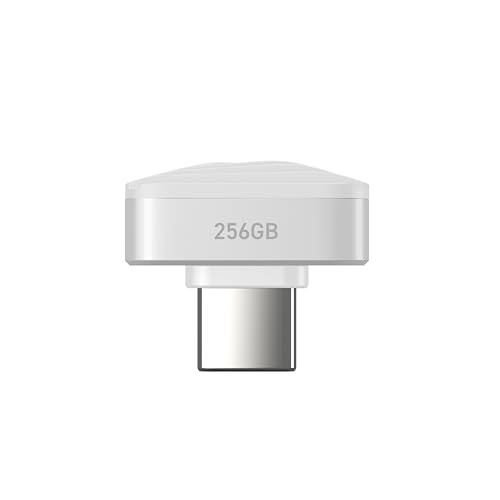
Pre-formatted exFAT and a claimed 2.8 g body make the Nano the pick that plugs into anything, at the cost of half the speed.
Best for: carrying files between a phone, a tablet and a lab PC Skip it if: transfer speed matters more than size
The compatibility list is the reason this one is here. SUNEAST states the drive ships pre-formatted in exFAT and works out of the box with Windows, macOS, Linux, Android 14 and above, and iOS or iPadOS devices with USB-C. No other pick in this set publishes that spread of named operating systems. Formatting is the quiet obstacle in this category, and a drive that skips it saves you a Google search on day one.
It is also absurdly small. SUNEAST claims 2.8 grams and roughly 10.6 x 20 x 13.5 mm, which is closer to a USB stick's cap than to the Kingston's shell. The listing states an operating range of 0-40 °C and storage from -20-70 °C, the only temperature figures published in this group. It's the second-cheapest pick, released in 2025.
The speed gap is the whole trade. SUNEAST claims 450MB/s read and 400MB/s write on USB-C 3.2 Gen1, so writes are under half the T7's stated figure and a fifth of the T9's. The specification sheet is also the thinnest here: no published weight in ounces, no dimensions in inches, and no warranty statement at all, where every other pick publishes 3 or 5 years. At 256GB, with a noted 5% formatting reserve, it is a satchel drive rather than an archive.
Pros:
- Pre-formatted exFAT, no setup on Mac, Windows, Linux, Android or iOS
- Claimed 2.8 g, smallest form factor in this set
- Second-cheapest pick here
- Published operating and storage temperature ranges
- 2025 release, newest design
Cons:
- Claimed 400MB/s write, slowest here by a wide margin
- No warranty stated in the listing
- No published weight in ounces or dimensions in inches
- 256GB, plus a stated 5% formatting reserve
- Only one seller lists it
How much capacity does coursework actually need?
Capacity is where students overspend. The instinct is to buy the biggest number, but the three 1TB drives here exist to hold video, game installs and raw camera files, not lecture notes.
Rough guide, based on what the drives in this set hold:
- Documents, slides and PDFs only. 250GB is generous. The SSK's roughly 232GB of usable space swallows years of coursework.
- Photography, design files, phone backups. 256GB starts to squeeze. This is where the SUNEAST's small footprint stops compensating.
- Video editing, 4K footage, large datasets. 1TB is the floor. Samsung explicitly ties the T7 to 4K 60fps camera recording, and the T9 to sustained creator workloads.
Two thresholds are worth naming. The first is 250GB versus 1TB: below it you save money and weight, above it you stop deleting things to make room. The second is the format question. Only the SUNEAST states exFAT out of the box, so if you move between a Mac and a Windows lab machine, everything else may need reformatting before it works cleanly on both.
What the listings do not tell you
Every one of these five publishes a headline speed. Not one publishes what happens after the first thirty seconds of a large copy, except by implication.
- Sustained versus burst. SSK is the only brand naming its cache size. Samsung's T9 is the only one naming a thermal solution. Kingston and SUNEAST name neither, so a long export is the unknown.
- Split read and write. Kingston publishes a single 1,050MB/s figure. You cannot line that up against the T7's stated 1,000MB/s write, so treat it as unconfirmed on that axis.
- What is in the box. Only SSK states its cables. Assume you may need a Type-A adapter for older campus machines and check before you rely on it.
- Encryption. Samsung mentions extra encryption through Magician software on the T9. The other four listings say nothing about it, and coursework with personal data in it is worth a thought.
- SUNEAST's warranty. There isn't one stated. Three of the others publish 3 or 5 years.
The practical move: buy on the figures that are published, and treat the silences as risk rather than as absence of risk.
The verdict
The Samsung T7 1TB is the best compact external SSD for students, because 1,000MB/s claimed writes at 2.08 oz in a 0.3 in shell is the cleanest balance of speed, capacity and bag-friendliness in this group. It's the drive I'd hand someone who does not want to think about it again.
Two conditions flip that. First, warranty length: if you plan to keep the drive through a full degree, Kingston's XS1000 publishes 5 years limited against Samsung's 3, in a smaller 0.53 x 2.74 x 1.28 in body, at a lower price position. That is the pick for the long haul. Second, port speed: if your laptop has USB 3.2 Gen 2x2 and you edit video, the T9's claimed 2,000MB/s is genuinely double the T7's, and its stated thermal guard is aimed at exactly that workload. You pay for it in a 4.32 oz body.
If the budget is tight, the SSK 250GB matches the T7's claimed write figure and ships both cable types, which makes it a better first drive than any bargain spinning disk. And if the drive has to work with a phone, a tablet and a Linux box without reformatting, the SUNEAST Nano's exFAT preparation is the only listing here that promises it. The runner-up's exact advantage over the winner is two extra warranty years in a smaller shell.
FAQ
Is a compact external SSD for students worth the money?
A compact external SSD for students is worth it if your laptop's internal drive is under 512GB or you handle video. The Kingston XS1000 puts 1TB into 1.44 oz with a 5 years limited warranty, which is storage you can carry between lectures. If you only shuffle documents and use cloud sync already, the 250GB SSK covers you for far less.
Which offers better value, the Samsung T7 or the Kingston XS1000?
Better value between the Samsung T7 and the Kingston XS1000 depends on what you weight. Kingston sits at a mid-range price position with a 5 years limited warranty and a smaller 0.53 x 2.74 x 1.28 in body. Samsung costs more and covers 3 years, but publishes a separate 1,000MB/s write figure Kingston does not. Speed clarity versus warranty length.
Do I need USB 3.2 Gen 2x2 for the Samsung T9?
You need USB 3.2 Gen 2x2 to reach the T9's claimed 2,000MB/s. On a plain USB 3.2 Gen 2 port, expect the interface to cap you nearer the 1,050MB/s territory the T7, SSK and XS1000 already claim. Check your laptop's port specification first, because paying for the T9's 4.32 oz body without the matching port wastes its main advantage.
Will these drives work on both Mac and Windows?
Working on both Mac and Windows depends on formatting. Only the SUNEAST Nano states exFAT pre-formatting with named support for Windows, macOS, Linux, Android 14+ and USB-C iOS devices. The others are USB 3.2 drives that may arrive in a single-platform format and need reformatting for cross-platform use. SSK also notes its 250GB appears as roughly 232GB on Windows.
What mistake do buyers make in this category?
The mistake buyers make is comparing read speeds. Four of these five claim over 1,000MB/s read, which tells you almost nothing, while published write speeds run from 400MB/s to 2,000MB/s. Check the write figure, then check whether the listing says anything about cache or heat. SSK names its SLC cache; Samsung's T9 names a thermal guard.
Start with the port on your own laptop, not the drive. If it's USB 3.2 Gen 2, the Samsung T7 gives you everything that port can carry in the thinnest 1TB shell here, and the 1,000MB/s write claim is the number that shortens your afternoon. If you want that same capacity to survive four years of backpacks with two extra warranty years behind it, order the Kingston XS1000 instead and lose nothing you'll notice. Either way, buy the write speed and the warranty, and let the read figure on the box be marketing.