Best Flash Drive for Programmers on a Tight Desk

Five USB drives compared on published capacity, interface generation, bundled count and stated encryption, with a named winner for anyone who needs a bootable stick and a backup stick on the same keyring.

By Samuel HarrisUpdated 16 min read
On this page
- Best flash drive for programmers at a glance
- Why bus speed decides this more than capacity
- How I screened these five listings
- 1. Maspen 2 Pack 64GB USB Flash Drive USB 2.0 Thumb Drives — Best overall
- 2. SANDISK 64GB Ultra Flair USB 3.0 Flash Drive — Runner-up
- 3. Lexar A30E USB 3.2 Gen 1 Flash Drive 128GB 2-Pack — Best premium
- 4. PNY 128GB Turbo Attaché 3 USB 3.0 Flash Drive 2-Pack — Best for beginners
- 5. SamData 32GB USB Flash Drives 2 Pack — Best budget pick
- Does a flash drive still make sense for dev work?
- What the listings don't tell you about programming use
- When a different pick wins
- The verdict
- FAQ
The best flash drive for programmers here is the Maspen 2-Pack 64GB, because two 64GB sticks at 9.07 g each let you keep a bootable installer and a scratch drive on the same keyring. If raw transfer speed matters more than having a spare, the SanDisk Ultra Flair is the pick: it's a USB 3.0 drive with a claimed read speed of up to 150MB/s.
The deciding number in this field isn't capacity. It's the interface generation. Two of these five are USB 2.0 drives and three are USB 3.x, and that single line on the listing changes how long a 4GB ISO takes to write far more than the gigabyte figure on the label does.
Best flash drive for programmers at a glance
| Pick | Capacity | Interface | Price |
|---|---|---|---|
Best overall Maspen 2 Pack 64GB USB Flash Drive |
64GB × 2 | USB 2.0 | Check Price |
Runner-up SANDISK 64GB Ultra Flair USB 3.0 |
64GB × 1 | USB 3.0 150MB/s claim |
Check Price |
Best premium Lexar A30E USB 3.2 Gen 1 128GB |
128GB × 1 | USB 3.2 Gen 1 100MB/s claim |
Check Price |
Best for beginners PNY 128GB Turbo Attaché 3 2-Pack |
128GB × 2 | USB 3.0 | Check Price |
Best budget pick SamData 32GB USB Flash Drives 2 Pack |
32GB × 2 | USB 2.0 | Check Price |





Why bus speed decides this more than capacity
Capacity is the number on the front of the box, so it's the number people compare. It's the wrong one to lead with.
A USB 2.0 bus tops out well below what a USB 3.0 or USB 3.2 Gen 1 port allows. SanDisk states up to 150MB/s read on the Ultra Flair and calls it up to 15 times faster than a standard USB 2.0 drive. Lexar claims up to 100 MB/s on the A30E and describes it as 10x faster than USB 2.0. PNY makes the same 10x comparison for the Turbo Attaché 3. Those are the manufacturers' own numbers, not measured figures, but three separate brands drawing the same contrast tells you where the gap sits.
Here's what that means for dev work specifically:
- Writing a Linux installer image, typically 2GB to 6GB, is the single slowest thing you'll do with any of these drives.
- Copying a repo full of small files punishes slow drives twice: once on the bus and again on per-file overhead.
- Reading a portable toolchain off the stick happens constantly, so read speed matters more than write speed for daily use.
The Maspen and the SamData are both USB 2.0 and both listed as compatible with USB 2.0 and below. They'll still work in a USB 3.x port. They just won't go faster than the older bus allows. That's the trade you accept for the two-drive count and the low price position.
Two more listing details are worth checking before capacity. Both the SanDisk and the Lexar mention built-in security: SanDisk describes easy-to-use password protection using 128-bit AES encryption, and Lexar describes DataShield creating a password-protected safe with auto-encryption. Neither the Maspen, the SamData nor the PNY listing mentions encryption software at all. If you're moving anything that shouldn't sit unencrypted in a jacket pocket, that narrows this set to two immediately.
How I screened these five listings
The criteria, weighted in the order they actually changed the ranking:
- Interface generation, weighted heaviest. USB 3.x beats USB 2.0 for anything larger than a few hundred megabytes, and that's most of what a programmer moves.
- How many drives are in the box. Two sticks means one can be dedicated to a bootable image and left alone. Three of the five ship as 2-packs.
- Physical durability signals. Metal casing, a swivel cap, a retracting connector or a sliding collar, all stated in the listings, all protecting the one part that fails.
- Stated encryption support, because a lost drive is a leaked drive.
- Published warranty, which only three of the five list at all.
Why those weights and not others: speed and drive count are the two things you feel every week, and they're both plainly stated on the listing. Durability and encryption are insurance against the two failure modes that actually cost you something. Warranty came last because a warranty on a low-cost drive rarely gets claimed.
What got cut in the weighting: colour, released year, and model number. The Maspen lists a 2026 release and the SanDisk a 2015 one, and that gap tells you nothing useful about whether either drive holds your build artefacts safely.
The winner isn't the fastest drive here. The Maspen took the top spot because the two-drive count at 9.07 g apiece solves the keyring problem better than any single stick in this set does, and it's the second-cheapest of the five.
1. Maspen 2 Pack 64GB USB Flash Drive USB 2.0 Thumb Drives — Best overall
Two 64GB sticks at 9.07 g each, which is the lightest per-drive weight in this whole set.
Best for: carrying two separate 64GB sticks on one keyring Skip it if: you need USB 3.x write speeds for large repos
The case for this one is arithmetic. You get two 64GB drives, each weighing 9.07 g, in a body measuring 0.45 x 2.25 x 0.72 in. That's 128GB total across two independent devices, which is the same total capacity as the single Lexar A30E but split so one drive can hold a permanent bootable image while the other stays free for handoffs and scratch work.
Maspen describes a 360° metal swivel cap with a matt surface and a key ring, which protects the connector without a cap you'll lose in a laptop bag. The listing states plug-and-play with no software install, and names Windows 7 through 10, Vista, XP, Unix, 2000, ME, NT, Linux and Mac OS. That Linux mention matters more than it sounds: a drive you can format and mount from any of your machines is a drive that keeps working when your main box doesn't.
The catch is real. This is a USB 2.0 drive, so it's slower than the SanDisk, the Lexar and the PNY on any large write. The listing says "Warranty" without naming a term, where SanDisk and PNY both state one year. You're trading speed and warranty clarity for two drives at the second-lowest price position here.
Pros:
- Two 64GB drives in one box, 128GB total
- Lightest per-drive weight in this set at 9.07 g
- 360° metal swivel cap protects the connector
- Linux and Mac OS both named in the compatibility list
- Second-cheapest pick of the five
Cons:
- USB 2.0 only, so slower than three picks here
- Warranty listed without any stated term
- No password protection or encryption software mentioned
- Only one seller lists it
2. SANDISK 64GB Ultra Flair USB 3.0 Flash Drive — Runner-up
The highest claimed read speed in this set at up to 150MB/s, in a metal body 0.26 in thick.

Best for: moving multi-gigabyte images or ISOs quickly Skip it if: you want a spare drive in the same box
If your bottleneck is time rather than drive count, this is the one to buy. SanDisk claims up to 150MB/s read, the highest stated figure among these five picks, and says writes run up to 15x faster than a standard USB 2.0 drive at 4MB/s. The listing illustrates it with a 1.2GB MPEG-4 video moving in under 30 seconds on a USB 3.0 host. Treat those as manufacturer figures, but note that no other drive here claims a higher number.
Two things beyond speed put it second. The casing is described as sleek durable metal, and at 0.26 x 0.52 x 1.67 in it's the slimmest drive in this comparison, which is the difference between fitting beside a USB-C dongle and not. SanDisk also states easy-to-use password protection using 128-bit AES encryption, supported on Windows 7, 8 and 10 and macOS. That's a genuine advantage over the Maspen, the SamData and the PNY, none of which mention encryption.
The model number is SDCZ73-064G-G46 and the warranty is stated as 1 year limited. The real cost is count: this is a single drive at 18 g, so it's double the weight of one Maspen stick and you don't get a backup in the box. At 64GB it's also half the capacity of the two 128GB picks here.
Pros:
- Highest claimed read speed here, up to 150MB/s
- 128-bit AES password protection stated on the listing
- Slimmest body of the five at 0.26 in thick
- Metal casing rather than plastic
- 1 year limited warranty published
Cons:
- Single drive only, no spare included
- 64GB is half the capacity of the two 128GB picks
- Heaviest per-drive weight here alongside the PNY at 18 g
- The oldest listing in the set, released 2015
3. Lexar A30E USB 3.2 Gen 1 Flash Drive 128GB 2-Pack — Best premium
The newest interface generation here, USB 3.2 Gen 1, in the lightest drive of the five at 7.41 g.
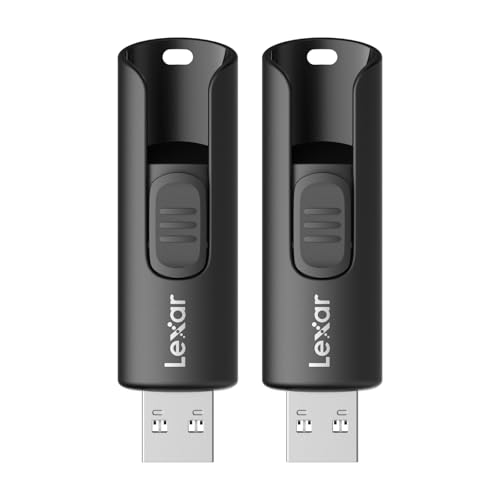
Best for: the largest single-drive capacity here at 128GB Skip it if: you want a published warranty term
This is the most expensive pick here, and what it buys is the newest bus and the lowest weight. The A30E is listed as USB 3.2 Gen 1 with 128GB of capacity, and Lexar states transfer speeds up to 100 MB/s based on internal testing, describing it as 10x faster than standard USB 2.0. At 7.41 g and 0.45 x 2.31 x 0.79 in, it's the lightest drive in this comparison by a clear margin.
The design details are the ones I'd care about on a daily carry. Lexar describes a push-button retractor and a lanyard loop, so the connector tucks away without a separate cap. The security story is the strongest of the five: Lexar DataShield creates a password-protected safe with auto-encryption, and the listing states that files deleted from the safe are securely erased and can't be recovered. For anyone handling client code or credentials, a documented secure-delete is worth more than a few MB/s.
Two gaps count against it. The listing gives no warranty term at all, where SanDisk, SamData and PNY all state one year. And despite the "2-Pack" wording in the product name, the listed count for this configuration is 1, so read the option you're selecting carefully. You're paying the top price in this set for a single 128GB drive.
Pros:
- Newest interface here, USB 3.2 Gen 1
- Lightest drive in the set at 7.41 g
- DataShield encryption with stated secure erase
- Push-button retractor and lanyard loop, no loose cap
- 128GB, tied for largest capacity here
Cons:
- Most expensive pick in this comparison
- No warranty term published
- Listed count of 1 despite the 2-Pack name
- Claimed 100 MB/s is below SanDisk's 150MB/s figure
4. PNY 128GB Turbo Attaché 3 USB 3.0 Flash Drive 2-Pack — Best for beginners
Two 128GB USB 3.0 drives with a cap-less sliding collar and a stated 1 year warranty.

Best for: two 128GB cap-less drives with a stated warranty Skip it if: pocket bulk matters at 18 g
This is the highest total capacity in the comparison: two drives at 128GB each, on USB 3.0, with a 1 year warranty published and model number P-FD128X2TBOP-MP. If you want the setup I recommend for the Maspen but with four times the space and a faster bus, this is that drive.
PNY describes a convenient sliding collar and a cap-less design that protects the content when not in use, plus compatibility with most PC and Mac laptops and desktops with USB 3.0 ports. The listing claims transfer speeds up to 10 times faster than standard USB 2.0 flash drives. That's the same comparison Lexar makes, and it's a marketing framing rather than a measured throughput number, so don't read a specific MB/s into it.
Why it lands fourth rather than higher: PNY publishes no MB/s figure at all, which makes it the hardest drive here to compare on speed. Each stick weighs 18 g, tying the SanDisk for the heaviest per-drive weight, and the listing gives no dimensions, so you can't check clearance next to a crowded port. There's no encryption software mentioned either. It's the most storage per box, with the least published detail about how fast that storage actually is.
Pros:
- Highest total capacity here, 128GB × 2
- USB 3.0 on both drives
- Cap-less sliding collar, nothing to lose
- 1 year warranty stated on the listing
Cons:
- No MB/s transfer figure published anywhere
- 18 g per drive, tied heaviest in this set
- No dimensions listed, so port clearance is unknown
- No password protection or encryption mentioned
5. SamData 32GB USB Flash Drives 2 Pack — Best budget pick
The cheapest pick here, and the only one with two visibly different colours for separating content.

Best for: colour-coded throwaway sticks for handoffs Skip it if: 32GB won't hold your toolchain
This is the cheapest of the five, and the reason to consider it is the colour split. SamData ships one black and one blue 32GB drive and says outright that different colours help you store different content. That's a small thing that solves a real annoyance: you can tell your bootable installer from your handoff drive without plugging either in.
The rest is straightforward. Each drive weighs 12 g and measures 0.39 x 2.28 x 0.75 in. The listing describes a metal clip rotating 360° around an ABS plastic body, plug-and-play with no software needed, and names Windows 7 through 10, Vista, XP, 2000, ME, NT, Linux and Mac OS. SamData states a 12-month warranty covering any problem within a year of purchase, which is more than the Maspen or the Lexar listings commit to.
The limits are obvious and they're the price of admission. It's USB 2.0, and the listing says high-speed USB 2.0 with compatibility for USB 2.0 and below, so it's the slowest tier here alongside the Maspen. At 32GB per stick it holds half what the Maspen holds and a quarter of the PNY. For a drive you hand to a client and don't expect back, that's fine. For a working drive that carries a portable toolchain, 32GB gets tight fast.
Pros:
- Cheapest pick in this comparison
- Two colours for separating content at a glance
- 12-month warranty stated in the listing
- Linux and Mac OS named in the compatibility list
- ABS body with a 360° rotating metal clip
Cons:
- 32GB per stick, the smallest capacity here
- USB 2.0, the slowest interface tier in this set
- No encryption or password protection mentioned
- Plastic body where the SanDisk uses metal
Does a flash drive still make sense for dev work?
Cloud storage handles most file movement now. So why keep a stick on your keyring?
Three jobs a USB drive still does better than a sync folder:
- Bootable media. Installing an OS, running a live environment, or recovering a machine that won't boot needs physical media. A cloud folder can't do this.
- Air-gapped transfer. Some client sites, labs and secure networks don't let you plug into the internet. They do let you plug in a drive.
- Offline recovery. When your laptop dies and you're on a borrowed machine, a stick with your dotfiles, SSH config and a portable editor gets you working in minutes.
That's the honest case. None of these five drives replaces a proper backup strategy or a Git remote. They complement one. The capacity you need follows from the job: bootable images run 2GB to 6GB, so even the 32GB SamData has room for several, while a portable toolchain plus a couple of repos is where 64GB or 128GB starts to earn its keep.
What the listings don't tell you about programming use
None of these five listings mentions programming, developers, or code. That's worth saying plainly, because it changes how you read every claim on the page.
What's missing across the board:
- Random read and write performance. Every stated MB/s figure is a sequential number, usually measured with one large video file. A repo with thousands of small files behaves nothing like that, and none of these listings addresses it.
- Endurance ratings. Flash cells wear out. No listing here publishes a write-cycle or TBW figure, so a drive you rebuild a bootable image on weekly is running on unknown headroom.
- Filesystem support. All five mention Windows and Mac compatibility, and the Maspen and SamData both name Linux. None states whether the drive ships formatted FAT32, exFAT or NTFS, which matters the first time you try to write a file over 4GB.
- Sustained write behaviour. A drive can hit a headline speed for a few seconds and then drop sharply once its cache fills. No listing here says anything about it.
The practical move: format the drive yourself before you trust it, keep a second copy of anything you can't regenerate, and treat any single stick as expendable. That's the real argument for the 2-packs in this set. Redundancy costs less than recovery.
When a different pick wins
Three thresholds flip the recommendation away from the Maspen:
If you write bootable images more than once a month, buy the SanDisk instead. Its claimed 150MB/s read and up-to-15x write comparison are the highest stated numbers here, and that's the one task where the USB 2.0 penalty is felt as minutes rather than seconds.
If you carry client code or credentials, the choice narrows to the SanDisk or the Lexar. They're the only two picks whose listings mention encryption: 128-bit AES password protection on the SanDisk, DataShield with auto-encryption and secure erase on the Lexar. The other three don't mention it.
If your working set exceeds 64GB per drive, go to the PNY. Two 128GB sticks on USB 3.0 is the most total storage in this comparison, and the 1 year warranty is published rather than implied.
And the reverse case: if you hand drives to clients and never see them again, the SamData is the pick. It's the cheapest here, it ships two, and the black-and-blue split means you'll never mix up the one you're giving away with the one you're keeping.
The verdict
At the entry tier, the two USB 2.0 picks split by capacity and colour. The Maspen 2-Pack takes the overall win because 64GB × 2 at 9.07 g per stick is the best capacity-to-carry ratio here, and two drives let you keep a bootable installer permanently separate from working files. The SamData sits below it: cheapest of the five, 32GB per stick, with a 12-month warranty stated and two colours to keep the drives straight.
In the middle sits the SanDisk Ultra Flair, and it's the pick if speed decides for you. Up to 150MB/s claimed read is the highest figure in this set, the metal body is 0.26 in thick, and 128-bit AES password protection is stated on the listing. The exact advantage over the Maspen is bus generation, and it costs you the second drive.
At the top, the two premium picks diverge sharply. The PNY Turbo Attaché 3 gives you the most raw storage, 128GB × 2 on USB 3.0 with a 1 year warranty, but publishes no speed figure. The Lexar A30E gives you the newest interface at USB 3.2 Gen 1, the lightest body at 7.41 g, and DataShield encryption with secure erase, but no warranty term. Pick PNY for capacity, Lexar for security and weight.
FAQ
Is the best flash drive for programmers worth buying over cloud storage?
The best flash drive for programmers is worth buying alongside cloud storage, not instead of it. A stick handles the three jobs sync folders can't: creating bootable install media, moving files onto air-gapped networks, and getting you working on a borrowed machine when your laptop dies. Keep your repos in a remote and your recovery tools on the drive.
How much capacity does a programmer actually need on a USB drive?
How much capacity you need depends on the job. Bootable OS images typically run 2GB to 6GB, so the 32GB SamData holds several with room to spare. A portable toolchain plus a couple of working repos is where 64GB starts to matter, which is why the Maspen and SanDisk both land at 64GB. The 128GB PNY and Lexar suit anyone storing large build artefacts.
Does USB 2.0 versus USB 3.0 make a real difference here?
USB 2.0 versus USB 3.0 makes the biggest difference of any specification in this set. SanDisk states its USB 3.0 Ultra Flair writes up to 15 times faster than a standard USB 2.0 drive, and both Lexar and PNY claim 10x over USB 2.0. The Maspen and SamData are USB 2.0 drives, so large image writes take noticeably longer on them.
SanDisk Ultra Flair or Lexar A30E for carrying sensitive code?
SanDisk Ultra Flair or Lexar A30E both mention encryption, and they're the only two picks here that do. SanDisk states 128-bit AES password protection supported on Windows 7 through 10 and macOS. Lexar's DataShield creates a password-protected safe with auto-encryption and states that deleted files are securely erased and unrecoverable. Choose Lexar for the documented secure erase.
What mistake do people make buying a flash drive for code?
The mistake people make is buying on capacity alone and ignoring the interface generation and drive count. A 128GB USB 2.0 stick writes an ISO slower than a 64GB USB 3.0 one. And a single drive gives you no redundancy, which is why three of these five picks ship as 2-packs. Buy two smaller fast drives over one large slow one.
Start with the Maspen 2-Pack and dedicate one stick to a bootable image on day one. That single habit, one drive that never changes and one that does whatever you need, is what turns a flash drive from clutter into a tool you reach for. If you'd rather have speed than a spare, order the SanDisk Ultra Flair and accept that you'll want a second drive eventually. Either way, format it yourself before you trust it with anything you can't regenerate from a remote.