Best Portable Dual Flash Drive for Tight Bags

Six dual-ended USB-C and USB-A drives compared on weight, capacity and warranty. The Lexar D40E leads, with clear conditions for when the JOIOT or the budget OSCOO wins instead.

By Samuel HarrisUpdated 15 min read
On this page
- Best portable dual flash drive at a glance
- How I screened these six down
- What actually decides a dual flash drive?
- 1. Lexar D40E 128GB Dual USB 3.2 Gen 1 Type-C Jump Drive — Best overall
- 2. SSK 128GB USB C Flash Thumb Drive up to 550MB/s Dual USB — Best premium
- 3. JOIOT 256GB USB C Flash Drive Dual USB 3.0 Type C + USB A — Best upgrade
- 4. myemuun 2-Pack 128GB USB C Flash Drive Dual Type C + USB A — Best for pros
- 5. Vansuny 128GB USB C Flash Drive 2 in 1 OTG USB 3.0 + Type — Best minimal setup
- 6. OSCOO 32GB Dual USB Flash Drive — Best budget pick
- Does the manufacturer's speed claim mean anything?
- One drive or a two-pack?
- What the listings leave out
- The verdict
- FAQ
The best portable dual flash drive is the Lexar D40E 128GB, a 26 g metal stick with USB-C and USB-A ends and a 3-year limited warranty behind it. If 128GB runs out too fast, the JOIOT 256GB dual drive doubles the room for a small size penalty. Most buyers compare these drives on the headline speed number printed on the listing. That figure is the least trustworthy thing here, and it is not what should decide your pick.
Best portable dual flash drive at a glance
| Pick | Capacity | Warranty | Price |
|---|---|---|---|
Best overall Lexar D40E 128GB Dual USB 3.2 Gen 1 Type-C |
128GB | 3 years | Check Price |
Best premium SSK 128GB USB C Dual USB C+A |
128GB | 3 years | Check Price |
Best upgrade JOIOT 256GB USB C Dual Type C + USB A |
256GB | 1 year | Check Price |
Best for pros myemuun 2-Pack 128GB Dual Type C + USB A |
128GB x2 | not listed | Check Price |
Best minimal setup Vansuny 128GB USB C 2-in-1 OTG |
128GB | not listed | Check Price |
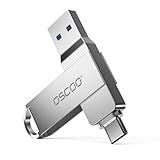
Best budget pick OSCOO 32GB Dual USB 3.2 Gen1 |
32GB | 3 years | Check Price |



How I screened these six down
I lined up the published specifications for every dual-ended drive in this set and sorted them by what a shopper can actually verify. My rule was simple. A feature bullet is a claim; a spec with a unit is closer to a fact. So I ranked on capacity, weight, dimensions and warranty first, then let the attributed speed claims act as a tiebreaker rather than a decider.
Three things pushed a drive down the list:
- No published warranty. Two picks here list no warranty at all, which matters for a device you plug and unplug hundreds of times.
- Missing physical specs. A drive with no stated weight or dimensions is hard to judge for pocket carry.
- Capacity that runs out fast. A 32GB drive is fine for documents and thin for 4K video.
What survived is a spread of six drives from 32GB to 256GB, one of them a two-pack. Every one carries both a USB-C and a USB-A connector, so all six clear the basic dual-drive bar. The differences are in weight, capacity, warranty and how honest the size figures look. That mapping to buyer profiles is what the picks below reflect.
What actually decides a dual flash drive?
What actually decides a dual flash drive is not the read-speed number on the box. It is the match between capacity, physical size and warranty, weighed against what you carry every day.
Here is why the speed claim misleads. Every listing states its own figure using its own method, and none is measured the same way. The SSK listing claims up to 550MB/s. The Lexar and OSCOO listings claim up to 100MB/s. Those numbers are not comparable across brands, and real transfer speed depends on the host port, the file mix and the drive's temperature. Treat them as marketing, not as a spec sheet.
The figures you can compare are the ones with fixed units:
- Capacity. 32GB, 128GB or 256GB. This is the hard ceiling on what fits.
- Weight. The Lexar D40E is 26 g; the Vansuny is 9.07 g; the SSK is 1.31 oz.
- Warranty. Three of these six publish a 3-year term. Two publish none.
- Enclosure. Metal on the Lexar and SSK, plastic on the JOIOT, per their listings.
Decide on capacity first, warranty second, weight third. The best portable dual flash drive for you is the one that clears your capacity need with a warranty you trust, at a weight you will actually keep on your keys.
1. Lexar D40E 128GB Dual USB 3.2 Gen 1 Type-C Jump Drive — Best overall
The Lexar D40E wins on the strongest set of published specs here: 128GB, a metal body, a 3-year warranty and a light 26 g weight.
Best for: someone moving files between a phone and a laptop daily Skip it if: you need more than 128GB
What sets the D40E apart in this group is that it does not lean on a single big claim. It carries 128GB, which sits mid-pack for capacity, and it weighs 26 g at dimensions of 0.04 x 2.77 x 0.67 in. Lexar says the enclosure is metal and rated to work from 0° to 50° C. That build, paired with a 3-year limited warranty, is what most of these rivals lack.
The speed story is modest and honest. Lexar states transfer speeds up to 100MB/s, based on internal testing, and it says performance varies by host device. That is a slower claim than the SSK, but it comes with a warranty and a metal shell the same length as a house key. Lexar also mentions 256-bit AES encryption software for locking files.
The trade-off is capacity. At 128GB it holds half of what the JOIOT does, and if you shoot a lot of 4K clips you will fill it. It also sits mid-range on price for no capacity edge over cheaper 128GB drives, so you are paying for the metal build and the warranty, not for more room.
Pros:
- Light 26 g weight, easy to keep on a keyring
- Metal enclosure per the listing
- 3-year limited warranty
- Both USB-C and USB-A ends, no adapter
- Encryption software mentioned by Lexar
Cons:
- 128GB fills fast for heavy video work
- Claimed 100MB/s is slower than the SSK's number
- Mid-range price with no extra capacity for it
2. SSK 128GB USB C Flash Thumb Drive up to 550MB/s Dual USB — Best premium
The SSK is the most expensive pick here and stakes its case on the highest claimed speed in the set.

Best for: moving large video files where the claimed speed matters most Skip it if: pocket space is tight
The SSK is where the speed argument lives. Its listing claims up to 550MB/s read and 500MB/s write over USB 3.2 Gen 2, calling itself 10 times faster than a traditional USB 3.0 stick. I can only report that as SSK's own claim, since no independent figure is supplied, but it is by far the boldest number in this group.
On the specs I can verify, it holds 128GB and weighs 1.31 oz, the heaviest drive here. SSK says the shell is high-grade zinc alloy, resistant to drops and abrasion, and the drive carries a 3-year warranty. Dimensions run 0.34 x 3.07 x 0.81 in, the chunkiest body of the six.
The catch is size and price together. It is the most expensive pick in this set and the bulkiest, so you pay a premium and give up pocketability. If the speed claim holds up on your gear, that is a fair trade for a video workflow. If you mostly shuttle documents, you are buying headroom you will not touch.
Pros:
- Highest claimed speed here, 550MB/s per SSK
- Zinc alloy shell, per the listing
- 3-year warranty
- USB 3.2 Gen 2 port claim
Cons:
- Most expensive pick in this set
- Heaviest and bulkiest body at 1.31 oz
- Speed figure is unverified marketing
3. JOIOT 256GB USB C Flash Drive Dual USB 3.0 Type C + USB A — Best upgrade
The JOIOT is the only 256GB drive here, doubling the room of every 128GB rival in a slim body.

Best for: photographers who fill a 128GB drive too fast Skip it if: you want a longer warranty
Capacity is the whole point of the JOIOT. At 256GB over USB 3.0, it holds twice what the Lexar, SSK, Vansuny and myemuun drives do. For anyone who keeps running out of room mid-shoot, that headroom is worth more than a shell material or a speed claim.
It stays slim too. Dimensions are 0.04 x 2.52 x 0.7 in, and JOIOT describes a mini 63.5mm body that fits a pocket. The listing pairs a Type-C plug and a USB-A plug at each end and claims support for Windows, Android, Linux and Mac OS with backward USB 2.0 compatibility. JOIOT calls the enclosure premium plastic.
Two things hold it back. The warranty is 1 year, the shortest here and a third of what the Lexar, SSK and OSCOO offer. And the enclosure is plastic where the Lexar and SSK use metal. It sits in the premium price tier as well, so you are paying up mainly for the capacity, not for the build or the coverage. If you value storage above longevity guarantees, that is the right call.
Pros:
- Only 256GB drive in this set
- Slim 0.04 x 2.52 x 0.7 in body
- Broad OS support per the listing
- USB-C and USB-A ends, no adapter
Cons:
- Just a 1-year warranty, shortest here
- Plastic enclosure, not metal
- Premium price tier
4. myemuun 2-Pack 128GB USB C Flash Drive Dual Type C + USB A — Best for pros
The myemuun is the only two-pack here, giving you 128GB x2 for a working drive and a backup at once.

Best for: anyone who wants a backup drive and a working drive at once Skip it if: you need published dimensions and weight
The myemuun stands alone in this set by shipping two 128GB drives, one black and one blue. That is the pro move: keep one as your live drive and one as a rotating backup, or hand a colleague a copy without unplugging your own. No single-drive pick here can do that without a second purchase.
Each drive carries USB-C and USB-A connectors, so it works with phones, tablets, MacBooks and PCs with no adapter, per myemuun. The listing lists the design as plug-and-play with no drivers, and notes the line comes in sizes from 16GB up to 128GB. It sits in the mid price tier for the set.
The weakness is thin data. The listing publishes no weight, no dimensions and no warranty. For a drive you carry, that leaves you guessing on pocket bulk and long-term coverage. So this is the pick when you value having two physical drives more than you value a full spec sheet. If you want documented build details and a warranty term, the Lexar answers that better.
Pros:
- Two 128GB drives in one buy
- Black and blue for easy sorting
- USB-C and USB-A ends per pack
- Plug-and-play, no drivers
Cons:
- No published weight or dimensions
- No stated warranty
- Speed claim absent from the listing
5. Vansuny 128GB USB C Flash Drive 2 in 1 OTG USB 3.0 + Type — Best minimal setup
The Vansuny is the lightest drive here at 9.07 g and ships preformatted with a keychain loop.

Best for: Android users who just want plug-and-play with a keychain loop Skip it if: you carry a metal enclosure everywhere
The Vansuny is the drive to grab if you want the least fuss. It weighs 9.07 g, the lightest of all six, and its listing points out it ships formatted as exFAT, the format phones and tablets read out of the box. That means no reformatting step before your first phone transfer.
It carries 128GB with USB 3.0 and Type-C connectors, and the listing highlights OTG support for nearly all phones that offer it, plus a keychain loop for carry. Vansuny lists broad compatibility across Windows versions, Linux and Mac OS, with backward USB 2.0 support. Dimensions are 0.39 x 2.24 x 0.79 in, and it sits in the entry price tier as the second-cheapest here.
Its limits are on paper. The listing publishes no warranty and no metal-shell claim, so on build and coverage it trails the Lexar and SSK. The lightness comes from a plastic body you should not treat roughly. Pick it when a preformatted, feather-light keychain drive matters more than a warranty card.
Pros:
- Lightest drive here at 9.07 g
- Ships preformatted exFAT for phones
- Keychain loop for carry
- Second-cheapest pick in the set
Cons:
- No published warranty
- No metal-enclosure claim
- Lower-tier USB 3.0 speed
6. OSCOO 32GB Dual USB Flash Drive — Best budget pick
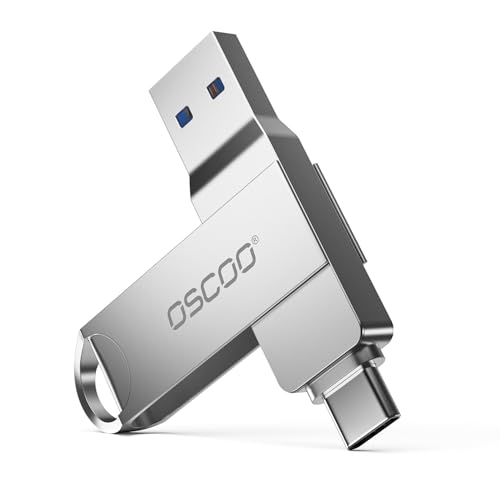
The OSCOO is the cheapest drive in this set and still ships a metal-alloy build and a 3-year warranty.
Best for: light document and photo transfers on a strict budget Skip it if: 32GB fills up in a week for you
The OSCOO is the value entry, and it punches above its price on the two things I trust most. It is the cheapest of the six, yet it still lists a 3-year manufacturer warranty and a zinc alloy shell. That is a better spec floor than either the Vansuny or the myemuun, both of which cost more and publish no warranty.
Capacity is the obvious limit. At 32GB, it holds the least here by a wide margin, enough for documents, a photo set or a working folder, not for a 4K video library. OSCOO claims read speeds up to 100MB/s and write speeds up to 30MB/s over USB 3.1 Gen1, and it lists a compact 63.67mm body at 0.1 x 2.48 x 0.54 in. It works across Windows, macOS, Linux and Android with no drivers.
The trade-off is plain. You get the strongest warranty-to-price ratio in the set and the smallest capacity in the set. If your files are light and your budget is tight, that swap makes sense. If you handle video, the JOIOT's 256GB is the smarter buy.
Pros:
- Cheapest pick in this set
- 3-year manufacturer warranty
- Zinc alloy shell per the listing
- USB-C and USB-A, no adapter
Cons:
- Just 32GB, the least here
- 30MB/s claimed write is modest
- Fills fast with video files
Does the manufacturer's speed claim mean anything?
Short answer: treat every speed number here as a claim, not a measurement. Each listing states its own figure using its own internal method, and none is checkable against a common standard.
Look at the spread these drives print:
- SSK claims up to 550MB/s read, 500MB/s write.
- Lexar claims up to 100MB/s.
- OSCOO claims up to 100MB/s read, 30MB/s write.
- JOIOT and Vansuny cite USB 3.0 without a firm ceiling in the supplied text.
Even Lexar's own bullet admits performance varies by host device, interface and usage. So a drive that claims 550MB/s on paper can behave very differently on an older USB-A port or with thousands of tiny files. Use the claim to sort roughly, then lean on capacity, weight and warranty to make the call. Those are the numbers that mean the same thing on every listing.
One drive or a two-pack?
Most of these picks are single drives. The myemuun is the exception, shipping 128GB x2 in black and blue. Whether that split beats a single larger drive depends on how you work.
Choose the two-pack when:
- You want a live drive and a physical backup at the same time.
- You share files with someone and do not want to hand over your own drive.
- You keep losing single drives and want a spare on hand.
Choose a single drive when:
- You need one big pool of space, like the JOIOT's 256GB, not two smaller ones.
- You want a published warranty and full physical specs, which the two-pack lacks.
- You value a metal enclosure, which the Lexar and SSK offer and the myemuun listing does not claim.
Two 128GB drives give you redundancy; one 256GB drive gives you a single deep bucket. Neither is better in the abstract. Match it to whether you fear loss or fear running out of room.
What the listings leave out
A note on the search term itself. "Portable" is on every one of these because they are all pocket-sized dual-ended drives, but the listings vary in how much they document that portability. Some publish weight and dimensions; some do not. So you have to judge portability yourself from what is stated.
Two gaps show up across the set:
- Missing physical specs. The myemuun lists no weight or dimensions at all, so you cannot compare its pocket bulk directly.
- Missing warranties. The Vansuny and myemuun publish no warranty term, while the Lexar, SSK and OSCOO each list 3 years.
Also worth knowing: the JOIOT and Vansuny describe plastic enclosures, while the Lexar and SSK claim metal. None of these listings states a formal drop rating you can trust, only descriptive words like "durable." When a listing skips a figure, do not assume the best. Assume it was left out because it was not a selling point, and shop accordingly.
The verdict
The best portable dual flash drive is the Lexar D40E 128GB. It wins because it stacks the specs that stay true across every listing: a light 26 g weight, a metal enclosure per Lexar, a 3-year limited warranty, and 128GB that suits the everyday phone-to-laptop shuffle. Nothing else here matches that balance of build, weight and coverage at a mid-tier price.
Two conditions flip the choice. First, if 128GB is not enough, the JOIOT 256GB is the buy. It is the only drive here that doubles the room, and it stays slim, though you trade down to a 1-year warranty and a plastic shell. Second, if your budget is the hard limit, the OSCOO 32GB is the pick. It is the cheapest of the six and still ships a zinc alloy shell and a 3-year warranty, which no other value option matches.
The SSK earns the premium slot on its 550MB/s speed claim, but that number is unverified and the drive is the heaviest and priciest here. So it wins only when the claimed speed is your top priority. For everyone else, start with the Lexar.
FAQ
Is a portable dual flash drive worth it over a single-port drive?
A portable dual flash drive is worth it when you move files between a phone and a computer. The dual USB-C and USB-A ends skip the adapter you would otherwise carry. If every device you own uses the same port, a single-port drive does the same job. For mixed setups, the two connectors save real hassle.
Which portable dual flash drive gives the best value?
The best value portable dual flash drive here is the OSCOO 32GB. It is the cheapest of the six, yet it still publishes a 3-year warranty and a zinc alloy shell, which the pricier Vansuny and myemuun do not. The catch is capacity. At 32GB it holds the least here, so it fits documents and photos, not a video library.
Does the 550MB/s speed claim on the SSK hold up?
The 550MB/s speed claim is SSK's own figure from its listing, not an independent measurement, so I can only report it as a claim. Real transfer speed depends on your host port, the file mix and the drive's temperature. Even Lexar's listing admits performance varies by device. Use these numbers to sort roughly, then decide on capacity and warranty.
Lexar D40E or JOIOT 256GB: which should I buy?
Between the Lexar D40E and JOIOT 256GB, pick by capacity first. The Lexar holds 128GB with a metal build and a 3-year warranty at 26 g. The JOIOT holds 256GB, twice the room, but drops to a 1-year warranty and a plastic shell. Choose the JOIOT if you fill drives fast; choose the Lexar for build and coverage.
What is the biggest mistake buying a dual flash drive?
The biggest mistake buying a dual flash drive is picking on the headline speed number alone. Those figures use different test methods per brand and are not comparable. Capacity, weight and warranty are the specs that mean the same thing on every listing. Decide on capacity first, then warranty, then weight. That order avoids overpaying for a claim you cannot verify.
Start with capacity: figure out whether 32GB, 128GB or 256GB fits how you actually work, then let warranty and weight break the tie. For most people that path lands on the Lexar D40E, because 128GB covers daily phone-to-laptop transfers, the metal body survives a keyring, and the 3-year term is coverage you can hold the maker to. Fill drives faster than that and the JOIOT 256GB is your upgrade. Watching every dollar and moving light files, the OSCOO 32GB gets you a warranty and a metal shell for the least outlay.