Best Ergonomic Gaming Laptop Setup for Engineers

The NIMO N155 leads a six-piece build for engineers who run heavy workloads on a portable machine, paired with the chair, mouse and lap desk that fix the posture problems a laptop creates.

By Samuel HarrisUpdated 15 min read
On this page
- Best ergonomic gaming laptop for engineers at a glance
- 1. NIMO 15.6" IPS FHD Light Gaming Laptop — Best overall
- 2. ASUS TUF Gaming F16 — Best premium
- 3. Newtral Ergonomic Office Chair — Best for heavy use
- 4. SAIJI Laptop Lap Desk — Best for beginners
- 5. Razer Basilisk V3 Ergonomic Mouse — Best budget pick
- 6. Razer Orochi V2 Wireless Mouse — Best compact
- How I cut the field down to six
- Why a laptop alone can't be ergonomic
- Which pieces matter most for engineers?
- What should you check before you buy?
- When does a different pick win?
- The verdict
- FAQ
The best ergonomic gaming laptop for engineers is the NIMO N155, a 3.75 lb machine with 32GB LPDDR5 RAM and a 1TB SSD that stays portable without cutting memory. If you need a discrete RTX GPU for rendering, the ASUS TUF Gaming F16 with its RTX 5050 is the better buy. A laptop alone can't fix posture, so this guide pairs the machine with the chair, mouse and lap desk that turn a hot, hunched setup into one you can work at for hours.
Best ergonomic gaming laptop for engineers at a glance
| Pick | Key spec | Weight | Price |
|---|---|---|---|
Best overall NIMO 15.6" IPS FHD Light Gaming Laptop |
32GB RAM 1TB SSD |
3.75 lb | Check Price |
Best premium ASUS TUF Gaming F16 |
RTX 5050 16GB DDR5 |
4.85 lb | Check Price |
Best for heavy use Newtral Ergonomic Office Chair |
4D armrests Auto lumbar |
62 lb | Check Price |
Best for beginners SAIJI Laptop Lap Desk |
4 heights 4 tilt angles |
10.5 lb | Check Price |
Best budget pick Razer Basilisk V3 Ergonomic Mouse |
11 buttons Wired |
3.56 oz | Check Price |
Best compact Razer Orochi V2 Wireless Mouse |
Under 60g Dual wireless |
Under 60g | Check Price |





A quick note on the search itself. "Ergonomic" is doing a lot of work in that phrase, and Amazon reads it loosely. A laptop is not ergonomic by itself; it forces your screen and your hands to share one hinge angle. So this is a build, not a single product. The laptop is the engine. The chair, mouse and lap desk are what make an eight-hour day survivable. If you only want the machine, buy the NIMO and stop there. If you want the whole posture story fixed, read on.
1. NIMO 15.6" IPS FHD Light Gaming Laptop — Best overall
The NIMO N155 packs 32GB of RAM and a 1TB SSD into a 3.75 lb body, and that ratio is why it leads this build.
Best for: engineers who run heavy compiles on a machine light enough to carry Skip it if: you need a discrete NVIDIA GPU for CUDA or CAD rendering
Memory is what an engineer runs out of first. Docker containers, virtual machines and a browser full of docs eat RAM long before they stress a CPU. The NIMO ships with 32GB of LPDDR5, double the ASUS TUF's 16GB, and it does it in a chassis that weighs 3.75 lb. That combination is rare. Most machines make you pick portability or memory.
NIMO says the Ryzen 7 6800H runs eight cores at up to 4.7GHz, and the listing claims it beats an i7-12700H. Treat that as the maker's claim, not a benchmark. The 1TB SSD gives you room for repos and toolchains. The 100W USB-C charger matters more than it sounds: one cable can power the laptop and a dock, cutting the desk clutter that pushes your posture off centre.
The 180-degree hinge lets you lay the screen flat, useful when you pair it with an external monitor. Its trade-off against the ASUS is plain: no discrete GPU. For rendering or CUDA work, that gap is decisive.
Pros:
- 32GB LPDDR5 RAM, most in this set
- Light at 3.75 lb for daily carry
- 1TB SSD holds large toolchains
- 100W USB-C charging cuts cable count
- 180-degree hinge for flat-lay pairing
Cons:
- No discrete GPU for CUDA or CAD
- Only one seller lists it
- Warranty terms stated vaguely
- Sits in the premium price tier
2. ASUS TUF Gaming F16 — Best premium
The TUF F16 brings a discrete RTX 5050 and a 16-inch 165Hz screen, the GPU and display an engineer doing 3D work actually needs.

Best for: engineers who need a real RTX GPU and a bigger 16-inch screen Skip it if: you carry your machine daily and want to stay under 4 lb
This is the machine to buy when your work touches a GPU. ASUS lists an NVIDIA GeForce RTX 5050 with a Max TGP of 115W, paired with an Intel Core i5 13450HX. For CAD viewports, simulation previews or GPU-accelerated builds, that hardware does what the NIMO's integrated graphics cannot.
The 16-inch FHD+ panel runs at 165Hz with 100% sRGB, per ASUS. That colour accuracy helps if you touch design or visualisation. The 16:10 ratio gives you extra vertical space for code and terminals, which matters more than refresh rate for most engineering tasks.
The cost is size and weight. At 4.85 lb it's the heaviest of the two laptops here, over a pound above the NIMO, and it carries just 16GB of DDR5 against the NIMO's 32GB. You also get a stated 1-year warranty and a 2025 release, so it's the newer design. ASUS says the chassis meets MIL-STD-810H durability testing. For a heavier machine that stays mostly on a desk, that GPU is the whole argument.
Pros:
- Discrete RTX 5050, 115W Max TGP
- 16-inch 165Hz, 100% sRGB panel
- 16:10 ratio adds vertical code space
- Stated 1-year warranty
- 2025 release, newest in this set
Cons:
- Heaviest laptop here at 4.85 lb
- Only 16GB RAM, half the NIMO
- Most expensive pick in this set
- 512GB SSD, smaller than the NIMO
3. Newtral Ergonomic Office Chair — Best for heavy use
The Newtral chair's auto-following lumbar support and 4D armrests are the single biggest posture upgrade in this build.

Best for: engineers logging eight-hour days who feel it in their lower back Skip it if: you have no floor space or move between desks constantly
A laptop can't make you comfortable if you're slumping. This chair fixes the base of the problem. Newtral's headline feature is automatic lumbar tracking that follows your spine as you shift, which the listing quotes an ergonomist calling the most unique lumbar support she's seen in decades. Attribute that to the maker, not to a test, but the mechanism is real and rare at this price position.
The 4D armrests move up and down, in and out, forward and back, and pivot. That range lets you set arm height to match the laptop keyboard, which is the joint that hurts first when you type all day. Seat depth and height both adjust, so taller and shorter engineers can dial in thigh support.
This configuration ships with a footrest and a laptop tray, useful extras for a build centred on a portable machine. The catch is bulk. At 62 lb it's by far the heaviest item here, and its 20 x 20 x 22 in footprint needs real floor space. It also sells slowly and only one seller stocks it. Buy it if your body pays the price of long days.
Pros:
- Auto-following lumbar tracks your spine
- 4D armrests set typing height precisely
- Seat depth and height both adjust
- Includes footrest and laptop tray
Cons:
- Heavy at 62 lb, hard to move
- Large 20 x 20 x 22 in footprint
- Only one seller lists it
- Slowest seller in this set
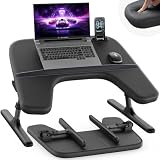
4. SAIJI Laptop Lap Desk — Best for beginners
The SAIJI lap desk gives you a stable, tilting surface for a couch or bed, the cheapest way to fix bad posture off a desk.
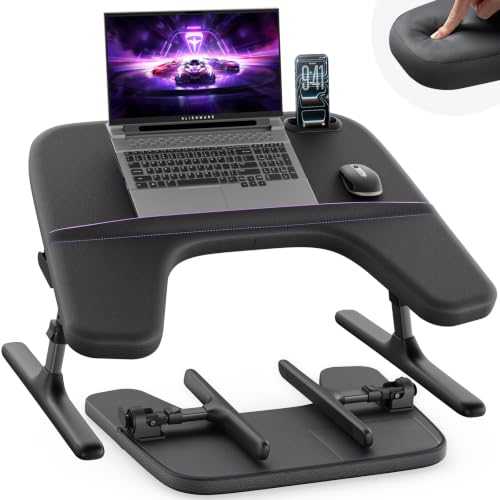
Best for: engineers who work from a couch or bed and need a stable surface Skip it if: you already have a proper desk and monitor arm
Not everyone codes at a desk. If you work from the sofa, a lap desk is the difference between a neutral wrist and a sore one. SAIJI's tray offers four height settings from 9.3 to 12.6 in and four tilt angles at 0, 12, 24 and 36 degrees. That tilt is the point: angling the screen up drops your neck flex, and raising the base brings the keyboard closer to a natural typing height.
The surface measures 22 by 28 in and, per SAIJI, fits laptops up to 18 inches, so either laptop here sits on it with room for a mouse. The padded armrests aim to take pressure off your wrists during long sessions, and a bonus riser lifts the laptop for airflow, which helps the NIMO's fans breathe.
It's the entry point to this build, not the endgame. At 10.5 lb it's not something you shift often, and no warranty is stated. For a beginner setting up a home workspace on a budget, it's the fastest posture win.
Pros:
- Four tilt angles up to 36 degrees
- Four heights from 9.3 to 12.6 in
- Fits laptops up to 18 inches
- Padded armrests reduce wrist pressure
- Built-in riser aids laptop airflow
Cons:
- Heavy for a lap desk at 10.5 lb
- No stated warranty
- Not a full desk replacement
- Slow seller in this category
5. Razer Basilisk V3 Ergonomic Mouse — Best budget pick
The Basilisk V3 is a full-hand ergonomic mouse with 11 mappable buttons, and it's the cheapest pick in this build.

Best for: engineers who want a full-hand grip and 11 mappable buttons Skip it if: you travel light and hate cable clutter
A trackpad is where wrists go to ache. A shaped mouse fixes it, and the Basilisk V3 is the sculpted, palm-filling kind. Razer's design puts a dedicated thumb rest under your hand, which keeps the wrist neutral instead of arched. At 3.56 oz with a 5.12 in length, it's a full-size right-handed shape, not a travel puck.
The 11 programmable buttons are the engineer's angle. Map them to build shortcuts, window switches or push-to-talk in calls. Razer claims a HyperScroll tilt wheel that free-spins for fast document scrolling or switches to a tactile notched mode. Its optical switches are rated for up to 70 million clicks with a 0.2ms actuation, per the listing, and it carries a 2-year manufacturer warranty.
It's wired, which is the trade-off. That means one more cable on a desk you're trying to keep clean, and it's tethered to your NIMO or ASUS. For an engineer who stays put and wants a supportive grip cheaply, that cable is a fair price.
Pros:
- Sculpted shape with dedicated thumb rest
- 11 buttons for macros and shortcuts
- 2-year manufacturer warranty
- Switches rated to 70 million clicks
- Cheapest item in this build
Cons:
- Wired only, adds a desk cable
- Right-handed shape only
- Too large for travel bags
- RGB is styling, not ergonomics
6. Razer Orochi V2 Wireless Mouse — Best compact
The Orochi V2 weighs under 60g and runs dual wireless, the mouse for engineers who work everywhere but their own desk.

Best for: engineers who work on trains, planes and shared desks Skip it if: you have large hands and want a full palm rest
The mobile counterpart to the Basilisk. Where that mouse fills your palm, the Orochi V2 disappears into a bag. Razer lists it at under 60g without a battery, and its 4.25 in length makes it the compact choice for a laptop-first engineer who never sits in the same seat twice.
Dual wireless is the standout. It switches between Bluetooth for low-power work and Razer's HyperSpeed wireless for lower latency, so one mouse covers both a coffee-shop session and a focused build at home. Razer claims up to 1100 hours on Bluetooth, which means you rarely think about batteries on the road. The Focus X 18K optical sensor and Gen-2 switches rated to 60 million clicks handle precise cursor work fine.
The trade-off is size. A compact body means less palm support than the Basilisk, and a claw grip over long days can tire large hands. No weight-with-battery figure is stated either. For the engineer whose desk changes daily, its portability wins over the Basilisk's fuller ergonomics.
Pros:
- Under 60g, easy to pocket
- Dual Bluetooth and HyperSpeed wireless
- Up to 1100 hours on Bluetooth, per Razer
- 2-year manufacturer warranty
- 18K optical sensor for precise tracking
Cons:
- Small body, less palm support
- No weight-with-battery figure stated
- Claw grip tires large hands
- Needs its own battery power
How I cut the field down to six
I built this list by profile, not by category, because an engineer buying a laptop is really assembling a workstation. Three buyer profiles shaped every choice: the daily-carry engineer, the desk-bound heavy user, and the couch coder. Each pick maps to at least one.
Here's how I screened:
- The laptop had to balance memory against weight. The NIMO's 32GB at 3.75 lb won on that ratio. The ASUS earned its spot on the RTX 5050 alone.
- Every support piece had to fix a specific posture failure. The chair fixes the spine, the lap desk fixes the couch, the mice fix the wrist.
- Specs had to be published, not implied. I compared weights, dimensions, memory and warranty side by side, and cut anything vague enough to guess at.
What didn't make it: single-spec machines that traded memory for a flashy screen, and accessories with no stated adjustment range. If a chair doesn't list its armrest movement, it can't earn an ergonomic claim. The six here each carry a figure I can point to.
Why a laptop alone can't be ergonomic
This is the misconception the search term hides. A laptop welds the screen to the keyboard at one fixed distance. Raise the screen to eye level and your hands float. Drop the keyboard to your lap and your neck bends. You cannot solve both with one hinge.
Engineers feel this harder than most because the sessions are long. A four-hour debugging run in a bad position is a real injury risk over months. So the "ergonomic" part of this build lives in the accessories, not the machine:
- The chair sets your spine and your arm height.
- The lap desk tilts the screen up and the keyboard toward neutral.
- The mouse keeps your wrist from arching over a trackpad.
- The laptop stays light so an external monitor and keyboard can take over at the desk.
That last point is why the NIMO's 3.75 lb weight and 100W USB-C matter beyond portability. A light machine you can dock is a machine you can position correctly. A heavy one you leave flat on the desk, hunching over it. Ergonomics here is a system, and the laptop is only one part.
Which pieces matter most for engineers?
If the budget is tight, spend in this order. Not every piece is equal for an engineer's actual workload.
- Laptop first. It's the engine, and memory is the bottleneck. The NIMO's 32GB LPDDR5 is the piece you'll feel every day.
- Chair second. Your back is the part that fails silently. The Newtral's auto-following lumbar and 4D armrests target the exact joints long coding sessions punish.
- Mouse third. A shaped mouse is cheap insurance against wrist strain. The Basilisk V3 at 3.56 oz is the full-hand option; the Orochi V2 under 60g is the travel one.
- Lap desk last, unless you work off a desk. If the couch is your office, it jumps to second.
The pattern for engineers: prioritise memory and back support, because those are the two failures that compound. A GPU is a want unless your work renders. That's the case for the NIMO over the pricier, GPU-heavy ASUS for most people, and the case for the ASUS when your work truly needs the RTX 5050.
What should you check before you buy?
A few things the listings won't spell out for you, worth confirming for yourself.
- Port count for docking. The NIMO's 100W USB-C is great, but check the full port list against your monitor and peripherals before you commit to a single-cable desk.
- RAM upgradeability. LPDDR5 like the NIMO's is often soldered, meaning 32GB may be the ceiling. If you expect to grow past it, that's a real limit.
- Chair assembly and space. The Newtral is 62 lb boxed. Confirm you have the floor area for a 20 x 20 x 22 in base and somewhere to build it.
- Mouse hand fit. The Basilisk's 5.12 in length suits medium to large hands. The Orochi's 4.25 in body suits smaller grips or claw users.
- Lap desk laptop clearance. SAIJI states a fit for laptops up to 18 in, so both machines here sit fine, but measure if you carry anything larger.
None of these are dealbreakers. They're the checks that stop a good pick becoming the wrong pick for your specific desk, hands and body.
When does a different pick win?
The NIMO leads for most engineers, but three concrete conditions flip the recommendation.
- If your work renders or uses CUDA, buy the ASUS TUF F16. Its RTX 5050 with a 115W Max TGP does what the NIMO's integrated graphics can't. The trade is 4.85 lb and 16GB of RAM.
- If you code mostly from a couch, the SAIJI lap desk jumps ahead of the chair. Its four tilt angles and four heights fix the posture the sofa ruins, and it costs a fraction of a chair.
- If your desk changes every day, the Orochi V2 beats the Basilisk. Under 60g and dual wireless, it travels; the wired Basilisk stays put.
The through-line: the winner depends on where and how you work, not on which spec sheet looks longest.
The verdict
The best ergonomic gaming laptop for engineers is the NIMO N155, and the reason is a memory-to-weight ratio nothing else here matches: 32GB of LPDDR5 and a 1TB SSD in a 3.75 lb body. Engineers run out of RAM before they run out of anything else, and this machine gives you the most of it while staying light enough to dock and position correctly. That portability is what makes the rest of the build work.
Two conditions change the answer. If your work leans on a GPU, for rendering, simulation or CUDA, the ASUS TUF Gaming F16 is the better buy, because its RTX 5050 with a 115W Max TGP does what integrated graphics cannot, even at 4.85 lb and 16GB of RAM. And if you rarely sit at a desk, the SAIJI lap desk earns your money before any laptop upgrade, because posture off a desk is the real problem.
The ASUS runner-up's exact advantage is that discrete GPU and its 16-inch 165Hz, 100% sRGB panel. The NIMO's advantage is everything about carrying and docking a machine you use all day. For most engineers, that wins.
FAQ
Is the best ergonomic gaming laptop for engineers worth building as a full setup?
Building the best ergonomic gaming laptop for engineers as a full setup is worth it if you work long days. The laptop alone leaves your screen and hands fighting one hinge angle. Adding the Newtral chair and a shaped mouse fixes the posture failures that cause strain over months. Start with the laptop and chair, then add pieces as budget allows.
What actually decides value in this category?
What actually decides value here is not the flashiest spec but the bottleneck you hit first. For engineers, that's memory. The NIMO N155 gives you 32GB of LPDDR5, double the ASUS TUF's 16GB, in a lighter 3.75 lb body. Paying more for a GPU you never use is poor value. Spend on RAM and back support instead.
Which specification matters most for an engineering workload?
The specification that matters most for an engineering workload is RAM. Compilers, virtual machines and containers consume memory long before they stress the processor. The NIMO's 32GB LPDDR5 handles that load, while the ASUS TUF's 16GB fills faster under the same tasks. A GPU only matters if your work renders or uses CUDA, in which case the ASUS RTX 5050 leads.
NIMO N155 or ASUS TUF F16 for engineers?
Choosing the NIMO N155 or ASUS TUF F16 comes down to whether you need a GPU. The NIMO wins on memory and weight, with 32GB of RAM at 3.75 lb. The ASUS wins on graphics, with a discrete RTX 5050 and a 16-inch 165Hz panel, at 4.85 lb and 16GB of RAM. Rendering work picks the ASUS; everything else picks the NIMO.
What's the biggest mistake buyers make in this category?
The biggest mistake buyers make in this category is treating the laptop as ergonomic on its own. A laptop fixes your screen and keyboard to one distance, forcing either a bent neck or floating wrists. The fix lives in the accessories: the Newtral chair's 4D armrests set arm height, and the SAIJI lap desk's four tilt angles lift the screen. Budget for those, not just the machine.
Start with the NIMO N155 if you want one decision made well: it's the light, memory-rich core the rest of this build hangs on. Add the Newtral chair next, because your back is the part that fails without warning, and the auto-following lumbar targets exactly that. The mice and lap desk fill in based on how and where you work. The reason the NIMO stays the right default is simple. A light laptop you can dock and position is a laptop you can actually use ergonomically, and no amount of GPU power fixes a machine you're hunched over all day.