Best Ergonomic KVM Switch for Writers Who Split Work

Seven KVM switches ranked for writers who split time between a drafting rig and a research machine, with a clear winner, price-tier picks and the specs that actually decide it.

By Samuel HarrisUpdated 19 min read
On this page
- Best ergonomic KVM switch for writers at a glance
- Who this is not for, and where to go instead
- 1. UGREEN AK704 — Best overall
- 2. Jancane V806-A1 — Runner-up
- 3. Hearvo S7232H — Best minimal setup
- 4. JCYMELE SW273 — Best for pros
- 5. TJCXELE 2-port DP — Best for beginners
- 6. AOOCOO 4x3 KVM — Best premium
- 7. CMSTEDCD GMXUS-SW219S — Best budget pick
- How I narrowed the field to seven
- What actually decides a KVM switch for writing?
- One monitor or two: which layout suits writers?
- The ergonomics question the listings dodge
- What to check before you plug anything in
- How the price tiers compare in this set
- The verdict
- FAQ
The best ergonomic KVM switch for writers is the UGREEN AK704, an 8K@60Hz box that shares three monitors and four USB 3.0 ports between two computers in a 1.57 x 6.18 x 2.83 in aluminium body. If you only run one HDMI monitor, the Jancane V806-A1 handles a 4K@60Hz single-screen swap without the extra ports you would not use. Everything below sorts the field by how it fits a writing workflow: drafting on one machine, research on the other, one clean keyboard between them.
Best ergonomic KVM switch for writers at a glance
| Pick | Monitors supported | Max resolution | Price |
|---|---|---|---|
Best overall UGREEN AK704 |
3 (2 DP + 1 HDMI) | 8K@60Hz claim | Check Price |
Runner-up Jancane V806-A1 |
1 (HDMI) | 4K@60Hz claim | Check Price |
Best minimal setup Hearvo S7232H |
1 (HDMI) | 4K@60Hz claim | Check Price |
Best for pros JCYMELE SW273 |
2 (DisplayPort) | 4K@144Hz claim | Check Price |
Best for beginners TJCXELE 2-port DP |
2 (DisplayPort) | 4K@144Hz claim | Check Price |
Best premium AOOCOO 4x3 KVM |
3 (2 DP + 1 HDMI) | 8K@60Hz claim | Check Price |
Best budget pick CMSTEDCD GMXUS-SW219S |
1 (HDMI) | 4K@60Hz claim | Check Price |



Who this is not for, and where to go instead
A KVM switch is a small box that swaps your keyboard, mouse and monitors between two or more computers with a single button. If you only own one machine, you do not need one. If your second "machine" is a phone or a tablet, you want a Bluetooth keyboard with multi-device pairing instead. And if you share a monitor with a partner who uses their own separate keyboard on their own side of the desk, that is a monitor input switcher, not a KVM.
The best ergonomic KVM switch for writers earns its keep when you keep a drafting machine and a research machine physically running at the same time. Maybe your day job sits on a company laptop and your novel sits on a personal desktop. Maybe you write technical documentation on one OS and test the software on the other. That is the workflow this whole set is built for. Everyone else can close the tab.
One note on the keyword. The listings in this set do not describe themselves as ergonomic writing devices. None of them ship with a wrist rest or a split keyboard. What the seven boxes do is remove a switching pain: reaching for a second mouse, ducking under the desk, unplugging cables. That is where the ergonomic case sits, and you have to judge whether it fits your desk.
1. UGREEN AK704 — Best overall
A three-monitor, two-computer switch in an aluminium body that fits the widest range of writing rigs in this set.
Best for: writers running a triple-monitor drafting and research setup across two machines Skip it if: you only own one monitor and a laptop
The AK704 is the only pick here that pairs a triple-monitor layout (two DisplayPort plus one HDMI) with the smaller 1.57 x 6.18 x 2.83 in aluminium shell. The AOOCOO premium box also supports three monitors, but it stretches to four computers you probably will not use and sits at the top of the price positions in this set. UGREEN says the AK704 runs 8K@60Hz or 4K@240Hz over DisplayPort 1.4, and the listing describes four USB 3.0 ports shared across the two computers.
For a writer, the practical value is a wide research screen on the left, a drafting screen in the middle, and a reference or comms screen on the right, all following whichever machine you press to. Two switching methods, a button on the box and a wired desktop controller, let you keep the switch under the desk and the trigger by your keyboard. UGREEN lists Windows, macOS and Linux support with no driver install, which matters when the drafting machine and the research machine run different systems. The trade-off: it is the second-most expensive pick here, and if you have never used more than one monitor, most of the port count is wasted.
Pros:
- Three-monitor layout in a compact aluminium body
- 8K@60Hz claim over DisplayPort 1.4
- Four USB 3.0 ports for keyboard, mouse and drive
- Button and wired remote for switching
- Cross-platform: Windows, macOS, Linux
Cons:
- Sits near the top of the price positions here
- No warranty figure published in the listing
- Overkill for single-monitor writers
2. Jancane V806-A1 — Runner-up
A single-monitor 4K@60Hz HDMI switch that covers the classic laptop-and-desktop writing setup without extra ports you will not use.

Best for: writers with one HDMI monitor and a games console sharing the same screen Skip it if: you need refresh rates above 60Hz
Most writers do not run three monitors. Most run one, and swap between a laptop for the day job and a desktop for the writing, or between a work machine and a personal one. The V806-A1 covers exactly that. Jancane says it handles 4K@60Hz over HDMI and works with Windows 10, 8 and older versions with no driver install. The box measures 1.18 x 7.87 x 4.72 in, larger than the Hearvo and CMSTEDCD entry picks, and the listing includes two HDMI cables and two USB cables so you can wire the whole thing on day one.
The feature list mentions PS4, Xbox and Nintendo Switch compatibility as signal sources, which is telling. If your one monitor is the family screen and shares time with a console, this switch handles both jobs. What holds it back from best overall is the same thing that keeps it cheap: one monitor, no DisplayPort, 60Hz cap. Fine for prose. Not fine for a triple-screen research layout.
Pros:
- 4K@60Hz claim on HDMI
- Cables included in the box
- One-button switching
- Handles consoles as signal sources
- Second-cheapest of the seven
Cons:
- Single monitor only
- 60Hz ceiling on refresh rate
- Larger footprint than other entry picks
3. Hearvo S7232H — Best minimal setup
A slim single-monitor HDMI switch with a USB-C port on the front, aimed at writers who plug in a phone or a tablet mid-session.

Best for: writers on a single monitor who want USB-C on the front Skip it if: you need two or more displays
The S7232H sits between the CMSTEDCD budget box and the Jancane runner-up on the price ladder. What sets it apart in this set is the port mix Hearvo describes: four USB 3.0 ports, three USB-A and one USB-C, with a claimed 5Gbps data rate. If your reference workflow includes plugging a phone in for photos or a USB-C SSD for backups, that front port saves you a hub. Dimensions are 0.8 x 5 x 2.4 in, the second-slimmest chassis of the seven.
Hearvo lists 4K@60Hz over HDMI with HDCP 2.2 and adaptive EDID, which is the reason a switch does not confuse your monitor when it wakes up. Two switching options are described: a button on the box and a wired remote. The trade-off against the Jancane is fewer bundled cables in the listing and a shorter set of platform notes, so plan on buying the HDMI and USB cables separately. And like every single-monitor pick, it caps at 60Hz, which is fine for writing but tight for anything else you might do at the same desk.
Pros:
- USB-C port among the four USB 3.0 ports
- 5Gbps data rate claim
- HDCP 2.2 support noted
- Slim 0.8 x 5 x 2.4 in body
- Button and wired remote switching
Cons:
- Single monitor only
- No warranty figure in the listing
- Cables not confirmed in the bundle
4. JCYMELE SW273 — Best for pros
A two-monitor DisplayPort switch that claims 4K@144Hz, the only mid-priced dual-DP pick with a published two-year warranty.

Best for: writers running a dual-DisplayPort layout who care about refresh rate Skip it if: you use HDMI monitors
If your writing desk has two DisplayPort monitors and you have already put in the money for them, the SW273 is the pick that treats them properly. JCYMELE says the switch supports 4K@144Hz and 8K@60Hz, with backward compatibility down to 2K. Four USB 3.0 ports feed keyboard, mouse and two more devices between the two computers, and the listing includes a 12V DC power adapter so USB devices get stable power rather than pulling from the host. The body measures 5.91 x 2.68 x 1.5 in.
The listed 2-year warranty matters here. Only two picks in the set publish a warranty figure, and this is one of them. For a device you leave under the desk for years, that is a meaningful difference against the AOOCOO premium box, which does not publish a warranty at all. The obvious limit: no HDMI ports. If one of your two screens is HDMI, this is not the right box, and you would drop to the UGREEN triple-monitor pick instead.
Pros:
- 4K@144Hz claim over DisplayPort
- 2-year warranty published
- Powered by a 12V DC adapter
- Four USB 3.0 ports
- Button and desktop controller switching
Cons:
- No HDMI input
- Bulkier than the entry HDMI picks
- Mid-range price position in this set
5. TJCXELE 2-port DP — Best for beginners
A plain dual-DisplayPort switch in a bright white body, with two switching methods and no configuration to learn.

Best for: first-time KVM buyers with two DisplayPort screens Skip it if: your monitors use HDMI
The TJCXELE sits in a strange price spot. Its price position is above the JCYMELE, yet the published spec list is shorter, with only a colour and a 2.2 x 7.8 x 5.7 in dimension. TJCXELE describes 4K@144Hz over DisplayPort 1.4, four USB 3.0 ports at up to 5Gbps, and both panel-button and wired-controller switching. The white body is larger than the other DP box in the set, so it lives on the desk more comfortably than under it.
Why call it best for beginners? The listing keeps the feature set narrow: two computers, two monitors, four USB devices, extended or copy mode. No four-machine option to accidentally buy, no HDMI complication. If you know you want two DisplayPort screens and you want the least chance of buying the wrong thing, this is the safe pick. The catch is what the listing does not carry: no warranty figure, no weight, no model spec beyond what appears in the title. On that basis alone the JCYMELE is the stronger dual-DP buy for the same class of writer.
Pros:
- Two DisplayPort inputs
- 4K@144Hz claim
- Four USB 3.0 ports
- Extended or copy mode described
- Wired remote and button switching
Cons:
- Larger footprint than the JCYMELE
- No warranty figure published
- Sits in the premium price position without extra published spec
6. AOOCOO 4x3 KVM — Best premium
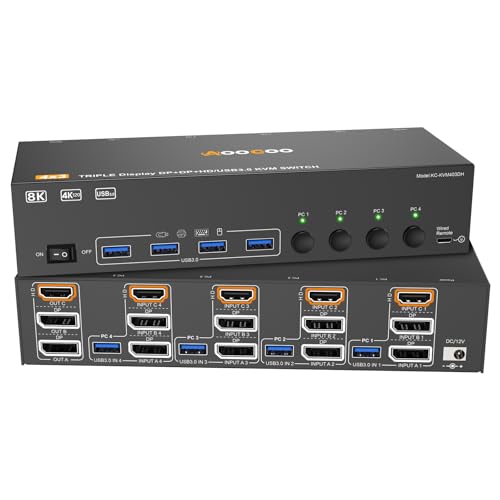
The only switch in this set that connects four computers to three monitors, for writers who somehow juggle that many machines.
Best for: writers juggling four machines across three monitors Skip it if: two computers is all you'll ever run
The AOOCOO is the most expensive pick here and the only 4-in, 3-out box in the set. AOOCOO says it carries two DisplayPort 1.4 lines and one HDMI 2.1 line, with 8K@60Hz on the HDMI side and 4K@144Hz support, plus four USB 3.0 ports. The chassis is 0.79 x 3.94 x 1.97 in, similar in shape to the UGREEN AK704 but a little larger. AOOCOO lists a bundle that includes the wired remote, power adapter and four USB 3.0 cables.
The question is whether four computers is a real number for a writer. If you keep a work laptop, a personal desktop, a NAS or homelab box, and a testbed, this is the layout that keeps all four on the same three monitors. If not, the UGREEN gives you the same monitor count without paying for two extra inputs. AOOCOO also does not publish a warranty figure, which is a real gap against the JCYMELE and CMSTEDCD picks. Bring this one in only when the fourth computer is already on your desk.
Pros:
- Four-computer, three-monitor layout
- 8K@60Hz on HDMI 2.1 claim
- Cables and adapter included in listing
- Extended and copy mode
- Compact 0.79 x 3.94 x 1.97 in body
Cons:
- Highest price position in the set
- No published warranty
- Two extra inputs most writers never use
7. CMSTEDCD GMXUS-SW219S — Best budget pick
The cheapest of the seven, a light 2.12 oz HDMI switch with a published two-year warranty and USB 2.0 ports.

Best for: writers who need the cheapest working single-monitor swap Skip it if: you plug in fast external SSDs
The GMXUS-SW219S is the cheapest of the six picks with a published price position and the lightest at 2.12 oz. Body is 0.63 x 3.86 x 2.36 in. CMSTEDCD says the switch supports 4K@60Hz over HDMI and carries two USB 2.0 ports rated at 480Mbps, with wired-remote and button switching. A 2-year warranty is listed, which is a real point of confidence at this price position: only the JCYMELE otherwise commits to one.
The trade-off is the USB spec. USB 2.0 at 480Mbps is fine for a keyboard, mouse and even a wired headset, but a fast external SSD will not run at full speed through this switch. For a writer, that mostly does not matter: prose files are tiny, backups run overnight, and the switch is asleep by then. What you get is the classic entry-level scenario, a laptop and a desktop sharing one monitor, at the lowest price here. If that describes your desk, buy this and spend the difference on the chair.
Pros:
- Cheapest of the six ranked positions
- 2-year warranty published
- Very light at 2.12 oz
- Button and wired remote switching
- 4K@60Hz claim
Cons:
- USB 2.0 ports rather than USB 3.0
- Single monitor only
- Slower data rate limits external drive use
How I narrowed the field to seven
Three cuts got the shortlist here. The first cut was disqualification. Anything that only supported one computer was gone: a KVM that only listens to one input is not switching anything. Boxes that only carried VGA or DVI came out too, because no writer buying a new desk in the current year is running those cables. And anything that lacked either a physical button or a wired controller was out on the ergonomic argument: a switch you have to reach the back of the desk for defeats the point.
The second cut was port sanity. I lined up the port layout of every candidate against the two workflows writers actually run: one-monitor laptop-plus-desktop, and multi-monitor drafting-plus-research. If a switch did not cleanly fit one or the other, it did not stay. The third cut was published data. Where a listing carried a warranty, a weight or a chassis dimension, that made the pick easier to trust; where none of the three appeared, the box had to earn its place on port count alone.
The seven survivors split neatly across three shapes: single-monitor HDMI (CMSTEDCD, Hearvo, Jancane), dual-monitor DisplayPort (JCYMELE, TJCXELE) and triple-monitor mixed (UGREEN, AOOCOO). The best ergonomic KVM switch for writers depends on which of those three shapes matches your desk, not on which brand is loudest.
What actually decides a KVM switch for writing?
Refresh rate is not what decides it. Every switch in this set supports at least 4K@60Hz, which is more than enough for text. What decides it is the shape of your desk and the trigger you press to swap.
Three things matter, in this order:
- How many monitors do you already own? One monitor points you at the HDMI single-screen picks. Two points you at the dual-DisplayPort picks. Three points you at the UGREEN or AOOCOO.
- Where does the switch button live? A KVM with only a button on the back of the box means reaching under the desk every time you swap. Every pick here carries either a wired remote or a top-mounted button, and that is not negotiable for writers who swap contexts thirty times a day.
- What are the USB ports for? If you plug a mechanical keyboard, a wired mouse and a phone into the switch, USB 3.0 matters. If you just need a keyboard and a mouse, USB 2.0 is fine and the CMSTEDCD becomes viable.
Everything else, the resolution ceilings, the HDCP versions, the extended-versus-copy mode notes, matters less than getting those three right.
One monitor or two: which layout suits writers?
The honest answer is that most writers work best on two. One screen for the draft in progress, one for research, notes, browser tabs, transcript. That is the setup a KVM switch really pays back, because you are moving between two computers and two screens at once, and doing it with one hand.
If you already own two DisplayPort monitors, the JCYMELE SW273 is the box to buy. Dual DisplayPort, 4K@144Hz claim, published two-year warranty, four USB 3.0 ports. If your two monitors are mixed, one HDMI and one DisplayPort, the UGREEN AK704 is the only pick in the set that will take both.
If you only own one monitor, do not spend money on a three-monitor switch to cover a future you may never reach. The Jancane V806-A1 handles the classic laptop-and-desktop swap, and the money you did not spend on ports goes into a second screen instead. A monitor and a single-input KVM outperforms a fancy KVM and no monitor every time.
The ergonomics question the listings dodge
None of these boxes is ergonomic on its own. What they do is remove a source of friction from an already-designed workstation. That friction comes in three places:
- The reach for the second mouse or keyboard.
- The duck under the desk to press a button or swap a cable.
- The mental cost of remembering which machine is currently listening.
Six of the seven picks list a wired remote controller, and the seventh, the CMSTEDCD budget pick, also carries one. That is the single feature that turns a KVM into an ergonomic upgrade, and I would not buy a switch without one. Put the remote next to the keyboard, tape it down if you need to, and the swap becomes a thumb press instead of a shoulder rotation.
The listings do not talk about desk depth, cable strain relief or the weight of the switch when you tug on the cable behind it. Two of the picks are worth noting for their body: the UGREEN AK704 uses an aluminium chassis, which stays put under cable tension, and the CMSTEDCD is light enough at 2.12 oz that a firm cable will drag it around. If you are cabling a switch to the back of a monitor arm rather than the desk, weight and material matter more than the port count.
What to check before you plug anything in
Before you buy, check these five details against your own setup. They are the ones that cause returns:
- Cable direction. Your computer's video output goes into the switch. Your monitor plugs into the output side. Sounds obvious. Half of the one-star returns on any KVM listing miss this.
- Cable count. For a two-computer, three-monitor switch, you need six video cables plus two USB cables plus the ones from the switch to your peripherals. That is a lot of cable. The AOOCOO listing includes cables; the UGREEN listing does not mention them.
- Power. The JCYMELE ships with a 12V DC power adapter. Some entry picks are bus-powered from the USB line. Bus-powered is neater; powered is more stable when you plug in an external drive.
- OS compatibility. UGREEN lists Windows, macOS and Linux. If you use a Chromebook or an iPad as one of the two machines, check the listing carefully; not all of them commit to that support.
- Copy mode versus extended mode. Copy mirrors one image across your monitors. Extended treats them as separate desktops. Writers almost always want extended. Every multi-monitor pick here supports both, but check that setting before you assume it is on.
Do the checks. The best ergonomic KVM switch for writers is only ergonomic if you plug it in correctly the first time.
How the price tiers compare in this set
The seven picks land across three price positions: entry (CMSTEDCD, Jancane, Hearvo), mid (JCYMELE), and premium (TJCXELE, UGREEN, AOOCOO). Here is what each tier gives you.
The entry tier gets you one monitor, HDMI, 4K@60Hz and a working wired remote. That is the classic laptop-and-desktop writing setup, and if you are on a single screen, entry is where you should shop. Between the three, the CMSTEDCD is the cheapest, the Hearvo carries the USB-C port, and the Jancane bundles cables in the box.
The mid tier here is the JCYMELE alone. What you gain over entry is a second monitor input, DisplayPort instead of HDMI, USB 3.0 speed and a published warranty. For a writer who already runs two screens, that jump is worth it every time.
The premium tier is where the diminishing returns bite. The TJCXELE dual-DP box is priced above the JCYMELE without matching its published spec, which is why the JCYMELE wins the pro pick. The UGREEN AK704 earns its premium position by adding a third monitor. The AOOCOO adds a fourth computer, which most writers will never plug in. Premium is worth it only if your desk already fills it.
The verdict
The UGREEN AK704 is the best ergonomic KVM switch for writers because it fits the widest range of real writing rigs: two computers, up to three monitors, mixed HDMI and DisplayPort, and a wired remote you can put next to the keyboard. It is not the cheapest and it is not the most maximal, and that is why it wins. It handles the drafting-plus-research layout most working writers grow into, and it does it in a compact aluminium chassis that stays put on the desk.
If your writing desk is simpler, the Jancane V806-A1 is the runner-up because it does the single-monitor, two-computer swap at 4K@60Hz without extra ports you would not use, and its listing includes the HDMI and USB cables you need to run it on day one. That is where most writers should actually start, and the money saved buys a second monitor sooner.
If your two monitors are DisplayPort and refresh rate matters, the JCYMELE SW273 is the box to buy, with the only mid-tier published two-year warranty in the set. Everyone else in this shortlist is a specialist: the AOOCOO for four-machine setups, the Hearvo for USB-C, the CMSTEDCD for the tightest budget.
FAQ
Is a KVM switch worth it for writing?
Is a KVM switch worth it for a working writer? Yes, if you actively use two computers at the same desk. A single wired remote next to your keyboard turns a full context change, second mouse, second keyboard, second screen, into a thumb press. If you only use one machine, or your second device is a phone, spend the money on a better monitor arm or chair instead. The whole point of the ergonomic case is fewer motions per swap.
What is the difference between HDMI and DisplayPort KVM switches?
The difference between HDMI and DisplayPort KVM switches sits in which cable your monitor already uses. HDMI is more common on TVs and mixed-purpose monitors. DisplayPort is more common on higher-refresh desktop monitors. In this set, the CMSTEDCD, Hearvo and Jancane are HDMI; the JCYMELE and TJCXELE are DisplayPort; the UGREEN and AOOCOO carry both. Match the switch to the cable, not the other way round.
Can I use one keyboard and mouse across a Mac and a PC with these?
Can I use one keyboard and mouse across a Mac and a PC? Yes with every pick here, assuming both computers have the right video output. The UGREEN AK704 listing explicitly names Windows, macOS and Linux support without a driver install. What you cannot do through a KVM is share the clipboard between the two systems, so plan on a text file or a cloud note for that. Software KVMs handle clipboards; hardware ones do not.
How does the UGREEN AK704 compare to the AOOCOO for a two-machine setup?
The UGREEN AK704 versus the AOOCOO for a two-machine setup comes down to inputs you will use. Both share three monitors between computers over two DisplayPort and one HDMI line. The AOOCOO adds two more computer inputs and sits at the highest price position in the set. If you will only ever run two machines, the UGREEN is the smarter buy, in a similar aluminium body without the extra inputs you would leave empty.
What is the biggest mistake people make buying a KVM switch?
The biggest mistake people make buying a KVM switch is chasing refresh rate they will not use. 4K@144Hz on a writing monitor is invisible for prose. Buy for the port shape first, monitor count second, USB speed third, and refresh rate last. The second biggest mistake is skipping the wired remote and then reaching under the desk thirty times a day. Every pick here carries a remote; use it.
The best ergonomic KVM switch for writers is not the loudest listing on the page, it is the one that matches the desk you actually sit at. Count your monitors first. If it is one, go to the Jancane V806-A1 and put the difference toward a second screen. If it is two DisplayPort, buy the JCYMELE SW273 for its warranty and refresh rate ceiling. If it is anything larger or mixed, the UGREEN AK704 is the safe default and the reason it wins overall. Whatever you buy, put the wired remote next to your keyboard on day one. The switch only feels ergonomic when the trigger is under your thumb.