Best KVM Switch for Home Office: UGREEN Leads

Six KVM switches for a two-computer desk, ranked by monitor count, port spread and switching method. The UGREEN AK704 leads on three-display support; the AV Access iDock C10 wins if a USB-C laptop is one of your two machines.

By Samuel HarrisUpdated 17 min read
On this page
- Best kvm switch for home office at a glance
- How I screened this field down to six
- 1. UGREEN 8K@60Hz HDMI DisplayPort KVM Switch — Best overall
- 2. AV Access iDock C10 KVM Dock — Best premium
- 3. GREATHTEK 8K 3 Monitor KVM Switch — Best upgrade
- 4. AV Access KD-E10 KVM Docking Station — Most versatile
- 5. Hearvo USB 3.0 HDMI KVM Switch S7232H — Best for families
- 6. CMSTEDCD HDMI KVM Switch 2 Ports — Best budget pick
- How many monitors do you actually need to switch?
- Why USB port speed decides more than resolution
- Does a KVM switch really suit a home office?
- What the listings do not tell you
- The verdict
- FAQ
The best KVM switch for home office use is the UGREEN AK704, because it pushes three monitors at 8K@60Hz from either of two computers and shares four USB 3.0 ports while doing it. If one of your two machines is a USB-C laptop, the AV Access iDock C10 is the better buy: it docks the laptop over a single cable and adds Gigabit Ethernet. The deciding number here is not resolution. It is how many display outputs the box carries, and this field splits into one-monitor, two-monitor and three-monitor tiers with almost nothing in common between them.
Best kvm switch for home office at a glance
| Pick | Monitors | USB sharing | Price |
|---|---|---|---|
Best overall UGREEN 8K@60Hz HDMI DisplayPort KVM Switch |
3 2x DP + 1x HDMI |
4x USB 3.0 claim | Check Price |
Best premium AV Access iDock C10 KVM Dock |
2 HDMI + DP in |
12-in-1 dock claim | Check Price |
Best upgrade GREATHTEK 8K 3 Monitor KVM Switch |
3 HDMI 2.1 + DP 1.4 |
4x USB 3.0 claim | Check Price |
Most versatile AV Access KD-E10 KVM Docking Station |
2 HDMI + DP in |
11-in-1 dock claim | Check Price |
Best for families Hearvo USB 3.0 HDMI KVM Switch S7232H |
1 2x HDMI in |
3x USB-A + 1x USB-C 3.0 | Check Price |
Best budget pick CMSTEDCD HDMI KVM Switch 2 Ports |
1 2x HDMI in |
2x USB 2.0 claim | Check Price |




How I screened this field down to six
I started from the KVM switches category and compared the published specifications side by side rather than the marketing headlines. Every unit here shares the same core job: two computers, one keyboard, one mouse, one set of screens.
Three things I checked in every listing:
- Display output count. Not resolution. A one-monitor switch and a three-monitor switch solve different problems, and the field divides cleanly at two, two and two.
- USB generation. USB 3.0 and USB 2.0 sit at very different speeds, and one pick here is on the slower standard.
- Physical footprint. Published dimensions run from 0.63 x 3.86 x 2.36 in up to 0.98 x 9.06 x 5.51 in. That is the difference between a puck behind the monitor and a slab that owns desk space.
What got cut: anything without a published dimension figure, and anything where the number of switchable computers was not two. Note the search modifier too. Amazon's results for a home office qualifier do not filter for it, so no product here is certified as an office unit. I have treated "home office" as a set of constraints instead: quiet desk, two machines, limited depth, peripherals you actually use daily.
Two of the six publish a warranty. Four do not. That gap does more to separate this set than any resolution claim.
1. UGREEN 8K@60Hz HDMI DisplayPort KVM Switch — Best overall
The only pick that combines three display outputs, USB 3.0 sharing and a metal body, which is why it takes the top slot in this set.
Best for: a triple-display desk running two desktop towers Skip it if: one of your two machines is a USB-C laptop
The port layout is the story. UGREEN gives you two DisplayPort 1.4 outputs plus one HDMI 2.1, so all three of your monitors survive the switch instead of two of them going dark. The listing claims 8K@60Hz and 4K@240Hz across those outputs, which covers high-refresh gaming panels as well as productivity screens.
At 1.57 x 6.18 x 2.83 in it is longer than the single-monitor picks but shallower front-to-back than either dock here, so it fits along the back edge of a desk without eating the mousing area. Model AK704, aluminium construction per the listing.
Switching runs two ways: a button on the unit and a wired desktop controller. That second option matters more than it sounds, because it means the switch itself can hide behind the monitor stand. UGREEN also claims four USB 3.0 ports shared between machines and driver-free operation on Windows, macOS and Linux.
The trade-off against the docks below: there is no Ethernet port, no SD reader and no single-cable USB-C laptop connection. It is a switch, not a dock. It also publishes no warranty term, unlike the cheapest pick here.
Pros:
- Three display outputs, two DisplayPort plus one HDMI
- 8K@60Hz and 4K@240Hz per the listing
- Four USB 3.0 ports shared, per UGREEN
- Wired remote controller as well as body button
- Aluminium body, shallow desk footprint
Cons:
- No published warranty term
- No Ethernet, SD reader or audio jack
- No USB-C laptop docking over one cable
- Only two sellers list it
2. AV Access iDock C10 KVM Dock — Best premium
The most complete answer if one of your two computers is a USB-C laptop, and the only pick here that publishes both a warranty and a return window.

Best for: a work laptop plus a personal desktop on two screens Skip it if: you run macOS and need extended, not mirrored, displays
This is the most expensive pick here, and the port list explains why. AV Access describes a 12-in-1 hub: three USB 3.0, two USB 2.0, a USB-C data port, an SD card reader, Gigabit LAN, TOSLINK audio and a 3.5 mm jack. The Ethernet works for the USB-C laptop side only, which the listing states plainly.
Display support is two monitors, fed by HDMI IN and DP IN from the desktop. AV Access says EDID emulation keeps monitors and peripherals attached during a switch, so windows do not reshuffle every time you change machines. That is the single most annoying failure in this category and it is worth paying to avoid.
Warranty is one year with a 30-day return window, the clearest after-sales statement in this set. Model iDock-C10-US, dimensions 1.97 x 5.51 x 3.74 in, which makes it the tallest unit here at just under two inches.
Two limits deserve flagging. Mirrored output only on macOS, so Mac users lose the dual-screen benefit entirely. And the desktop side needs three cables connected, HDMI, DP and USB-B, which is more cabling than the plain switches demand.
Pros:
- 12-in-1 port list including Gigabit LAN and SD reader
- One-year warranty plus 30-day return, stated
- EDID emulation to prevent window rearrangement
- Docks a USB-C laptop alongside a desktop
- TOSLINK and 3.5 mm audio outputs
Cons:
- Mirrored display only on macOS
- Most expensive pick in this set
- Two monitors, not three
- Tallest unit here at 1.97 in
- Ethernet limited to the USB-C laptop side
3. GREATHTEK 8K 3 Monitor KVM Switch — Best upgrade
Three-monitor switching in the smallest body here, at a mid-range price rather than a premium one.
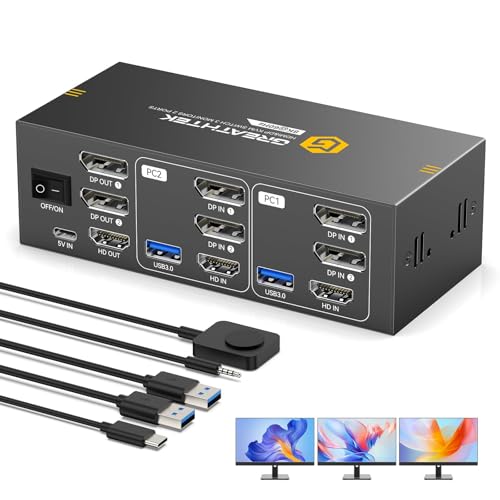
Best for: three screens on a tight budget for a mid-range price Skip it if: you need a published warranty before you buy
At 1 x 3 x 2 in this is the most compact three-display switch in the set, smaller in every dimension than the UGREEN above it. If your desk is already crowded, that matters. Graphite gray finish, and the body is small enough to velcro to the back of a monitor arm.
GREATHTEK claims HDMI 2.1 and DisplayPort 1.4 support up to 8K@60Hz, with 4K@144Hz and 4K@120Hz options for high-refresh panels. The listing also describes four USB 3.0 ports shared between the two computers, covering keyboard, mouse, webcam, printer and drives.
EDID Adaptive is the feature GREATHTEK leads on, which it says reduces black screens when you switch. Same problem the AV Access units address, different name for the fix.
Where it loses ground: the published specification list is the thinnest of the six. No weight, no warranty, no model number given. You are buying on the feature claims and the dimensions alone, and only one seller lists it, so there is no second source if something goes wrong. The UGREEN costs more and gives you a stated aluminium build plus a wired remote in exchange.
Pros:
- Smallest three-monitor switch here at 1 x 3 x 2 in
- 8K@60Hz plus 4K@144Hz claim
- Four USB 3.0 ports shared, per the listing
- EDID Adaptive to reduce switching black screens
Cons:
- Thinnest published specification list of the six
- No warranty term stated
- Only one seller lists it
- No model number published
4. AV Access KD-E10 KVM Docking Station — Most versatile
The widest port spread on the flattest body, which makes it the pick for a laptop-first desk that still needs wired networking.

Best for: a laptop-first desk that needs wired Ethernet and an SD reader Skip it if: desk depth is limited
AV Access calls this an 11-in-1 dock: three USB 3.0, two USB 2.0, one USB-C, Gigabit Ethernet, an SD card slot and a 3.5 mm jack. It connects one laptop and one desktop to two monitors, and the switching claim is two to three seconds with advanced EDID emulation and automatic device wake-up.
The shape is the real differentiator. At 0.98 x 9.06 x 5.51 in it is the flattest unit here, under an inch tall, but also by far the widest and deepest. Think of it as a mat rather than a box. On a deep desk it disappears under a monitor riser. On a shallow one it dominates.
Compared with the iDock C10 above, you drop the TOSLINK output and one port from the count, and you also drop the published warranty. Same macOS caveat applies: mirrored mode only, and the desktop needs USB-B, HDMI and DP cables all connected.
The Ethernet port is genuinely useful in a home office where Wi-Fi is contested. It is also the reason this one earns versatility over the pure switches: it replaces a dock, a hub and a card reader at the same time.
Pros:
- 11-in-1 port list with Gigabit Ethernet
- Flattest body here at 0.98 in tall
- SD card slot and USB-C data port
- Two to three second switching claim
- Handles laptop and desktop together
Cons:
- Largest desk footprint of the six
- No warranty term published
- Mirrored display only on macOS
- Three cables required on the desktop side
5. Hearvo USB 3.0 HDMI KVM Switch S7232H — Best for families
The cheapest way to get real USB 3.0 sharing, which makes it the sensible pick for a single-monitor desk two people take turns at.

Best for: a shared family desk with one monitor and two towers Skip it if: you run dual or triple displays
One monitor, two computers. That is the whole brief, and for a shared desk where a work machine and a family PC take turns on the same screen, it is often the right brief. Hearvo puts two HDMI inputs on model S7232H and claims 4K@60Hz with HDCP 2.2, so streaming apps on either machine should behave.
The port count is what earns it a place above the budget pick. Four USB 3.0 ports, three USB-A and one USB-C, with a claimed 5Gbps transfer rate. On a family desk that covers a keyboard, a mouse, a webcam and a backup drive with nothing left over, which is exactly enough.
Dimensions are 0.8 x 5 x 2.4 in, slim and narrow. Switching runs from the body button or a wired remote, so the box can sit out of reach. Hearvo describes Adaptive EDID to keep the display settling quickly after a switch.
The costs of the low price: no warranty is published, only one seller lists it, and there is no second display output at all. If a second monitor arrives next year, this switch does not grow with you.
Pros:
- Four USB 3.0 ports, three USB-A and one USB-C
- 5Gbps transfer claim, the fastest at this price position
- 4K@60Hz with HDCP 2.2 per the listing
- Wired remote plus body button
- Slim 0.8 in profile
Cons:
- Single display output only
- No published warranty
- Only one seller lists it
- No Ethernet or card reader
6. CMSTEDCD HDMI KVM Switch 2 Ports — Best budget pick
The cheapest of the six and the only entry-price unit with a stated two-year warranty, but its USB ports are a generation behind.

Best for: a second machine you switch to occasionally Skip it if: you plug fast external drives into the switch
At 2.12 oz and 0.63 x 3.86 x 2.36 in, this is the smallest and lightest thing here by a clear margin. It is genuinely pocketable, which is useful if you move between two desks. Model GMXUS-SW219S, grayish black.
The specification that separates it from the Hearvo above is USB generation. CMSTEDCD publishes two USB 2.0 ports at up to 480Mbps. That is fine for a wired keyboard and mouse, and it is the whole point of a keyboard-and-mouse switch. It is not fine for an external SSD, a 4K webcam or a fast card reader. Know which of those you plug in before you buy.
Display side, the claim is 4K@60Hz over HDMI from either computer to a single monitor, with a wired desktop controller alongside the body button.
The surprise is the warranty: two years, stated, which is longer than the premium dock's one year and better than the four picks that publish nothing at all. That is a strong signal at the cheapest price position in this set. The trade-off is bluntly stated in the port count. Two USB 2.0 ports, no card reader, no Ethernet, no second display.
Pros:
- Cheapest of the six
- Two-year warranty published
- Lightest unit here at 2.12 oz
- 4K@60Hz claim over HDMI
- Wired remote included
Cons:
- USB 2.0 only, 480Mbps ceiling
- Two USB ports, the fewest here
- Single display output
- Only one seller lists it
How many monitors do you actually need to switch?
This is the question that decides your purchase, and it is the one most people answer wrong. They count the monitors on the desk today rather than the ones they will have in eighteen months.
The set breaks into three tiers:
- One monitor: the Hearvo S7232H and the CMSTEDCD. Both take two HDMI inputs and feed one screen. Cheapest, smallest, simplest.
- Two monitors: both AV Access docks. Each takes HDMI plus DP from a desktop and pairs it with a USB-C laptop.
- Three monitors: the UGREEN AK704 and the GREATHTEK. Two DisplayPort outputs plus one HDMI on the UGREEN; HDMI 2.1 plus DP 1.4 on the GREATHTEK.
Here is the trap. A three-monitor switch can drive fewer screens, but a one-monitor switch can never drive more. Adding a second display later means buying a second switch, and the cabling on your desk doubles for no gain.
My rule for a best kvm switch for home office purchase: if you already run two screens, buy into the two- or three-monitor tier now. If you run one screen and have no space for another, the entry tier saves you real money and desk depth. The middle case, one screen today with room for two, is where the GREATHTEK earns its award. Three outputs, mid-range price, 1 x 3 x 2 in.
Why USB port speed decides more than resolution
Every pick here claims 4K@60Hz or better. Two claim 8K@60Hz. Resolution is effectively solved at every price position in this set, which means it cannot be your deciding factor.
USB generation is not solved. Five of six publish USB 3.0 sharing. One, the CMSTEDCD, publishes USB 2.0 at up to 480Mbps. That gap is roughly ten times in stated throughput, and it lands exactly where a home office desk feels it.
What runs fine on USB 2.0:
- Wired keyboards
- Wired mice
- A basic wireless receiver dongle
What suffers on USB 2.0:
- External SSDs and hard drives
- 1080p and 4K webcams
- SD card readers moving photo batches
- Printers pushing large scan files
Port count matters alongside speed. The CMSTEDCD gives two. The Hearvo, UGREEN and GREATHTEK each claim four. Both AV Access docks claim five USB-A ports plus a USB-C data port. Once a keyboard, mouse and webcam are plugged in, a two-port switch is full.
The practical check before you buy: count the USB devices you would move to the switch, then add one. That number is your minimum port count, and it will usually push you above the cheapest option in the field.
Does a KVM switch really suit a home office?
A KVM switch is a box that lets one keyboard, mouse and monitor set control two or more computers. It suits a home office when you own two machines and one desk, which is a very specific situation.
You want one if:
- A work laptop and a personal desktop both live on the same desk.
- You want one good keyboard and one good mouse rather than two mediocre pairs.
- Desk space is the constraint, not budget.
You should skip the category if you use one computer, or if your second machine sits in another room. Remote desktop software costs nothing and needs no cables.
One honest caveat on the search itself. Amazon's results for this qualifier are not filtered for office use, so none of these six is certified for a home office in any meaningful sense. That judgment is yours to make, and the specifications that support it are footprint, port count and switching method. A wired remote controller, which four of the six list, is the most office-relevant feature here: it lets the box hide and keeps a cable-free desk surface.
For a Mac-based desk, read the notes carefully. Both AV Access docks state mirrored output only on macOS, which removes the dual-screen advantage they are built around.
What the listings do not tell you
Specifications end where real use begins, and a few gaps in this set are worth naming before you commit.
Cables are rarely itemised. A two-monitor dock needs HDMI, DP and USB-B running to the desktop. Both AV Access listings say so directly. Whether those cables ship in the box is not clearly published for every pick here, so budget for the possibility that you supply them.
Switching speed is claimed, not measured. AV Access states two to three seconds on the KD-E10. The others describe EDID handling without a number. EDID is the handshake a monitor uses to tell a computer what it can display, and it is why screens sometimes go black or windows rearrange after a switch. Every pick addresses it in words; none of them proves it in a specification.
Hotkey switching is not mentioned anywhere. All six describe a button, and four add a wired remote. If you want a keyboard shortcut to change machines, nothing in this set publishes one.
Warranty coverage is thin. Two of six publish a term: two years on the CMSTEDCD, one year plus a 30-day return on the iDock C10. The other four say nothing, and four of the six list only one or two sellers, which limits your options if a unit fails.
The verdict
If you run three monitors and two desktop towers, the UGREEN AK704 is the best kvm switch for home office duty in this set. Two DisplayPort 1.4 outputs plus HDMI 2.1, four shared USB 3.0 ports, an aluminium body at 1.57 x 6.18 x 2.83 in and a wired remote so the box can hide. Nothing else here matches that combination.
If one of your two machines is a USB-C laptop, the AV Access iDock C10 wins instead. Its exact advantage is the single-cable laptop connection plus Gigabit Ethernet, an SD reader and TOSLINK audio, backed by the only one-year warranty and 30-day return statement in the field. You give up the third display and you accept mirrored-only output on macOS.
The cutoff is your display count. At three monitors, take the UGREEN, or the GREATHTEK at 1 x 3 x 2 in if desk space is tighter than your budget. At two monitors with a laptop involved, take the iDock C10, or the flatter KD-E10 if you have desk depth to spare. At one monitor, the Hearvo S7232H is the pick, because its four USB 3.0 ports at a claimed 5Gbps beat the CMSTEDCD's two USB 2.0 ports for the sake of a small step up in price.
FAQ
Is a KVM switch worth it for a two-computer desk?
A KVM switch is worth it for a two-computer desk when you value one good keyboard and mouse over two sets. You reclaim desk space, you stop reaching for a second mouse, and you cut the cable count under the desk. If your second machine is used only occasionally and sits elsewhere, remote desktop software does the job for free.
Which is the best value KVM switch in this comparison?
The best value KVM switch here is the Hearvo S7232H. It sits at the second-cheapest price position in the set but publishes four USB 3.0 ports, three USB-A and one USB-C, with a claimed 5Gbps rate. The CMSTEDCD costs less and adds a two-year warranty, but its two USB 2.0 ports cap out at 480Mbps, which throttles drives and webcams.
Do I need HDMI or DisplayPort for a triple monitor KVM switch?
For a triple monitor KVM switch you generally need both. The UGREEN AK704 uses two DisplayPort 1.4 outputs plus one HDMI 2.1, and the GREATHTEK pairs HDMI 2.1 with DP 1.4. Check what your monitors accept before buying, because a screen with only HDMI inputs cannot use a DisplayPort output without an adapter that may cap your refresh rate.
UGREEN AK704 or AV Access iDock C10: which should I buy?
Choose between the UGREEN AK704 and the AV Access iDock C10 by counting monitors and machine types. The UGREEN drives three displays from two desktops with four USB 3.0 ports. The iDock C10 drives two displays but docks a USB-C laptop over one cable and adds Gigabit Ethernet, an SD reader and a one-year warranty. Laptop involved means iDock.
What mistake do people make buying a KVM switch?
The most common mistake buying a KVM switch is choosing on resolution instead of ports. Every pick in this comparison claims 4K@60Hz or better, so resolution separates nothing. What separates them is display output count, one, two or three, and USB generation. Buy a single-monitor switch today and a second screen next year, and you buy the switch twice.
Start by counting two numbers: the monitors on your desk and the USB devices you want shared. Those two figures narrow this field to one or two candidates before price enters the conversation at all. For most home office desks running dual towers and three screens, the UGREEN AK704 is the right default, because it is the only pick that carries three display outputs, USB 3.0 sharing, a metal body and a wired remote in one shallow 1.57 in box. Buy for the desk you will have in a year, not the one in front of you tonight.