Best Flash Drive for 3D Modeling by Transfer Speed

Five 128GB USB drives ranked for 3D modeling work, from the SanDisk Ultra Fit at up to 400MB/s down to a credit-card-thin USB 2.0 stick. Speed is what decides it, and the gap is wide.

By Samuel HarrisUpdated 13 min read
On this page
- How I ranked these five drives
- Why transfer speed decides this, not capacity
- Best flash drive for 3D modeling at a glance
- 1. SANDISK 128GB Ultra Fit USB 3.2 Gen 1 Flash Drive — Best overall
- 2. SAMSUNG BAR Plus 3.1 USB Flash Drive — Best premium
- 3. SANDISK 128GB Ultra USB 3.0 Flash Drive — Runner-up
- 4. PNY 128GB Elite-X Fit USB 3.1 Flash Drive — Best budget pick
- 5. DSLRKIT 128GB Ultra Slim 2.3mm Thin USB 2.0 Flash Drive — Best for beginners
- Can a flash drive really handle 3D project files?
- Which drive fits which 3D workflow?
- What the listings won't tell you about USB drives
- The verdict
- FAQ
The best flash drive for 3D modeling is the SanDisk 128GB Ultra Fit, rated up to 400MB/s and weighing 18.1 g in a plug-and-stay body. If you want a drive that survives being tossed in a bag between studio and site, the Samsung BAR Plus with its metal casing is the better buy. What actually separates these five drives is read speed, not the shared 128GB size. The gap runs from up to 400MB/s down to a tested 34 MB/s, and that spread decides how long you wait on every scene file.
How I ranked these five drives
Every drive here holds 128GB, so I threw capacity out as a tiebreaker immediately. The picks map to the way people actually move 3D work: off a laptop, between locations, or onto a spare machine. I sorted them into four profiles and picked the strongest listing for each.
The profiles I used:
- Speed-first modelers who move large mesh and texture files daily and have a modern USB port.
- On-the-go users who carry a drive between machines and need it to survive the trip.
- Backup-only users on older hardware who value reliability over raw speed.
- First-timers and starter setups who want cheap, simple storage.
A word on the search itself: the "3d modeling" qualifier isn't a spec any of these listings claim to meet. None is sold as a 3D-modeling drive. What matters for that work is sustained read speed and enough room for heavy project files, and I judged each drive on those two things. Treat "for 3D modeling" as a use case you verify against your own port and file sizes, not a promise printed on the box.
Why transfer speed decides this, not capacity
3D project folders are heavy. A single scene with high-poly meshes, UV maps and 4K textures can run past a gigabyte before you export anything. When every drive here offers 128GB, the number that changes your day is how fast bytes move on and off.
Look at the claimed read speeds. The SanDisk Ultra Fit lists up to 400MB/s. The PNY Elite-X Fit lists up to 200MB/s. The SanDisk Ultra USB 3.0 lists up to 130MB/s. The DSLRKIT stick tested at read up to 34 MB/s. That's more than a tenfold spread across the set.
Here's the trick most shoppers miss: your port caps the drive. A 400MB/s drive in an old USB 2.0 socket crawls at USB 2.0 speed. The best flash drive for 3D modeling is only as fast as the slowest link in the chain, so check what your machine actually offers before you pay for headroom. Match the drive to the port, then match it to your file sizes.
Best flash drive for 3D modeling at a glance
| Pick | Rated read speed | USB standard | Price |
|---|---|---|---|
Best overall SANDISK Ultra Fit USB 3.2 Gen 1 |
Up to 400MB/s claim | USB 3.2 Gen 1 | Check Price |
Best premium SAMSUNG BAR Plus 3.1 |
Up to 300MB/s claim | USB 3.1 | Check Price |
Runner-up SANDISK Ultra USB 3.0 |
Up to 130MB/s claim | USB 3.0 | Check Price |
Best budget pick PNY Elite-X Fit USB 3.1 |
Up to 200MB/s claim | USB 3.1 Gen 1 | Check Price |
Best for beginners DSLRKIT Ultra Slim 2.3mm |
Read up to 34 MB/s tested | USB 2.0 | Check Price |




1. SANDISK 128GB Ultra Fit USB 3.2 Gen 1 Flash Drive — Best overall
The Ultra Fit posts the highest claimed read speed in this set and stays flush in the port, which makes it the drive I'd hand a 3D modeler first.
Best for: modelers moving large scene files off a fast USB 3.2 port Skip it if: you need a full-size drive with a keyring
What sets this one apart is the up to 400MB/s read speed SanDisk claims, the top figure among the five. Pair that with the USB 3.2 Gen 1 standard and a modern port, and heavy mesh and texture folders come off fast. SanDisk says a full-length movie transfers in under 30 seconds on a compatible host, which is a rough proxy for how a large project archive behaves.
The body measures 0.2 x 1.17 x 0.56 in and weighs 18.1 g. That plug-and-stay shape sits nearly flush, so you can leave it in a laptop as working storage rather than a caddy you plug and pull. The listing also mentions downloadable password protection using 128-bit AES encryption, useful if you carry client work.
It carries a 5-year limited manufacturer warranty and was released in 2023, the newest drive here. The trade-off: it sits at the premium end of this group, and only one seller lists it, so you're not shopping around on the same page.
Pros:
- Highest claimed read speed here at up to 400MB/s
- Flush plug-and-stay body, 18.1 g
- 5-year limited manufacturer warranty
- USB 3.2 Gen 1 standard
- Optional 128-bit AES password protection
Cons:
- Premium price position in this set
- Only one seller lists it
- Tiny body is easy to misplace, no keyring
2. SAMSUNG BAR Plus 3.1 USB Flash Drive — Best premium
A metal-cased drive with an integrated keyring, built to survive the trip between machines.

Best for: anyone hauling a drive between studio and site Skip it if: you want the smallest possible footprint
The BAR Plus trades the flush shape for durability. Samsung describes a sturdy metal body it calls waterproof, shock-proof, temperature-proof, magnet-proof and X-ray-proof, with an integrated keyring so it doesn't vanish in a bag. For a modeler moving between a home rig and a shared workstation, that toughness is the pitch.
Speed is strong but a step below the winner. Samsung lists read speeds up to 300MB/s on USB 3.1, and cites a 3GB 4K UHD video transfer as its example. That's the second-fastest claim here, plenty for shuttling scene files. The drive measures 0.47 x 1.58 x 0.61 in, larger than the Ultra Fit, and the listed weight of 1.13 g reads like a listing error given the metal shell.
It holds 128 GB and carries a 5 Year Warranty, matching SanDisk's cover. Released in 2018, it's the oldest design in the set, and it sits at the top of the price range here. The trade-off against the winner: you gain a rugged, keyring-ready body but give up the highest speed and the flush profile.
Pros:
- Rugged metal casing with integrated keyring
- Up to 300MB/s claimed read speed
- 5-year warranty
- Multiple durability claims from Samsung
Cons:
- Most expensive pick here
- Slower than the Ultra Fit
- Larger, protruding body
- Oldest design, released 2018
3. SANDISK 128GB Ultra USB 3.0 Flash Drive — Runner-up
A dependable full-size drive for backups, held back by the slowest claimed speed of the three USB 3.x picks.

Best for: steady backups from an older USB 3.0 machine Skip it if: you regularly move multi-gigabyte texture packs
This is the classic full-size SanDisk stick, and it earns runner-up on reliability rather than pace. The listing claims read speed up to 130MB/s, which SanDisk frames as up to 10x faster than standard USB 2.0. Among the three USB 3.x drives here, that's the lowest ceiling, so it's the one I'd use for scheduled backups rather than live project work.
It's backward compatible with USB 2.0, so it drops into almost any port, and the listing mentions secure file encryption and password protection. The body measures 0.31 x 0.42 x 0.87 in and weighs 18.1 g, a conventional protruding stick rather than a flush one.
Coverage is solid with a 5-year limited manufacturer warranty, and it was released in 2020. It sits mid-range on price for this set, and a couple of sellers stock it. The trade-off is plain: you get SanDisk's warranty and encryption at a friendlier price than the Ultra Fit, but a modeler pushing large files will feel the 130MB/s ceiling on every save.
Pros:
- 5-year limited manufacturer warranty
- Backward compatible with USB 2.0
- Mid-range price for this set
- Listed file encryption and password protection
Cons:
- Slowest of the three USB 3.x drives
- Protruding full-size body
- 130MB/s ceiling strains on big files
4. PNY 128GB Elite-X Fit USB 3.1 Flash Drive — Best budget pick
The cheapest drive here that still claims a real USB 3.1 read speed, ideal for a spare machine.

Best for: a cheap plug-and-stay stick for a second machine Skip it if: you want a long manufacturer warranty
The Elite-X Fit is the cheapest of the five and, importantly, it doesn't drop to USB 2.0 speeds to get there. PNY lists read speeds up to 200MB/s on USB 3.1 Gen 1, faster than the SanDisk Ultra USB 3.0 and behind only the Ultra Fit and BAR Plus. For a budget pick, that's a genuinely useful figure for a modeling workflow.
The design is micro-sized and low profile, meant to stay connected without sticking out. It measures 0.25 x 0.83 x 0.6 in and weighs 14 g, the lightest confirmed weight in the group after the DSLRKIT. It's backward compatible with USB 2.0 and PNY pitches it as a plug-and-stay drive for computers, consoles and car stereos.
Here's the catch: the warranty is 1 Year, the shortest in this set by a wide margin, where three rivals offer five. It was released in 2019 and only one seller lists it. The trade-off against the winner: near-half the top speed and a fifth of the warranty length, in exchange for the lowest price.
Pros:
- Cheapest of the five
- Up to 200MB/s claimed read speed
- Compact plug-and-stay body, 14 g
- Backward compatible with USB 2.0
Cons:
- Only 1-year warranty
- Well short of the winner's speed
- Single seller listing
5. DSLRKIT 128GB Ultra Slim 2.3mm Thin USB 2.0 Flash Drive — Best for beginners
A credit-card-thin USB 2.0 stick for small starter projects, not for heavy scene files.
Best for: a first drive for small starter projects and car audio Skip it if: your files run past a couple of gigabytes each
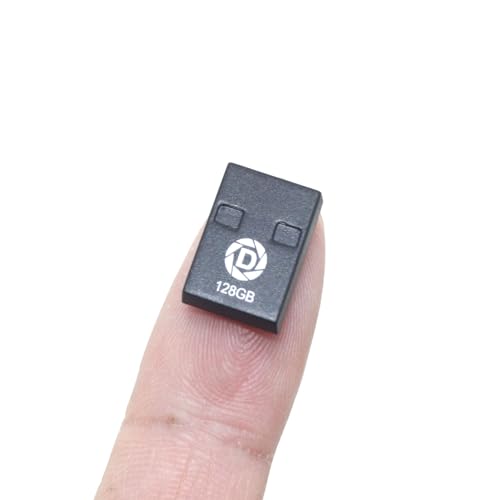
This one wins on physical form, not speed. DSLRKIT describes a 2.3mm-thin unibody it calls credit-card friendly, with a 16.7mm length that sits nearly invisible in a port. At a listed 0.8 g, it's by far the lightest drive here. The listing also claims it's water-resistant, dust-proof and shock-proof.
The speed is where a 3D modeler has to be honest with themselves. It's a USB 2.0 drive with tested peak speeds of read up to 34 MB/s and write up to 23 MB/s, the slowest in this roundup. That's fine for small OBJ files, reference images and car audio, but a large textured scene will test your patience. DSLRKIT says it passed H2testw with zero errors and offers about 117GB usable, which addresses the fake-capacity risk cheap drives carry.
It carries a 2 year manufacturer warranty and only one seller lists it. The listing omits colour and dimensions beyond the thickness figures. The trade-off: it's the friendliest starting point and the most portable, but the USB 2.0 ceiling rules it out for serious modeling work.
Pros:
- Ultra-thin 2.3mm profile
- Verified real capacity, about 117GB usable
- 2-year manufacturer warranty
- Water, dust and shock resistance claims
Cons:
- Slowest drive here at read up to 34 MB/s
- USB 2.0 only
- Listing omits several specs
- Single seller listing
Can a flash drive really handle 3D project files?
A flash drive can handle 3D project files, with two conditions. First, size: every drive here holds 128GB, which comfortably fits many project folders including meshes, UV maps and 4K textures. Second, speed: opening and saving from a drive is slower than a local SSD, so a slow drive drags on your workflow.
The practical rules:
- Use a drive for transfer and backup, not as a live working disk.
- Keep your active project on internal storage, then copy finished versions across.
- Match the drive's speed to your port. A USB 2.0 drive like the DSLRKIT caps at read up to 34 MB/s no matter the port.
- Watch write speed too. The DSLRKIT lists write up to 23 MB/s, and writing is what you do when saving.
For active heavy scenes, the Ultra Fit's up to 400MB/s claim gives the most breathing room in this set.
Which drive fits which 3D workflow?
Different modeling habits point to different drives. Here's how the five sort out.
- Heavy daily transfers, modern port: the SanDisk Ultra Fit. Its up to 400MB/s claim and flush body make it the best flash drive for 3D modeling when your machine can feed it.
- Constant travel between machines: the Samsung BAR Plus. The metal shell and keyring survive a bag, and up to 300MB/s keeps files moving.
- Backups on older hardware: the SanDisk Ultra USB 3.0. It drops into a USB 2.0 port and carries a 5-year warranty, though its 130MB/s ceiling limits live work.
- Second machine on a tight budget: the PNY Elite-X Fit. Up to 200MB/s at the lowest price here, if you can live with a 1-year warranty.
- First drive or car audio: the DSLRKIT. The thinnest body and verified capacity, best kept to small files.
If your files are large and frequent, start at the top. If they're small and occasional, the budget picks are enough.
What the listings won't tell you about USB drives
Listings are marketing copy, so a few things go unsaid. Worth knowing before you buy.
Claimed speeds are read speeds, usually the peak. Write speed, which matters when you save from a modeling app, is often lower and sometimes not stated. The DSLRKIT is the only one here that publishes both figures.
Advertised capacity uses 1GB = 1,000,000,000 bytes, so 128GB shows less in your operating system. SanDisk's own listing notes actual user storage is less. The DSLRKIT quantifies this at about 117GB usable, which is honest.
A few more gaps to close yourself:
- Sustained versus burst. Peak speed holds for a moment; a large multi-gigabyte copy runs slower over time.
- Warranty length varies widely. Five years for three drives here, 2 years for the DSLRKIT, 1 Year for the PNY.
- Encryption is software. SanDisk's password protection needs downloadable software and a supported operating system, not the drive alone.
The verdict
If you move large 3D files daily and have a modern USB port, the SanDisk Ultra Fit is the pick. Its up to 400MB/s claim leads this set, its 18.1 g flush body stays put in a laptop, and its 5-year limited manufacturer warranty backs the buy. That combination makes it the best flash drive for 3D modeling for most people here.
If you carry a drive between machines and worry about knocks and spills, the Samsung BAR Plus is the better call. Its exact advantage is the rugged metal casing and integrated keyring, plus a still-fast up to 300MB/s read claim and a matching 5-year warranty. You give up the top speed and the flush profile for a body built to travel.
The cutoff is your file size and how often you move it. Above a couple of gigabytes per transfer, done daily, buy speed and go SanDisk or Samsung. Below that, occasional and small, the PNY Elite-X Fit saves money at up to 200MB/s, and the DSLRKIT covers a first drive. Just don't ask a USB 2.0 stick at read up to 34 MB/s to shuttle a heavy textured scene.
FAQ
Is the SanDisk Ultra Fit worth it for 3D modeling?
The SanDisk Ultra Fit is worth it if you move large project files often and have a USB 3.2 Gen 1 port to match. Its up to 400MB/s claim is the highest here, the flush 18.1 g body works as semi-permanent storage, and the 5-year warranty is generous. It sits at the premium end, so lighter users can spend less.
How much does transfer speed matter versus capacity?
Transfer speed matters more than capacity here, because all five drives already hold 128GB. Speed decides how long you wait when copying heavy scene files, and the claims range from up to 400MB/s down to read up to 34 MB/s. That tenfold spread changes your day. Capacity only matters if a project folder exceeds what the drive holds.
Which is better, the Ultra Fit or the Samsung BAR Plus?
Between the Ultra Fit and the Samsung BAR Plus, the Ultra Fit wins on speed with its up to 400MB/s claim against Samsung's up to 300MB/s, and it sits flush. The BAR Plus wins on durability, with a metal casing and keyring Samsung calls waterproof and shock-proof. Both carry 5-year warranties. Choose the Ultra Fit for pace, the BAR Plus for travel.
Can the DSLRKIT drive keep up with modeling files?
The DSLRKIT drive keeps up only with small modeling files. It's a USB 2.0 stick with tested read up to 34 MB/s and write up to 23 MB/s, the slowest here, so a large textured scene will feel sluggish. It suits reference images, small OBJ files and car audio. DSLRKIT does verify about 117GB usable capacity, which is reassuring.
What is the most common flash drive buying mistake?
The most common flash drive buying mistake is paying for a fast drive, then plugging it into a slow port. A 400MB/s drive in a USB 2.0 socket runs at USB 2.0 speed. Check your machine's port first. The second mistake is ignoring write speed, which is what you use when saving, and which listings often leave out.
Before you buy, open your laptop's port list and confirm whether it's USB 3.x or older, because that single fact caps every drive here. If it's modern and your scenes are large, the SanDisk Ultra Fit is the right default: it posts the fastest read claim in this set at up to 400MB/s, stays flush so it doubles as working storage, and backs the deal with a 5-year warranty. Buy the speed you can actually use, match it to your file sizes, and keep your live project on internal storage.