Best Premium Silent Mouse for a Quiet Desk

Five silent mice compared on click noise claims, weight, battery life and connection type, with a clear winner and the conditions that flip it to a runner-up.

By Samuel HarrisUpdated 13 min read
On this page
- What makes a mouse actually quiet?
- Best premium silent mouse at a glance
- How I screened these five down
- 1. Logitech M240 Compact Silent Bluetooth Wireless Mouse — Best overall
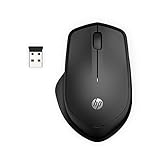
- 2. HP 280 Silent Wireless Mouse — Best premium
- 3. Logitech M330 Silent Plus Full Size Wireless Mouse — Best for heavy use
- 4. MOJO Pro Performance Silent Gaming Mouse — Best compact
- 5. wegear Bluetooth Mouse Silent Wireless Mice — Best budget pick
- Bluetooth or USB receiver: which should you pick?
- When a different mouse wins
- What the listings won't tell you
- The verdict
- FAQ
The best premium silent mouse is the Logitech M240, a 2.6 oz Bluetooth pick that pairs with no dongle and claims a 90% quieter click. If your computer lacks Bluetooth, the HP 280 is the better buy, since its nano receiver stores inside the mouse. What actually decides this category is not the click noise number, because every quiet mouse in this set claims roughly the same reduction. Connection type is what splits the field.
What makes a mouse actually quiet?
Every mouse here markets itself on the same headline figure. Logitech says the M240 and the M330 each cut click sound by more than 90%. HP claims up to 90% noise reduction on the 280's two main buttons. MOJO calls its wired mouse "ninja quiet." wegear calls its mouse quiet without giving a number.
So the click claim doesn't separate these picks. They all land in the same range, and none of these figures is a measurement you can hold me to. Treat them as marketing.
What a shared-room buyer actually needs to know is where the other noise comes from:
- The scroll wheel, which no listing quantifies
- The mouse feet dragging on a hard desk
- The tiny knock when you set the mouse down
None of that appears in the specs. So the quiet-click number is a floor, not a finish line. Once you accept that every pick clears it, the decision moves to weight, size, connection type and hand fit, which the data does describe.
Best premium silent mouse at a glance
| Pick | Weight | Connection | Price |
|---|---|---|---|
Best overall Logitech M240 Compact Silent |
2.6 oz | Bluetooth | Check Price |
Best premium HP 280 Silent Wireless |
3.36 oz | 2.4GHz receiver | Check Price |
Best for heavy use Logitech M330 Silent Plus |
3.2 oz | 2.4GHz receiver | Check Price |
Best compact MOJO Pro Performance Silent |
4.48 oz | Wired | Check Price |
Best budget pick wegear Bluetooth Silent |
Not listed | Bluetooth | Check Price |




A note on the search itself: this list came back for a "premium" query, but the modifier is only partly matched. Two picks sit at the premium price position, two at entry, and one has no price position published at all. So don't read "premium" as a promise. Judge each pick on its published build and connection, which is what the rest of this guide does.
How I screened these five down
I worked from the published listings only, so my method was criteria-first: I set what mattered before I ranked anything, then weighted those criteria for a shared-space buyer.
Here is the order I weighted them:
- Connection type, weighted highest. A silent mouse that can't connect to your machine is useless, so this decides fit before anything else.
- Weight and dimensions, weighted second. A lighter mouse travels better and tires the hand less over a long day.
- Battery and warranty, weighted third. Published figures here separate a confident maker from a vague one.
- Hand orientation, weighted last but as a hard filter. A right-handed-only shape rules the mouse out for left-handers, full stop.
The click-noise claim I deliberately left out of the weighting, for the reason in the section above: every pick makes the same claim, so it can't break a tie.
That method promoted the Logitech M240 for its no-dongle Bluetooth and 2.6 oz body. It kept the HP 280 close behind on a stored receiver and a 1600 DPI sensor. It pushed the wegear pick to the bottom, not because it's bad, but because its listing publishes no weight and no dimensions, which left me guessing on two of my top criteria.
1. Logitech M240 Compact Silent Bluetooth Wireless Mouse — Best overall
The M240 wins because it's the lightest confirmed mouse here and connects without a dongle, which is exactly what a shared desk needs.
Best for: a shared office or a partner sleeping nearby Skip it if: your machine has no Bluetooth
At 2.6 oz, the M240 is the lightest mouse in this set with a published weight, and its 3.9 x 1.54 x 2.36 in body is the smallest footprint here. That combination is what makes it the best premium silent mouse for a bag or a cramped desk. Logitech says it pairs over Bluetooth in seconds with no dongle or port required, which frees up a USB slot on a thin laptop.
The listing claims a 90% reduced click sound with the same click feel, and up to 18-month battery life with auto-sleep. Logitech states a range up to 10m/33 feet. The shape is ambidextrous, so left-handers get a natural fit too, which not every pick here offers.
The trade-off is the connection. Bluetooth means no receiver in the box, so a desktop without built-in Bluetooth needs a separate adapter. It also carries a 1-year limited hardware warranty, matching most of the set but shorter than nothing published for the wegear.
Pros:
- Lightest confirmed weight in the set at 2.6 oz
- No dongle needed, frees a USB port
- Ambidextrous shape fits either hand
- Claimed 18-month battery with auto-sleep
- Smallest published footprint here
Cons:
- No receiver, so needs built-in Bluetooth
- Only two sellers list it
- Click-noise figure is a claim, not measured
2. HP 280 Silent Wireless Mouse — Best premium
The HP 280 is the pick for anyone who wants a wireless silent mouse that stores its own receiver instead of relying on Bluetooth.
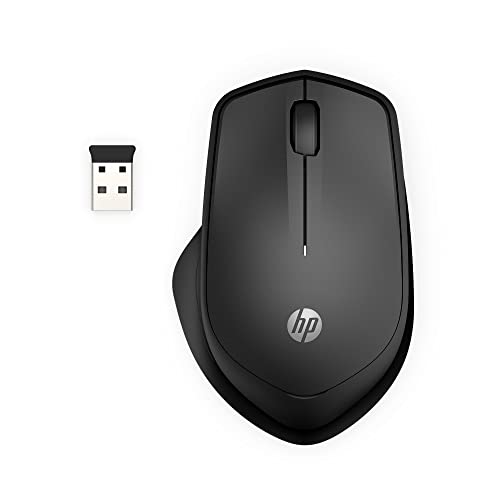
Best for: a right-handed worker who wants the receiver stored in the mouse Skip it if: you're left-handed
The 280 solves the M240's one weakness. It connects over a 2.4GHz USB-A link, and HP says the nano receiver stores inside the mouse for easy portability. So you get plug-and-play on a machine without Bluetooth, and nothing loose to lose in a bag. It weighs 3.36 oz and measures 1.58 x 4.31 x 2.79 in, making it the heaviest of the wireless picks here.
HP claims up to 90% noise reduction on the left and right buttons, a 1600 DPI optical sensor, multi-surface tracking that skips the mouse pad, and up to 18-month battery life. Range is stated at 32.8 feet. It ships with a 1-year limited warranty.
The catch is the shape. HP describes an ergonomic right-handed design, so this is not a pick for left-handers, where the M240's ambidextrous body wins outright. Only one seller lists it, too, which narrows your buying options.
Pros:
- Receiver stores inside the mouse
- Works without built-in Bluetooth
- 1600 DPI sensor, adjustable to your style
- Claimed multi-surface tracking, no pad needed
Cons:
- Right-handed shape only
- Heaviest wireless pick at 3.36 oz
- Only one seller lists it
3. Logitech M330 Silent Plus Full Size Wireless Mouse — Best for heavy use
The M330 is the full-size choice for long right-handed workdays, with a larger body that fills the palm better than the compact picks.

Best for: long right-handed workdays on a plug-and-play receiver Skip it if: you need a small mouse for travel
The M330 is the full-size option in this group. At 4.15 x 2.67 x 1.51 in and 3.2 oz, it's bigger than the M240 and built to fill a resting palm rather than fold into a bag. Logitech says the SilentTouch design reduces over 90% of clicking sound while keeping top performance, and the contoured grips are shaped for right-handed users over long sessions.
It connects through a bundled USB-A receiver, which Logitech says works with Windows, macOS, ChromeOS and Linux. Battery life is stated at 18 months on a single AA with power-saving auto-sleep, and range at 33 ft. That AA design means you swap a battery instead of recharging.
The limits are size and hand fit. This is the wrong mouse for a small hand or a travel kit, where the compact M240 wins, and the contoured grip commits you to right-handed use. It's the 2016 design in a field where two picks are newer. Two sellers list it.
Pros:
- Full-size body suits larger hands
- Plug-and-play receiver, broad OS support
- Claimed 18-month battery on one AA
- Contoured right-handed grip for long days
Cons:
- Too big for travel or small hands
- Right-handed shape only
- Oldest design in this set
4. MOJO Pro Performance Silent Gaming Mouse — Best compact
The MOJO is the pick when you want a silent mouse that still carries a gaming sensor and a cable's steady connection.

Best for: late-night gaming beside someone asleep Skip it if: you refuse a cable
The MOJO is the odd one out, and it earns its place. It's the only wired mouse here and the only one built around gaming. MOJO says all its buttons are silent so you can, in their words, play all night without bothering a partner asleep nearby. It packs nine programmable buttons including a sniper key, and MOJO claims a PMW3336 sensor rated up to 12000 DPI at a 1000 Hz polling rate.
At 4.48 oz it's the heaviest mouse in the set. Downloadable software handles button mapping, macros, DPI, LED and custom profiles, and it needs Windows 7 or above. It carries a 6-month manufacturer warranty.
Two real trade-offs. The cable rules it out for anyone who wants a clean wireless desk, and the software is Windows-only, so Mac gamers lose the customisation. The 6-month warranty is the shortest here, half the length of the Logitech and HP cover. One seller lists it.
Pros:
- Only wired pick, no battery to manage
- Claimed 12000 DPI gaming sensor
- Nine programmable buttons with a sniper key
- Silent buttons aimed at night play
Cons:
- Cable rules out a wireless desk
- Windows-only customisation software
- Shortest warranty here at 6 months
- Heaviest mouse in the set at 4.48 oz
5. wegear Bluetooth Mouse Silent Wireless Mice — Best budget pick
The wegear is the pick for a spare or second machine, where DPI switching and forward/back buttons matter more than a name on the shell.

Best for: a second machine or a spare bag mouse Skip it if: you want published weight and dimension figures
The wegear is the cheapest mouse in this set and the one with the most buttons for the money. wegear says it has six buttons, including forward and back for switching browser pages, and three DPI levels at 800, 1200 and 1600. It connects over Bluetooth, so like the M240 it needs no dongle, and wegear claims up to 24 months of use on a single AA, the longest battery claim here.
It's described as an ergonomic, medium-size mouse in dark grey, with a sculpted grip and quiet operation across surfaces like wood, fabric and paper. It carries a 1-year warranty.
The honest weakness is the listing itself. It publishes no weight and no dimensions, so you can't compare its size or heft against the M240 or the HP 280 before buying. Only one seller lists it, and the brand has no track record here to lean on. For a primary work mouse, the M240 is the safer call.
Pros:
- Cheapest pick in this set
- Six buttons with forward and back
- Three DPI levels: 800, 1200, 1600
- Longest battery claim at up to 24 months
Cons:
- No published weight or dimensions
- Only one seller lists it
- Unproven brand versus Logitech and HP
Bluetooth or USB receiver: which should you pick?
This is the single choice that decides most of this list, so settle it before you compare anything else.
Bluetooth mice, the M240 and the wegear, pair straight to your machine with no dongle. That frees a USB port on a thin laptop and leaves nothing to lose. The cost is that a desktop without built-in Bluetooth needs a separate adapter, which the box does not include.
Receiver mice, the HP 280 and the M330, plug a small USB-A dongle into a port. HP says the 280's receiver even stores inside the mouse when you travel. That means plug-and-play on almost any machine, at the price of one occupied port.
The MOJO sidesteps both with a cable, which never drops and never needs a battery, but ties you to the desk.
- Thin laptop with Bluetooth: M240 or wegear
- Older desktop, no Bluetooth: HP 280 or M330
- Never want to think about batteries: MOJO
When a different mouse wins
The M240 is my default, but three concrete conditions flip it.
- No Bluetooth on your machine. Then the HP 280 wins, because its stored receiver gives you plug-and-play without buying an adapter.
- A large hand and a fixed desk. Then the M330's full-size 4.15 x 2.67 x 1.51 in body fills the palm better than the compact M240 ever will.
- Late-night gaming. Then the MOJO wins, since it pairs silent buttons with a claimed 12000 DPI sensor and a cable that never lags.
One more: if hand orientation is the deciding factor and you're left-handed, only the M240's ambidextrous shape and the wegear fit you. Both Logitech M330 and the HP 280 are shaped for right hands. That single fact removes half the list for a left-handed buyer, which is why I weighted orientation as a hard filter earlier.
What the listings won't tell you
A few gaps are worth naming before you buy, because no spec sheet here fills them.
- Scroll-wheel noise. Every "silent" claim covers the click buttons only. HP is explicit that its 90% figure applies to the left and right buttons. The wheel is never quantified, so it can still click on any of these.
- The wegear's size. With no published weight or dimensions, you're buying its "medium" ergonomic shape on trust.
- MOJO's popularity signal. It's the one pick here with a sales position published, and it sits fairly low in gaming mice, which tells you it moves but not how it feels.
- Battery type. The M330 and wegear run on a swappable AA. The listings don't say whether the M240 recharges or takes a cell, so plan for a spare battery unless the package says otherwise.
Read the click claims as a floor every pick clears, then judge on the figures that are actually printed: weight, size, connection and warranty.
The verdict
If you want one mouse for a shared room and a thin laptop, buy the Logitech M240. It's the lightest confirmed pick here at 2.6 oz, the smallest at 3.9 x 1.54 x 2.36 in, and it pairs over Bluetooth with no dongle to lose. Its ambidextrous shape fits either hand, which no other wireless pick in this set can claim. That makes it the best premium silent mouse for most buyers.
If your machine has no Bluetooth, buy the HP 280 instead. Its exact advantage is the nano receiver that stores inside the body, so you get plug-and-play portability without hunting for an adapter. The cutoff is your connection: built-in Bluetooth points you to the M240, a bare USB port points you to the HP 280.
Two picks serve narrower cases. The M330 is the full-size choice for a large right hand at a fixed desk. The MOJO is the wired gaming pick for silent late-night play. The wegear is the spare-machine budget option, held back only by a listing that omits its weight and size.
FAQ
Is a premium silent mouse worth it over a standard one?
A premium silent mouse is worth it when you share a room or work beside someone sleeping. The whole point is the click reduction, which Logitech and HP both claim reaches 90% on the main buttons. If you work alone in a closed room, a standard mouse does the same job, so the quiet buttons are the feature you're paying for.
Which is quieter, the Logitech M240 or the HP 280?
Which is quieter between these two can't be answered from measured data. The Logitech M240 claims a 90% reduced click sound, and the HP 280 claims up to 90% noise reduction on its two main buttons. Both figures are manufacturer claims in the same range. Pick on connection instead: Bluetooth for the M240, a stored receiver for the HP 280.
Do these silent mice work without Bluetooth?
These silent mice split on connection. The HP 280 and the Logitech M330 use a 2.4GHz USB-A receiver, so they work on any machine with a spare port and no Bluetooth needed. The M240 and the wegear are Bluetooth-only, which means a desktop without built-in Bluetooth would need a separate adapter that the box doesn't include.
How long does the battery last on a wireless silent mouse?
Battery life on a wireless silent mouse here runs long, by the makers' claims. Logitech states up to 18-month battery life for both the M240 and M330, each with auto-sleep. wegear claims up to 24 months on a single AA, the longest here. These are stated figures, not tested ones, and real life depends on hours of daily use.
What's the best premium silent mouse for gaming?
The best premium silent mouse for gaming here is the MOJO Pro Performance, the only pick built for play. MOJO claims a PMW3336 sensor up to 12000 DPI, a 1000 Hz polling rate, and nine programmable buttons with silent clicks. It's wired, so no lag or battery, and needs Windows 7 or above. Skip it if you game on a Mac, since the software is Windows-only.
Start with your connection: check whether your machine has Bluetooth, then match it to the list. If it does, the Logitech M240 is the safe default, light at 2.6 oz, dongle-free, and shaped for either hand. If it doesn't, the HP 280 gives you the same quiet-click promise with a receiver that hides inside the mouse. The click claims are all roughly equal, so let weight, connection and hand fit make the call, and the M240 clears all three for the most people.